Hello! Welcome back to the Embedded Interview Preparation Bootcamp.
In our previous lesson, we mastered linker scripts, gaining granular control over the memory layout of our firmware. We saw how the linker script is the final blueprint that guides the creation of an executable file from all our compiled code.
This naturally leads us to the tools that perform this work. In embedded systems, you're almost always developing on one machine (e.g., an x86-64 Linux desktop) but creating software for another (e.g., an ARM Cortex-M or Cortex-A based SoC). This process is called cross-compilation. Understanding how to set up and use a cross-compilation toolchain, and more importantly, how to command it to generate highly optimized code for a specific processor, is a fundamental skill for roles at top semiconductor companies.
Today, your goal is to: Set up a cross-compilation toolchain and apply target-specific optimization flags. We will explore what a toolchain is, how to obtain one, and how to use compiler flags to unlock the full potential of your target hardware.
What is Cross-Compilation?
Cross-compilation is the act of compiling code on one system architecture (the host) to produce an executable that runs on a different architecture (the target). Your powerful desktop PC is the host, and the embedded device you're programming for is the target.
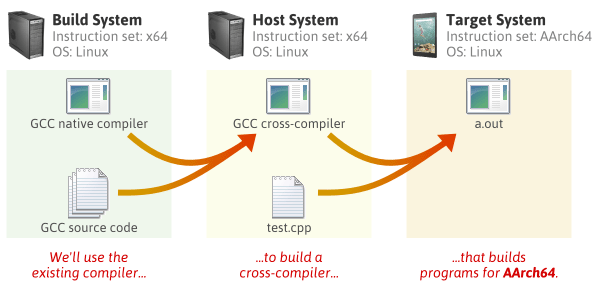
A cross-compilation toolchain is the suite of tools that makes this possible. To understand the key concepts and terminology, please watch the following video segment.
Anatomy of Cross-Compilation Toolchains
The video 'Anatomy of Cross-Compilation Toolchains' from The Linux Foundation provides a clear and concise definition of cross-compilation and introduces the concepts of build, host, and target machines.
Watch from 00:02:04 to 00:04:13. Focus on understanding the definitions of the host and target platforms and why this distinction is central to embedded development.
As the video explained, a toolchain isn't just one program; it's a collection. The main components are:
- Binutils: A collection of binary tools, including the assembler (
as) and the linker (ld). These tools work directly with machine code and object files. - Compiler: The program that translates high-level source code (like C/C++) into assembly code for the target. GCC (GNU Compiler Collection) is the most common example.
- C Library (libc): An implementation of the standard C library (e.g.,
printf,malloc,string.h) compiled for the target architecture. Common choices in embedded arenewlib,musl, orglibc. - Kernel Headers: If you are targeting an operating system like Linux, these headers define the API for user-space applications to communicate with the kernel. For bare-metal development, these are not used.
Obtaining a Toolchain
There are two primary ways to get a cross-compiler toolchain: download a pre-built one or build it from source. For 99% of use cases, especially in a professional setting, you will use a pre-built toolchain provided by a hardware vendor (like Arm) or a third party (like Linaro). Building your own is an advanced task typically reserved for situations where you need a highly customized toolchain.
The following video segment summarizes these options.
Anatomy of Cross-Compilation Toolchains
Let's return to the 'Anatomy of Cross-Compilation Toolchains' video to see an overview of how toolchains are sourced.
Watch from 00:48:24 to 00:51:34. This part discusses the different avenues for acquiring a toolchain, from distro packages to vendor-provided binaries and specialized build tools like crosstool-NG.
Setting up a Pre-built Toolchain
For most embedded work, especially with ARM processors, you'll use the GNU Arm Embedded Toolchain.
- Download: You can find it on the Arm Developer website.
- Extract: Unpack the downloaded archive to a location of your choice, for example,
/opt/toolchains/or~/toolchains/. - Add to PATH: To use the toolchain from any terminal, you need to add its
bindirectory to your system'sPATHenvironment variable.
You would typically add this line to your shell's startup file (e.g.,export PATH="/path/to/your/toolchain/gcc-arm-none-eabi-10.3-2021.10/bin:$PATH"~/.bashrcor~/.zshrc).
After setting this up, you can verify the installation:
$ arm-none-eabi-gcc --version
arm-none-eabi-gcc (GNU Arm Embedded Toolchain 10.3-2021.10) 10.3.1 20210824 (release)
...
The command arm-none-eabi-gcc follows a standard target-triplet format: arch-vendor-os-abi.
arm: The architecture.none: The vendor (in this case, unspecified).eabi: The operating system and Application Binary Interface (ABI).eabistands for "Embedded ABI". A toolchain for Linux might beaarch64-linux-gnu.
Understanding the Build Process (Conceptual)
While you rarely build a toolchain by hand, understanding the process is valuable for deep system knowledge. It involves a multi-stage build where dependencies are carefully compiled in order. The OSDev Wiki provides an excellent, detailed walkthrough.
To understand what's happening 'under the hood' when a toolchain is created, we'll consult the 'GCC Cross-Compiler' guide from the OSDev Wiki. You don't need to perform these steps, but reading them will clarify the dependencies and the purpose of key build flags.
Read the section titled 'The Build', focusing on the 'Preparation', 'Binutils', and 'GCC' subsections. Pay attention to the configure flags like --target, --prefix, --without-headers, and --enable-languages. This reveals how a toolchain is constructed to be independent of any host libraries.
Applying Target-Specific Optimization Flags
Now for the most critical part for interviews: telling the compiler how to generate the best code for your specific target. Using the right flags can result in dramatic performance improvements and code size reductions.
General Optimization Levels
You are likely familiar with the standard optimization levels:
-O0: No optimization. Best for debugging.-O1,-O2: Increasing levels of optimization.-O3: Aggressive optimization, focusing on speed, sometimes at the cost of larger code size.-Os: Optimize for size. This is a common default for memory-constrained embedded systems.
The article "The Best and Worst GCC Compiler Flags For Embedded" provides excellent context on these common flags. It highlights -Os as a go-to for embedded and also introduces -ffunction-sections and -fdata-sections paired with the linker flag --gc-sections, which are essential for stripping unused code and data from your final binary.
Architecture and CPU-Specific Tuning
This is where you connect the compiler directly to the silicon.
-march=<architecture>: Specifies the instruction set architecture. For example,-march=armv7e-mtells GCC it can use instructions from the ARMv7-M architecture with the DSP extension.-mcpu=<cpu>/-mtune=<cpu>: Goes a step further and tunes the generated code for a specific processor core's microarchitecture (pipeline, cache, etc.). For instance,-mcpu=cortex-m4will generate code optimized for the Cortex-M4 pipeline.-mtuneis similar but doesn't enable or disable instructions, it only affects scheduling.

Application Binary Interface (ABI) Flags
The ABI defines calling conventions, data type sizes, and how arguments are passed. Mismatched ABIs are a common source of linking errors.
-mfloat-abi=<soft|softfp|hard>: This is crucial for targets with a Floating-Point Unit (FPU).soft: Don't use any FPU instructions. Floating-point operations are emulated in software.hard: Use FPU instructions and pass floating-point arguments in FPU registers. This is the most efficient.softfp: Use FPU instructions, but pass arguments in general-purpose integer registers. This maintains binary compatibility withsoftfloat code.
The following video segment explains these architecture and ABI concepts in the context of a toolchain.
Anatomy of Cross-Compilation Toolchains
Let's revisit the 'Anatomy of Cross-Compilation Toolchains' video for a discussion on architecture tuning and the importance of the ABI.
Watch from 00:44:14 to 00:48:24. This section covers runtime options like -march and -mcpu, and explains what an ABI is, using the ARM EABI vs. EABIHF (hard float) as a concrete example.
Case Study: The Power of Auto-Vectorization (SIMD)
One of the most powerful target-specific features is Single Instruction, Multiple Data (SIMD), available on many cores (e.g., NEON on Cortex-A, Helium on Cortex-M). By enabling the right flags, you can instruct the compiler to "auto-vectorize" your code, using single instructions to perform operations on multiple data points at once.
This video provides a stunning visual demonstration of the performance gains from enabling the right compiler flags.
The video '4x Code Performance with SIMD' by Keifer is a masterclass in demonstrating the impact of compiler flags. It shows how performance evolves by just changing the flags, without touching the C++ code.
Watch from 00:03:59 to 00:08:03. First, see the assembly and performance difference between -O2 and -O3, where the compiler starts using packed SSE instructions. Then, observe the dramatic speedup when -march=native is added, enabling even more powerful AVX-512 instructions and larger registers.
This is a perfect example of what an interviewer is looking for: knowledge of how to bridge the gap between high-level code and low-level hardware features.
Conclusion
You now have a solid understanding of what a cross-compilation toolchain is, how to set one up, and how to command it using target-specific flags to produce optimal code. This is not just a theoretical exercise; in your daily work and in interviews, being able to discuss the trade-offs of -O3 vs. -Os, the importance of -mfloat-abi, and the purpose of -mcpu demonstrates a deep understanding of the software-hardware interface.
Key Takeaways:
- Embedded development relies on cross-compilation, building on a host for a target.
- A toolchain consists of Binutils, a compiler (GCC), and a C library.
- Using a pre-built toolchain (e.g., from Arm) is the standard professional practice.
- Target-specific flags are essential for performance:
-marchsets the instruction set architecture.-mcputunes for a specific core's microarchitecture.-mfloat-abicontrols FPU usage and calling conventions.
- Flags like
-ffunction-sectionsand--gc-sectionsare critical for minimizing binary size in memory-constrained systems.
Preview of the Next Lesson:
We've seen how to compile our code, but how can we be sure it's correct before it even runs? In our next lesson, we will explore static analysis tools like cppcheck and clang-tidy. These tools analyze your source code to find potential bugs, undefined behavior, and style violations, acting as an automated, expert code reviewer.