Welcome to your third lesson in the Kotlin course! We've previously explored how to declare variables and how to craft elegant strings using templates. Today, we're diving into one of Kotlin's most significant and acclaimed features: null safety.
As a Java developer, you're undoubtedly familiar with the NullPointerException (NPE), often a source of frustrating runtime crashes. This lesson introduces Kotlin's powerful solution to this "billion-dollar mistake." You'll learn how Kotlin's type system is designed from the ground up to prevent these errors at compile time, leading to more robust and reliable code for your future Android applications.
Our focus will be on using nullable types and the primary null safety operators, ?. and ?:, to handle situations where a value might be absent. By the end of this lesson, you will be able to write safe, concise code that elegantly manages nullability.
1. A New Paradigm: Nullable vs. Non-Nullable Types
In Java, any object reference can be null by default. This means the burden is on you, the developer, to remember to check for null before using an object. If you forget, your application crashes at runtime.
Kotlin flips this on its head. By default, all types in Kotlin are non-nullable. The compiler enforces this rule, guaranteeing that a variable cannot hold a null value.
var name: String = "Alex"
// name = null // This line won't compile!
To allow a variable to hold null, you must explicitly mark its type as nullable by adding a question mark (?) at the end.
var name: String? = "Alex"
name = null // This is allowed.
This fundamental distinction is the cornerstone of Kotlin's null safety. The Kotlin documentation provides a clear explanation of this concept.
Null safety | Kotlin Documentation
Start by reading the introduction to understand why null safety is a core feature of Kotlin. Then, focus on the section about nullable and non-nullable types.
Read the introduction starting from the beginning to get context. Then, in the "Nullable types and non-nullable types" section, read the text and code examples from the main explanation down to the example that shows the compiler error when trying to access .length on a nullable type.
As you've just read, the moment a type is nullable (String?), the compiler stops you from using it directly, forcing you to handle the possibility of it being null. This prevents the NPE at compile time, not runtime.
2. The Tools for Safe Navigation
Kotlin provides a set of concise and powerful operators to work with nullable types. Instead of verbose if-else blocks, you can use these to safely access properties or provide default values.

The following video, created for Java developers learning Kotlin, provides a great overview of these concepts. We'll watch it in segments as we introduce each operator.
3. Null Safety // Java → Kotlin
This video provides an excellent comparison between Java's approach to nulls and Kotlin's safer, more expressive system.
First, watch the segment that introduces nullable types, which reinforces what you just read. Pay attention to how the presenter contrasts this with Java's behavior. Start at this point. Then, watch the explanation of handling nulls with a traditional if statement and how Kotlin's smart cast improves upon it, from this section.
As shown in the video, an if (variable != null) check works, and Kotlin's smart cast feature is clever enough to treat the variable as non-nullable within the if block. However, Kotlin offers even more idiomatic ways to handle this.
3. The Safe Call Operator: ?.
The most common way to work with a nullable variable is the safe call operator, ?.. This operator lets you attempt to access a property or call a method. If the variable is not null, the call proceeds. If the variable is null, the expression short-circuits and evaluates to null without causing a crash.
val name: String? = "Jane"
val length: Int? = name?.length // length is 4

val middleName: String? = null
val middleLength: Int? = middleName?.length // middleLength is null
Notice that the result of a safe call on a nullable type is also a nullable type (e.g., name?.length returns an Int?).
Safe calls can be chained together, which is incredibly useful for navigating nested objects that might be null at any level.
// In Java, this would be a nested series of 'if (x != null)' checks.
val countryCode: String? = user?.address?.country?.code
If user, address, or country is null, the entire expression gracefully evaluates to null.
The Kotlin documentation explains this operator in detail.
Null safety | Kotlin Documentation
Focus on the examples provided for the safe call operator and the concept of chaining.
Read the section titled "Safe call operator". Pay close attention to the explanation of its behavior and the example of a safe call chain.
4. The Elvis Operator: ?:
The safe call operator is great, but what if you don't want null as a result? What if you need a default, non-nullable value? For this, you use the Elvis operator, ?:.
This operator is typically used on the right-hand side of a nullable expression. It says: "if the expression on the left is not null, use it. Otherwise, use the value on the right."
val name: String? = null
val displayName: String = name ?: "Guest" // displayName is "Guest"

val realName: String? = "John"
val displayRealName: String = realName ?: "Guest" // displayRealName is "John"
The true power of the Elvis operator shines when combined with the safe call operator.
val name: String? = null
val length: Int = name?.length ?: 0 // length is 0, not null!
This single, readable line does the following:
- Safely try to get the
lengthofname. - If
nameisnull,name?.lengthevaluates tonull. - The Elvis operator sees the
nulland provides the default value,0.
Now, let's look at the official documentation and a video explanation for this operator.
Null safety | Kotlin Documentation
This section will solidify your understanding of how to provide default values.
Read the section "Elvis operator", focusing on how it provides an alternative to a full if expression. The example combining ?. and ?: is the most important pattern to understand. Also, note how it can be used with return and throw, which is a powerful feature for enforcing preconditions in functions.
3. Null Safety // Java → Kotlin
The video you started earlier also has clear explanations of the safe call and Elvis operators.
First, watch the segment on the safe call operator (?.) from this timestamp. Then, immediately continue with the explanation of the Elvis operator (?:) from this section.
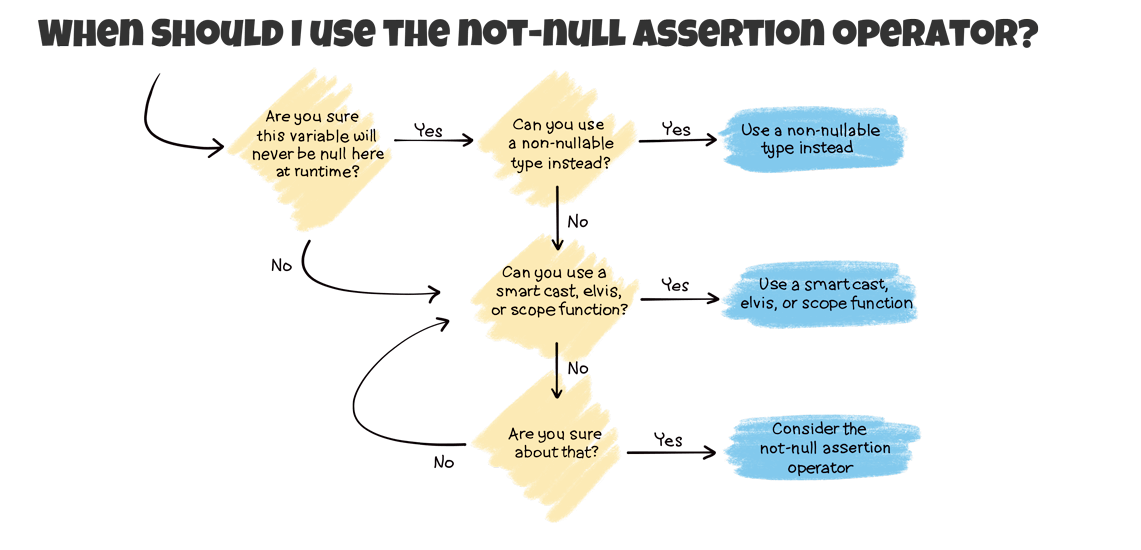
5. A Word of Warning: The Not-Null Assertion Operator (!!)
You might occasionally see the not-null assertion operator, !!. This operator converts any nullable type to its non-nullable version, essentially telling the compiler, "I promise this is not null."
val name: String? = "Can't be null"
val length: Int = name!!.length // Works, but is risky
Use this operator with extreme caution. If you are wrong and the value is null, your application will crash with a NullPointerException—the very thing Kotlin's null safety is designed to prevent. It is a sign that you are fighting the type system rather than working with it.
In almost all cases, a combination of ?. and ?:, a smart-casted if check, or redesigning your logic is a better and safer solution. The !! operator should be a last resort, not a default choice.
Practical Exercise
To see these concepts in a practical context relevant to your goal of Android development, the official Android developer codelabs offer a great hands-on tutorial. Working through this will reinforce everything we've discussed.
This codelab from Google will walk you through declaring nullable variables and using the operators we've learned today.
Follow the codelab from the beginning. In section 2, "Use nullable variables," read about declaring nullable types. Then, in section 3, "Handle nullable variables," work through the examples for the safe call operator ?. and the Elvis operator ?:. You can also review the sections on if/else and the risky !! operator for a complete picture.
Conclusion
You've just learned one of the most important features of Kotlin, which directly contributes to writing safer and more reliable Android apps. By making nullability an explicit part of the type system, Kotlin helps you catch potential errors before they ever reach your users.
Here are the key takeaways from this lesson:
- Nullable vs. Non-nullable: Types in Kotlin are non-nullable by default. Use a question mark (
?) to declare a type that can holdnull(e.g.,String?). - Safe Call Operator (
?.): Safely access properties or methods on a nullable object. If the object isnull, the expression returnsnullinstead of crashing. - Elvis Operator (
?:): Provide a default, non-nullable value for an expression that might otherwise benull. - Avoid
!!: The not-null assertion operator (!!) bypasses safety checks and should be avoided in favor of safer constructs like?.and?:.
In our next lesson, we'll continue exploring Kotlin's expressive power by looking at how if/else can be used not just as statements, but as expressions that return a value. This will further highlight how Kotlin encourages a more concise and functional style of coding compared to Java.