Hello! In our last lesson, we explored one of Kotlin's cornerstone features: null safety. You learned how Kotlin's type system helps you avoid the infamous NullPointerException by distinguishing between nullable and non-nullable types, a significant improvement over Java.
Today, we'll continue our journey by examining another area where Kotlin offers more expressive power and conciseness: conditional logic. As a Java developer, you're used to if/else being a statement that directs the flow of your program. In this lesson, you'll discover how Kotlin elevates if/else to an expression that can return a value. This simple but powerful shift allows you to write cleaner, more functional-style code, a concept you'll see repeated throughout your Kotlin and Jetpack Compose journey.
Statements vs. Expressions: A Core Concept
Before diving into the syntax, it's crucial to understand the difference between a statement and an expression, as this is where Kotlin's approach diverges from Java's.
- A statement is a piece of code that performs an action. In Java, an
ifblock is a statement; it tells the program what to do (e.g., call a method, assign a variable), but it doesn't have a value of its own. - An expression is a piece of code that evaluates to a single value. For example,
2 + 2is an expression that evaluates to the value4.
In Java, to conditionally assign a value to a variable, you might write something like this:
int max;
if (a > b) {
    max = a;
} else {
    max = b;
}
Or, for simple cases, you'd use the ternary operator, which is Java's primary way of creating a conditional expression:
int max = (a > b) ? a : b;
Kotlin simplifies this. In Kotlin, if is an expression. This means the if structure itself evaluates to a value, making the ternary operator unnecessary. Let's see how this works.
This article from Baeldung provides a great explanation of the distinction between statements and expressions in the context of Kotlin's if/else.
Please read the introduction and section 3, titled "Kotlin If-Else Expression". Focus on the definitions of expression and statement, and how this leads to the ability to assign the result.
Using if as an Expression
Now that you understand the concept, let's look at the syntax. When you use if as an expression, its result can be directly assigned to a variable.
The basic structure looks like this:
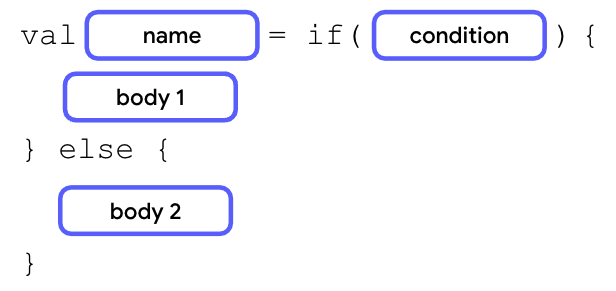
Let's refactor the Java max example into idiomatic Kotlin:
val a = 5
val b = 10
val max = if (a > b) a else b // max is now 10
Notice how much more concise this is. The if block evaluates to either a or b, and that value is assigned to max. A crucial rule when using if as an expression is that the else branch is mandatory. This makes sense: since the expression must always produce a value, you must provide a value for every possible condition.
The following video provides a clear walkthrough of this concept, specifically for developers coming from a Java background.
Kotlin Crash Course for Java Developers
This video, "Kotlin Crash Course for Java Developers," demonstrates how to convert a standard Java-style if/else statement into a Kotlin expression.
Watch the section from Control Structures. The presenter first shows the familiar statement form and then refactors it into a concise expression, highlighting the benefits.
Expressions with Multi-Line Blocks
Your conditional logic won't always be a single line. Just like if statements, if expressions can have larger blocks of code enclosed in curly braces {}. When you use multi-line blocks, the rule is simple: the last expression in the block is the value that the block returns.
This allows you to perform other actions, like logging, within the conditional block while still returning a value.
Let's return to the Baeldung article to see an example of multi-line blocks.
Read the short section titled "If-Else Block With Multiple Expressions". Pay attention to how the println() statements are executed, but the final value returned is the variable on the last line of each block.
Here's a practical example based on that concept:
val temperature = 25
val weatherDescription = if (temperature > 20) {
    println("It's a warm day!") // This action is performed
    "Sunny" // This value is returned
} else {
    println("It's a bit chilly.") // This action is performed
    "Cloudy" // This value is returned
}

println("The weather is: $weatherDescription") // Prints "The weather is: Sunny"
Chaining with if-else if-else
This feature extends naturally to more complex if-else if-else ladders. The entire chain acts as a single expression that resolves to the value from the first branch whose condition is met. This is a common pattern for replacing repetitive if statements.
The Android Developers Codelab provides an excellent walkthrough of converting a verbose if/else statement into a clean expression.
Write conditionals in Kotlin | Android Developers
This codelab will guide you through turning a multi-branch if statement into a more concise expression.
Start at section 4, "Use if/else and when as expressions". Follow the steps under the subsection "Convert an if statement to an expression". This will show you a practical "before-and-after" refactoring of the traffic light example.
After the refactoring, your code becomes significantly cleaner. Instead of having a println() in every branch, you determine the message with a single expression and then print it once.
Here is what the final code looks like in an IDE, demonstrating a complete if-else if-else expression being assigned to a variable and then printed.

Conclusion
In this lesson, you've seen how Kotlin treats if/else as an expression, a subtle but powerful feature that distinguishes it from Java. This allows for more concise, readable, and functional-style code, reducing boilerplate and potential for error.
Here are the key takeaways:
- Statement vs. Expression: In Kotlin,
ifis an expression that returns a value, unlike in Java where it's only a statement. - Concise Assignment: You can directly assign the result of an
ifexpression to a variable. - Mandatory
else: When used as an expression,ifmust have anelsebranch to ensure a value is always returned. - Block Value: For multi-line blocks, the last expression in the block becomes its return value.
This pattern of using control structures as expressions is fundamental to idiomatic Kotlin. In our next lesson, we will explore an even more powerful conditional expression: when. It's Kotlin's answer to Java's switch statement, but with far more flexibility and power, and it builds directly on the concepts you've learned today.