Welcome back! In our previous lesson, we saw how Kotlin enhances conditional logic by treating if/else as an expression that returns a value. This simple shift allows for more concise and readable code, eliminating patterns you might be used to from Java, like the ternary operator or verbose variable assignments.
Today, we'll explore an even more powerful tool for handling complex conditions: the when expression. For a Java developer, when can be seen as a supercharged switch statement, but you'll soon see it's far more flexible. It builds directly on the concept of expressions you learned in the last lesson, allowing you to write clean, exhaustive, and highly readable conditional logic. This is a fundamental structure you will use constantly in Kotlin, especially when managing different states in your Android apps.
Let's begin by looking at a common scenario: determining the action to take at a traffic light.
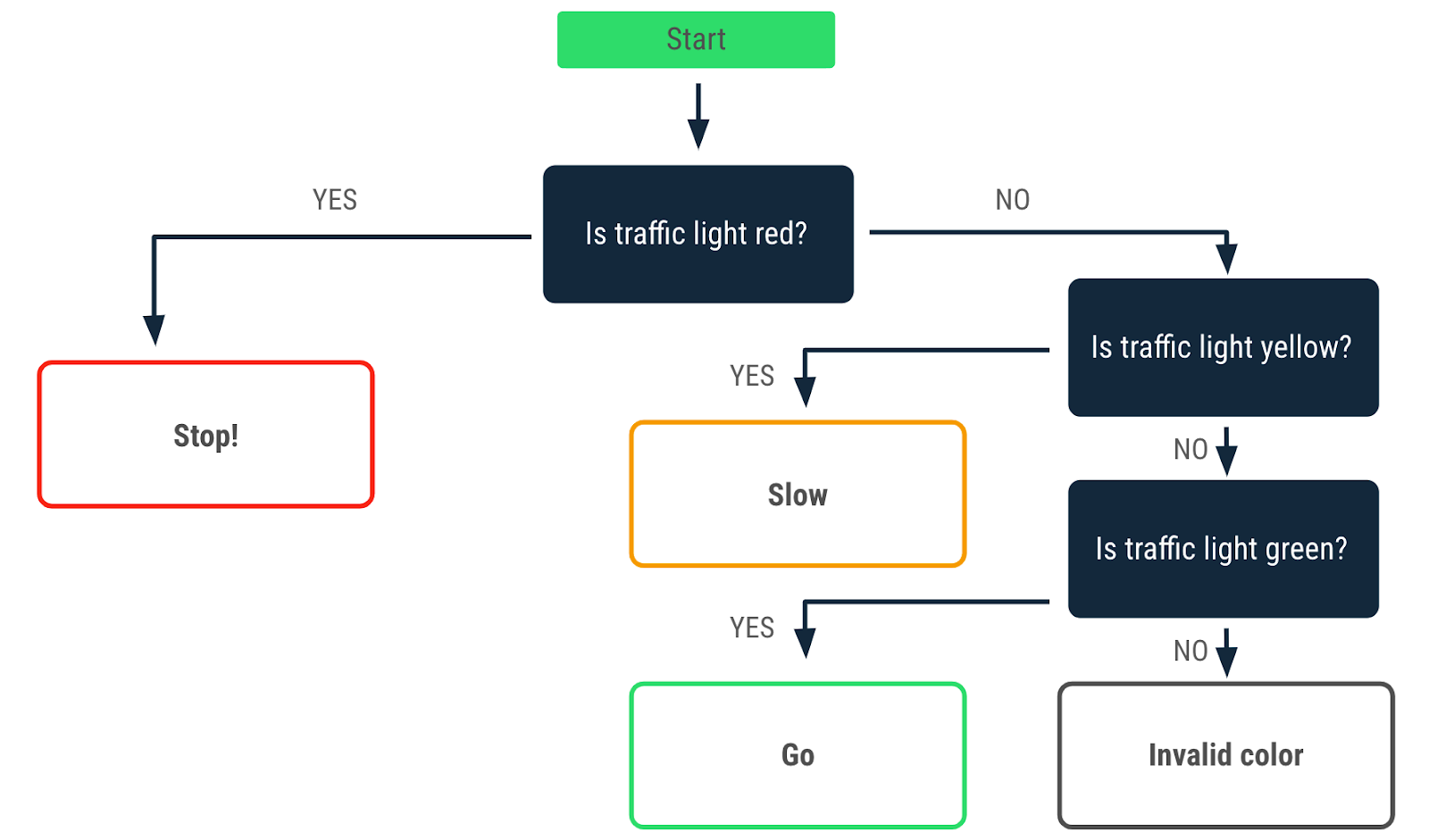
From if-else if to when
In the last lesson, you saw how to structure a multi-branch if-else if-else ladder as a single expression. While functional, it can still be cumbersome when you have many conditions. This is where when shines. It provides a clearer, more structured way to handle multiple branches.
At its core, when compares a subject (the variable in parentheses) against several possible values. It's Kotlin's answer to Java's switch statement, but with a cleaner syntax and some significant upgrades. Let's see how to convert the traffic light logic from an if/else chain into a when statement.
Write conditionals in Kotlin | Android Developers
The Android Developers Codelab provides a great introduction to when and walks through this exact refactoring process. Please read the following sections.
Start by reading the introduction to when in the section Use a when statement. Then, follow the step-by-step guide under the heading Rewrite an if/else statement to see how the traffic light code is transformed. Pay attention to the syntax: the arrow -> separates the condition from the action.
As you saw, the when version is more readable. The intent is immediately clear: we are checking the value of trafficLightColor and performing an action for each specific case. Notice a key difference from Java's switch: there are no break statements. In Kotlin, only the code in the first matching branch is executed, which prevents the common "fall-through" bugs that can happen in Java.
Using when as an Expression
Just like if, when is an expression in Kotlin, meaning it can evaluate to a value. This is where its power truly comes to light. Instead of performing an action in each branch (like calling println()), you can have each branch return a value. The entire when block then resolves to that value, which can be assigned to a variable.
This refactoring cleans up code by removing repetitive actions from each branch. The following video explains this concept clearly, demonstrating how to convert a when statement into a when expression.
Kotlin WHEN as Expression. Kotlin for Android #5.2
This video from the Smartherd channel provides a great walkthrough of the when expression. We will focus on the part that explains how to use it to return a value.
Watch the segment from when as expression. The presenter starts with a version that assigns a variable inside each branch (similar to what you might do in Java) and then refactors it into a much cleaner when expression. This is a core concept of idiomatic Kotlin. Also, note the explanation of the else branch, which serves as the default case from a Java switch.
When you use when as an expression, the compiler enforces a rule called exhaustiveness. This means you must cover all possible cases for the subject you are checking. If you are checking a String, which could have any value, you must provide an else branch. This guarantees that the expression will always produce a value, making your code safer and more predictable.
Let's apply this to our traffic light example:
val trafficLightColor = "Amber"

val message = when(trafficLightColor) {
    "Red" -> "Stop"
    "Yellow" -> "Slow"
    "Green" -> "Go"
    else -> "Invalid traffic-light color"
}

println(message) // Prints "Invalid traffic-light color" because "Amber" is not matched yet
This is much cleaner than having a println() in every branch.
Advanced when Conditions
So far, when seems like a slightly better switch. However, its real power lies in the flexibility of its conditions. You are not limited to checking for simple constant values.
The official Kotlin documentation provides a comprehensive overview of the different ways you can use when.
In the documentation, first review the section on Expressions to solidify your understanding of the exhaustiveness rule. Then, explore the powerful features under the heading Other ways to use when. Focus on these three capabilities: Grouping multiple conditions with commas. Checking for a value in a range or collection using in. Checking a variable's type using is.
Let's see these powerful features in action.
1. Combining Multiple Conditions
If multiple cases should result in the same outcome, you can combine them in a single branch, separated by a comma. Let's fix our traffic light example to handle "Amber" lights, which are common in some regions and have the same meaning as "Yellow".
val trafficLightColor = "Amber"

val message = when(trafficLightColor) {
    "Red" -> "Stop"
    "Yellow", "Amber" -> "Slow" // Both "Yellow" and "Amber" match this branch
    "Green" -> "Go"
    else -> "Invalid traffic-light color"
}

println(message) // Now prints "Slow"
2. Using Ranges and Collections with in
You can use the in keyword to check if a value falls within a range or is part of a collection. This is incredibly useful for numeric checks.
val a = 7
when (a) {
    in 1..10 -> println("a is in the range from 1 to 10")
    !in 20..30 -> println("a is not in the range from 20 to 30")
    else -> println("None of the above")
}
3. Checking Types with is
The is keyword allows you to check the type of a variable. This is a powerful feature for working with functions that can accept different types of data. Once a type is checked, Kotlin performs a "smart cast," allowing you to access properties and methods of that specific type without explicit casting.
fun describe(obj: Any): String = when (obj) {
    1 -> "One"
    "Hello" -> "A greeting"
    is Long -> "A Long number"
    !is String -> "Not a String"
    else -> "Unknown"
}

println(describe(100L))      // Prints "A Long number"
println(describe("Hello"))   // Prints "A greeting"
println(describe(42))        // Prints "Not a String"
4. when without an Argument
Finally, you can use when without a subject. In this form, the branch conditions are simply boolean expressions. when will execute the first branch whose expression evaluates to true. This makes it a highly readable substitute for complex if-else if-else chains.
val x = 5
val y = -5

when {
    (x > 0 && y > 0) -> println("Both x and y are positive")
    (x < 0 && y < 0) -> println("Both x and y are negative")
    else -> println("x and y have different signs")
}
Conclusion
In this lesson, you've learned about Kotlin's when expression, a versatile tool for managing conditional logic that goes far beyond Java's switch. It integrates seamlessly with Kotlin's "everything is an expression" philosophy, leading to safer, more concise, and more readable code.
Here are the key takeaways:
- A Better
switch:whenis Kotlin's replacement forswitch, but without the need forbreakstatements. whenas an Expression: Likeif,whencan return a value, allowing you to write cleaner, more functional code.- Exhaustiveness: When used as an expression,
whenmust be exhaustive, meaning all possible cases must be handled, often with anelsebranch. This is enforced by the compiler. - Powerful Conditions:
whensupports a wide range of conditions, including combining multiple values with a comma, checking ranges within, and checking types withis. - Argument-less
when: You can usewhenwithout a subject as a more readable alternative to a complexif-else ifchain.
Mastering when is a big step toward writing idiomatic Kotlin. You'll find it indispensable as you start building more complex logic in your Android applications.
In our next lesson, we will shift our focus from conditional logic to iteration, exploring how to write for and while loops in Kotlin to work with collections of data.