Welcome to the final lesson of our Kotlin Fundamentals module! We've covered a lot of ground, from variables and null safety to powerful conditional expressions like if/else and when. These control flow structures allow your program to make decisions and branch its execution path.
In this lesson, we'll explore the other side of control flow: iteration. You'll learn how to write for and while loops in Kotlin. These constructs allow you to execute a block of code repeatedly, which is fundamental for tasks like processing lists of data, retrying operations, or managing game loops in your future Android apps. As a Java developer, the concepts will be familiar, but you'll appreciate the concise and expressive syntax Kotlin brings, especially with its for loop.
The Kotlin for Loop: Iteration Made Easy
In Java, you're likely accustomed to the classic C-style for loop: for (int i = 0; i < 5; i++). While Kotlin supports this pattern, its primary for loop is a "for-each" style loop, which is often more readable and less prone to off-by-one errors. It's designed to iterate directly over anything that can be iterated—collections, ranges, strings, and more.
The basic syntax is simple and elegant: for (item in collection). Let's see it in action.
val languages = listOf("Java", "Kotlin", "Python")
println("Programming languages I know:")
for (language in languages) {
    println("- $language")
}

// Output:
// Programming languages I know:
// - Java
// - Kotlin
// - Python
This is clean and clear. The loop iterates through each element in the languages list, assigning it to the language variable for each pass.
Iterating with Ranges and Indices
While iterating over collections is common, you often need to loop a specific number of times or require access to the element's index. Kotlin provides powerful and readable constructs for these scenarios, which are a significant improvement over manual index management in Java.
The official Kotlin documentation provides an excellent overview of these features. As you read, pay close attention to the range operators (.., ..<), the downTo and step keywords, and the different ways to get an index (indices and withIndex()).
This document from the official Kotlin website covers control flow. We'll focus on the sections detailing for loops, ranges, and array iteration.
Please start at the heading "For loops". Read through the initial explanation and the example with the shoppingList. Then, continue through the subsections on Ranges and Arrays. Focus on understanding how .., ..<, downTo, step, indices, and withIndex() work.
To summarize those key concepts:
- Inclusive Range
..:1..4gives you numbers 1, 2, 3, 4. - Exclusive Range
..<(oruntil):1..<4(or1 until 4) gives you 1, 2, 3. This is very similar to the commoni < maxcondition in a Javaforloop. - Reverse Order
downTo:4 downTo 1gives you 4, 3, 2, 1. - Steps
step:1..7 step 2gives you 1, 3, 5, 7. - Index Access
.indices:for (i in array.indices)gives you the indices0, 1, 2, .... - Index and Value
.withIndex():for ((index, value) in array.withIndex())gives you both the index and the value at that index, which is incredibly handy.
The following video provides a great hands-on demonstration of these for loop variations, including a neat trick of iterating through a range of characters to print the alphabet.
Kotlin Newbie To Pro - FOR LOOP - Part 13
In this video from his "Kotlin Newbie To Pro" series, Philipp Lackner demonstrates how to use ranges with for loops.
Watch the segment starting from the explanation of ranges. Pay attention to how he uses .., downTo, step, and character ranges.
while and do-while Loops: The Familiar Workhorses
Sometimes, you don't know how many times you need to loop in advance. Your loop's continuation depends on a condition being true. For these cases, Kotlin provides while and do-while loops, and here's some good news: their syntax and behavior are identical to what you already know from Java.
while (condition) { ... }: The condition is checked before each iteration. The body might not run at all if the condition is initially false.do { ... } while (condition): The body is executed at least once, and the condition is checked after the iteration.
The following code demonstrates a while loop that simulates filling a parking garage.
var carsInGarage = 0
val maxCapacity = 3

while (carsInGarage < maxCapacity) {
    carsInGarage++
    println("Car entered. Cars now in garage: $carsInGarage")
}

println("Garage is full!")
The resource below explains while and do-while loops clearly. Since the concept is already familiar to you from Java, you can just skim through for a quick refresher.
Let's return to the Kotlin documentation to look at while loops.
Find the section titled "While loops" and read the explanation and the two code examples for while and do-while.
Visualizing the Loop Flow
Flowcharts can be a great way to visualize how loops work. The image below contrasts the structure of a for loop and a while loop.
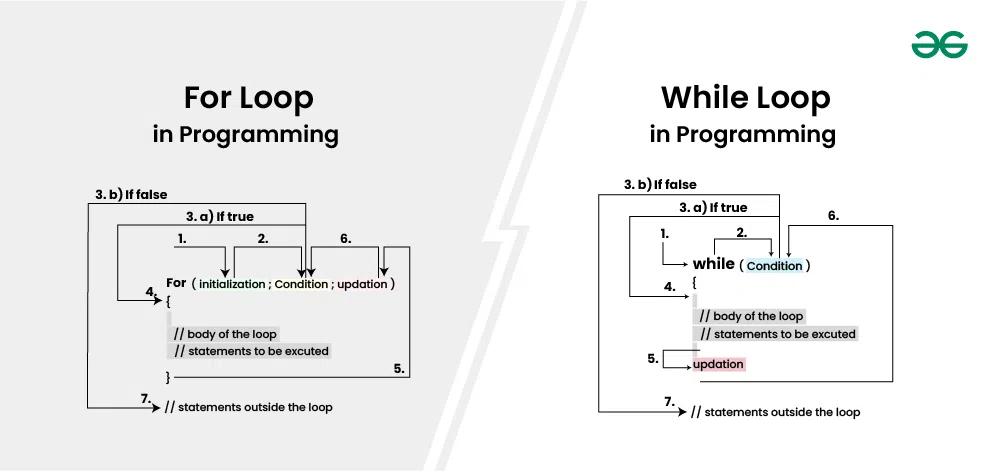
In the for loop on the left, you can see how the initialization, condition check, and update are all part of the loop's signature. The loop body only contains the statements to be executed. In the while loop on the right, the initialization happens before the loop, the condition is checked at the start, and the update must happen inside the loop body. Forgetting to include the update step in a while loop is a common cause of infinite loops!
A Practical Example: Finding the Maximum Value
Let's tie this all together with a practical example. Imagine you have a list of numbers and you need to find the largest one. This is a perfect task for a for loop combined with an if statement.
The logic is straightforward:
- Initialize a variable,
max, with the first element of the list. - Loop through the rest of the list.
- For each number, compare it to
max. - If the current number is greater than
max, updatemaxto this new value.
The following video segment walks through this exact problem, demonstrating how to implement this logic in Kotlin.
Kotlin Newbie To Pro - FOR LOOP - Part 13
Let's watch one more clip from Philipp Lackner's video, where he builds a practical example.
Watch the section where he finds the maximum value in an array. This is a great demonstration of combining a for loop with conditional logic.
Conclusion
Congratulations on completing the Kotlin Fundamentals module! You now have a solid grasp of Kotlin's essential building blocks, from variables and data types to conditionals and loops.
In this lesson, we focused on iteration. Here are the key takeaways:
forloops in Kotlin are powerful "for-each" style loops that work on any iterable object.- Ranges (
1..5),downTo, andstepgive you fine-grained control for counted loops, offering a safer and more readable alternative to C-styleforloops. - When you need an index, use
collection.indicesor the more powerfulcollection.withIndex()to get both the index and the value. whileanddo-whileloops function exactly as they do in Java, providing condition-based looping when the number of iterations is not known beforehand.
You have now mastered the basic syntax and control flow of Kotlin. You are ready to start organizing your code into more structured and reusable pieces.
In our next lesson, we will begin a new module, "Functions and Functional Programming." You'll learn how to define your own functions, which is the first step towards writing clean, modular, and scalable code for your Android applications.