In our previous lesson, we built a foundational text preprocessing pipeline to clean and normalize raw text. We focused on turning unstructured strings into a structured list of meaningful base words. Now, we'll build on that foundation to move from simply cleaning text to actively extracting structured information from it.
Today's lesson focuses on Named Entity Recognition (NER), a core task in Natural Language Processing. Your goal is to learn how to use spaCy's pre-trained NER models to automatically identify and classify entities like people, organizations, dates, and locations within a body of text. This is a highly practical skill, forming the backbone of applications ranging from information retrieval and document analysis to building knowledge graphs.
The ner Component in the spaCy Pipeline
In the last lesson, you saw the spaCy processing pipeline. Named Entity Recognition is one of the standard components in that pipeline, typically running after the tokenizer, tagger, and parser.
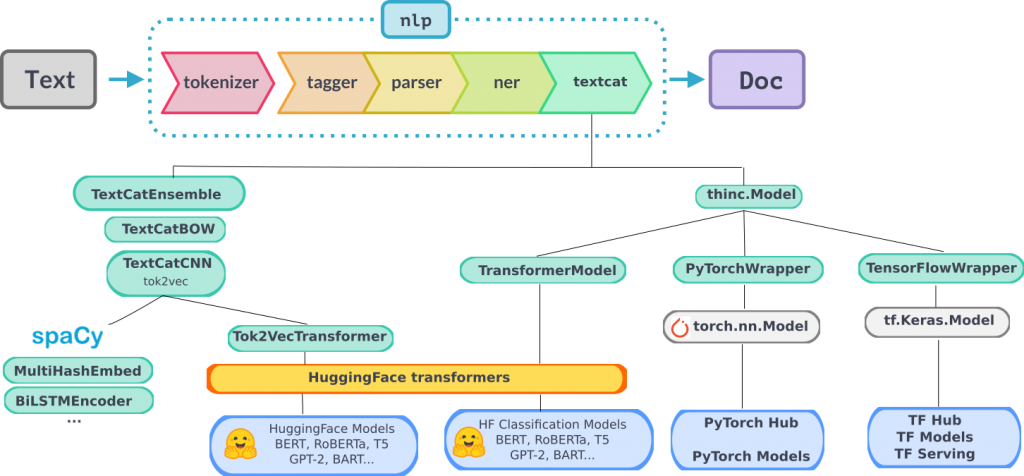
When you load a standard spaCy model like en_core_web_sm, the NER component is included and enabled by default. It has been statistically trained to recognize a variety of entities based on the data it was trained on. This means that without any extra configuration, you can immediately start extracting entities.
Accessing Named Entities
The primary way to access the entities found by the model is through the ents attribute of a Doc object. When you process a text, spaCy's NER model identifies contiguous spans of tokens that it considers to be an entity and makes them available in doc.ents.
Let's start with a practical example.
import spacy

nlp = spacy.load("en_core_web_sm")

text = "Apple's CEO Tim Cook announced that the new iPhone will be launched from Cupertino in September 2024 for $999."

doc = nlp(text)


# The doc.ents attribute is an iterator of Span objects
print(f"Found {len(list(doc.ents))} entities.")


# Let's iterate through them and print their text and label
for ent in doc.ents:
    print(f"- Entity: '{ent.text}', Label: '{ent.label_}'")
When you run this code, you'll see that spaCy has identified several key pieces of information: "Apple" as an organization, "Tim Cook" as a person, "Cupertino" as a location, and so on. Each ent in this loop is a spaCy Span object, which represents a slice of the document.
The Applied Language Technology channel provides a very clear, concise demonstration of this process.
Named Entity Recognition (NER) using spaCy
This video offers a quick and direct introduction to accessing named entities in spaCy.
Watch the first minute of the video, from the beginning to types of named entities. This will visually reinforce how to access doc.ents and loop through the results to print the entity text and its label.
Entity Attributes
Each Span object within doc.ents carries important information about the entity it represents. The two most fundamental attributes are:
ent.text: The actual text of the entity (e.g., "Tim Cook").ent.label_: A string representing the entity type (e.g., "PERSON").
For a more detailed breakdown of the attributes available on an entity Span, the official spaCy documentation is the best reference.
Linguistic Features · spaCy Usage Documentation
The official spaCy documentation provides the definitive guide to its features.
Read the section on Accessing entity annotations. Pay attention to the distinction between ent.label (a hash value) and ent.label_ (the human-readable string), as you will almost always use ent.label_.
Understanding Entity Types
The label string (e.g., ORG, GPE, MONEY) is what gives the extracted entity its meaning. But what do all these acronyms stand for? SpaCy's models are trained to identify a specific set of entity types.
The blog "Data Science Duniya" provides a very helpful reference table that lists the common entity types, their descriptions, and examples.
Named Entity Recognition NER using spaCy | NLP | Part 4 – Data Science Duniya
This article includes an excellent, clear table of NER tags used by spaCy.
In the article, find the section on NER Tags and study the table that lists the entity types. This table is a valuable reference for interpreting the output of spaCy's NER model. You'll see definitions for GPE (Geopolitical Entity), NORP (Nationalities or religious or political groups), and more.
If you're ever in doubt while coding, spaCy includes a handy utility function, spacy.explain(), to get a quick definition for any label.
# Example of using spacy.explain()
print(f"GPE: {spacy.explain('GPE')}")
print(f"NORP: {spacy.explain('NORP')}")
Visualizing Entities with displaCy
Printing a list of entities is useful, but it can be hard to see them in their original context. For debugging, analysis, and presentation, a visual representation is far more effective. SpaCy includes a brilliant built-in visualizer called displaCy.
You can use displaCy.render() to generate an HTML visualization of the entities directly within a Jupyter Notebook or save it to a file. It highlights the entities in the text and color-codes them by label.

Here is how you would generate that visualization in code. Note the jupyter=True argument, which is necessary for rendering directly in a notebook.
from spacy import displacy


# Let's use the same doc object from before
# text = "Apple's CEO Tim Cook announced that the new iPhone will be launched from Cupertino in September 2024 for $999."
# doc = nlp(text)


# Render the visualization
# If you are not in a Jupyter environment, you can omit jupyter=True
# and displacy.render() will return the HTML markup as a string.
displacy.render(doc, style="ent", jupyter=True)
This simple line of code produces a rich, interactive visualization that dramatically improves the interpretability of your model's output.
A Practical Application: Filtering Entities
Now let's put this all together into a practical function. A common requirement is to extract all entities of a specific type from a document. For instance, you might want to find all people mentioned in an article or all company names from a set of reports.
This is straightforward to implement by combining doc.ents with a simple conditional check inside a loop or list comprehension.
The following video demonstrates this exact process, building a list of all entities that are labeled as a "PERSON".
Spacy and Named Entity Recognition NER (Spacy and Python Tutorial for DH 04)
This tutorial from "Python Tutorials for Digital Humanities" walks through the process of not only extracting but also filtering entities based on their label.
Watch the segment from metadata from this. The presenter first shows how to access the .label_ and .text attributes, and then uses this to build a new list containing only entities where the label is "PERSON". This is a core pattern you will use frequently.
Drawing inspiration from that, let's build a function that can extract all entities of a given type from a text.
from typing import List

def extract_entities_by_label(text: str, label: str) -> List[str]:
    """
    Extracts all named entities of a specific label from a text.

    Args:
        text: The input text to process.
        label: The string label of the entities to extract (e.g., "PERSON", "ORG").

    Returns:
        A list of the text of the found entities.
    """
    doc = nlp(text)
    entities = [ent.text for ent in doc.ents if ent.label_ == label]
    return entities


# Let's test our function
article_text = """
Sundar Pichai, the CEO of Google, announced a new partnership with Microsoft.
Bill Gates, co-founder of Microsoft, expressed his support.
The deal was finalized yesterday in Redmond.
"""


# Find all people mentioned
people = extract_entities_by_label(article_text, "PERSON")
print(f"People mentioned: {people}")


# Find all organizations mentioned
orgs = extract_entities_by_label(article_text, "ORG")
print(f"Organizations mentioned: {orgs}")
This function is a reusable tool that demonstrates the practical power of NER. You've gone from raw text to a structured list of specific information types in just a few lines of Python.
Conclusion
In this lesson, you have moved from preprocessing text to extracting high-value, structured information. You leveraged spaCy's pre-trained models to perform Named Entity Recognition, a fundamental task in applied NLP.
Here are the key takeaways:
- Named Entity Recognition (NER) is the process of identifying and categorizing named entities in text.
- The
nercomponent is part of spaCy's default pipeline and populates thedoc.entsattribute. - Each entity is a
Spanobject with useful attributes like.textand.label_. - You can use
spacy.explain()to get definitions for entity labels likeGPE,ORG, andPERSON. displaCyis an essential tool for visualizing entities in context, making it easier to analyze and debug your model's output.
In our next lesson, we will delve even deeper into the linguistic structure of text. We will explore Part-of-Speech (POS) tagging and Dependency Parsing, which allow us to understand the grammatical roles of words and the relationships between them. This will enable even more sophisticated analysis and feature extraction.