Welcome to the third lesson in our module on practical NLP with spaCy. In our previous lesson, we focused on Named Entity Recognition (NER) to extract what a text is about by identifying entities like people and organizations. Today, we'll dive deeper into the grammatical structure to understand how a sentence is constructed.
This lesson covers Part-of-Speech (POS) tagging and Dependency Parsing. Your goal is to learn how to use spaCy's linguistic annotations to analyze the grammatical role of each word and the relationships between them. Mastering this skill is crucial for moving beyond simple keyword extraction to more sophisticated information extraction systems, which directly sets the stage for our next topic.
Understanding the Building Blocks: Part-of-Speech Tagging
Before we can understand sentence structure, we need to know the grammatical role of each individual word. This is where Part-of-Speech (POS) tagging comes in. A POS tagger assigns a category like "noun," "verb," or "adjective" to each token.
When you process a text with a spaCy pipeline, the tagger component annotates each Token object with detailed linguistic information. You can access these annotations through attributes on the token.
The two most important attributes for POS are:
token.pos_: A coarse-grained, universal POS tag (e.g.,NOUN,VERB,ADJ). This is part of the Universal Dependencies scheme and is useful for abstracting over language-specific details.token.tag_: A fine-grained, language-specific POS tag (e.g.,NNfor a singular noun,NNSfor a plural noun in English).
For most applications, token.pos_ is sufficient and more general. Let's see how to access these attributes.
import spacy

nlp = spacy.load("en_core_web_sm")

text = "The quick brown fox jumped over the lazy dog's back."
doc = nlp(text)

# Iterate through each token and print its text and POS tag
for token in doc:
    # The :10 format specifier aligns the output for readability
    print(f"{token.text:10} {token.pos_:7} {token.tag_:7} {spacy.explain(token.pos_)}")
This code iterates over each token and prints its text, its universal POS tag (pos_), its fine-grained tag (tag_), and a human-readable explanation of the universal tag.
The tutorial on the Real Python blog provides a clear walkthrough of this process.
Natural Language Processing With spaCy in Python
This article offers a practical introduction to POS tagging with clear code examples.
Read the section on Part-of-Speech Tagging. Focus on the code example that iterates through about_doc and prints the token.pos_ and token.tag_ attributes. This will reinforce the code we just discussed.
Analyzing Sentence Structure: Dependency Parsing
While POS tags tell us the role of individual words, they don't explain how those words connect to form a coherent sentence. Dependency Parsing is the process that uncovers this grammatical structure. It represents the sentence as a directed graph where words (tokens) are nodes and the grammatical relationships between them are labeled arcs (dependencies).
Each arc connects a head token to a child token (its dependent). For example, in "She ate an apple," the verb "ate" is the head, and "She" (the nominal subject) and "apple" (the direct object) are its children. Every sentence has exactly one token that is the root of the tree—often the main verb—which has no head.
In spaCy, these relationships are available as attributes on each token:
token.dep_: A string describing the dependency relation (e.g.,nsubjfor nominal subject,dobjfor direct object).token.head: TheTokenobject that is the syntactic head of the current token.
Let's inspect the dependencies for our example sentence.

This image shows the output of iterating through a spaCy Doc object and printing key token attributes, including the text, part-of-speech (pos_), and dependency label (dep_), along with its explanation.
The code to produce this output is straightforward:
# Using the same doc from before
# text = "The quick brown fox jumped over the lazy dog's back."
# doc = nlp(text)

for token in doc:
    print(f"{token.text:10} {token.pos_:7} {token.dep_:7} {spacy.explain(token.dep_)}")
Notice that "jumped" is the ROOT of the sentence. "fox" is its nominal subject (nsubj), and "over" is a prepositional modifier (prep). This structure provides a powerful way to understand who did what to whom.
Visualizing the Dependency Tree
Reading a list of dependencies can be unintuitive. The best way to understand the parse tree is to visualize it. SpaCy's built-in displaCy visualizer is an indispensable tool for this.
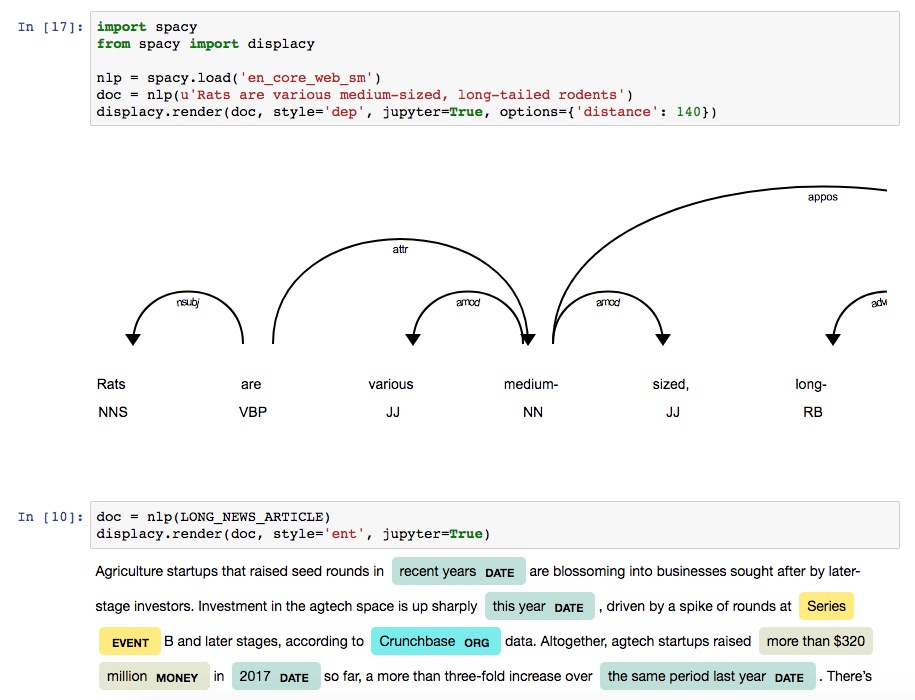
An example of displaCy rendering a dependency parse (top) and named entities (bottom). The dependency parse shows the directed arcs between tokens, labeled with their grammatical relationship.
You can generate this visualization with a single line of code in a Jupyter Notebook.
from spacy import displacy

# The style="dep" argument tells displacy to render the dependency parse
displacy.render(doc, style="dep", jupyter=True, options={'distance': 120})
The resulting visualization clearly shows the tree structure, with "jumped" at the root and all other words branching off it according to their grammatical function.
The spaCy documentation provides the definitive guide to dependency parsing and navigating the parse tree.
Linguistic Features · spaCy Usage Documentation
This document explains the technical details of spaCy's dependency parser and visualizer.
First, read the introduction to Dependency Parsing. Then, skim the subsection on Navigating the parse tree to understand the head and child relationship. Finally, review the section on Visualizing dependencies to see how displaCy works.
A Practical Application: Rule-Based Information Extraction
Now, let's combine these concepts to solve a practical problem. Imagine you're analyzing customer feedback and want to extract all the products that people have purchased. You could try to train a custom NER model for PRODUCT, but a much simpler and more direct approach is to use the grammatical structure of the sentence.
A sentence describing a purchase often follows a pattern: [person] [verb of buying] [product]. We can translate this into a rule using linguistic features:
- Find a verb whose base form (lemma) is "buy" or "purchase".
- Find the direct object (
dobj) of that verb. - That direct object is likely the product that was purchased.
This is a classic example of rule-based information extraction. The video from Explosion, the creators of spaCy, provides an excellent demonstration of building exactly this logic.
Using Linguistic Features - spaCy shorts
This video walks through a complete, practical example of using linguistic features for information extraction.
First, watch how the presenter uses token.lemma_ to identify verbs related to buying, regardless of their conjugation, from extra information. Next, see how they use displaCy to inspect the dependency parse and formulate a rule combining verbs, dependencies, and noun chunks from similar trick. Finally, watch the implementation of a function that captures this logic to extract the purchased products from proper function now.
Inspired by the video, here is a Python function that encapsulates this logic. It identifies noun phrases that are the direct object of a verb for "buying" or "purchasing."
def find_purchased_items(doc):
    """
    Finds noun chunks that are the direct object of a 'buy' or 'purchase' verb.
    """
    purchased_items = []
    # Define the lemmas of verbs we're interested in
    purchase_lemmas = {"buy", "purchase"}

    for token in doc:
        # Check if the token is a verb and its lemma is in our set
        if token.pos_ == "VERB" and token.lemma_ in purchase_lemmas:
            # Find children of this verb that are direct objects
            for child in token.children:
                if child.dep_ == "dobj":
                    # The direct object might be part of a larger noun phrase (e.g., "a veggie lasagna")
                    # We can find this phrase by iterating over its "noun chunk"
                    # A noun chunk is a base noun phrase.
                    if child.doc.has_annotation("DEP"):
                        for chunk in child.doc.noun_chunks:
                            if child in chunk:
                                purchased_items.append(chunk.text)
                                break # Move to the next child
    return purchased_items

# Example usage:
texts = [
    "I bought a veggie lasagna from your store yesterday.",
    "My husband purchased the new sausages and they were spoiled.",
    "I would like to return the milk I got last week." # 'got' is not in our list, so this won't be found
]

for text in texts:
    doc = nlp(text)
    items = find_purchased_items(doc)
    if items:
        print(f"Text: '{text}'")
        print(f"--> Found purchased items: {items}\n")
This function successfully identifies "a veggie lasagna" and "the new sausages" as purchased items by analyzing the sentence's grammatical structure, demonstrating the practical power of dependency parsing.
Conclusion
In this lesson, you have learned to move beyond surface-level text features and analyze the deep grammatical structure of sentences. This allows for a much more nuanced understanding of text and enables powerful information extraction techniques.
Here are your key takeaways:
- Part-of-Speech (POS) tagging assigns grammatical labels (noun, verb, etc.) to tokens, accessible via
token.pos_andtoken.tag_. - Dependency Parsing maps the relationships between words in a sentence, which you can access via
token.dep_andtoken.head. displaCyis an essential tool for visualizing the dependency tree (style="dep") to understand sentence structure interactively.- By combining POS tags, lemmas, and dependency relations, you can create precise rules to extract specific information, such as finding the object of a particular action.
In our next and final lesson for this module, we will formalize the rule-based logic we explored today. You will learn to use spaCy's Matcher, a powerful engine for finding sequences of tokens based on patterns of their attributes, including the very POS tags and dependency labels you learned about here.