Welcome to the next stage of your journey! In the previous module, we laid the groundwork by building static web pages and learning the professional workflow for saving and sharing your code with Git and GitHub. You now have the skills to structure content and style it beautifully, but our pages are still just static documents. It's time to bring them to life.
This lesson marks your entry into JavaScript, the language that powers interactivity on the web. We'll start with the most fundamental concept: how to store and manage information. You'll learn how to declare variables, the named containers for your data, and how to use the basic "primitive" data types—strings, numbers, and booleans. For a UI/UX designer, this is where the magic begins. These variables will hold user input, track the state of your UI (like whether a menu is open or an item is selected), and allow you to display dynamic information, forming the coded logic behind every user experience.
What is a Variable?
At its core, a variable is simply a named container for a piece of data. Think of it like a labeled box where you can store a value to use later in your program. Your experience with Figma variables for managing design tokens is a great mental model here; in code, variables serve a similar purpose but for a much broader range of data and logic.
When a program runs, it needs to hold information in memory. By creating a variable, you are essentially asking the computer to reserve a small piece of memory, giving it a name so you can easily access it.
The following video uses a fantastic analogy of ingredients on a kitchen counter to explain how variables occupy memory (your computer's RAM) to make data available to your program. This should resonate with your engineering background, where managing physical resources is a familiar concept.
The Complete Guide to JavaScript Variables - Everything Explained
The video "The Complete Guide to JavaScript Variables" from Future Fullstack offers a great introduction to this idea.
Watch the initial segment from the beginning, which explains how variables store values and occupy memory, drawing a parallel to how a web page uses your computer's resources.
Creating a variable in JavaScript involves two steps, which are often combined into one:
- Declaration: Creating the variable and giving it a name (e.g.,
let userName;). - Assignment: Giving the variable a value to hold (e.g.,
userName = 'Ahmed';).
When you do both at once, it's called initialization: let userName = 'Ahmed';.
Declaring Variables: let and const
In modern JavaScript, there are two keywords you will use to declare variables: let and const. You may see an older keyword, var, in legacy code, but for our purposes, you should never use var. Sticking to let and const leads to safer and more predictable code.
The choice between let and const depends on a simple question: will this variable's value need to change?
let: Useletwhen you expect the variable's value to be reassigned later. Think of a score in a game, the number of items in a shopping cart, or a user's current status. The value is mutable (changeable).const: Useconst(short for "constant") when the variable's value should not be changed after it's first assigned. This is for values that are fixed, like a user's date of birth, a mathematical constant like PI, or an API endpoint URL. The value is immutable (unchangeable).
As a best practice, always default to const. Only switch to let if you have a specific reason to believe the value will need to be reassigned. This simple rule helps prevent accidental changes and makes your code's intent clearer to you and other developers.
This image provides a helpful visual analogy for the difference between var, let, and const.
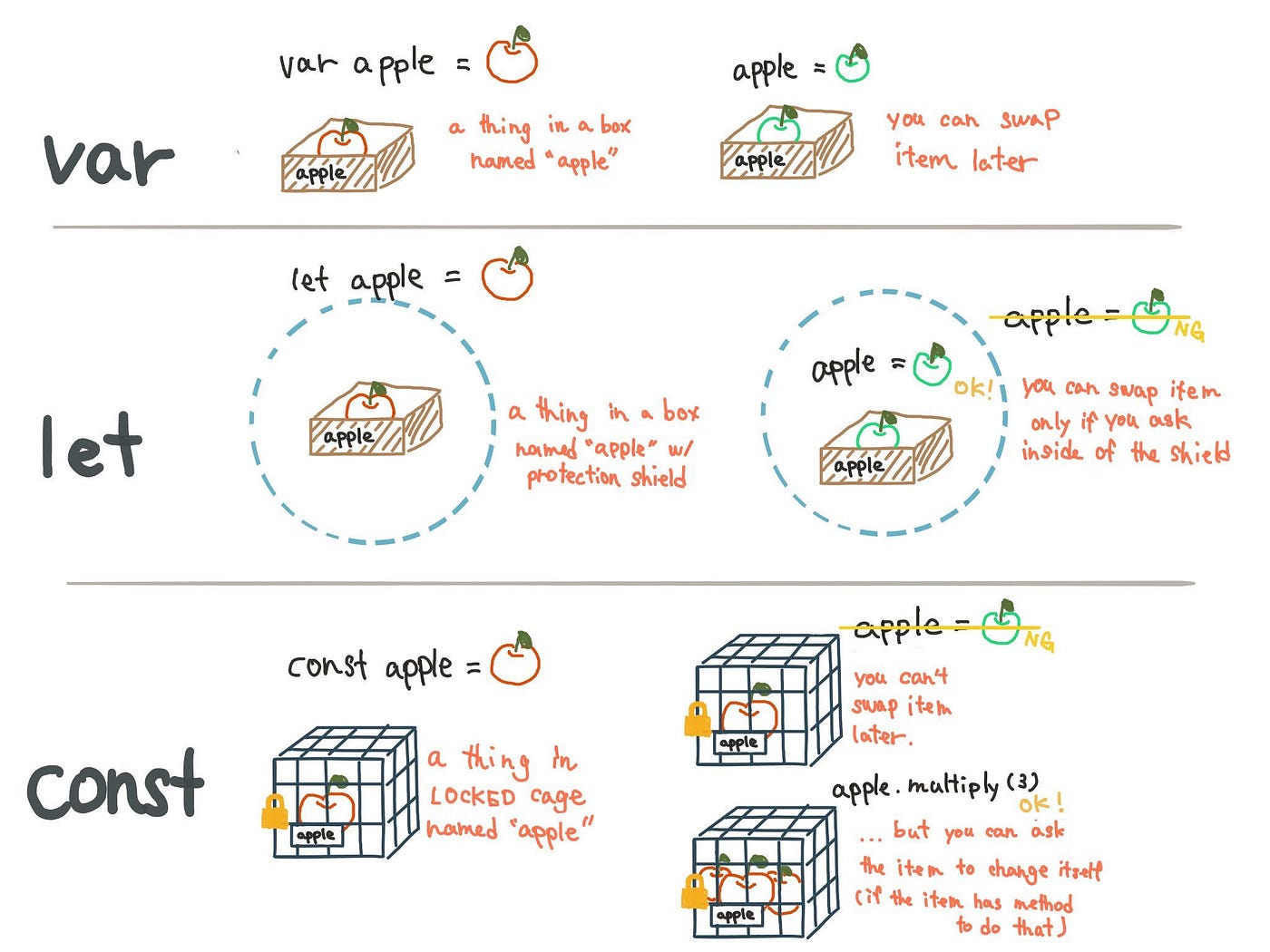
The video from Future Fullstack demonstrates this distinction perfectly, showing what happens when you try to change a const variable.
The Complete Guide to JavaScript Variables - Everything Explained
Continue with the "The Complete Guide to JavaScript Variables" video.
Watch these two key sections: The let keyword (Explanation of let): This part explains how let variables are mutable and can be reassigned. The const keyword (Explanation of const): Here, the video demonstrates that const variables are immutable and shows the error that occurs when you try to reassign one.
For a detailed textual explanation and more examples, the following article is an excellent resource.
JavaScript Variables and Data Types: Complete Beginner ...
This article from Fullstack Foundations provides a clear, practical guide to modern variable declaration.
Focus on the sections Declare, then assign and var, let, const. It reinforces the "never use var" rule and gives clear guidelines on when to choose let versus const.
Primitive Data Types
Now that we know how to create containers, let's look at the basic types of data we can put in them. In JavaScript, data types are grouped into two main categories.
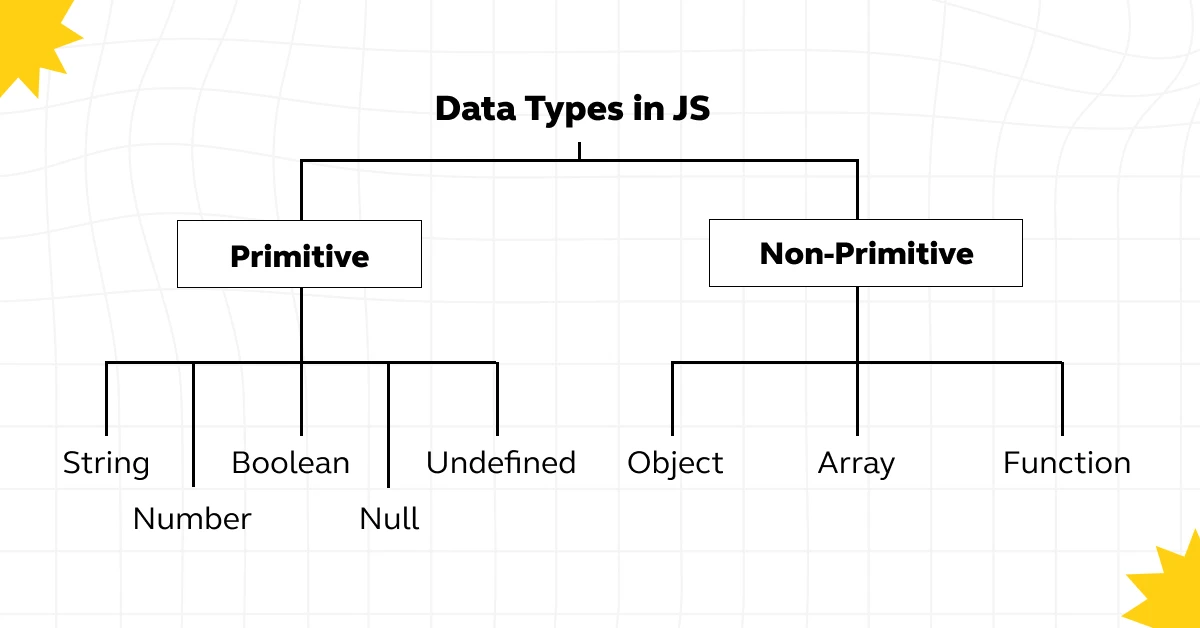
Primitive types are the simplest, most fundamental data types. For now, we will focus on the three you will use every day:
- String: Represents textual data. Anything enclosed in single quotes (
'...'), double quotes ("..."), or backticks (`...`) is a string. Strings are used for names, messages, labels, and any other text in your UI.const userName = 'Fatima'; const welcomeMessage = "Welcome to the dashboard!"; - Number: Represents numeric data, including both integers and floating-point (decimal) numbers. Numbers are used for calculations, sizes, counts, and coordinates.
const userAge = 32; const price = 49.99; let itemsInCart = 0; - Boolean: Represents a logical value of either
trueorfalse. Booleans are perfect for tracking states in your UI. Is the dark mode enabled? Is the user logged in? Is the dropdown menu visible? These are all questions answered with a boolean.const isLoggedIn = true; const hasAcceptedTerms = false;
Two other special primitive values are undefined and null. undefined is the default value of a variable that has been declared but not yet assigned a value. null is a value you can intentionally assign to a variable to signify that it is empty or has no value.
The "Bro Code" channel offers a very quick and clear video breakdown of these three core data types.
JavaScript VARIABLES are easy! 📦
This video, "JavaScript VARIABLES are easy! 📦," is great for a quick, practical overview.
Watch these three short segments back-to-back: Number data type String data type Boolean data type Each segment explains one primitive type with clear examples.
Naming Conventions and Practice
How you name your variables is incredibly important for writing code that is easy to read and understand. The standard convention in JavaScript is camelCase, where the first word is lowercase and every subsequent word starts with an uppercase letter.
- Good:
userName,isModalOpen,mainContentContainer - Bad:
Username,is_modal_open,Maincontentcontainer
The Future Fullstack video has an excellent section on naming rules and conventions.
The Complete Guide to JavaScript Variables - Everything Explained
Let's return to "The Complete Guide to JavaScript Variables" one last time.
Watch the section on naming conventions and rules. This will solidify your understanding of camelCase and other important rules for creating valid variable names.
Time to Practice
Let's apply what you've learned. The browser's developer tools include a JavaScript console, which is a perfect playground for experimenting.
- Open your browser (Chrome or Firefox is recommended).
- Right-click anywhere on a page and select "Inspect."
- In the panel that opens, find and click on the "Console" tab.
Now, type the following lines of code directly into the console, hitting Enter after each one. Think about why const or let is the appropriate choice for each.
Imagine you are tracking properties for a product card component in an e-commerce UI:
const productName = 'Ergonomic Mechanical Keyboard';
const price = 159.95;
const isAvailable = true;
let stockCount = 50;
After you've declared these, you can check their values by typing the variable name and hitting Enter. For example:
productName; // Should show 'Ergonomic Mechanical Keyboard'
You can also see a variable's value using console.log():
console.log(stockCount); // Should print 50
Now, let's simulate a customer buying a keyboard. We need to update the stock count. Since stockCount was declared with let, we can reassign it:
stockCount = 49;
console.log(stockCount); // Should now print 49
What happens if you try to change the product name?
productName = 'Gaming Keyboard';
You should see a TypeError. This is JavaScript protecting you, enforcing the rule you set by using const: this value should not change.
Conclusion
You've just taken your first and most important step into JavaScript. Understanding how to store and manage data is the bedrock upon which all dynamic applications are built.
Key Takeaways:
- Variables are named containers for data, declared with
letandconst. - Use
constby default for values that won't change, andletonly for values you know will need to be reassigned. - The three core primitive data types are
string(text),number(numeric values), andboolean(true/falsestates). - Using clear, conventional naming like
camelCaseis crucial for professional, readable code.
In our next lesson, we will introduce functions. If variables are the nouns of programming—the data and state—then functions are the verbs. They are reusable blocks of code that perform actions, often using the variables we've just learned how to create. This is where your pages will truly start to feel interactive.