In our last lesson, we explored variables—the "nouns" of programming that act as containers for data like text, numbers, and true/false states. Now, it's time to introduce the "verbs": functions. Functions are reusable blocks of code that perform actions, and they are the engine that drives all interactivity on the web.
This lesson is where your UI/UX design concepts begin to translate directly into functional code. Every time a user interacts with a page—clicking a button, submitting a form, toggling a switch—a function is running behind the scenes to make something happen. You will learn the three primary ways to write functions in modern JavaScript: declarations, expressions, and the concise arrow syntax. Mastering this will allow you to encapsulate logic, making your code organized, reusable, and powerful.
What is a Function?
Imagine you have a series of steps you need to perform repeatedly in your application, like greeting a user when they log in. Without functions, you would have to copy and paste the same lines of code everywhere you need that functionality. This is inefficient and error-prone. If you needed to change the greeting, you'd have to find and update every single copy.
A function solves this by bundling that logic into a single, named, reusable package. You define the steps once inside the function, and then you can "call" or "invoke" that function by its name whenever you need it. This principle is known as DRY: Don't Repeat Yourself.
The following video from Web Dev Simplified provides an excellent introduction to this core idea.
How To Create/Use Functions - JavaScript Essentials
This video, "How To Create/Use Functions," clearly explains the motivation behind functions and the basic syntax for creating and calling them.
Watch these two sections to start: The "why": This part illustrates the problem of repeated code and introduces functions as the solution. Creating and calling: Here, you'll see the fundamental syntax for declaring a function and then invoking it to run the code inside.
As you just saw, creating and using a function involves two distinct steps:
- Declaration: Writing the function and giving it a name. This defines what the function does.
- Invocation (or Calling): Running the function to execute the code inside it.
This separation is key. You can declare a function once and call it a hundred times, from a hundred different places in your code.
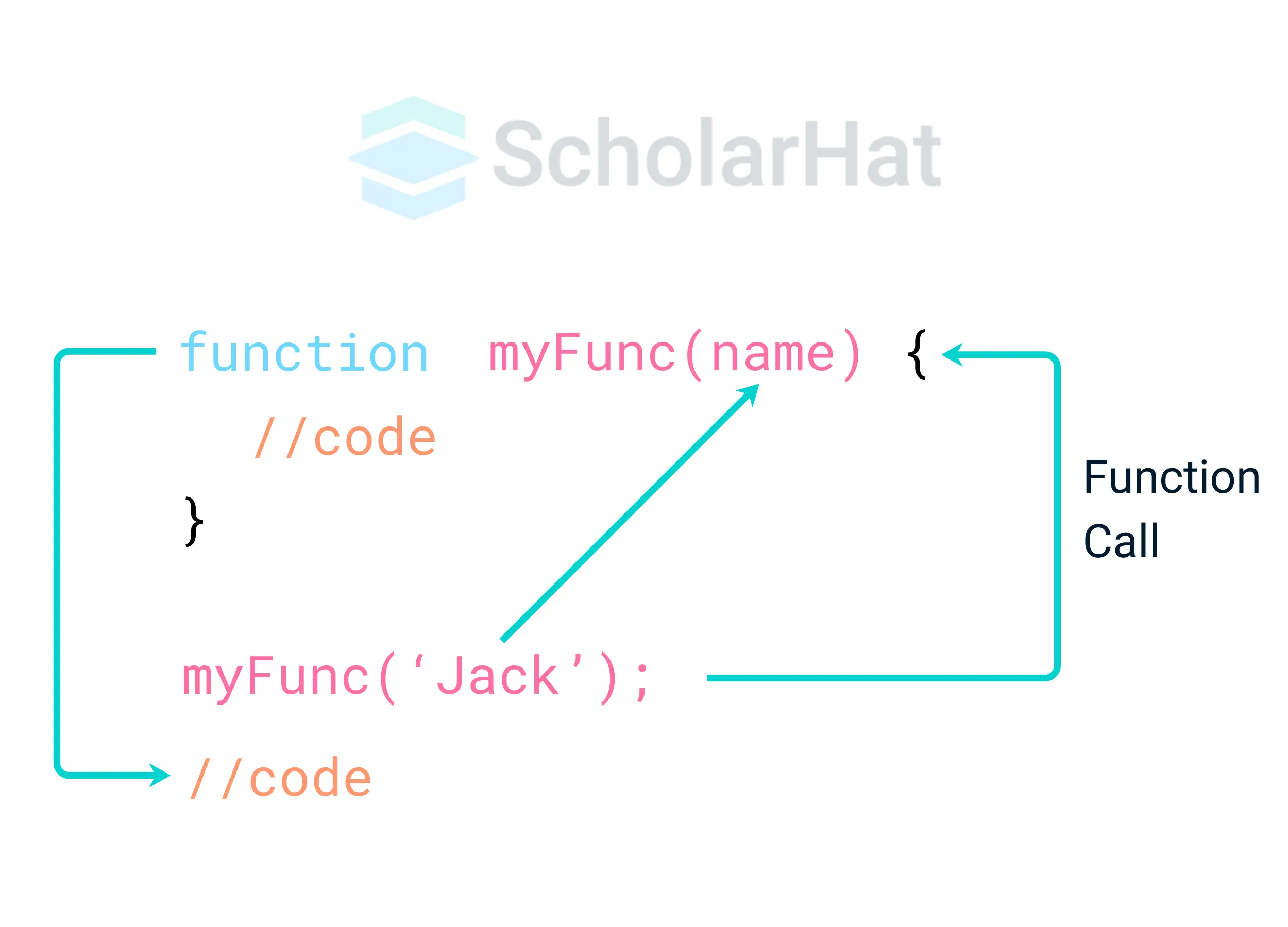
The Anatomy of a Function
Let's break down the essential parts of a function: parameters for input and return values for output. Your engineering background will find this input-process-output model very familiar.
Parameters and Arguments: Passing Data In
A function that does the exact same thing every time is useful, but functions become truly powerful when they can operate on different data. We achieve this with parameters and arguments.
- Parameters are variables listed in the function's definition. They act as placeholders for the data the function expects to receive.
- Arguments are the actual values you pass into the function when you call it.
// 'userName' is a parameter
function createGreeting(userName) {
  console.log(`Hello, ${userName}!`);
}

// 'Fatima' and 'Ahmed' are arguments
createGreeting('Fatima');  // Outputs: "Hello, Fatima!"
createGreeting('Ahmed');   // Outputs: "Hello, Ahmed!"
In your UI/UX work, this is like having a component property. A "Button" component might have a label property. The parameter is label; the arguments you pass could be "Submit", "Cancel", or "Learn More".
JavaScript Functions: Complete Beginner Tutorial
The article from Fullstack Foundations provides a fantastic, in-depth explanation of these core mechanics.
Read the following sections: Start with How to write and call a function for a recap of declaring vs. calling. Then, carefully study the section on parameters and arguments. The author does a great job of explaining how the arguments you pass during a call map directly to the parameters in the function definition.
Return Values: Getting Data Out
Often, a function needs to not only perform an action but also produce a result that can be used elsewhere. For this, we use the return keyword. When a function hits a return statement, it immediately stops executing and sends back the specified value.
function calculateVat(price) {
  const vatRate = 0.14; // 14% VAT
  const vatAmount = price * vatRate;
  return vatAmount; // Send this value back
}

const productPrice = 200;
const tax = calculateVat(productPrice); // 'tax' is now 28

console.log(`The VAT on a ${productPrice} EGP item is ${tax} EGP.`);
// Outputs: The VAT on a 200 EGP item is 28 EGP.
If a function does not have a return statement, it implicitly returns the value undefined.
JavaScript Functions: Complete Beginner Tutorial
Now, let's revisit the Fullstack Foundations article to learn about output.
Read the section on return values. Focus on how return allows you to capture the result of a function in a variable.
Three Ways to Write a Function
JavaScript offers a few different syntaxes for defining functions. While they achieve similar goals, they have important differences in behavior.

1. Function Declaration
This is the classic syntax you've seen so far. It starts with the function keyword, followed by the function's name.
function add(num1, num2) {
  return num1 + num2;
}
2. Function Expression
A function expression involves creating a function (often an anonymous one without a name) and assigning it to a variable.
const add = function(num1, num2) {
  return num1 + num2;
};
Here, the function itself has no name, but we can call it using the variable name add. This syntax treats functions as values, just like the strings and numbers from the previous lesson, which is a powerful concept.
3. Arrow Function Expression
Introduced in modern JavaScript (ES6), arrow functions provide a more compact syntax for writing function expressions. They are extremely common in modern codebases, especially in React.
// The modern, concise way
const add = (num1, num2) => {
  return num1 + num2;
};
To convert a regular function expression to an arrow function, you remove the function keyword and add a "fat arrow" => between the parameters and the function body.
For very simple functions that only have a single return statement, you can make them even shorter:
// Implicit return: if there are no curly braces, the value is automatically returned.
const add = (num1, num2) => num1 + num2;
The Crucial Difference: Hoisting
So why have different types? The main behavioral difference is a concept called hoisting.
- Function Declarations are hoisted. This means the JavaScript interpreter "lifts" the entire function definition to the top of its scope before the code is executed. As a result, you can call a function declaration before it appears in your code file.
- Function Expressions (including Arrow Functions) are not hoisted. They are assigned to variables (
letorconst), and those variables are not initialized until the line of code where the assignment happens. If you try to call a function expression before its definition, you will get an error.
The following video from Kevin Powell explains this concept very clearly.
The different types of JavaScript functions explained
The video "The different types of JavaScript functions explained" provides a great visual breakdown of the syntaxes and the concept of hoisting.
Watch these segments: Function Declarations: A quick look at the classic syntax. Function Expressions: Introduction to assigning anonymous functions to variables. Hoisting explained: This is the most critical part. It clearly demonstrates why declarations can be called before they are defined, while expressions cannot. Arrow Functions: An explanation of the modern arrow syntax and its concise forms.
For a detailed written reference that you can come back to, the freeCodeCamp article is excellent.
Function Declaration vs Function Expression
This article provides a thorough comparison of the different function types.
Focus on these key parts: Function Declaration: The basic definition. Function Expression: How to create expressions with and without the function keyword. Arrow functions: The modern, concise syntax. The hoisting difference: A detailed text explanation of the concept you just saw in the video.
As a general rule for modern development, using const with arrow functions is the most common and recommended approach for its predictability (no hoisting) and conciseness. However, function declarations are still perfectly valid and widely used.
Time to Practice
Let's put this into practice. Open your browser's developer console ("Inspect" -> "Console") and try writing these functions.
-
Write a function declaration named
calculateDiscountthat takes two parameters:priceanddiscountPercentage. It should calculate the discount amount and return it.function calculateDiscount(price, discountPercentage) { const discountAmount = price * (discountPercentage / 100); return discountAmount; } // Call it and log the result const finalDiscount = calculateDiscount(500, 15); console.log(finalDiscount); // Should print 75 -
Rewrite the same function as a function expression.
const calculateDiscountExpr = function(price, discountPercentage) { const discountAmount = price * (discountPercentage / 100); return discountAmount; }; console.log(calculateDiscountExpr(500, 15)); // Should also print 75 -
Now, rewrite it as an arrow function. Try the concise, one-line version!
const calculateDiscountArrow = (price, discountPercentage) => price * (discountPercentage / 100);

console.log(calculateDiscountArrow(500, 15)); // Should still print 75
Conclusion
You now have a foundational understanding of functions, the workhorses of JavaScript. They are essential for creating organized, maintainable, and interactive code.
Key Takeaways:
- Functions are reusable blocks of code that perform specific tasks.
- You declare a function to define its logic and call (or invoke) it to run that logic.
- Use parameters as placeholders for data input and arguments as the actual values you pass in.
- Use the
returnkeyword to get a value out of a function. - JavaScript has three main function syntaxes: declarations, expressions, and arrow functions. The key difference is that declarations are hoisted, while expressions are not.
In our next lesson, we will explore arrays and objects. These are complex data types that allow you to group related data together—for example, a list of product names in an array, or the complete details of a user (name, email, ID) in an object. Combining these with the functions you've just learned will unlock the ability to manage and manipulate complex data, bringing you one step closer to building dynamic user interfaces.