Welcome back. In our last lesson, we established why asynchronous code is essential. You learned that synchronous operations can block the main thread, freezing the user interface and creating a frustrating user experience. As a Design Engineer, preventing this is a top priority to ensure the applications you build feel responsive and reliable.
Today, we'll dive into the how. We will focus on async/await, the modern JavaScript syntax for managing asynchronous tasks like fetching data. Your goal for this lesson is to learn how to read and understand code that uses async/await. This skill is fundamental to your ability to supervise AI tools like Cursor, as they will generate this type of code constantly when dealing with network requests. By the end of this lesson, you'll be able to look at an AI-generated function that fetches data and confidently verify that it's structured correctly.
From Chains to Line-by-Line: The Evolution of Async Code
Before async/await, handling asynchronous operations involved a syntax that could become difficult to read. Operations were "chained" together using a method called .then(). While powerful, this could lead to nested and sometimes confusing code structures, especially when multiple sequential steps were needed.
The video segment below briefly introduces this older style, which helps to appreciate why async/await was such a significant improvement.
Callbacks, Promises, Async Await | JavaScript Fetch API Explained
This video from Dave Gray's channel provides context by explaining the "callback hell" problem and the subsequent introduction of Promises with .then() chains.
First, watch the brief explanation of "callback hell" from this segment. Then, watch the introduction to Promises from this part, focusing on how .then() is used to chain operations. You don't need to master this syntax, just recognize the "chaining" pattern.
This chaining approach works, but async/await, introduced in ES2017, provides what is often called "syntactic sugar." It lets us write asynchronous code that looks synchronous—as if it's executing line by line—making it much more intuitive to read and reason about.
Deconstructing async and await
At its core, async/await is a combination of two keywords that work together.
-
async: This keyword is placed before a function declaration. It does two simple but important things:- It ensures the function automatically returns a Promise. (A Promise is an object representing the eventual result of an asynchronous operation).
- It allows you to use the
awaitkeyword inside that function.
-
await: This keyword can only be used inside anasyncfunction. It tells JavaScript to pause the function's execution at that line and wait for a Promise to be resolved or rejected. Once the Promise settles, the function resumes, and theawaitexpression returns the resolved value.
The following article provides fantastic visualizations to help build a mental model of how the await keyword "suspends" a function without blocking the rest of the application.
JavaScript Visualized: Promises & Async/Await
This article by Lydia Hallie uses animated diagrams to show exactly how the JavaScript engine handles async/await. For a visual thinker, this is an incredibly effective way to understand the concept.
Please read the section Async/Await. Focus on the diagrams illustrating how, upon hitting an await, the engine suspends the async function, goes off to do other work, and then returns to the function once the awaited promise is resolved.
A Practical Example: Fetching Data
Let's see how these keywords are used in the most common scenario you'll encounter: fetching data from an API using the fetch function. The fetch function itself returns a Promise, making it a perfect candidate for async/await.
The image below shows a complete, annotated example.
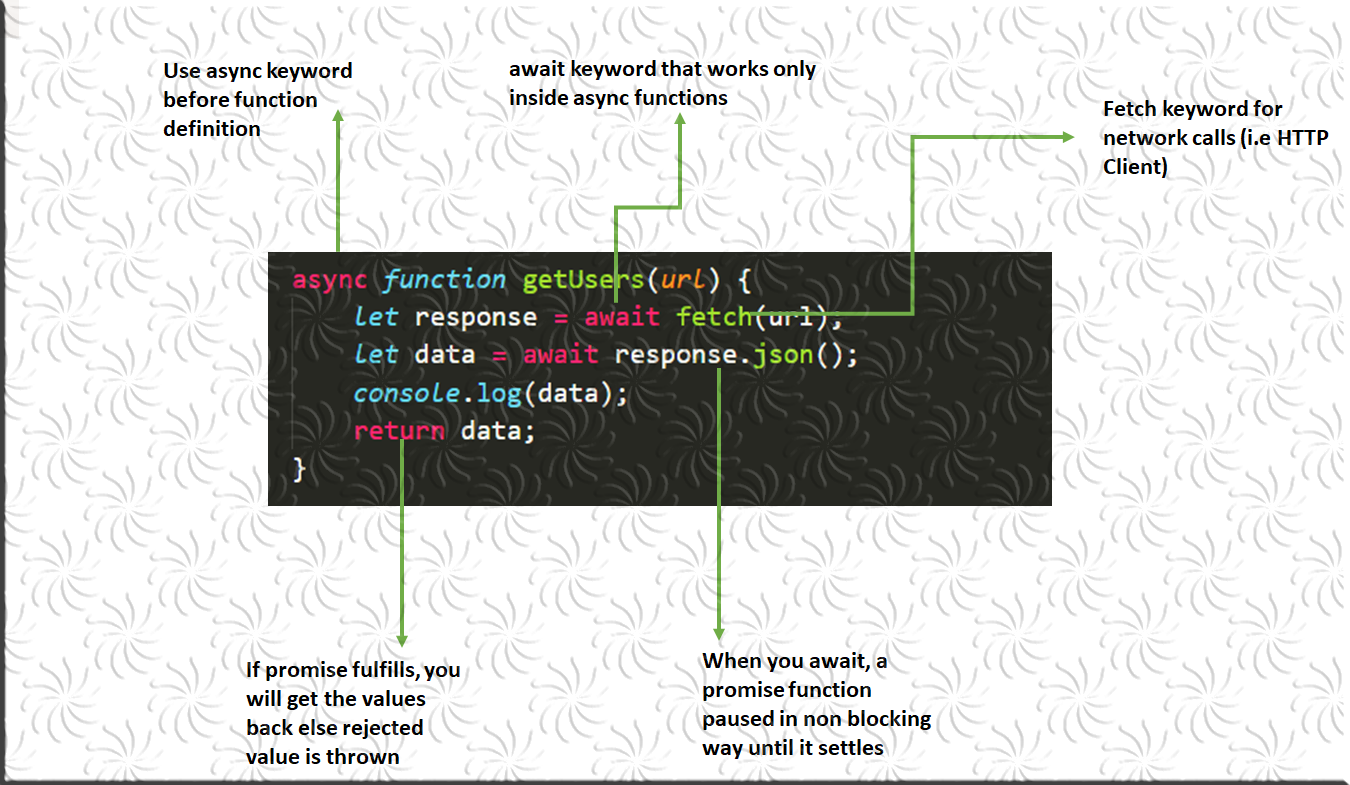
Notice the two await calls:
await fetch(url): The first pause waits for the server to respond to our network request. The result is aResponseobject.await response.json(): The body of theResponseobject is a stream of data that needs to be parsed. The.json()method does this parsing, and since it can also take time, it also returns a Promise. The secondawaitpauses the function again until this parsing is complete, finally giving us the actual data.
This short video provides a practical coding demonstration of this exact process.
Using Async/Await with the Fetch API - JavaScript Tutorial
This concise tutorial from dcode demonstrates how to use async/await with the Fetch API.
Watch the segment from the beginning to see how an async function is defined and the first await is used with fetch. Then, skip to this section to see how response.json() is also awaited to get the final data.
Shipping with Confidence: Handling Errors with try...catch
What happens if the network is down? Or if the API server returns an error? An awaited Promise that gets rejected will throw an error. If we don't handle it, our application will crash. This is where try...catch comes in—a critical pattern for building robust applications and a key part of your "Exploratory & Edge Case Thinking."
try: You wrap the code that might fail (yourawaitcalls) inside atry { ... }block.catch: You add acatch (error) { ... }block immediately after. If any error occurs inside thetryblock, execution immediately jumps to thecatchblock, where you can handle the error gracefully—for instance, by showing a user-friendly message.
This pattern is your primary tool for supervising AI-generated code. You must ensure the AI has included proper error handling.
This part of The Modern JavaScript Tutorial clearly explains how to handle errors in async functions.
Read the section on Error handling. It shows how a rejected promise behaves like a throw statement and how try...catch is used to manage it.
The video you watched earlier also demonstrates this principle perfectly.
Using Async/Await with the Fetch API - JavaScript Tutorial
The dcode video also provides a clear example of implementing try...catch for error handling.
First, watch how the try...catch block is set up from this part. Then, see it in action as it successfully catches an error at this point.
The Big Picture
The async/await syntax is a specific but crucial part of the overall process of interacting with an API.

Conclusion
In this lesson, you've demystified the async/await syntax, the cornerstone of modern asynchronous JavaScript. You now have the knowledge to read and understand the code that AI tools will generate for fetching data, a crucial step toward effective supervision.
Key Takeaways:
async/awaitis modern syntax that makes asynchronous code look and read like synchronous code.- The
asynckeyword declares a function that returns a Promise and allows the use ofawaitwithin it. - The
awaitkeyword pauses a function's execution until a Promise settles, then returns its result. - You must
awaitboth thefetch()call and the subsequentresponse.json()call. try...catchis the standard way to handle errors inasyncfunctions, a vital practice for building robust, user-friendly applications.
In our next lesson, we will put this knowledge into practice. You'll use the fetch API and async/await to request data from a real API. More importantly, you'll start integrating your UX skills by implementing loading states and empty states in the UI while the data is being fetched.