Hello! Welcome to the final lesson in our "Deployment and Production Best Practices" module.
In the last lesson, you successfully deployed your full-stack application to Render with separate services for the frontend and backend, and connected it to a robust, cloud-based Neon database. This is a common and scalable production architecture. However, this separation introduces a final, crucial hurdle that many developers face: the Cross-Origin Resource Sharing (CORS) error.
You might have noticed that while your frontend and backend could communicate on your local machine, they can't in production. This is because your deployed frontend (e.g., https://my-app.onrender.com) and backend (https://my-api.onrender.com) are now on different "origins."
This lesson will teach you how to handle Cross-Origin Resource Sharing (CORS) for production environments. We'll explore why this browser security feature exists and cover the two primary strategies to resolve it, ensuring your deployed application functions correctly and securely.
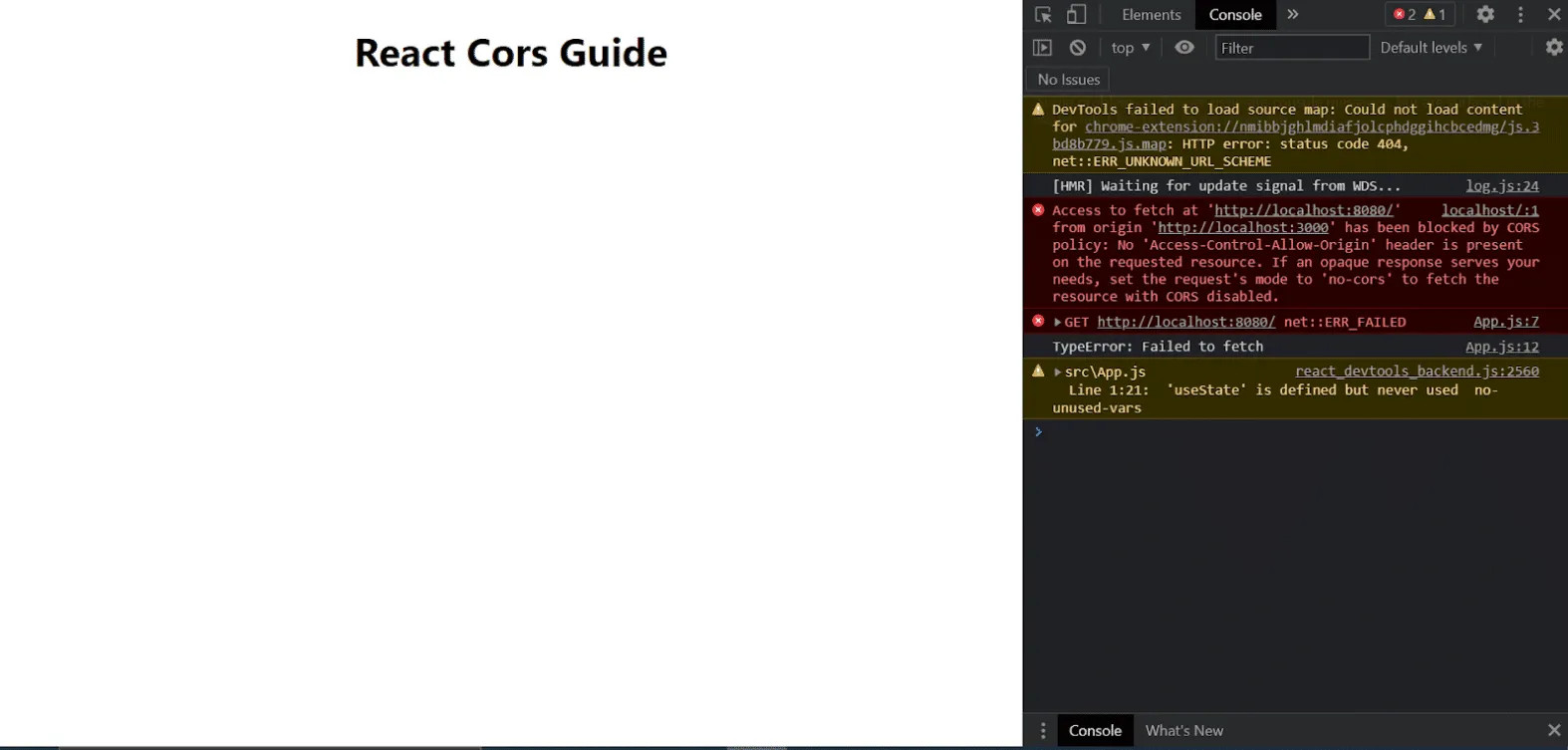
What is CORS and Why Does it Exist?
CORS is a security mechanism enforced by web browsers. It's built on a principle called the Same-Origin Policy, which states that a web page can only request resources from the same origin it was loaded from.
An origin is defined by the combination of its protocol (e.g., http or https), domain (e.g., my-app.com), and port (e.g., :80 or :3000). If any of these three parts differ between the requester (your React app) and the provider (your Express API), the request is considered cross-origin.

This policy prevents a malicious website from making unauthorized requests to a site where you might be logged in (like your bank or email) and stealing your data. The server must explicitly "opt-in" to allow requests from other origins.
For a quick and clear explanation of what CORS is and why you encounter it, watch the beginning of this video.
The video "Learn CORS In 6 Minutes" from Web Dev Simplified gives a fantastic, practical introduction to the problem and the most direct solution.
Watch from the beginning to 01:28. The video explains exactly what the 'No Access-Control-Allow-Origin header' error means and what role the server plays in fixing it.
Now that you understand the "what" and "why," let's focus on the "how" for your deployed application.
Strategy 1: Enabling CORS on Your Express Backend (Recommended for Your Current Setup)
Since your frontend and backend are deployed as separate services, the most direct solution is to configure your Express server to tell the browser that it trusts requests from your frontend's origin.
We'll use the official cors middleware for Express, which makes this process straightforward.
First, install it in your backend project:npm install cors
Then, you'll use it as middleware in your server.js or index.js file. The key is to configure it for production by creating a "whitelist" of allowed origins.
How to Fix CORS Errors in Node.js Express
This article, "How to Fix CORS Errors in Node.js Express," provides excellent code examples for configuring the cors middleware, especially for production.
Read the section titled "Allow Specific Origins (Production)." This is the most important part. It shows you how to create a corsOptions object that specifies exactly which frontend domains are allowed to access your API.
Based on this, your implementation in Express should look like this:
const express = require('express');
const cors = require('cors');
const app = express();

// Define allowed origins. Best practice: use environment variables.
const allowedOrigins = [
  'https://your-frontend-app.onrender.com'
  // You can add more origins here, like a staging environment
];

const corsOptions = {
  origin: function (origin, callback) {
    // The 'origin' is the URL of the site making the request
    if (!origin || allowedOrigins.indexOf(origin) !== -1) {
      // If the origin is in our whitelist (or if it's not a browser request), allow it
      callback(null, true);
    } else {
      // Otherwise, block it
      callback(new Error('Not allowed by CORS'));
    }
  },
  credentials: true, // This is important for authentication
  optionsSuccessStatus: 200 // For legacy browser support
};

// Use the CORS middleware *before* your routes
app.use(cors(corsOptions));

// ... your API routes (app.use('/api/users', ...), etc.)

app.listen(3000, () => {
  console.log('Server is running on port 3000');
});
Important: Place app.use(cors(corsOptions)); before you define your API routes. Middleware in Express runs in the order it's defined.
By using an environment variable for your allowedOrigins, you can easily manage different environments (development, staging, production) without changing your code.
Test your understanding!
You are deploying a new "admin dashboard" for your application. It will be hosted at https://admin.my-app.onrender.com. How would you modify your allowedOrigins array to grant it access to your API while still allowing your main frontend?
Show answer
You would simply add the new URL to the array:
const allowedOrigins = [
  'https://your-frontend-app.onrender.com',
  'https://admin.my-app.onrender.com'
];
This demonstrates how a whitelist provides precise control over which clients can interact with your API.
Strategy 2: Serving Your Frontend From Your Backend
An alternative architecture is to eliminate cross-origin requests entirely by having your Express server also serve your React application's static files. In this model, both your API and your UI are served from the same origin, so the browser's Same-Origin Policy is never violated.
This approach involves a different deployment strategy:
- Build your React app for production (
npm run build). This creates abuildordistfolder with static HTML, CSS, and JS files. - Copy this folder into your Express project.
- Configure Express to serve these static files.
- Deploy the combined Express application as a single service.
This video provides an excellent walkthrough of this exact strategy.
React Proxy | Easiest Fix to CORS Errors
The video "React Proxy | Easiest Fix to CORS Errors" by Sam Meech-Ward perfectly demonstrates this alternative production strategy.
First, watch from 04:35 to 06:56. This section explains the concept of having the Express backend serve the static React files to avoid CORS in production. Next, watch from 11:12 to 13:20. This is a practical demonstration of the steps: building the React app, copying the 'dist' folder into the Express project, and using express.static() to serve it. This shows how you can deploy a single service that handles both frontend and backend.
This strategy simplifies deployment to a single service but couples your frontend build process with your backend deployment. Both strategies are valid and widely used; choosing between them depends on your project's needs and team structure.
Debugging and Security Best Practices
When dealing with CORS, keep these points in mind:
- Never use
origin: '*'with credentials. If your app uses authentication (cookies, authorization headers), browsers will block requests if the server responds with a wildcard*for the origin andAccess-Control-Allow-Credentials: true. Always specify the exact origin. - Use Browser DevTools. In the "Network" tab, select a failed request. Look at the "Headers" section. You can see the
Originheader sent by the browser and check if the server's response includes the matchingAccess-Control-Allow-Originheader. - Use
curlto bypass the browser.curlis a command-line tool that doesn't enforce CORS. If acurlrequest to your API works but the browser request fails, you know the problem is definitely CORS and not a bug in your API endpoint itself.
How to Fix CORS Errors in Node.js Express
To round out your knowledge, review the security and debugging sections of the oneuptime.com article. These are practical tips that will save you time in the future.
Quickly read the sections titled "Debugging CORS Issues" and "Security Best Practices." Pay special attention to the advice about never using a wildcard with credentials and using the Network tab.
Conclusion and Course Wrap-Up
Congratulations! You've reached the end of the final lesson. You've now confronted and learned to solve one of the most common and confusing issues in web development.
Key Takeaways from this Lesson:
- CORS is a browser security feature that blocks requests to different origins unless the server explicitly allows them.
- For decoupled frontends and backends, the standard solution is to use the
corsmiddleware in Express to whitelist your frontend's production URL. - An alternative strategy is to have your Express server serve your React app's static files, making them same-origin and avoiding CORS issues altogether.
- Always be specific with your CORS configuration in production for security; avoid wildcards when credentials are involved.
This lesson marks the end of your course journey. Look back at how far you've come: from the core concepts of JavaScript, to manipulating the DOM, handling asynchronous operations, building powerful user interfaces with React, creating a backend API with Node.js and Express, managing data with PostgreSQL, and finally, deploying a complete, full-stack application to the cloud.
You have successfully achieved your goal of learning the key technologies needed to build a dynamic web application. You now possess the foundational skills for a job as a Web Developer or Software Engineer. The next step is to keep building. Apply what you've learned to new projects, explore more advanced topics, and continue to refine your craft.
Well done, and best of luck in your future endeavors