Hello! Welcome to the next lesson in our movie search application project.
In our last session, we successfully created a MovieList that renders individual MovieCard components, passing data down from the App component using props. This established a clear one-way data flow: from parent to child.
Today, we'll tackle a new challenge: what happens when components need to share information, or when a child component needs to communicate back up to its parent? This is a very common scenario in React. The answer is a powerful pattern called "lifting state up."
Our learning goal for this lesson is to implement the 'lifting state up' pattern to manage shared application state. We will refactor our search functionality, moving the search input into its own SearchBox component and using this pattern to allow it to communicate the user's query back to the main App component.
The Problem: When Sibling Components Need to Communicate
Imagine you have two components that are "siblings"—meaning they are both rendered by the same parent, but are not nested within each other. For example:
- A
ToDoListcomponent that displays a list of tasks. - An
AddToDocomponent with a form to add a new task.
Both are rendered inside the App component. When you add a new task in AddToDo, the ToDoList needs to know about it so it can update. But since they are siblings, they can't pass props to each other directly.
This is where lifting state up comes in. Instead of each component managing its own piece of the puzzle, we move the shared state (the list of to-dos) to their closest common ancestor (App).
To see a practical demonstration of this problem and its solution, please watch the following video.
The ideal scenario to Lift state up in react js
The video 'The ideal scenario to Lift state up in react js' by xplodivity clearly explains why this pattern is necessary when sibling components need to share or update the same state.
Watch the entire video (it's short!). Pay close attention to how the to-do state is initially trapped in a child component and why it needs to be moved to the parent App component to allow all sibling components to access and modify it.
As the video demonstrates, the solution is to make the parent component the "single source of truth" for the shared state.
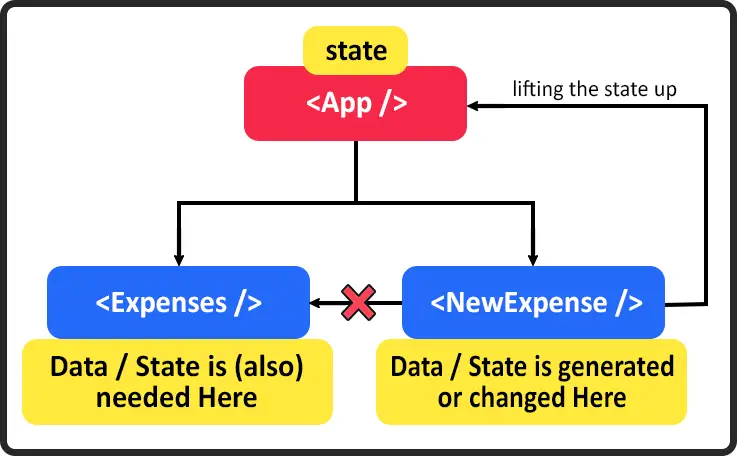
The Pattern: How to Lift State Up
Lifting state up follows a clear, repeatable pattern that can be broken down into three main steps. The official React documentation provides an excellent guide.
Sharing State Between Components
The article 'Sharing State Between Components' from the official React documentation is the definitive guide on this topic. It walks through a step-by-step example using an accordion component.
Please read from the beginning up to the end of the 'Step 3: Add state to the common parent' section. Then, read the 'Recap' section at the end. Focus on understanding the three core steps: 1. Remove state from children. 2. Pass data from the parent. 3. Add state to the parent and pass down handlers.
To summarize the pattern:
- Identify the common ancestor: Find the lowest-level parent component that contains all the child components that need to share the state.
- Lift the state: Move the
useStatecall from the child component to the identified common ancestor. - Pass data down: Pass the state value down as a prop to any child component that needs to read the data.
- Pass handlers up (via props down): Pass the state's setter function (or a function that calls it) down as a prop to any child component that needs to update the data. The child then calls this function prop when an event occurs.
This creates a flow often described as "data flows down, actions flow up."
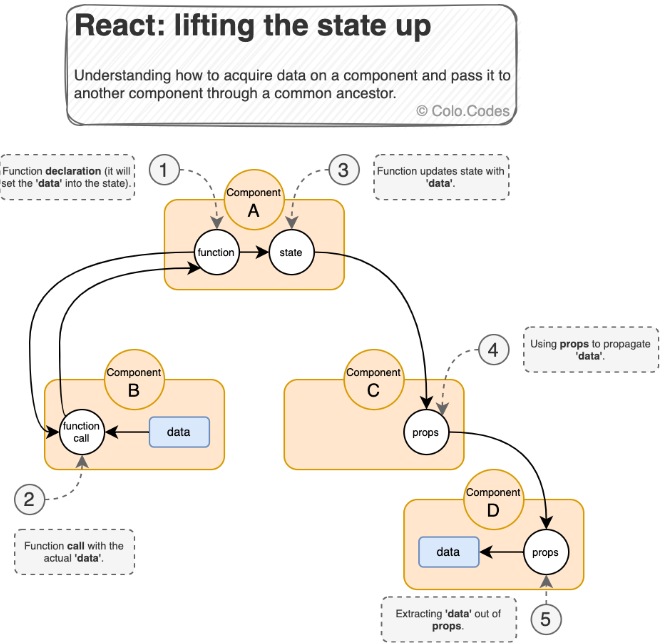
Applying the Pattern: Creating a SearchBox Component
Let's apply this to our movie search app. Currently, your App.js likely contains the state for the search query (searchValue) and the input element to change it. We're going to extract that input into its own reusable SearchBox component.
In your App.js, you should already have the state and the useEffect hook for fetching movies:
// src/App.js
// ... imports
const App = () => {
    const [movies, setMovies] = useState([]);
    const [searchValue, setSearchValue] = useState(''); // This state will be "lifted"

    // ... getMovieRequest and useEffect are here ...

    return (
        <div className='movie-app'>
            <div className='row d-flex align-items-center mt-4 mb-4'>
                {/* We'll replace the input here with our new component */}
                <input
                    className='form-control'
                    value={searchValue}
                    onChange={(event) => setSearchValue(event.target.value)}
                    placeholder='Type to search...'
                ></input>
            </div>
            <div className='row'>
                <MovieList movies={movies} />
            </div>
        </div>
    );
};
App is the perfect common ancestor. It owns the searchValue and needs it to fetch movies. It then passes the movies down to MovieList. Now, let's create a SearchBox component that can update the searchValue in App.
Step 1: Create SearchBox.jsx
In your src/components folder, create a new file named SearchBox.jsx. This component will be responsible only for rendering the input field. It won't have its own state.
// src/components/SearchBox.jsx
import React from 'react';

const SearchBox = (props) => {
    return (
        <div className='col col-sm-4'>
            <input
                className='form-control'
                value={props.value}
                onChange={(event) => props.setSearchValue(event.target.value)}
                placeholder='Type to search...'
            ></input>
        </div>
    );
};

export default SearchBox;
Notice two key things here:
- The input's
valueis set toprops.value. This component doesn't control its own value; it's "controlled" by its parent. - The
onChangehandler callsprops.setSearchValue. It's executing a function that was passed down from its parent.
Step 2: Update App.js to Use SearchBox
Now, go back to App.js. Import the new SearchBox component and use it, passing down the searchValue state and the setSearchValue function as props.
// src/App.js

import React, { useState, useEffect } from 'react';
import 'bootstrap/dist/css/bootstrap.min.css';
import './App.css';
import MovieList from './components/MovieList';
import SearchBox from './components/SearchBox'; // Import the new component

const App = () => {
    const [movies, setMovies] = useState([]);
    const [searchValue, setSearchValue] = useState('');

    // ... getMovieRequest and useEffect remain the same ...

    return (
        <div className='movie-app'>
            <div className='row d-flex align-items-center mt-4 mb-4'>
                {/* You might have a heading component here */}
                <SearchBox searchValue={searchValue} setSearchValue={setSearchValue} />
            </div>
            <div className='row'>
                <MovieList movies={movies} />
            </div>
        </div>
    );
};

export default App;
And that's it! We have successfully "lifted the state up." The searchValue state lives in App.js, which is the single source of truth.
Apppasses thesearchValueandsetSearchValuefunction down toSearchBox.SearchBoxdisplays thesearchValueand callssetSearchValuewhen the user types.- Calling
setSearchValueupdates the state inApp. - The state update in
Apptriggers itsuseEffecthook, which fetches new movies. Appre-renders, passing the newmoviesarray down toMovieList.
This architecture is clean, predictable, and scalable.
Test your understanding!
Imagine you have two SearchBox components rendered in App.js, both linked to the same searchValue state. What would happen if you type in the first search box? What would you see in the second search box, and why?
Show answer
If you type in the first search box, the text would appear simultaneously in the second search box as well.
This happens because both SearchBox components are controlled by the same single source of truth: the searchValue state in the App component. When you type in one input, it calls setSearchValue, updating the state in App. This triggers a re-render, and App passes the new searchValue down to both SearchBox instances, keeping them perfectly in sync. This is a powerful demonstration of the "single source of truth" principle.
Conclusion
In this lesson, you've mastered one of React's most important architectural patterns. Understanding how and when to lift state is fundamental to building complex, interactive applications.
Key Takeaways:
- Why Lift State: You lift state up when multiple components (especially siblings) need to share or modify the same data.
- The Pattern: The state is moved to the closest common ancestor, which becomes the "single source of truth."
- Data Down, Actions Up: The parent passes state down as props and passes setter functions down as props. Children call these functions to send actions up.
- Controlled Components: By lifting state up, child components like our
SearchBoxbecome "controlled components," as their value is dictated by props from the parent rather than their own internal state.
In our next lesson, we will continue to enhance our application by implementing loading and error states to provide user feedback during API calls. This will involve adding more state to our App component and passing it down to control what the user sees while data is being fetched or if something goes wrong.