Hello! Welcome to the first lesson of our "Mid-Course Project" module. In the last lesson, you mastered how to create controlled components to handle forms, which was the final core concept in our React Fundamentals module.
Today, we take a major step forward. We're moving from learning individual concepts to applying them in a real project: a Movie Search Application. This lesson's goal is to lay the architectural foundation for that project by learning how to structure a React application with multiple, reusable components.
Think of this as designing the blueprint for a software system. A well-organized structure is crucial for creating applications that are maintainable, scalable, and easy to work on—all key principles in software engineering. We'll start by breaking down the app's UI into logical pieces and then organizing them in our project's file system.
The Philosophy: Component-Based Architecture
At its heart, React is all about building user interfaces by composing small, independent, and reusable pieces of code called components. Instead of thinking about a web page as one giant HTML file, we think of it as a tree of components.
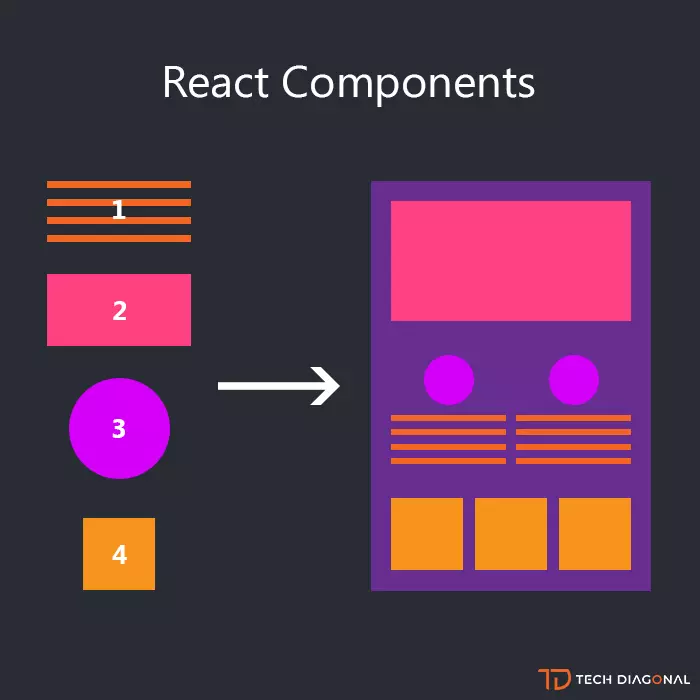
For our movie app, we can immediately identify several potential components:
- A search bar.
- A list of movies.
- An individual movie card.
- A section for favorite movies.
- A heading for each section.
By building these as separate components, we can develop, test, and reuse them independently.
How to Organize Your Components: Folder Structure
Once you start creating components, the next question is: where do you put the files? A clean folder structure is vital for project sanity. While there's no single "correct" way, there are common patterns that scale with project size.
To get a great overview of these patterns, let's watch a video from Web Dev Simplified, which covers three common approaches.
Junior vs Senior React Folder Structure - How To Organize React Projects
This video explains three levels of folder structure maturity: simple, intermediate, and advanced. As you watch, think about which one makes the most sense for our mid-sized movie app project.
Watch the entire video (it's about 15 minutes, but the concepts are dense and valuable). Pay special attention to the 'Intermediate Structure' (starts at 03:48). This is the model we'll be adopting for our project. The advanced, feature-based structure (starts at 09:41) is something to keep in mind for future, large-scale applications you'll build as a software engineer.
Summary of Folder Structures
Here’s a quick recap of the structures discussed in the video:
-
Simple Structure:
- All components live in a single
src/componentsfolder. - Pros: Easy for very small projects.
- Cons: Becomes a mess quickly as the project grows.
- All components live in a single
-
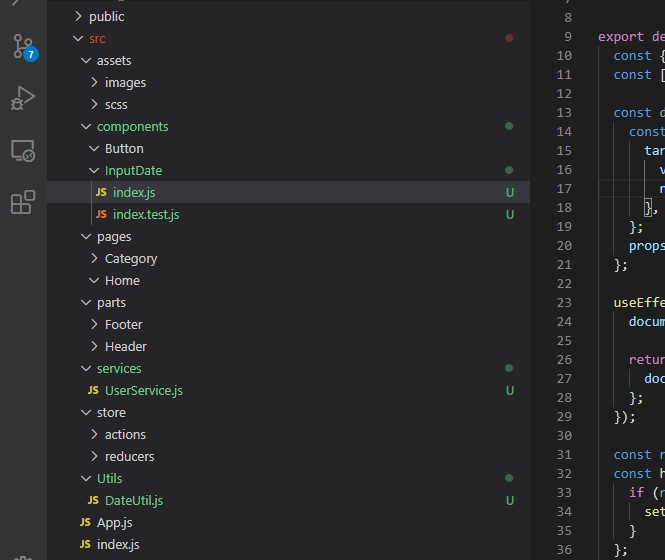
Intermediate Structure (Our Approach):
- This is the sweet spot for many applications, including our movie app.
src/pages: Contains components that represent an entire page or view (e.g.,HomePage,ProfilePage). These components are responsible for the page's layout and composing other components.src/components: Contains smaller, reusable components that are shared across different pages (e.g.,Button,Modal,SearchBox). This folder can be further subdivided (e.g.,src/components/ui,src/components/form).- Co-location: Logic specific to one page (like custom hooks or smaller components) can live inside that page's folder (e.g.,
src/pages/Home/ToDoList.js).
-
Advanced (Feature-Based) Structure:
- Code is organized by feature, not by file type. A
src/features/authenticationfolder would contain all components, hooks, and logic related to authentication. - Pros: Highly scalable and maintainable for large, enterprise-level applications.
- Cons: Overkill for smaller projects.
- Code is organized by feature, not by file type. A
Practical Application: Structuring Our Movie App
Now, let's apply the intermediate structure to our movie app. We'll break down the UI and create our first set of reusable components. We will follow a tutorial that builds the exact project we are working on.
First, we need a component to display the list of movies.
React Movie App Tutorial - Build A Fun Portfolio Project ...
This freeCodeCamp article walks through the creation of our first component, MovieList. It clearly shows how to create a components folder and define a component that takes data via props.
Read the sections 'How to Create a MovieList Component' and 'How to Render our MovieList'. This will show you how to create the file src/components/MovieList.js and render it inside App.js, passing the movie data as a prop.
As the article shows, the basic flow is:
- The main
App.jscomponent holds the application's state (an array of movies). - It renders the
<MovieList />component. - It passes the movie data down to
MovieListas a prop:<MovieList movies={movies} />. - The
MovieListcomponent receivesprops.moviesand uses the.map()method to render a list of movie posters.
Creating More Reusable Components
Our app needs more than just a list. It needs a heading and a search box. We could put them directly in App.js, but creating separate components is better for reusability and separation of concerns.
Why is MovieListHeading a good candidate for a reusable component? Because we will soon have two movie lists: one for search results and one for favorites. We can reuse the same heading component for both, simply by passing a different heading prop.
Let's see this in action. The following clip from the tutorial video demonstrates the creation of the MovieListHeading and SearchBox components, reinforcing the idea of breaking down the UI.
Watch from 14:16 to 17:45. Observe how the UI is broken down into a MovieListHeading and a SearchBox. The instructor explains that making the heading a separate component allows it to be reused for the favorites list later.
Advanced Reusability: Passing Components as Props
Here's a powerful pattern that truly unlocks component reusability. Instead of having a component decide what to render internally, you can pass another component to it as a prop.
In our movie app, when you hover over a movie in the main list, you want to see an "Add to Favorites" button. But when you hover over a movie in the favorites list, you'll want to see a "Remove from Favorites" button.
The MovieList component shouldn't have to know about adding or removing favorites. Its only job is to display a list of movies and show an overlay on hover. We can make it completely generic by passing the overlay content (the button component) as a prop.
This is a key software engineering concept—composition. Let's watch how the tutorial implements this by passing an AddFavorites component as a prop to MovieList.
Watch from 26:42 to 28:30. The key takeaway is how a favoriteComponent prop is passed to <MovieList>. Inside MovieList, it's simply rendered as <FavouriteComponent />. This decouples the list from the actions you can perform on its items.
This pattern is incredibly powerful. The MovieList component is now a generic "list renderer" that can be used in many different contexts just by passing it different data and different action components.
Putting It All Together: Reusing MovieList
Now for the payoff. We can reuse our MovieList component to display the favorites list. We just render it a second time, passing it the favorites array from our state and a RemoveFavorites component as the prop.
To see this reusability in action, watch this short clip.
Watch from 33:14 to 33:47. Notice how the exact same MovieList component is used twice in App.js—once for the search results and once for the favorites. This is a perfect demonstration of the DRY (Don't Repeat Yourself) principle.
Test your understanding!
You're building a simple blog front-end. It has a homepage showing a list of post summaries, and a separate page for reading a full post.
Using the intermediate folder structure (with pages and components folders), what components might you create, and in which folder would you place each file?
Show answer
Here’s a good way to structure it:
-
src/pages/HomePage.js: This component would represent the main page. It would fetch the list of all posts and use other components to display them. -
src/pages/PostPage.js: This would be a dynamic page for displaying a single post in full. -
src/components/PostList.js: This reusable component would take an array of posts as a prop and render them. It would be used on theHomePage.js. -
src/components/PostSummary.js: A small component used byPostList.jsto display a single post's title, author, and a short excerpt. -
src/components/Header.js: A global header with the blog title and navigation links. It would be used on bothHomePage.jsandPostPage.js. -
src/components/Button.js: A generic, styled button component that could be used for a "Read More" link or other actions.
This structure separates page-level concerns from general, reusable UI elements.
Conclusion
In this lesson, you've learned the fundamental principles of structuring a React application. This is a critical software engineering skill that moves you beyond just writing code to designing scalable and maintainable systems.
Key Takeaways:
- Component-Based Architecture: Break down complex UIs into small, independent, and reusable components.
- Folder Structure: Organize your project logically. For our project, we're using an intermediate structure with
pagesfor top-level views andcomponentsfor shared, reusable UI elements. - Data Flow: The parent component (
App.js) holds the state and passes it down to child components via props. - Component Reusability: Maximize reusability by creating generic components (
MovieList) and passing in data and even other components as props. This is a powerful form of composition.
You now have the skeleton of our movie app in place! In the next lesson, we will bring it to life. We'll focus on the SearchBox component, implement the controlled component pattern you learned previously, and make our first API call to fetch movie data dynamically based on user input.