Hello! Let's dive back into building our Express server.
In our last lesson, we brought a great deal of order to our application by separating routes into modular files using express.Router. This is a fantastic step towards a professional, maintainable codebase. Now, with our routes neatly organized by feature (like users, products, etc.), a new question arises: how can we execute a piece of code for every request, or for every request to a specific group of routes? For example, how could we log every incoming request, or check if a user is authenticated before they access any of the user-related endpoints?
This is where middleware comes in. Today, your learning outcome is to write custom middleware to perform tasks like logging requests or validating inputs. You'll discover that middleware is the heart of Express, providing a powerful mechanism for creating reusable, modular logic that processes requests.
What is Express Middleware?
At its core, middleware is simply a function that runs in the middle of the request-response cycle. When your Express server receives a request, it passes it through a chain or "pipeline" of middleware functions before your final route handler sends a response.
Each middleware function has access to three key objects:
- The request object (
req): Contains information about the incoming HTTP request. - The response object (
res): Used to build and send the HTTP response. - The
nextfunction: A callback function that, when called, passes control to the next middleware function in the chain.
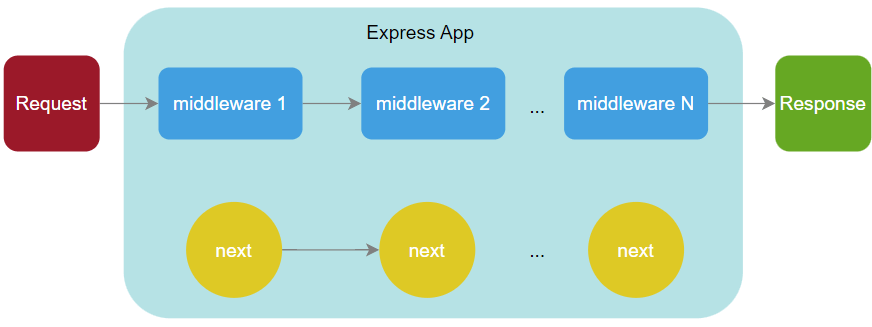
A middleware function can:
- Execute any code.
- Make changes to the
reqandresobjects. - End the request-response cycle by sending a response.
- Call the
next()function to pass control to the next middleware.
If a middleware function doesn't end the cycle or call next(), the request will simply be left hanging, and the client will time out.
To see this concept explained, watch the first part of the following video.
What is middleware in Express JS? | Node JS Tutorial
This brief clip from Nikita Dev clearly defines what middleware is and its place in the request-response cycle.
Watch from 00:23 to 00:45. The key takeaway is that middleware is simply code that runs in between the request and the response, forming a chain.
Writing Your First Middleware: A Request Logger
The classic first step is to create a logger. It's a simple, practical example that demonstrates the fundamental mechanics. A logger helps in debugging by showing you exactly what requests are hitting your server.
Let's write a function that logs the HTTP method and the path of every incoming request.
// A simple logger middleware
const logger = (req, res, next) => {
  console.log(`${req.method} ${req.originalUrl}`);
  next(); // Pass control to the next middleware
};
To make this logger run for every single request that comes into our application, we use app.use(). The order is crucial: middleware defined with app.use() must be placed before your route definitions to ensure it runs first.
const express = require('express');
const app = express();

const logger = (req, res, next) => {
  console.log(`${req.method} ${req.originalUrl}`);
  next();
};

// Use the logger middleware for all incoming requests
app.use(logger);

// Your routes
app.get('/', (req, res) => {
  res.send('Homepage');
});

app.get('/users', (req, res) => {
  res.send('Users Page');
});

// ... start the server
Now, every time you visit a page, you'll see a log in your terminal, like GET / or GET /users. Notice the next() call. Without it, the request would be logged, but it would never reach the route handlers for / or /users.
Common Middleware Use Cases
Middleware is incredibly versatile. Let's explore two of the most common and practical patterns you'll use constantly.
1. Validating Input and Terminating Requests
Middleware is the perfect place to put validation logic. You can check for required headers, query parameters, or body properties. If the validation fails, you can send an error response immediately, preventing invalid data from ever reaching your core business logic.
Let's watch how to create a middleware that validates the presence of an Authorization header.
What is middleware in Express JS? | Node JS Tutorial
This video demonstrates a powerful use case: creating a validation middleware. Pay close attention to how it can either modify the request and call next(), or end the request early by sending a response.
Watch from 03:12 to 05:14. Notice how the validateUser middleware checks for a header. If the header is missing, it sends a 'Not authorized' response and stops. If it's present, it modifies the request object by adding a userId and calls next().
As you saw in the video, a middleware function can add properties to the req object (e.g., req.userId = 1). This is a standard pattern for passing information from one middleware (like an authentication middleware) to the next middleware or to the final route handler.
Another common validation is ensuring the client is sending data in the correct format. For a REST API, you'll almost always want JSON. Here is a middleware function that checks the Content-Type header on incoming POST requests.
const requireJsonContent = (req, res, next) => {
  if (req.headers['content-type'] !== 'application/json') {
      res.status(400).send('Server requires application/json');
  } else {
      next();
  }
};
2. Applying Middleware Selectively
You don't always want middleware to run on every single request. Express gives you precise control over where it's applied.
- Globally (all routes):
app.use(myMiddleware)- We've already seen this. - For a specific router:
router.use(myMiddleware)- This is very powerful. You can apply authentication middleware to your entire/usersrouter, but not to your public/productsrouter. - For a single route:
app.get('/secret', myMiddleware, routeHandler)- The middleware runs only for requests to this specific path and method.
The following video shows how to apply middleware to a single, specific route.
Learn Express Middleware In 14 Minutes
Web Dev Simplified demonstrates how to apply a middleware function to a single route, making it specific to that endpoint instead of global.
Watch from 06:52 to 07:52. Note how the auth middleware is passed as an argument directly into the app.get function for the /users route, right before the final route handler.
Test your understanding!
You are building an admin dashboard. You need to ensure that only requests with a specific API key can access the routes under /admin.
- Write a middleware function named
checkAdminKey. It should check for a query parameterapiKey. Ifreq.query.apiKeyis equal to the string'supersecret', it should callnext(). - If the
apiKeyis missing or incorrect, it should send a401 Unauthorizedstatus with the message'Invalid API Key'. - How would you apply this middleware so it protects only the admin routes, assuming they are defined in a separate
adminRouterfile?
Show answer
-
The middleware function:
const checkAdminKey = (req, res, next) => { if (req.query.apiKey === 'supersecret') { next(); } else { res.status(401).send('Invalid API Key'); } }; -
Applying it to the admin router:
In your main
server.jsfile, you would apply it to the base path for your admin router.const adminRouter = require('./routes/admin'); // ... other app setup ... // Apply the middleware ONLY to routes starting with /admin app.use('/admin', checkAdminKey, adminRouter);Alternatively, and often cleaner, you could apply it inside your
routes/admin.jsfile before any routes are defined:// In routes/admin.js const router = express.Router(); const checkAdminKey = (req, res, next) => { /* ... as above ... */ }; // Use this middleware for all routes in this file router.use(checkAdminKey); router.get('/', (req, res) => { /* ... logic for /admin ... */ }); router.get('/dashboard', (req, res) => { /* ... logic for /admin/dashboard ... */ }); module.exports = router;
An Essential Best Practice: return When You Respond
One of the most common bugs when writing middleware involves forgetting to stop the function's execution after sending a response.
Consider this faulty code:
// BUGGY CODE!
const myMiddleware = (req, res, next) => {
  if (validationFails) {
    res.status(400).send('Invalid');
    // The function continues here!
  }
  next(); // This will still run!
}
If the validation fails, Express sends the 400 response. But the function doesn't stop; it continues and calls next(), which tries to send another response in the next handler. This causes the infamous error: Error: Cannot set headers after they are sent to the client.
The fix is simple: when you send a response and want to end the cycle, return.
// CORRECTED CODE
const myMiddleware = (req, res, next) => {
  if (validationFails) {
    return res.status(400).send('Invalid'); // Note the 'return'
  }
  next();
}
This concept is so important and can be tricky. This video explains the problem and solution perfectly.
Learn Express Middleware In 14 Minutes
This clip is one of the most valuable you'll see on middleware. It clearly explains a huge pitfall for developers and how to avoid it. Understanding this will save you hours of debugging.
Watch from 10:54 to 13:22. The key insight is that calling next() does not stop the current function from executing. If you want to exit after sending a response, you must use return.
Conclusion
You've just unlocked one of the most powerful and fundamental features of Express. Custom middleware allows you to keep your code DRY (Don't Repeat Yourself) and organized by separating cross-cutting concerns like logging, authentication, and validation from your core route logic.
Key Takeaways:
- Middleware functions are the building blocks of an Express application, running in a pipeline between the request and response.
- They always receive
req,res, andnextas arguments. - You must either send a response or call
next()to avoid hanging the request. - Use
returnwhen sending a response from middleware to prevent the "headers already sent" error. - Middleware can be applied globally with
app.use(), to a group of routes withrouter.use(), or to a single endpoint. - Common use cases include logging requests, validating input, checking authentication, and adding data to the request object.
Preview of the Next Lesson:
We've focused on what happens when things go right. But what happens when an error occurs deep inside one of your route handlers? In our next lesson, we'll explore a special kind of middleware designed specifically for this: a centralized error-handling middleware. This will allow us to catch all errors in one place and send back consistent, professional error responses, making our API much more robust.