Hello! Welcome to a new module focused on building a complete RESTful API.
In the last module, you mastered the fundamentals of interacting with a PostgreSQL database, culminating in the crucial lesson on writing secure, parameterized queries to prevent SQL injection. You now have the skills to create tables, perform CRUD operations, and combine data safely.
Today, we take the first and most important step in building any data-driven application: designing the database schema. Think of this as creating the architectural blueprint for your application's data. For this module, we will be building a blog API, and this lesson will guide you through designing its entire database structure from scratch.
By the end of this lesson, you will be able to translate application requirements into a well-structured database schema, complete with tables, columns, and the relationships that connect them.
What is a Database Schema and Why is it Important?
A database schema is the blueprint that defines how data is organized and related within a database. It specifies the tables, the columns (fields) within each table, the data types for those columns, and the relationships between tables.
Getting the schema right from the start is critical. A well-designed schema:
- Ensures Data Integrity: Prevents inconsistent or orphan data.
- Improves Performance: Allows for fast and efficient queries.
- Enhances Scalability: Makes it easier to extend the application with new features later.
- Increases Maintainability: A logical structure is easier for you and other developers to understand and work with.
The Database Design Process
Designing a schema isn't about guesswork. It's a systematic process of turning an idea into a logical structure. We'll follow these general steps:
- Define Requirements: State in plain language what the application needs to do.
- Identify Entities: Extract the main "nouns" or concepts from the requirements. These will become your database tables.
- Define Attributes: List the properties for each entity. These will be the columns in your tables.
- Establish Relationships: Determine how the entities are connected and implement these connections using keys.
Let's apply this process to our blog application.
Step 1: Defining Requirements for Our Blog
First, let's read a concise breakdown of the requirements for a typical blog application and how to extract the core entities from them.
How to create & manage a Postgres database in NodeJS · Tutorial
The article 'How to create & manage a Postgres database in NodeJS' from Tinloof provides a perfect starting point. It clearly outlines the requirements for a blog and identifies the main entities.
Please read the section 'Step 1: designing the database schema', stopping just before 'Drawing the database schema'. Focus on how the author breaks down the blog's features into requirements and then distills those into three core entities: Users, Articles, and Categories.
As the article explains, our blog's core entities are:
- Users: The authors who write posts.
- Posts (Articles): The main content of the blog.
- Categories: A way to organize posts.
These will become our first three tables: users, posts, and categories.
Step 2: Defining Attributes and Relationships
Now that we have our tables, we need to define their columns (attributes) and, most importantly, how they relate to each other. This involves two key concepts:
- Primary Key (PK): A unique identifier for each record (row) in a table. By convention, this is often a column named
id. - Foreign Key (FK): A column in one table that references the primary key of another table, creating a link between them.
The relationships between tables generally fall into three types:
- One-to-One (1:1): Each record in Table A relates to exactly one record in Table B. (e.g., one user has one profile).
- One-to-Many (1:N): One record in Table A can relate to many records in Table B. (e.g., one user can write many posts).
- Many-to-Many (N:M): Many records in Table A can relate to many records in Table B. (e.g., one post can have many categories, and one category can have many posts).
The following video provides an excellent, detailed walkthrough of this entire process, from defining tables and keys to establishing all three types of relationships.
From Idea to Production-Ready Database Design (No More Mistakes!)
The video 'From Idea to Production-Ready Database Design' by Jan Marshal is a fantastic guide. While the example is a Twitter-like app, the principles are universal. We'll watch it in parts.
First, watch from 02:39 to 04:45 to understand how to define attributes and the critical role of a primary key. Then, watch from 07:45 to 08:34 for a clear explanation of the three relationship types.
Applying Relationships to Our Blog Schema
Now let's apply those concepts to our blog entities.
1. Users and Posts (One-to-Many)
- Relationship: One
usercan write manyposts. Apostis written by only oneuser. - Implementation: We add a foreign key column to the
poststable. Let's call itauthor_id, which will store theidof the user who wrote the post.
2. Posts and Comments (One-to-Many)
- Let's add a
commentstable to our schema. - Relationship: One
postcan have manycomments. Acommentbelongs to only onepost. - Implementation: We add a
post_idforeign key to thecommentstable. We could also add auser_idto track who wrote the comment.
3. Posts and Categories (Many-to-Many)
- Relationship: A
postcan belong to multiplecategories. Acategorycan contain multipleposts. - Implementation: We can't just add a foreign key to one of the tables. This requires a third table, often called a junction table or join table.
- We'll create a table named
post_categories. - This table will have only two columns:
post_id(a foreign key toposts) andcategory_id(a foreign key tocategories). - Each row in this table represents a single association between a post and a category.
- We'll create a table named
This video segment shows exactly how to implement these one-to-many and many-to-many relationships using foreign keys and junction tables.
From Idea to Production-Ready Database Design (No More Mistakes!)
Let's continue with the video from Jan Marshal. This section is the core of schema design, showing how to connect the tables you've defined.
Watch from 08:34 to 17:45. Pay close attention to how a one-to-many relationship is formed by adding a foreign key (like linking a user to their tweets) and how a many-to-many relationship requires a separate table (like the 'follows' table).
Step 3: Visualizing the Schema with an ERD
Now that we have designed the structure, we can visualize it using an Entity-Relationship Diagram (ERD). An ERD is a flowchart that illustrates how entities (tables) relate to each other.
Here is a simple ERD that represents the core of the blog schema we've just designed.
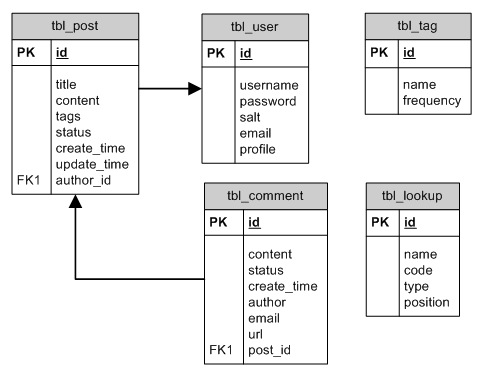
The article from DragonflyDB provides a very clear, step-by-step breakdown of what the final CREATE TABLE SQL statements would look like for a blog schema. This is the perfect way to see how our abstract design translates into concrete code.
Designing a Blog Database Schema (Ultimate Guide)
The article 'Designing a Blog Database Schema' provides excellent SQL examples for each table in a blog.
Read the sections '1. The users Table', '2. The posts Table', and '5. The post_categories Table (Many-to-Many)'. Notice how the FOREIGN KEY constraint in the SQL code directly implements the relationships we discussed.
Test your understanding!
Imagine you're designing a database for a simple project management tool with the following requirements:
- The system has
Users,Projects, andTasks. - A
Usercan be assigned to manyProjects. AProjectcan have manyUsers. - A
Projectconsists of manyTasks. EachTaskbelongs to only oneProject. - Each
Taskis assigned to exactly oneUser.
How would you model these relationships? Which tables would need foreign keys, and would you need a junction table?
Show answer
Here's how you would model it:
-
Entities (Tables):
users,projects,tasks. -
Relationships:
- Users & Projects (Many-to-Many): Since a user can have many projects and a project can have many users, you need a junction table. Let's call it
project_users. It would contain two columns:user_idandproject_id. - Projects & Tasks (One-to-Many): A project has many tasks, but a task belongs to one project. You would add a
project_idforeign key to thetaskstable. - Users & Tasks (One-to-Many): A task is assigned to one user (but a user could have many tasks). You would add an
assignee_id(oruser_id) foreign key to thetaskstable.
- Users & Projects (Many-to-Many): Since a user can have many projects and a project can have many users, you need a junction table. Let's call it
Conclusion
You have just completed the most fundamental design task for any database-driven application. This process of translating requirements into a logical schema is a skill you will use in every backend project you build.
Key Takeaways:
- Database design is a systematic process: Requirements → Entities → Attributes → Relationships.
- Entities become your tables. Attributes become your columns.
- Use a unique Primary Key (PK) for every table (e.g.,
id). - One-to-Many relationships are created using a Foreign Key (FK) on the "many" side of the relationship.
- Many-to-Many relationships require a third junction table that holds foreign keys to both of the related tables.
- An ERD is the standard way to visualize your final schema.
Preview of the Next Lesson:
Our blueprint is ready! In the next lesson, we will begin the implementation phase of our RESTful API. We'll start by creating our tables in PostgreSQL based on this design and then build our very first API endpoint: a GET request to fetch all posts from the database.