Hello! In our last lesson, we explored the power of SQL JOINs to combine data from multiple tables. As we concluded, I mentioned that building applications requires not just powerful queries, but secure queries.
Today, we tackle one of the most critical topics in web security: SQL Injection. You'll learn what it is, why it's so dangerous, and most importantly, how to prevent it using the industry-standard technique of parameterized queries. In your journey to becoming a web developer, understanding and implementing this practice is non-negotiable for building safe and professional applications.
By the end of this lesson, you will be able to write secure database queries in your Node.js application that are protected against SQL injection vulnerabilities.
What is SQL Injection and Why is it So Dangerous?
When your application takes input from a user (e.g., from a search box, a login form, or even a URL) and uses it to build a database query, you create a potential security hole.
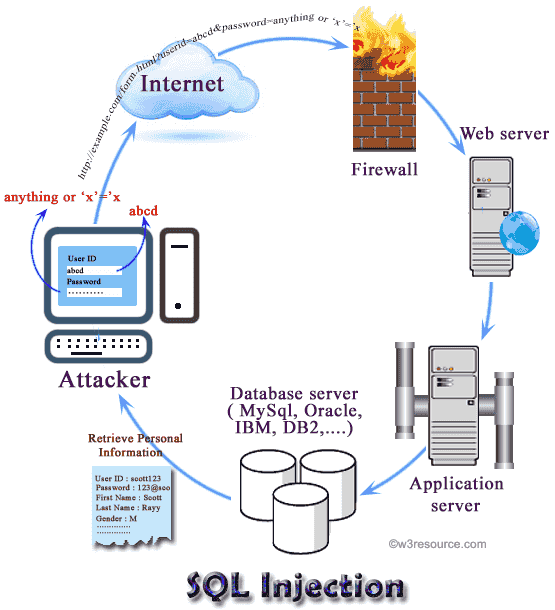
An SQL Injection attack occurs when a malicious user provides specially crafted input that tricks your application into running unintended SQL commands. Instead of just providing data, the user "injects" bits of SQL code into your query.
The consequences can be catastrophic:
- Bypassing logins and accessing sensitive data.
- Reading, modifying, or deleting your entire database.
- Gaining administrative control over the database server.
The image below illustrates how an attacker can manipulate form inputs to bypass security and retrieve sensitive information from the database.
To get a clear overview of the threat, let's watch a brief explanation.
How to Prevent SQL Injection Attacks in Node.js
The following video from PlanetScale gives a concise summary of what SQL injection is and the kind of damage it can cause.
Watch from 00:26 to 01:00 to understand the definition and potential impact of these attacks.
The Vulnerability: Building Queries with String Concatenation
The root cause of SQL injection is almost always building query strings by concatenating or interpolating untrusted user input directly into the SQL statement. Let's look at what this bad practice looks like in a Node.js/Express application.
Imagine you have an endpoint to fetch a user's profile based on their company name, which comes from a URL query parameter (req.query.userCompany). A naive and insecure way to write this query would be:
// WARNING: VULNERABLE CODE. DO NOT USE.
const userCompany = req.query.userCompany;
const sql = "SELECT * FROM users WHERE company = '" + userCompany + "';";
const result = await client.query(sql);
Or, using ES6 template literals:
// WARNING: VULNERABLE CODE. DO NOT USE.
const userCompany = req.query.userCompany;
const sql = `SELECT * FROM users WHERE company = '${userCompany}';`;
const result = await client.query(sql);
At first glance, this seems fine. If a user provides MyCo, the query becomes SELECT * FROM users WHERE company = 'MyCo';, which works as expected.
But what if a malicious user provides the following input for userCompany?' OR '1'='1
The resulting SQL query becomes:SELECT * FROM users WHERE company = '' OR '1'='1';
Since '1'='1' is always true, the WHERE clause is always satisfied, and the query returns all users from the table, not just those from a specific company. An attacker just bypassed your filter and accessed data they shouldn't have. Even worse, they could use similar techniques to UPDATE or DROP tables.
How to Prevent SQL Injection Attacks in Node.js
To see this in action, the same PlanetScale video provides excellent, concrete examples of how an attacker can manipulate a query string.
Watch from 03:12 to 06:05. The video demonstrates how an attacker can comment out parts of your query to bypass security checks or even inject a command to drop an entire table.
The Solution: Parameterized Queries
The correct way to handle user input is to use parameterized queries (also known as prepared statements). This technique separates the SQL command from the data. You provide the SQL query with placeholders, and then you provide the values for those placeholders separately.
The database driver (in our case, node-postgres) is then responsible for safely inserting the values. It treats the user input strictly as data, ensuring it cannot be interpreted as SQL code.
The node-postgres (pg) library uses placeholders in the format $1, $2, and so on.
Let's rewrite our vulnerable query securely:
// SECURE CODE
const userCompany = req.query.userCompany;
const sql = 'SELECT * FROM users WHERE company = $1';
const values = [userCompany];

const result = await client.query(sql, values);
Here’s what happens:
- The SQL statement
SELECT * FROM users WHERE company = $1is sent to the PostgreSQL server. - The server parses and understands this query, noting that it expects one parameter.
- The
valuesarray[userCompany]is sent separately. - The server then safely inserts the value into the prepared query. If an attacker provides
' OR '1'='1', the database will literally search for a company with the name' OR '1'='1', which will almost certainly return no results. The malicious code is never executed.
The official node-postgres documentation provides a clear example of this.
Let's look at the official documentation for node-postgres to see the canonical way to write these queries.
Read the section titled 'Parameterized query'. It concisely explains the concept and provides the fundamental INSERT example using $1 and $2 placeholders.
This short video also gives a quick, practical demonstration of this exact syntax.
Step by Step Javascript and Postgres Tutorial using node-postgres
The following clip from a tutorial by Hussein Nasser shows this in practice.
Watch from 18:20 to 19:35. The presenter explicitly states that using parameters is the best way to avoid SQL injections and demonstrates the $1 syntax.
Alternative Syntax: The Query Config Object
You will also frequently see the query and values passed together in a single configuration object. This is just a different way of writing the same secure, parameterized query.
// SECURE CODE (alternative syntax)
const userCompany = req.query.userCompany;
const query = {
  text: 'SELECT * FROM users WHERE company = $1',
  values: [userCompany],
};

const result = await client.query(query);
This pattern is especially useful when your query has other configuration options. The Stack Overflow answer below refactors insecure code into a secure version, demonstrating this concept perfectly.
Prevent SQL Injection with Nodejs and Postgres
This Stack Overflow thread provides a fantastic 'before and after'. It starts with vulnerable code and shows exactly how to fix it.
First, look at the question to see the examples of insecure SELECT, UPDATE, and INSERT queries using string concatenation. Then, read the first answer, which shows how to rewrite each of those queries securely using parameterized queries with the $1 placeholder and a values array.
Test your understanding!
You have an Express route to update a user's email based on their id. The id and newEmail come from the request body. Here is the insecure code:
// In an Express route handler: app.put('/users/:id', async (req, res) => { ... });

const userId = req.params.id;
const { newEmail } = req.body;

// WARNING: VULNERABLE CODE
const sql = `UPDATE users SET email = '${newEmail}' WHERE id = ${userId}`;

try {
  const result = await client.query(sql);
  res.send('User updated!');
} catch (err) {
  res.status(500).send('Error updating user.');
}
Rewrite this database query logic to use a secure, parameterized query.
Show answer
Here's the secure version. Notice that we have two placeholders, $1 and $2, and the values array contains the variables in the corresponding order.
// SECURE CODE
const userId = req.params.id;
const { newEmail } = req.body;

const sql = 'UPDATE users SET email = $1 WHERE id = $2';
const values = [newEmail, userId];

try {
  const result = await client.query(sql, values);
  res.send('User updated!');
} catch (err) {
  res.status(500).send('Error updating user.');
}
Defense in Depth: Additional Safeguards
While parameterized queries are your primary defense, a robust security strategy involves multiple layers. You should also validate user input before it even reaches the database query.
This means ensuring the input is in the format you expect. For example:
- If you expect a number, check that it's a valid number.
- If you expect an email, check that it looks like an email address.
- If the input can only be one of a few predefined options (e.g., 'admin', 'editor', 'viewer'), check it against an "allow list" of those values.
This approach is called input validation. It acts as a second line of defense and can prevent errors and attacks early.
How to Prevent SQL Injection Attacks in Node.js
The PlanetScale video we watched earlier concludes with a great discussion on these additional validation techniques.
Watch from 08:25 to 12:27. This section covers input validation using regular expressions, type checking, and the concept of 'allow-listing'.
Important Limitation: Parameterized queries are for values only. You cannot use them for dynamic table names, column names, or other SQL keywords. If you need to build queries with dynamic identifiers, you must use a dedicated library like pg-format to safely escape them, or use a strict allow-list to ensure the identifier is one of a few known, safe values.
Conclusion
You've now learned the most important principle for writing secure database code. Building this habit from the start will save you from enormous headaches and vulnerabilities down the line.
Key Takeaways:
- Never trust user input. Always assume it could be malicious.
- Never build SQL queries using string concatenation or template literals with user-provided variables. This is the direct path to SQL injection vulnerabilities.
- Always use parameterized queries. Separate your SQL command (
text) from the user data (values). The database driver will handle the data safely. - In
node-postgres, the syntax for placeholders is$1,$2, etc. - Employ input validation as an additional layer of defense to check data before it even gets to your query logic.
Preview of the Next Lesson:
This lesson concludes our module on PostgreSQL fundamentals. You now have the skills to design tables, perform CRUD operations, join related data, and do it all securely.
In the next module, we will begin building a complete RESTful API using Node.js and Express. You'll design a schema for a new application and implement all the endpoints for creating, reading, updating, and deleting data, putting all your new database skills into practice in a real-world project context.