Welcome back! In our last lesson, you successfully built your first API endpoint to retrieve a list of all users from the database. You established a clean architecture with routes, controllers, and services, which is a fantastic foundation for what comes next.
Today, we'll build on that foundation. While getting a list of all users is useful, a very common requirement is to fetch information about a single, specific user. Think of viewing a user's profile page or editing a specific blog post. To do this, we need an endpoint that can identify and retrieve one record from the database.
Our learning outcome for this lesson is to implement a GET endpoint to retrieve a single record by its ID. We will modify our existing API to handle requests like GET /api/users/1, which should return only the user with an ID of 1. This will introduce you to two fundamental backend concepts: route parameters and the SQL WHERE clause.
Understanding Route Parameters
To tell our API which user we want, we need to pass its ID in the URL. We do this using a route parameter. In Express, we define a placeholder in the route's path by prefixing it with a colon (:).
For example, if we define the route /users/:id, Express will match URLs like /users/1, /users/20, or /users/any-value. The value in that position is then captured and made available to us inside our controller.
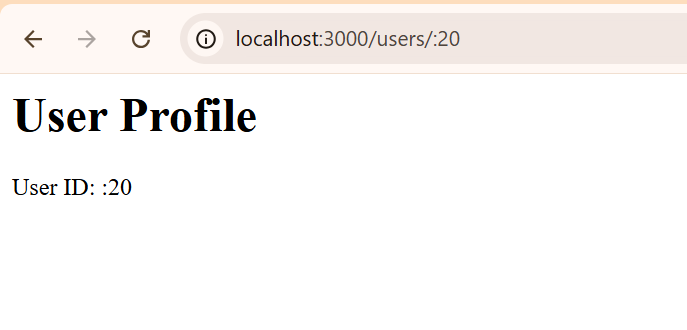
Let's implement this step-by-step, following the same organized structure as before.
Step 1: Defining the Route
First, we need to tell our Express router to listen for this new pattern. We'll add a new route to our userRoutes.js file.
Build a CRUD Rest API with Node.js, Express, PostgreSQL & Docker
Let's start by defining the route. In the previous lesson's video from Dipesh Malvia, he set up all the routes at once. We'll revisit that part to focus on the specific route for getting a user by ID.
Watch from 22:33 to 25:04. You've already done most of this, but pay close attention to this line: router.get('/user/:id', getUserById); This is where you define the dynamic route. The :id part is the placeholder for the user's ID. Add this line to your routes/userRoutes.js file.
Now your application knows that when it sees a GET request to /api/user/ followed by some value, it should trigger the getUserById controller function, which we'll create next.
Step 2: Implementing the Service (Data Logic)
The heart of this operation is the SQL query. Instead of selecting all users, we need to tell the database to find only the one row WHERE the id column matches the ID from the URL.
A critical security concept comes into play here: SQL Injection. We must never insert user-provided input (like an ID from the URL) directly into a SQL string. Doing so would allow a malicious user to manipulate our database. Instead, we use parameterized queries. The pg library uses $1, $2, etc., as placeholders for values we'll provide safely.
Build a CRUD Rest API with Node.js, Express, PostgreSQL & Docker
Let's create the service function that will query the database. This clip from the same video shows how to build getUserByIdService.
Watch from 28:51 to 29:53. Focus on these key parts: The function signature: export const getUserByIdService = async (id) => { ... } It accepts the id as an argument. The SQL query: SELECT * FROM users WHERE id = $1 The query execution: pool.query(query, [id]). Notice how the id is passed in a separate array. This is how pg safely substitutes the value for $1, preventing SQL injection. The return value: It returns result.rows[0], as the query for a unique ID should return at most one row.
By using a parameterized query, you've made your application significantly more secure. This is a non-negotiable best practice in professional development.
Step 3: Implementing the Controller (Request Handling)
The controller acts as the bridge. It extracts the ID from the incoming request, calls our new service function with that ID, and then sends the appropriate response back to the client.
A new challenge here is handling the case where the requested user doesn't exist. If getUserByIdService returns nothing, our controller shouldn't send back an empty success response. It should send a 404 Not Found error, which is the correct HTTP status code for a missing resource.
Build a CRUD Rest API with Node.js, Express, PostgreSQL & Docker
Now, let's create the getUserById controller function that ties the route and the service together.
Watch from 36:06 to 37:04. This clip demonstrates: Getting the ID: The ID is extracted from the request's parameters using const id = req.params.id;. Calling the service: It calls the getUserByIdService(id) function we just wrote. Handling 'Not Found': It checks if (!user) and, if true, returns a 404 status with a 'User not found' message. Handling Success: If a user is found, it sends a 200 status with the user data in the JSON response.
With this, the entire flow is complete. A request hits the route, the controller extracts the ID, the service queries the database safely, and the controller sends back either the user data or a 404 error.
Test your understanding!
Imagine you wanted to find a user by their email address instead of their ID. You would define a route like /users/email/:email.
How would you modify the service function (getUserByEmailService) to handle this? What would the SQL query and the pool.query call look like?
Show answer
The service function would accept an email string instead of an id. The core logic would change to query the email column.
export const getUserByEmailService = async (email) => {
  const sql = 'SELECT * FROM users WHERE email = $1';
  const result = await pool.query(sql, [email]);
  return result.rows[0]; // Assuming email is unique
};
The key changes are WHERE email = $1 in the query and passing the email variable into the pool.query arguments array. The principle of using a parameterized query remains the same.
Step 4: Testing Your New Endpoint
It's time to see your code in action. Using an API client like Postman or Thunder Client, you can now test your new endpoint.
You should test two scenarios:
- A valid ID: Make a
GETrequest tohttp://localhost:5001/api/user/{id}where{id}is an ID that you know exists in your database. You should get a200 OKstatus and a JSON object for that user. - An invalid ID: Make a
GETrequest to an ID that does not exist (e.g.,999). You should get a404 Not Foundstatus and an error message.
Build a CRUD Rest API with Node.js, Express, PostgreSQL & Docker
This final clip shows how to test the endpoint, demonstrating both the success and 'not found' cases.
Watch from 44:43 to 45:23. The presenter tests the endpoint with different IDs and shows the corresponding responses in Thunder Client. Replicate these tests with your own API.
Conclusion
Excellent work! You've now implemented a fundamental piece of any REST API. Fetching a single item by its identifier is a building block you will use constantly as a web developer.
Key Takeaways:
- Route Parameters: Use
/:paramNamein your route definitions to capture dynamic values from the URL. - Accessing Parameters: Retrieve captured values in your controller from the
req.paramsobject (e.g.,req.params.id). - SQL
WHEREClause: UseWHEREto filter your database queries and select specific rows. - Parameterized Queries: Always use placeholders (
$1,$2, etc.) and pass values as a separate array topool.queryto prevent SQL injection attacks. - Handling "Not Found": It's crucial to check if your query returned a result and send a
404 Not Foundstatus if the requested resource does not exist.
Preview of the Next Lesson:
So far, we've focused on reading data (the 'R' in CRUD). In the next lesson, we will tackle the 'C'—Create. You will learn how to implement a POST endpoint to create a new record in the database, allowing you to add new users to your application through the API.