Welcome to our second lesson. In our previous session, we established a strategic framework for tackling the OCP 17 exam, focusing on its structure, topic weights, and question styles. Today, we transition from strategy to execution, beginning our technical deep dive with a topic that seems simple on the surface but is filled with nuances the exam loves to test: Java's type system.
Your experience means you work with primitives and objects every day. This lesson will sharpen that practical knowledge, focusing on the precise distinctions, implicit behaviors, and syntactical traps the OCP exam uses to separate proficient developers from certified ones. By the end of this lesson, you will be able to distinguish between primitive types and their wrapper classes, and, most importantly for the exam, identify illegal numeric literal patterns involving different bases and underscores.
1. Primitives and Wrappers: A Tale of Two Types
Java's type system is famously split between primitive types (like int, double, boolean) and object types (any class, including the "wrapper" classes Integer, Double, Boolean). As you know, primitives are not objects; they are raw value types stored directly in the stack or as part of an object on the heap, which makes them fast and memory-efficient.
So, why do wrapper classes exist? They serve three primary purposes that primitives cannot fulfill:
- Participation in the object-oriented world: Most critically, they allow primitive values to be used in contexts that require objects, such as generic collections (e.g.,
List<Integer>is valid, butList<int>is not). - Representing
null: A wrapper class reference can benull, which allows for a "no value" state that primitives do not have. - Providing utility methods: Wrapper classes contain useful static methods for conversions and other operations, like
Integer.parseInt().
Let's start with a quick video overview that recaps these core concepts and introduces the mechanisms that bridge these two worlds.
This video from Telusko provides a clear and concise explanation of why wrapper classes are necessary and how Java moves values between primitives and their corresponding wrapper objects.
Please watch the following segments: The introduction, which explains the fundamental difference between primitives and objects and the motivation for wrapper classes. The segment on boxing and autoboxing, showing how a primitive is "wrapped" into an object. The segment on unboxing and auto-unboxing, which demonstrates extracting the primitive value from the object. The final part, which shows a practical use case with the parseInt() utility method.
The video introduces the key terms:
- Boxing: Manually creating a wrapper object from a primitive value (e.g.,
Integer i = Integer.valueOf(10);). Note thatnew Integer(10)is deprecated and its removal should be anticipated. - Unboxing: Manually extracting a primitive value from a wrapper object (e.g.,
int i = i.intValue();). - Autoboxing: The automatic conversion the compiler makes when a primitive value is used where a wrapper object is expected (e.g.,
Integer i = 10;). - Auto-unboxing: The automatic conversion from a wrapper object to a primitive when required (e.g.,
int i = someIntegerObject;).
While convenient, auto-unboxing hides a significant exam trap.
2. OCP Traps with Wrappers: Nulls and Caches
For the OCP exam, understanding the "happy path" is only half the battle. You must master the edge cases.
The Null Unboxing Trap
Auto-unboxing is seamless until null gets involved. What happens when the JVM tries to auto-unbox a null reference?
public class UnboxingTrap {
    public static void main(String[] args) {
        Integer myInteger = null;
        // The JVM tries to call myInteger.intValue() on a null reference
        int i = myInteger; // Throws NullPointerException at runtime
        System.out.println(i);
    }
}
This code compiles perfectly but throws a NullPointerException at runtime. The exam frequently features questions where a null wrapper is passed to a method or used in an expression that triggers auto-unboxing, leading to this exact error.
What you need to know about Java wrapper classes
The InfoWorld article you'll read next provides a more detailed look at this and other wrapper-related issues.
First, read the section on the null unboxing trap. Then, review the section on best practices, which summarizes when to choose primitives over wrappers.
The == vs. .equals() Trap
This is one of the most classic OCP questions. When == is used on object references, it checks for identity (do they point to the same object in memory?). When .equals() is used, it checks for value equality.
The trap is that Java caches a small pool of wrapper objects for frequently used values to save memory. For Integer, this cache covers values from -128 to 127.
Consider this code:
Integer a = 100;
Integer b = 100;
System.out.println(a == b);      // true, because both point to the same cached object

Integer c = 200;
Integer d = 200;
System.out.println(c == d);      // false, because 200 is outside the cache range
                                 // so two distinct objects are created

System.out.println(c.equals(d)); // true, because their values are equal
The OCP exam will almost certainly test this behavior. The rule is simple: when comparing wrapper objects for their value, always use .equals(). Relying on == is a bug waiting to happen.
What you need to know about Java wrapper classes
Now, let's read the section of the InfoWorld article that details this specific trap.
Find the heading "The == versus .equals() wrapper trap" and read from that section carefully.
3. Numeric Literals and Underscores
The second part of our learning outcome involves identifying valid and invalid numeric literals. Java allows you to write numbers in several formats, and since Java 7, you can use underscores to improve readability. The exam tests your knowledge of the strict rules governing this syntax.
Number Systems
- Decimal: The default (e.g.,
123). - Octal: Starts with a
0prefix. Digits can only be 0-7. (e.g.,077).08is a compile error. - Hexadecimal: Starts with
0xor0X. Digits are 0-9 and a-f (case-insensitive). (e.g.,0xFF). - Binary: Starts with
0bor0B. Digits can only be 0-1. (e.g.,0b1010).
The Underscore Rule
The rule for underscores is simple but absolute: You can place one or more underscores only between digits.
This means you CANNOT place an underscore:
- At the very beginning or end of a literal.
- Adjacent to a decimal point.
- Before a type suffix (
L,F,D). - Next to the
0xor0bprefix.
Let's examine some examples, some of which are illegal.
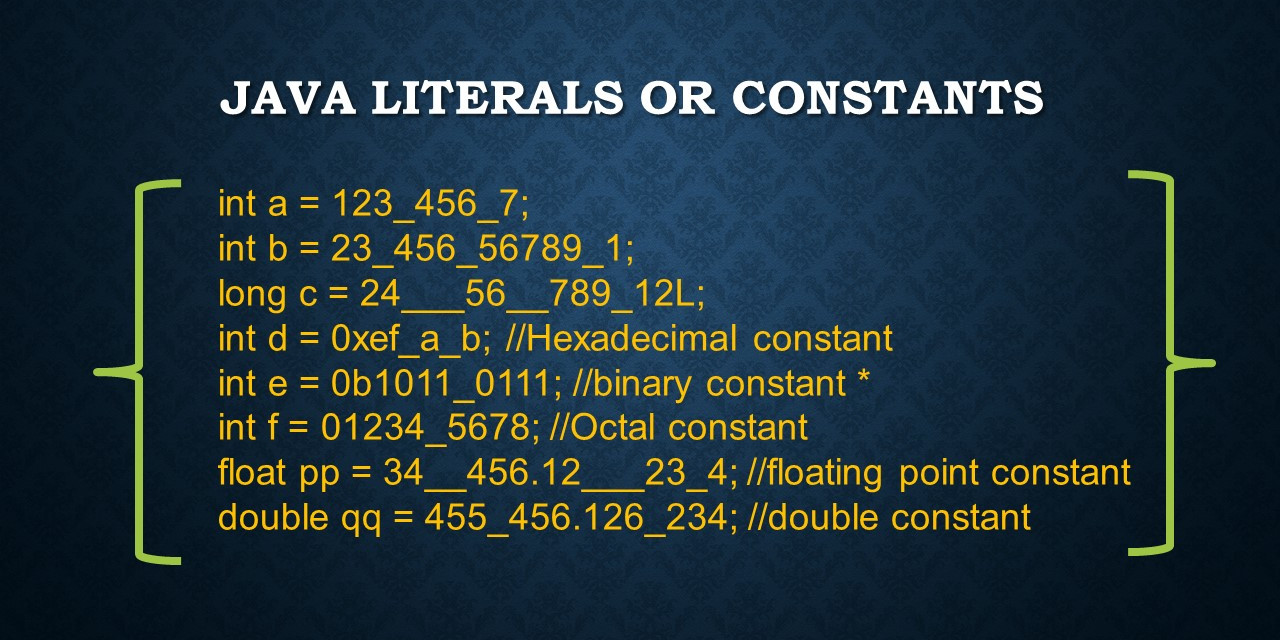
Let's break down the lines in the image:
int a = 123_456_7;- Valid. Underscores are between digits.int b = 23_456_56789_1;- Invalid. The syntax of the literal is fine, but the value23,456,567,891is too large for anint. This would cause a compile error, a topic we'll explore in the next lesson on overflow.long c = 24__56_789_12L;- Valid. Multiple underscores are allowed between digits.int d = 0xef_a_b;- Valid. Works for hex digits too.int e = 0b1011_0111;- Valid. Works for binary.int f = 01234_5678;- Invalid. This is an octal literal (starts with0), but the digit8is not a valid octal digit (0-7). This is a common compile error test.float pp = 34_456.12_23_4;- Valid. Underscores can be on both sides of the decimal point, as long as they are between digits.double qq = 455_456.126_234;- Valid.
Now, let's focus on the rules for illegal placement.
Where To Use the Underscore in Java - Claudio De Sio Cesari
This article by Claudio De Sio Cesari provides an excellent breakdown of the rules for using underscores in numeric literals, with a great section on what is not allowed.
First, read the section "Underscore for Numeric Types Literals" for examples of valid usage. Then, pay close attention to the section "One Rule to Remember", which lists numerous examples of invalid, non-compiling code. This is prime exam material.
To solidify this, here are some non-compiling examples based on those rules:
// All of these will cause a compiler error:
int x1 = _52;         // Cannot be at the beginning.
int x2 = 52_;         // Cannot be at the end.
float f1 = 3.14_F;    // Cannot be before the type suffix.
float f2 = 3._14F;    // Cannot be adjacent to the decimal point.
int h1 = 0_x52;       // Cannot be between 0 and x in a hex literal.
Memorizing these invalid patterns is a high-yield activity for exam preparation.
Conclusion
In this lesson, we refined your understanding of Java's core types, shifting the focus from practical application to the specific, rule-based knowledge required for the OCP exam.
Here are the key takeaways:
- Primitives vs. Wrappers: Primitives are for raw performance; wrappers are objects that can be used in collections and can be
null. - Autoboxing Traps: Be vigilant for
NullPointerExceptions when code might auto-unbox anullwrapper. - Comparison: Always use
.equals()to compare the values of wrapper objects. Use==only when you intentionally want to check for object identity, and be mindful of the integer cache from -128 to 127. - Numeric Literals: Literals can be written in decimal, octal, hex, or binary.
- Underscore Rule: Underscores in literals are only permitted between digits. Any other placement is a compile error.
You've now built a solid foundation on the first major topic of the OCP curriculum. In our next lesson, we will continue this thread by diving into numeric promotion, casting, and overflow behavior, exploring what happens when you mix different numeric types in expressions and what the limits of each type are.