Welcome back. In our previous lesson, we explored syncopation, understanding it as a principle of rhythmic tension created by accenting weak metrical positions. We saw how displacing notes from the strong beats to the weaker 'e's and 'a's of the 16th-note grid generates the "push and pull" that is so essential to groove.
This lesson focuses on the primary tool used to enforce these rhythmic decisions in a Digital Audio Workstation (DAW): quantization. We will examine how this function snaps your recorded performances to a precise grid, but more importantly, we will investigate how this seemingly simple act of correction profoundly affects the music's "feel." By the end of this lesson, you will not only know how to use quantization to tighten your rhythms but also how to manipulate it to move between machine-like precision and human-like groove, making a deliberate artistic choice about the character of your music.
The Mechanism of Quantization
At its core, quantization is an algorithm that realigns the timing of musical events (typically MIDI notes) to the nearest specified rhythmic grid line. If you play a note slightly after the beat, quantization will move it perfectly onto the beat.
The video below provides an excellent introduction to this process, demonstrating how different grid settings affect the outcome.
What is Quantizing in Music Production?
The video "What is Quantizing in Music Production?" from Composing Academy clearly explains the fundamental purpose and application of quantization.
Please watch the following sections: Introduction (Basic Form): This segment defines quantization as a corrective tool. Quarter Notes (Quarter Notes): Observe how notes that are slightly off the beat are snapped perfectly to the quarter-note grid. This demonstrates the benefit of locking different instrumental layers together. Eighth & Sixteenth Notes (Finer Grids): This is the most crucial part. The presenter highlights the cardinal rule of quantization: you must set the quantization grid to the shortest note value present in your performance. Watch what happens when a 16th-note rhythm is incorrectly quantized to an 8th-note grid—the rhythm is destroyed. This demonstrates that quantization is not magic; it's a precise tool that requires a correct setting.
The process is straightforward:
- Record or program a MIDI performance.
- Select the MIDI clip.
- Choose a quantization resolution (e.g., 1/8, 1/16, 1/16T for triplets).
- Apply quantization.
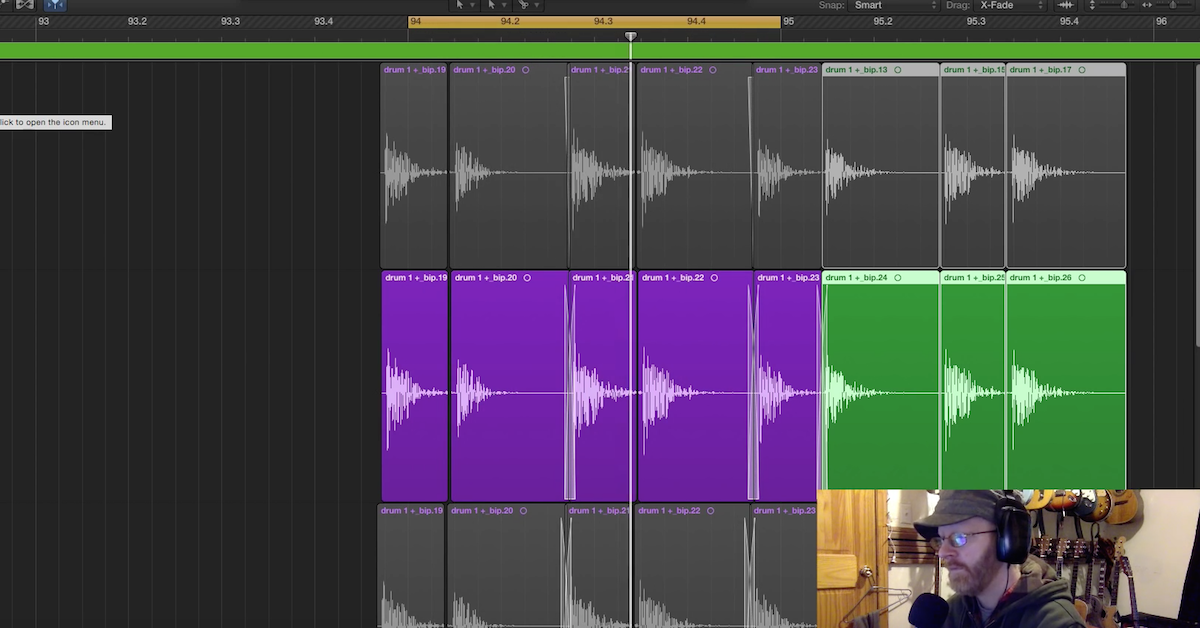
The DAW's MIDI editor will then shift each note onset to the nearest grid line defined by your chosen resolution. While most often used on MIDI, many DAWs can also apply similar time-correction algorithms to audio recordings, as seen below where drum hits are aligned to the grid.
The Effect on "Feel": Precision vs. Groove
Now we arrive at the central aesthetic question. Is perfect timing always desirable? The answer depends entirely on the genre and the desired feel. For many forms of techno, industrial, and complex breakbeat, absolute rhythmic precision is paramount. It creates a powerful, machine-like energy and allows intricate syncopated layers to interlock flawlessly.
However, in many other contexts, the small, natural timing deviations—what musicologists call microtiming—are precisely what create a human "groove." A performance that is perfectly on the grid can sometimes feel sterile or robotic. The subtle push and pull against the beat by a human performer is often what makes music feel alive.
Your physics background will appreciate that this subjective perception has been studied quantitatively. The following paper investigates how musical experience shapes the preference for quantized versus unquantized rhythms.
[PDF] Living Off-Grid: Exploring the Effect of ... - Music & Science
This research paper from Music & Science analyzes how quantization affects the perception of groove, particularly for musicians versus non-musicians.
Please read the Abstract on the first page for a complete overview. Then, focus on the Discussion section to understand the interpretation of the results. Start with the paragraph in the Discussion section defining the differing perceptions of musicians and non-musicians. This sets up the core finding. Read the following paragraphs about the "W-spike" and "Q-aversion," which are fascinating phenomena. The key insight here is that trained musicians often show an aversion to perfect quantization and have a preference for slightly off-beat variations. This suggests a "sweet spot" for groove that is not perfectly on the grid. Finally, read the conclusion starting from the paragraph that summarizes this key finding: a “sweet spot” for groove.
The paper's findings give us a scientific basis for a crucial artistic concept: 100% quantization is a specific sound, not a universal goal. The "feel" of a rhythm is a function of its deviation from the absolute grid.
Advanced Quantization: Finding the Middle Ground
Luckily, modern DAWs offer tools that provide a nuanced approach, allowing you to move fluidly between perfect rigidity and human looseness.
Quantization Strength
Instead of moving a note 100% of the way to the grid line, you can specify a percentage. For example, 50% strength will move a note that is off-beat by 20 milliseconds only 10 milliseconds closer to the grid, preserving half of its original "error."
Mathematically, if a note's position is at time and the nearest grid line is at , the distance is . Applying quantization with strength (where is a value from 0 to 1) results in a new position :
A strength of moves the note fully to the grid, while leaves it unchanged. This is an invaluable tool for tightening a performance without completely erasing its human character.
Groove Quantization and Swing
The most powerful quantization tools don't just align to an evenly spaced grid; they align notes to a groove template. These templates contain their own specific patterns of micro-timing offsets and velocity changes. The most common type is swing.
Swing rhythm systematically delays the off-beats (the "ands"). Instead of an 8th-note pair dividing a beat 50/50, a swing rhythm might divide it 60/40 or 66/33 (a perfect triplet feel). This creates a characteristic "bouncing" or "shuffling" feel common in jazz, blues, and house music.
This article from the Csound Journal discusses the mechanics of swing rhythm in a computational context, which should resonate with your background.
Focus on two key ideas: In the "Swing Rhythm" section, read the paragraphs discussing swing ratios. This quantifies the "feel" by describing how the first note of an eighth-note pair is elongated relative to the second. Notice the mention that a setting of 54% can "loosen up" a straight beat without it sounding like obvious swing. Next, jump to the "Grooves" section. The key concept here is that of groove templates. This formalizes the idea of capturing the unique rhythmic DNA of a performance and applying it to other parts.
In your DAW, this is implemented through a "Groove Pool" or similar feature. You can select a groove template (e.g., "MPC 16th Swing 62%") and apply it. Your MIDI notes will then be quantized not to a rigid grid, but to the subtly shifted, uneven grid defined by that specific swing setting.

Practical Exercise
Let's apply these concepts. Open your DAW.
- Record a Performance: Program or play a one-bar syncopated synth line or drum pattern. Use the pattern from our last lesson or create a new one. Crucially, turn off all input quantization and try to play it by hand on your MIDI keyboard. It will have natural timing imperfections.
- Apply 100% Quantization: Select the clip and quantize it to a 16th-note grid at 100% strength. Listen to the result. It should sound very tight and precise, but potentially a bit stiff compared to the original.
- Apply Strength < 100%: Undo the previous step. Now, apply 16th-note quantization again, but this time set the strength to around 60%. Listen again. Notice how the rhythm is tighter and more "in the pocket," but it still retains some of the original human timing variation.
- Apply a Groove Template: Undo again. Find your DAW's groove or swing function. Apply a 16th-note swing template (a setting between 55% and 65% is a good starting point). Listen to the dramatic change in feel. The rhythm is no longer straight; it has a characteristic shuffle or bounce. You have quantized to a feeling, not just a grid.
Conclusion
Today, we've treated quantization not as a simple "fix-it" button, but as a fundamental control over the rhythmic character of your music. You now have a framework for making conscious decisions about where your tracks fall on the spectrum from perfect, robotic precision to subtle, human groove.
Key Takeaways:
- Quantization aligns musical events to a grid. The grid's resolution must match the shortest note value in the part.
- Feel vs. Precision: 100% quantization is an aesthetic choice that creates a tight, modern, electronic sound. It is not inherently "better" than a looser, more human feel.
- Microtiming: The subtle deviations from a perfect grid are what often constitute "groove." Studies show experienced musicians often prefer rhythms with these slight imperfections.
- Nuanced Tools: Quantization Strength allows you to tidy a performance without erasing its humanity. Groove Templates and Swing allow you to quantize to a specific rhythmic feel, systematically altering the grid itself.
In our previous lesson, we learned to place notes off the beat to create syncopation. Today, we learned how to control exactly how those notes lock to the grid. With these tools, you are now in full command of the rhythmic pulse.
In our next lesson, we will begin our next module, "Advanced Rhythmic Structures," by exploring rhythms that actively challenge the simple grid. We will investigate polyrhythms, mathematically and musically constructing patterns like "3 against 2" and exploring how multiple rhythmic layers can coexist with different, conflicting subdivisions.