Hello! Welcome to the next lesson in our Python Foundations module.
In our previous session, we mastered list comprehensions and generator expressions, powerful tools for transforming collections of data. You learned to write concise, efficient, and "Pythonic" code to filter and manipulate lists.
Today, we're making a fundamental shift from just processing data to modeling concepts. We will introduce you to the core of Object-Oriented Programming (OOP) by learning how to implement a Python class with attributes, methods, and a constructor (__init__). While functions help us organize actions, classes allow us to bundle data and actions together into logical, reusable blueprints called "objects." This is a cornerstone of modern software development and essential for building the complex AI systems you'll encounter later.
1. From Data Types to Custom Objects
You've already been using objects without even knowing it! In Python, everything—from an integer to a string to a list—is an object. Each object has data (its value) and can perform actions (its methods, like .upper() for a string or .append() for a list).
Python Object Oriented Programming (OOP) - For Beginners
To really understand this, let's start with a video from Tech With Tim that demystifies this idea. It shows that the 'types' you've been working with are actually classes.
Watch from the beginning to 05:42. The key takeaway is that when you create a variable like x = 1, you're creating an object (or instance) of the int class. This class defines what an integer is and what it can do.
Object-Oriented Programming allows us to define our own custom types using the class keyword. A class is like a blueprint. An object (also called an instance) is a specific thing created from that blueprint. For example, we could have a Dog class (the blueprint) and create individual dog objects like fido and spot, each with their own specific name and age.
2. Defining a Class and its Constructor (__init__)
Let's start by defining a class. A class acts as a container for the data (attributes) and functions (methods) that will define our objects.
To see why we need a structured way to create objects, let's watch how we might do it inefficiently at first.
Python OOP Tutorial 1: Classes and Instances
This short clip from a classic tutorial by Corey Schafer shows what it's like to manually add properties to different objects. You'll quickly see why this isn't a good approach.
Watch from 01:31 to 05:03. Notice how creating an empty class and then manually assigning attributes like emp_1.first = 'Corey' is repetitive and error-prone.
Manually setting attributes is tedious. The proper way to initialize an object with its starting data is by using a special method called a constructor. In Python, the constructor is named __init__. This method is automatically called every time you create a new instance of the class.
Let's see how to implement __init__ to make our object creation clean and reliable.
Python OOP Tutorial 1: Classes and Instances
Continuing with Corey Schafer's tutorial, this next part introduces the __init__ method and the all-important self parameter.
Watch from 05:03 to 08:36. Pay close attention to these key points: The __init__ method runs automatically when you create an object (e.g., Employee('Corey', ...)). The self parameter represents the specific instance being created. It's how the object refers to itself. Lines like self.first = first create an instance attribute, a piece of data that is unique to that specific object.
To summarize the key ideas:
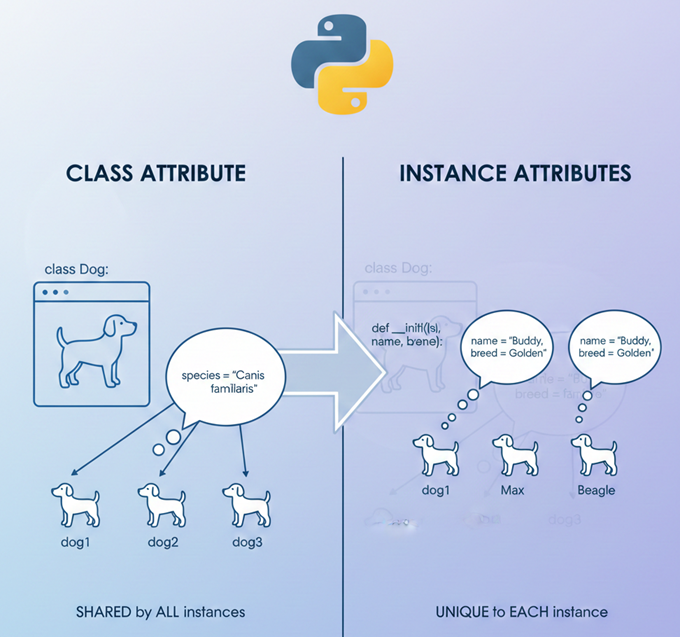
- Class: The blueprint, defined with the
classkeyword. - Object/Instance: A specific item created from the class.
__init__(self, ...): The constructor method. It initializes the new object.self: A special variable that refers to the instance itself. It's used to access or create attributes for that specific instance.- Attributes: Variables associated with an object, like
self.nameorself.age. These hold the object's state.
3. Adding Behavior with Methods
Objects aren't just for storing data; they're also for performing actions. Functions defined inside a class are called methods. They define the behavior of an object.
Just like __init__, every instance method's first parameter must be self. This allows the method to access the object's attributes (e.g., self.name) and perform actions with them.
Python OOP Tutorial 1: Classes and Instances
Let's see how to add a method to our class. This final clip from Corey Schafer will demonstrate how to create a fullname method and will further clarify the role of self.
Watch from 08:43 to 14:07. Notice how the fullname method uses self.first and self.last to access the data specific to the employee instance it's called on. The explanation of why emp_1.fullname() is secretly Employee.fullname(emp_1) is a crucial concept for understanding self.
Here is a complete example that ties everything together.
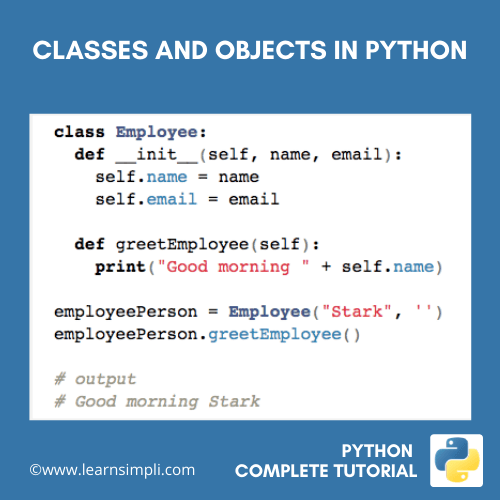
For a quick written summary of these concepts, you can refer to the following guide.
This article from Programiz provides a concise text-based summary of classes, objects, methods, and constructors. It's a great reference to solidify what you've just seen in the videos.
Read the sections titled 'Python Methods' and 'Python Constructors'. This will reinforce your understanding of how to define and use these core components of a class.
4. Practice: Build a Student Class
Now it's your turn to apply these concepts. Your task is to build a Student class that can store a student's name and grades, and can calculate their average score.
Instructions:
- Create a class named
Student. - Define the
__init__constructor. It should accept aname(string) andgrades(a list of numbers) as arguments. Store them as instance attributes. - Define a method called
add_grade(self, new_grade). This method should appendnew_gradeto theself.gradeslist. - Define a method called
get_average(self). This method should calculate and return the average of the numbers in theself.gradeslist. - Create an instance of your
Studentclass and test its methods.
# Your code here...


# Example of how to test your class:
# student1 = Student("Alice", [85, 90, 92])
# print(f"{student1.name}'s initial average: {student1.get_average()}")


# student1.add_grade(95)
# print(f"{student1.name}'s new average: {student1.get_average()}")
Click here to see a possible solution
class Student:
    """Represents a student with a name and a list of grades."""

    def __init__(self, name, grades):
        """Initializes a new Student object."""
        self.name = name
        self.grades = grades

    def add_grade(self, new_grade):
        """Adds a new grade to the student's grade list."""
        self.grades.append(new_grade)
        print(f"Added grade {new_grade} for {self.name}.")

    def get_average(self):
        """Calculates and returns the average of the student's grades."""
        if not self.grades:
            return 0  # Avoid division by zero if there are no grades
        return sum(self.grades) / len(self.grades)


# --- Testing the class ---


# 1. Create an instance
student1 = Student("Alice", [85, 90, 92])


# 2. Test the get_average method
initial_avg = student1.get_average()
print(f"{student1.name}'s initial average: {initial_avg}")


# Expected output: Alice's initial average: 89.0


# 3. Test the add_grade method
student1.add_grade(95)


# Expected output: Added grade 95 for Alice.


# 4. Test get_average again to see the change
new_avg = student1.get_average()
print(f"{student1.name}'s new average: {new_avg}")


# Expected output: Alice's new average: 90.5
Conclusion
Excellent work! You've just taken a huge step forward by learning to create your own custom objects. This is the foundation of Object-Oriented Programming and is a skill you will use constantly in your journey as a Full Stack AI Developer, whether you're building a web application backend or defining the architecture of a neural network.
Let's recap the key takeaways:
- A class is a blueprint for creating objects.
- An object (or instance) is a specific entity created from a class, with its own unique data.
- The
__init__method is the constructor, used to initialize an object's attributes when it's created. - The
selfparameter is a reference to the current instance, allowing methods to access and modify the object's attributes. - Methods are functions inside a class that define an object's behavior.
In our next lesson, we will build directly on this foundation by exploring inheritance and polymorphism. You'll learn how to create new classes that reuse and extend the functionality of existing ones, a powerful technique for building scalable and organized code.