Hello! Welcome back to our course on the foundations of Python.
In our last lesson, you learned how to create functions—one of the most fundamental building blocks in programming. We covered how to define them with parameters, get results using return, and document them with docstrings. Functions allow us to package logic for reuse, which is a key step towards writing clean and modular code.
Today, we'll explore two powerful and "Pythonic" features that build on this: list comprehensions and generator expressions. This lesson will teach you how to create and transform lists and other sequences of data in a highly concise and efficient way. Mastering these tools is a hallmark of a proficient Python developer and will be incredibly useful in AI for preparing and manipulating datasets.
1. From for Loops to List Comprehensions
Imagine you have a list of numbers and you want to create a new list containing the square of each number. Using what you know, you might write a for loop:
numbers = [0, 1, 2, 3, 4, 5]
squares = []
for num in numbers:
    squares.append(num ** 2)

print(squares)


# Output: [0, 1, 4, 9, 16, 25]
This works perfectly well, but Python provides a more compact and often more readable way to achieve the same result: a list comprehension.
A list comprehension is a single line of code that creates a new list by iterating over an existing one. It can be broken down into three logical parts.
Python List Comprehension (Visually Explained) | The Cleanest Way to Code | #Python Course 33
To understand this structure, let's watch a short, visually-oriented explanation from the 'Data with Baraa' channel. It introduces a clear mental model for how comprehensions are built.
Watch from 00:34 to 03:36. Focus on the three core 'blocks' of a list comprehension: the transformation, the loop, and the filter. See how Python processes these steps internally.
As the video explained, the basic syntax is:
[<expression> for <item> in <iterable>]
Let's rewrite our for loop example as a list comprehension:
numbers = [0, 1, 2, 3, 4, 5]
squares = [num ** 2 for num in numbers]

print(squares)


# Output: [0, 1, 4, 9, 16, 25]
You can read this as: "Create a new list containing num ** 2 for each num in the numbers list." This is not only shorter but is also often faster because the iteration happens at a lower level in Python's C implementation.
2. Adding Logic to Comprehensions
The real power of list comprehensions comes from their ability to include conditional logic, allowing you to both transform and filter data in one line.
Filtering with if
You can add an if clause at the end of a comprehension to filter the items from the original iterable. Only items for which the condition is True will be processed and included in the new list.
The syntax is: [<expression> for <item> in <iterable> if <condition>]
10 Python Comprehensions You SHOULD Be Using
The 'Tech With Tim' channel has a great video that demonstrates this filtering capability with a clear example.
Watch from 02:05 to 04:25. Notice how the if statement is placed after the for loop to act as a filter.
For instance, if we only wanted the squares of the even numbers from our list:
numbers = [0, 1, 2, 3, 4, 5]
even_squares = [num ** 2 for num in numbers if num % 2 == 0]

print(even_squares)


# Output: [0, 4, 16]
Conditional Transformation with if-else
What if you want to apply a different transformation based on a condition? For this, you use a different syntax, placing the if-else expression before the for loop.
The syntax is: [<value_if_true> if <condition> else <value_if_false> for <item> in <iterable>]
This structure can feel a bit unusual at first. Let's see it in action.
10 Python Comprehensions You SHOULD Be Using
Let's return to the 'Tech With Tim' video to see how this if-else structure works.
Watch from 09:12 to 11:24. Observe how the if-else expression is placed on the left side of the for loop to decide what value to add for every item.
Example: Let's create a list that labels numbers as 'even' or 'odd'.
numbers = [0, 1, 2, 3, 4, 5]
labels = ['even' if num % 2 == 0 else 'odd' for num in numbers]

print(labels)


# Output: ['even', 'odd', 'even', 'odd', 'even', 'odd']
3. More Advanced Techniques
List comprehensions can also handle more complex scenarios, such as nested loops or applying custom functions.
-
Nested Loops: To work with nested lists (like a matrix), you can use multiple
forclauses. The loops are written in the same order as they would appear in a traditional nested loop structure. -
Applying Functions: You can call any function within a comprehension, including functions you wrote yourself! This is a powerful way to combine the modularity of functions (from our last lesson) with the conciseness of comprehensions.
The following video segment demonstrates both of these concepts.
10 Python Comprehensions You SHOULD Be Using
This last segment from the 'Tech With Tim' video will show you how to handle nested loops and call functions within a comprehension.
Watch from 07:40 to 09:12 to see how to flatten a matrix with a nested loop. Then, watch from 14:23 to 15:34 to see how to apply a function.
Here's an example that explicitly connects to our previous lesson. Let's say we have a function to clean up user input, and we want to apply it to a list of raw strings:
def clean_and_capitalize(text):
    """Removes leading/trailing whitespace and capitalizes text."""
    return text.strip().capitalize()

raw_names = ['  alice  ', ' bob', 'CHARLIE ']

cleaned_names = [clean_and_capitalize(name) for name in raw_names]
print(cleaned_names)


# Output: ['Alice', 'Bob', 'Charlie']
4. Generator Expressions: The Memory-Efficient Cousin
List comprehensions are fantastic, but they have one significant characteristic: they build the entire list in memory at once. What happens if you need to process a list with millions, or even billions, of items? Storing all of that in memory could crash your program.
This is where generator expressions come in.
A generator expression looks almost identical to a list comprehension, but it uses parentheses () instead of square brackets [].
(<expression> for <item> in <iterable>)
The crucial difference is that a generator expression performs lazy evaluation. It doesn't create the whole list in memory. Instead, it creates a generator object, which produces each value one by one, only when asked. This makes them incredibly memory-efficient for working with large datasets.

Trying to create a massive list with a list comprehension can have serious consequences.
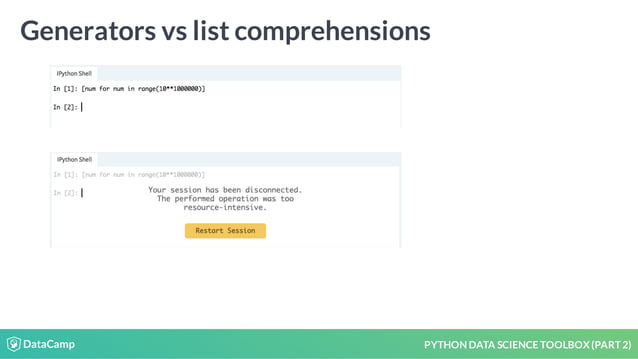
To get a more formal understanding of how generators work and why they are so efficient, please read the following section from an article on the OneUptime blog.
How to Use List Comprehensions Effectively in Python
This section explains the concept of generator expressions, their syntax, and their key advantage in memory efficiency, complete with a practical example using sys.getsizeof.
Read the section titled 'Generator Expressions'. Pay close attention to the comparison of memory usage between a list and a generator, and the important note that generators can only be iterated over once.
Generator expressions are often used with functions that can process items one at a time, like sum(), max(), min(), or inside a for loop.
# A list comprehension would first create a list of 10 million squared numbers in memory...
# sum([x**2 for x in range(10_000_000)]) # This can use a lot of memory!


# A generator expression calculates each square one by one as sum() needs it.
total = sum(x**2 for x in range(10_000_000)) # Very memory-efficient.

print(f"The sum is: {total}")
5. Best Practices: When (and When Not) to Use Comprehensions
While powerful, comprehensions aren't always the right tool. Overly complex or nested comprehensions can become difficult to read. Remember, code is read more often than it is written.
How to Use List Comprehensions Effectively in Python
This final reading from the OneUptime article provides essential guidance on when to stick with a traditional for loop for the sake of readability and maintainability.
Read the sections 'When NOT to Use Comprehensions', 'Best Practices', and 'Summary'. This will give you a balanced perspective on when a simple loop is better than a complex comprehension.
Key guidelines:
- Use comprehensions for simple transformations and filtering.
- Use
forloops when the logic is complex, involves multiple lines, requirestry-exceptblocks, or has side effects (like printing to the console). - Use generator expressions over list comprehensions when working with very large datasets to save memory.
Practice: Your Turn to Transform Data
Let's apply what you've learned. You are given a list of log entries from a server.
log_entries = [
    "INFO: User 'alex' logged in.",
    "DEBUG: Connection established.",
    "ERROR: Failed to connect to database 'db1'.",
    "INFO: Data processed successfully.",
    "ERROR: File 'report.csv' not found.",
    "WARNING: Disk space is low."
]
Your tasks:
- Filter Error Messages: Using a list comprehension, create a new list called
error_messagesthat contains only the message part (the text after "ERROR: ") of the log entries that start with "ERROR". - Calculate Total Length: Using a generator expression passed to the
sum()function, calculate the total number of characters in all log entries combined. Store this in a variable calledtotal_chars.
Take your time to solve this. You can check your solution below.
Click here to see a possible solution
log_entries = [
    "INFO: User 'alex' logged in.",
    "DEBUG: Connection established.",
    "ERROR: Failed to connect to database 'db1'.",
    "INFO: Data processed successfully.",
    "ERROR: File 'report.csv' not found.",
    "WARNING: Disk space is low."
]


# Task 1: Filter error messages with a list comprehension
# We slice the string from index 7 to skip "ERROR: "
error_messages = [
    entry[7:] for entry in log_entries if entry.startswith("ERROR")
]
print("Error Messages:", error_messages)


# Expected Output: Error Messages: ["Failed to connect to database 'db1'.", "File 'report.csv' not found."]


# Task 2: Calculate total characters with a generator expression
total_chars = sum(len(entry) for entry in log_entries)
print("Total Characters in all logs:", total_chars)


# Expected Output: Total Characters in all logs: 201
Conclusion
Great work! You've just added two of Python's most expressive features to your toolkit. They are fundamental to writing clean, efficient, and idiomatic Python code, especially in data-heavy fields like AI.
Here are the key takeaways from today's lesson:
- List Comprehensions (
[...]) provide a concise syntax for creating lists from iterables, including conditional filtering and transformation. They build the entire list in memory. - Generator Expressions (
(...)) offer a memory-efficient alternative by creating a generator that produces values one at a time (lazy evaluation). They are ideal for large datasets. - The choice between a comprehension and a traditional
forloop should always prioritize readability and maintainability.
In our next lesson, we will shift from processing data to modeling concepts by learning how to implement a Python class. While comprehensions help us transform data collections, classes will allow us to create our own custom objects with unique attributes and behaviors, a cornerstone of object-oriented programming.