Hello! Let's dive into the next lesson in your Python Programming Foundations module.
In our last session, we explored inheritance and polymorphism, discovering how to create specialized child classes from a parent class. This ability to create class hierarchies is not just for organizing code—it's a powerful mechanism that Python uses for many of its core features.
Today, we'll see a direct application of that. We'll focus on how to make your programs more robust and predictable by managing errors. The learning outcome for this lesson is to handle exceptions using try-except blocks and create custom exceptions. You'll learn how to anticipate and manage potential failures gracefully, preventing your applications from crashing unexpectedly.
1. Why We Need Error Handling
Imagine your program tries to open a file that doesn't exist or divide a number by zero. Without any error handling, the program would simply crash, showing a user-unfriendly "traceback" message. This is where exception handling comes in. It allows you to "try" a block of code that might fail and, if it does, "catch" the error and execute a fallback plan.
Let's watch a video that introduces this fundamental concept.
Python Tutorial: Using Try/Except Blocks for Error Handling
This video from Corey Schafer provides an excellent, practical introduction to why we need try-except blocks and how they work.
Watch the first two minutes (00:00 - 02:07). Notice how an unhandled FileNotFoundError crashes the program, and how wrapping the code in a try block allows you to catch the error and display a friendly message instead.
2. The try...except Block and Its Variations
The basic structure you just saw is the try-except block. However, there's more to it. A robust error handling structure can include else and finally blocks, giving you fine-grained control over your program's flow.
try: The block of code to be attempted.except: The block of code that runs only if an exception occurs in thetryblock.else: The block of code that runs only if no exception occurs in thetryblock.finally: The block of code that always runs, regardless of whether an exception occurred. This is perfect for cleanup actions, like closing a file or a database connection.
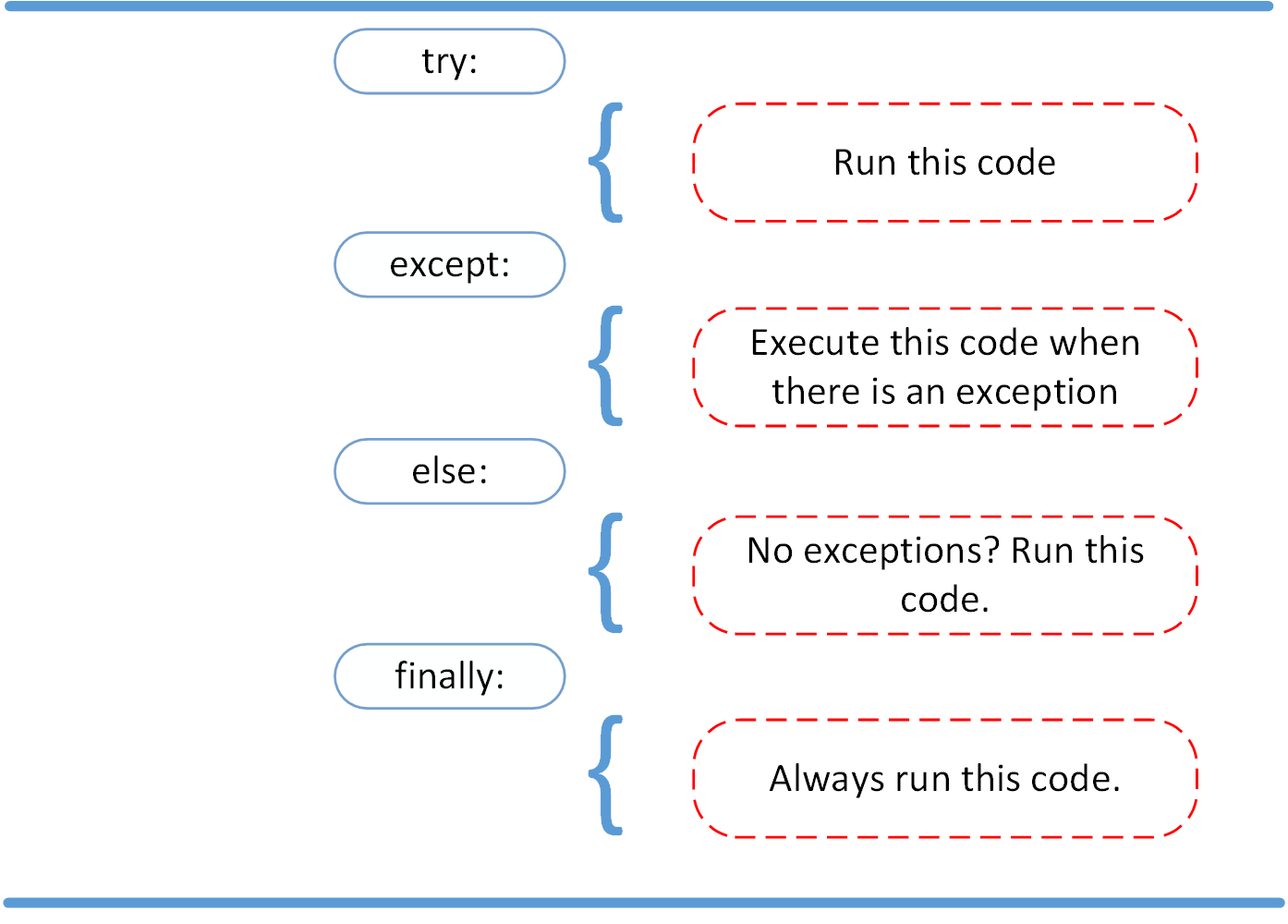
Let's continue with the video to see these components in action and learn a crucial best practice: being specific about the exceptions you catch.
Python Tutorial: Using Try/Except Blocks for Error Handling
This next segment of the video covers how to handle multiple, specific exceptions and explains the roles of the else and finally blocks.
Watch from 02:07 to 08:35. Pay close attention to: Catching Specific Exceptions: Why except FileNotFoundError: is better than a generic except Exception:. Catching specific errors prevents you from accidentally hiding bugs you didn't anticipate. Handling Multiple Exceptions: How you can stack except blocks to handle different types of errors. The else Block: How it's used for code that should only run if the try block was successful. The finally Block: Why it's essential for cleanup code that must execute no matter what.
3. Creating Your Own Exceptions
While Python has many built-in exceptions (ValueError, TypeError, FileNotFoundError, etc.), sometimes you need to represent an error that is specific to your application's logic. For example, in a banking application, you might want an InsufficientFundsError.
This is where you'll apply what you learned about inheritance. A custom exception is simply a Python class that inherits from the built-in Exception class.

Let's watch a video that explains the motivation and process for creating custom exceptions.
Why You Need Custom Exception Classes
This video from ArjanCodes clearly explains why you'd want to create a custom exception and walks through how to do it by subclassing Exception.
Watch from the beginning to 04:29. Focus on: The limitations of using generic exceptions like ValueError. How a custom exception is defined: class WeightLimitExceededError(Exception):. How you can add an __init__ method to your custom exception to store and pass along specific data about the error.
4. Raising Exceptions
You've seen how to catch exceptions that Python raises automatically. You can also trigger exceptions manually using the raise keyword. This is useful when you detect a condition in your code that makes it impossible to proceed, like a user providing invalid input to a function.
You can raise built-in exceptions or the custom ones you've created.
Python Try Except: Examples And Best Practices
Let's read a short article that provides a great example of defining, raising, and catching a custom exception. This will solidify the concepts from the video.
Read the sections titled 'Create custom exceptions' and 'Raising (or throwing) exceptions'. The UserNotFoundError example is a perfect illustration of why creating a custom exception makes your code more readable and robust than simply using raise Exception('User not found').
5. Practice: A Simple Inventory System
Time to combine these concepts. You will build a simple Inventory class that uses both built-in and custom exceptions to handle errors.
Instructions:
- Create a custom exception named
ItemNotFoundErrorthat inherits fromException. A simplepassin the class body is sufficient. - Create an
Inventoryclass with the following:- An
__init__method that initializes a dictionary to store inventory items and their quantities, e.g.,self.stock = {"laptop": 10, "mouse": 50}. - A method
remove_item(item_name, quantity).
- An
- Implement the logic for
remove_item:- If
item_nameis not inself.stock,raiseyour customItemNotFoundErrorwith a helpful message. - If the
quantityto remove is greater than the available stock for that item,raisea built-inValueErrorwith a helpful message. - If all checks pass, decrease the stock quantity for the item.
- If
- Write test code outside the class that calls
remove_itemand usestry-exceptblocks to gracefully handle bothItemNotFoundErrorandValueError.
# 1. Define your custom exception here
# class ItemNotFoundError...


# 2. Define the Inventory class here
class Inventory:
    def __init__(self):
        self.stock = {"laptop": 10, "mouse": 50, "keyboard": 25}
        print(f"Initial stock: {self.stock}")

    def remove_item(self, item_name, quantity):


        # 3. Implement the logic here
        pass


# --- 4. Test your implementation ---
inventory = Inventory()


# Test case 1: Successful removal
try:
    inventory.remove_item("mouse", 5)
    print(f"Successfully removed 5 mice. Current stock: {inventory.stock}")
except (ValueError, NameError): # Replace NameError with your custom exception
    print("This should not happen for this test case.")


# Test case 2: Item not found
try:
    inventory.remove_item("webcam", 1)
except NameError as e: # Replace NameError with your custom exception
    print(f"Error: {e}")


# Test case 3: Insufficient stock
try:
    inventory.remove_item("laptop", 20)
except ValueError as e:
    print(f"Error: {e}")


# Final stock check
print(f"Final stock: {inventory.stock}")
Click here to see a possible solution
# 1. Define your custom exception
class ItemNotFoundError(Exception):
    """Raised when an item is not found in the inventory."""
    pass


# 2. Define the Inventory class
class Inventory:
    def __init__(self):
        self.stock = {"laptop": 10, "mouse": 50, "keyboard": 25}
        print(f"Initial stock: {self.stock}")

    def remove_item(self, item_name, quantity):


        # 3. Implement the logic
        if item_name not in self.stock:
            raise ItemNotFoundError(f"Item '{item_name}' not found in inventory.")

        if quantity > self.stock[item_name]:
            raise ValueError(f"Cannot remove {quantity} of '{item_name}'. Only {self.stock[item_name]} available.")

        self.stock[item_name] -= quantity


# --- 4. Test your implementation ---
inventory = Inventory()


# Test case 1: Successful removal
try:
    inventory.remove_item("mouse", 5)
    print(f"Successfully removed 5 mice. Current stock: {inventory.stock}")
except (ValueError, ItemNotFoundError):
    print("This should not happen for this test case.")


# Expected output: Successfully removed 5 mice. Current stock: {'laptop': 10, 'mouse': 45, 'keyboard': 25}

print("-" * 20)


# Test case 2: Item not found
try:
    inventory.remove_item("webcam", 1)
except ItemNotFoundError as e:
    print(f"Error: {e}")


# Expected output: Error: Item 'webcam' not found in inventory.

print("-" * 20)


# Test case 3: Insufficient stock
try:
    inventory.remove_item("laptop", 20)
except ValueError as e:
    print(f"Error: {e}")


# Expected output: Error: Cannot remove 20 of 'laptop'. Only 10 available.

print("-" * 20)


# Final stock check
print(f"Final stock: {inventory.stock}")


# Expected output: Final stock: {'laptop': 10, 'mouse': 45, 'keyboard': 25}
Conclusion
Excellent work! You've learned how to build more resilient Python applications by anticipating and handling errors. This is a fundamental skill for any developer, as real-world data and user interactions are often unpredictable.
Here are the key takeaways from today's lesson:
- The
try-except-else-finallystructure provides a robust way to control program flow when errors occur. - Always be specific about the exceptions you catch to avoid masking unexpected bugs.
- Custom exceptions are created by inheriting from Python's
Exceptionclass and allow you to create meaningful, application-specific error types. - The
raisekeyword lets you manually trigger an exception when your code detects a problem.
In our next lesson, we'll begin working with files. You'll learn how to read, write, and process data from common formats like CSV and JSON. The exception handling skills you've just acquired will be immediately useful, as file operations are a common source of errors like FileNotFoundError and PermissionError.