Hello! Welcome to the third lesson in our "Databases and SQL Fundamentals" module.
In our last lesson, you mastered the art of querying single tables using SELECT, WHERE, GROUP BY, and ORDER BY. Before that, we discussed database normalization—the practice of splitting data into multiple, related tables to maintain data integrity and reduce redundancy.
This raises a crucial question: how do we bring that separated data back together to answer meaningful questions? If we have a users table and a separate orders table, how can we find out which user placed which order? The answer is JOIN.
This lesson is all about connecting the dots. By the end of our 60 minutes, you will be able to combine data from multiple tables using INNER JOIN and LEFT JOIN, a fundamental skill for any developer working with relational databases.
1. Why We Need to Join Tables
The concept of joining tables is a direct consequence of good database design (normalization). Instead of one massive, unmanageable table, we create smaller, logical tables. For instance, one for users and another for orders. A JOIN is the mechanism that lets us temporarily stitch them back together for a query.
To perform a join, we need a common column that links the tables. This is where the concepts of primary keys and foreign keys become critical.
- A Primary Key is a column (or a set of columns) that uniquely identifies each row in a table. In a
userstable, theidcolumn is typically the primary key. - A Foreign Key is a column in one table that refers to the primary key of another table. In an
orderstable, auser_idcolumn would be a foreign key that links an order back to the user who placed it.
Different Types of SQL JOINs that You Must Know
To understand the rationale behind joins and solidify the concepts of primary and foreign keys, please read the first few sections of this article from StrataScratch.
Read the sections titled "Why Would Anyone Need JOINs?", "How the JOIN Works in SQL", and "What Is a Primary Key and Foreign Key?". This will clearly explain the problem that JOINs solve and define the key terminology.
Joins are not just for reassembling normalized data. They serve several key purposes.
SQL Joins Basics (Visually Explained) | INNER, LEFT, RIGHT, FULL | #SQL Course 8
The video "SQL Joins Basics (Visually Explained)" provides an excellent overview of why and when we use joins. It will give you a strong conceptual foundation before we dive into the syntax.
Watch the segment from 03:57 to 07:32. Pay attention to the three main reasons for using joins: recombining data, data enrichment, and checking for data existence.
2. The INNER JOIN: Finding the Overlap
The INNER JOIN is the most common type of join. It selects records that have matching values in both tables. Think of it as finding the intersection between two sets. If a user has placed an order, an INNER JOIN between users and orders will combine their information. If a user has not placed an order, they will not appear in the result.
This image uses Venn diagrams to beautifully illustrate the concept. For an INNER JOIN, we're interested only in the overlapping area.
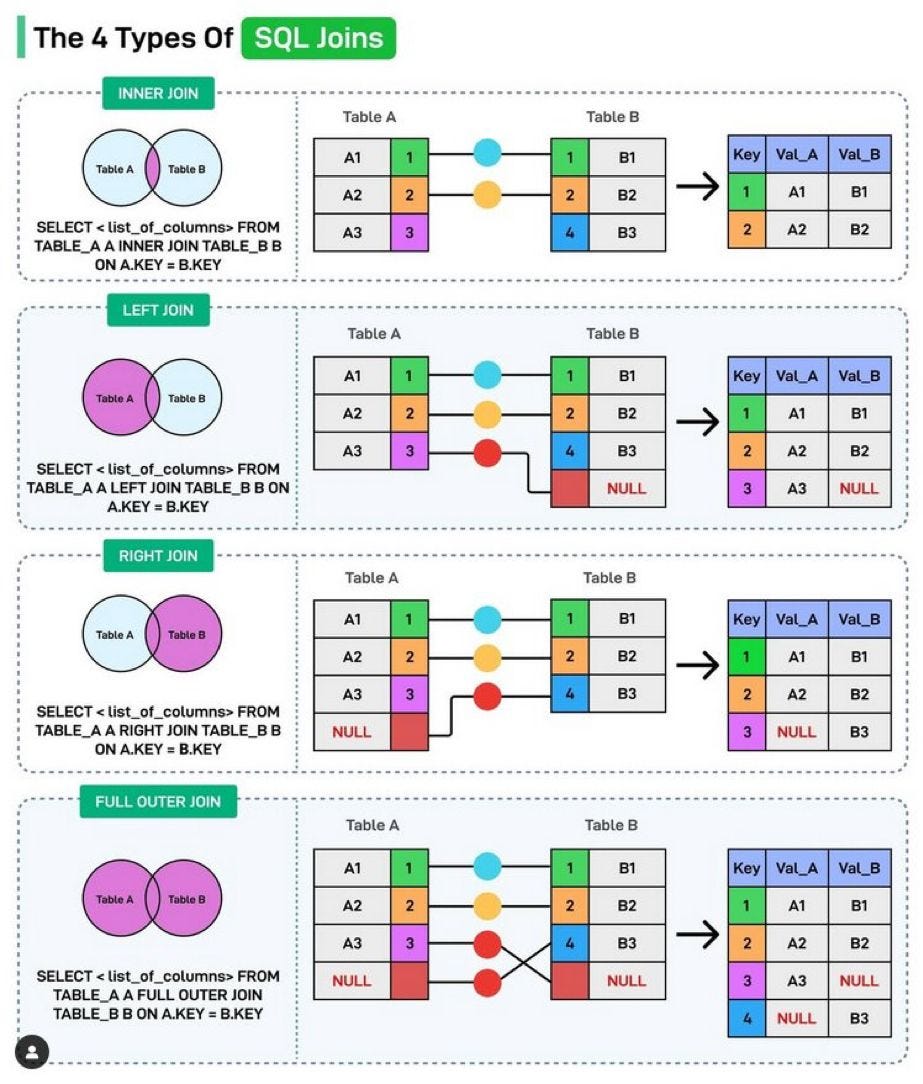
The basic syntax for a join is:
SELECT table1.column1, table2.column2
FROM table1
INNER JOIN table2
ON table1.common_column = table2.common_column;
The ON clause is where you define the relationship—how the tables are connected.
SQL Joins Basics (Visually Explained) | INNER, LEFT, RIGHT, FULL | #SQL Course 8
Let's watch a detailed walkthrough of the INNER JOIN. This segment will cover the syntax, a practical example, the logical execution flow, and the best practice of using table aliases.
Watch from 10:19 to 23:01. Focus on understanding how the database matches rows based on the ON condition. Also, note how aliases (e.g., FROM customers c JOIN orders o) make the query much cleaner and more readable.
Using aliases is a standard practice that you should adopt immediately. It makes your queries much easier to read, especially when you start joining more than two tables.
-- An INNER JOIN with aliases
SELECT
  c.first_name,
  o.order_id,
  o.sales
FROM
  customers AS c
INNER JOIN
  orders AS o
ON
  c.id = o.customer_id;
3. The LEFT JOIN: Keeping All from the Left
What if you want a list of all customers, along with any orders they might have placed? If you use an INNER JOIN, customers without orders will disappear. This is where LEFT JOIN comes in.
A LEFT JOIN returns all records from the left table (the one specified in the FROM clause), and the matched records from the right table (the one in the LEFT JOIN clause). If there is no match, the result is NULL on the side of the right table.
Look back at the "SQL Joins Illustrated" image. For a LEFT JOIN, we take everything from the left circle, plus any overlap from the right circle.
The most important thing to understand about LEFT JOIN is that table order matters. FROM A LEFT JOIN B is not the same as FROM B LEFT JOIN A.
SQL Joins Basics (Visually Explained) | INNER, LEFT, RIGHT, FULL | #SQL Course 8
This next segment explains the LEFT JOIN in detail, highlighting the importance of table order and how NULL values appear when there are no matches.
Watch from 23:01 to 30:05. Pay close attention to the example of finding customers without orders and see how the query result includes all customers, with NULLs in the order columns for those who haven't ordered anything.
A common use case for LEFT JOIN is finding records that exist in one table but not another. For example, to find all customers who have never placed an order, you would perform a LEFT JOIN and then filter for rows where the order information is NULL.
SELECT c.first_name
FROM customers c
LEFT JOIN orders o ON c.id = o.customer_id
WHERE o.order_id IS NULL; -- This condition finds the customers with no matching orders
A Note on RIGHT JOIN:
You might also encounter RIGHT JOIN. It's the exact opposite of LEFT JOIN—it returns all records from the right table and matched records from the left. However, in practice, RIGHT JOIN is rarely used. Any RIGHT JOIN can be rewritten as a LEFT JOIN by simply swapping the order of the tables. Sticking with LEFT JOIN makes queries more consistent and easier to read.
4. Practical Application: Joining Multiple Tables & Filtering
Real-world queries often involve more than two tables. For example, you might need to combine data from shipments, products, and salespeople tables to get a full report. You can chain JOIN clauses to connect as many tables as you need.
Furthermore, you can use the WHERE clause you learned in the previous lesson to filter the results after the tables have been joined.
SQL Joins - Beginner to PRO Masterclass with 10 Examples
Let's see a practical example of joining multiple tables and applying filters. This video from Chandoo demonstrates these concepts concisely.
Watch from 04:03 to 09:22. This segment shows how to join three tables (shipments, products, people) and then apply WHERE clauses to answer specific business questions, like "show me all shipments for the 'bars' category made by salesperson 'Barb'."
As the video demonstrates, you build up your query by adding one JOIN at a time, each with its own ON condition to specify the link.
-- Example joining three tables
SELECT
  s.date,
  p.product_name,
  sp.salesperson_name
FROM
  shipments AS s
INNER JOIN
  products AS p ON s.product_id = p.product_id
INNER JOIN
  salespeople AS sp ON s.salesperson_id = sp.id
WHERE
  p.category = 'Electronics' AND sp.team = 'North';
Conclusion
Great work! You have now unlocked one of the most powerful features of SQL. Being able to combine data from different tables is the key to leveraging the power of a relational database.
Key Takeaways:
JOINs are used to combine rows from two or more tables based on a related column between them (a primary/foreign key relationship).INNER JOINreturns only the records that have matching values in both tables. It's for finding the intersection.LEFT JOINreturns all records from the left table and the matched records from the right table. If no match is found, it returnsNULLfor the columns of the right table. The order of the tables is critical.- Table aliases are a best practice that makes complex queries with multiple joins much more readable.
- You can chain multiple
JOINclauses to combine several tables and use aWHEREclause to filter the final, combined result set.
In our next lesson, we will bridge the gap between Python and SQL. You'll learn about Object-Relational Mappers (ORMs), specifically SQLAlchemy, which allow you to interact with your database using Python objects instead of writing raw SQL strings. This is a common and powerful pattern in modern full-stack application development.