Hello! Welcome to your next lesson in the "Databases and SQL Fundamentals" module.
In our previous lesson, we explored database normalization. You learned the critical importance of structuring data across multiple, well-organized tables to prevent data anomalies and ensure integrity. This "schema design" is the architectural blueprint for your data.
Now that we have a blueprint, we need the tools to build and interact with the structure. This lesson introduces Structured Query Language (SQL), the universal language for managing and retrieving data from relational databases. Today, you'll move from theory to practice and write your first queries.
Our goal is to master the fundamental building blocks of data retrieval. By the end of this 60-minute lesson, you will be able to write SQL queries to:
- Select specific data using
SELECTandFROM. - Filter results based on conditions using the
WHEREclause. - Sort your data with
ORDER BY. - Summarize data using aggregate functions like
COUNTandSUM, combined withGROUP BY.
1. The Anatomy of a Basic Query: SELECT and FROM
The most fundamental task in SQL is asking the database to show you some data. This is done with a SELECT statement. Every SELECT query has two core parts:
SELECT: Specifies the columns you want to retrieve.FROM: Specifies the table you want to retrieve them from.
You can either select all columns from a table using an asterisk (*) or list specific column names separated by commas.
SQL SELECT Queries (Visually Explained) for Beginners | All Essential Clauses | #SQL Course 4
To see this in action, let's watch the first part of the video "SQL SELECT Queries (Visually Explained)" from Data with Baraa. It provides a clear, step-by-step visual walkthrough of these basic clauses.
Watch from the beginning to 10:02. The first part (until 06:47) explains the purpose of a query and how to use SELECT *. The second part (from 06:47) shows how to select specific columns by name.
As you saw in the video, the basic syntax is straightforward:
-- To select all columns from a table named 'customers'
SELECT * FROM customers;

-- To select only the name and country from the 'customers' table
SELECT first_name, country FROM customers;
You can also give temporary names, or aliases, to your columns in the output to make them more readable, using the AS keyword. This is especially useful for columns that are the result of a calculation.
-- Renaming 'first_name' to 'Name' in the result set
SELECT first_name AS Name, country FROM customers;
2. Filtering Your Data: The WHERE Clause
Retrieving all the data from a table is often impractical. More commonly, you need to find rows that match specific criteria. The WHERE clause allows you to filter your data based on conditions.
SQL SELECT Queries (Visually Explained) for Beginners | All Essential Clauses | #SQL Course 4
Let's continue with the same video to learn how to use the WHERE clause to filter rows.
Watch the segment from 10:02 to 16:02. Pay attention to how conditions are constructed for both numerical and text (string) data. Note the use of single quotes for strings.
A WHERE clause follows the FROM clause and specifies a condition that must be true for a row to be included in the results.
-- Select customers from Germany
SELECT first_name, country
FROM customers
WHERE country = 'Germany';

-- Select customers with a score higher than 500
SELECT first_name, score
FROM customers
WHERE score > 500;
You can combine multiple conditions using the AND and OR operators:
-- Select customers from Germany with a score higher than 500
SELECT first_name, country, score
FROM customers
WHERE country = 'Germany' AND score > 500;
The WHERE clause supports a rich set of operators beyond simple comparisons, such as BETWEEN, IN (for matching multiple values), and LIKE (for pattern matching in strings).
3. Sorting Your Results: The ORDER BY Clause
By default, the database returns rows in whatever order it finds convenient, which is often not very useful. The ORDER BY clause allows you to sort the final result set based on one or more columns.
SQL SELECT Queries (Visually Explained) for Beginners | All Essential Clauses | #SQL Course 4
The next section of the video explains how to use ORDER BY to sort your results and how to perform nested sorting using multiple columns.
Watch from 16:02 to 24:50. Note the difference between ascending (ASC, the default) and descending (DESC) order, and see how specifying a second column for sorting refines the results.
ORDER BY is one of the last clauses in a query. You can specify the sort direction:
ASC: Ascending (A-Z, 0-9). This is the default.DESC: Descending (Z-A, 9-0).
-- Retrieve all customers, sorted by their score from highest to lowest
SELECT first_name, score
FROM customers
ORDER BY score DESC;

-- Sort by country alphabetically, and then by score from highest to lowest within each country
SELECT first_name, country, score
FROM customers
ORDER BY country ASC, score DESC;
4. Summarizing Data: Aggregate Functions and GROUP BY
One of the most powerful features of SQL is its ability to perform calculations across many rows and summarize them. This is done using aggregate functions. The most common ones are:
COUNT(): Counts the number of rows.SUM(): Calculates the sum of a numeric column.AVG(): Calculates the average of a numeric column.MAX(): Finds the maximum value in a column.MIN(): Finds the minimum value in a column.
SQL functions (SUM, COUNT, AVG, MIN, MAX) and GROUP BY
This article from Data36 provides a quick, clear text-based reference for these essential aggregate functions.
Read the section titled 'SQL functions to aggregate data'. This will quickly familiarize you with the syntax for COUNT, SUM, AVG, MAX, and MIN.
When used alone, an aggregate function returns a single value for the entire table. However, their true power is unlocked when combined with the GROUP BY clause. GROUP BY collapses multiple rows that share the same value in a specified column into a single summary row, allowing the aggregate function to operate on each group.
For example, you can calculate the average score per country.
SQL SELECT Queries (Visually Explained) for Beginners | All Essential Clauses | #SQL Course 4
Let's see how GROUP BY works. This next video segment will show you how to combine aggregate functions with GROUP BY to generate powerful summary reports.
Watch from 24:50 to 33:15. Focus on how GROUP BY country transforms the data, allowing you to run SUM(score) for each country individually. Also, pay attention to the important rule about what other columns you can include in your SELECT statement.
This image provides a great visual summary of what a GROUP BY query does. It takes raw, detailed salary entries and transforms them into a summarized report of total salary per employee.
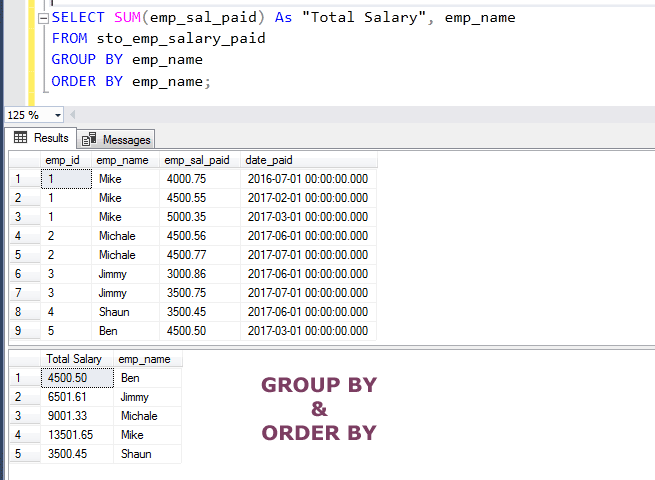
A critical rule to remember: When you use GROUP BY, any column in your SELECT list must either be part of the GROUP BY clause or be contained within an aggregate function. You cannot select an individual, non-aggregated value alongside a grouped, aggregated value because it's ambiguous which individual value to show for the group.
5. Hands-On Practice
Theory is great, but SQL is best learned by doing. This next resource provides a complete, self-contained example with a sample database you can use to practice everything we've covered.
How To Use GROUP BY and ORDER BY in SQL
The article 'How To Use GROUP BY and ORDER BY in SQL' from DigitalOcean will guide you through setting up a simple database and running queries against it. This is a great opportunity to apply your knowledge.
First, follow the instructions in the section 'Connecting to MySQL and Setting up a Sample Database'. This will create the movieDB database and the movie_theater table with some data. Then, work through the examples in the section 'Using GROUP BY'. Type out the queries yourself and run them. Try to predict the output before you execute the query. Compare the results to the article's explanations.
6. Understanding Query Execution Order
A common point of confusion for beginners is that SQL queries are not executed in the order they are written. Understanding the logical processing order helps you write correct queries and debug errors.

The key takeaways from this execution order are:
- The
WHEREclause is executed before theSELECTclause. This is why you cannot use a column alias defined inSELECTwithin aWHEREclause. - The
ORDER BYclause is executed after theSELECTclause. This is why you can use a column alias in anORDER BYclause.
SQL SELECT Queries (Visually Explained) for Beginners | All Essential Clauses | #SQL Course 4
To wrap things up, let's watch the final segment of the video, which summarizes the coding order versus the logical execution order of a full SQL query. This brings all the pieces together.
Watch from 49:37 to 54:01. This is a concise review of how all the clauses fit together and the sequence in which the database processes them.
Conclusion
Congratulations! You've just learned the fundamentals of retrieving and manipulating data with SQL. This is a cornerstone skill for any data-related role, including Full Stack AI Development.
Key Takeaways:
SELECTandFROMare the heart of every query, specifying what columns you want from which table.WHEREfilters rows based on specific conditions, allowing you to narrow down your data.ORDER BYsorts your final result set, making it readable and easy to analyze.- Aggregate functions (
COUNT,SUM,AVG, etc.) perform calculations on data. GROUP BYworks with aggregate functions to create powerful summary reports by grouping data.- SQL clauses have a logical execution order that is different from the order in which they are written.
In the next lesson, we'll build on this foundation by learning how to combine data from multiple tables using JOINs. This will allow us to work with the normalized database structures we designed in the previous lesson.