Hello! Welcome to the fourth lesson in our "Databases and SQL Fundamentals" module.
In our previous lesson, you learned how to use INNER JOIN and LEFT JOIN to combine data from multiple tables. This is a powerful SQL skill, but writing complex SQL queries as strings inside Python code can become unwieldy, error-prone, and difficult to maintain. It also opens the door to security vulnerabilities like SQL injection if not handled carefully.
This lesson introduces a more powerful and Pythonic way to interact with your database: Object-Relational Mappers (ORMs). We will focus on SQLAlchemy, the most widely used ORM in the Python ecosystem. By the end of this lesson, you will be able to explain the role of an ORM and set up SQLAlchemy in a Python project, creating the foundation for a robust data layer in your applications.
1. What is an Object-Relational Mapper (ORM)?
At its core, an ORM is a library that acts as a translator between two different paradigms: the object-oriented world of your programming language (like Python) and the relational world of your SQL database.
Let's break down the name:
- Object: These are the Python objects and classes you work with in your code (e.g., a
Userclass). - Relational: This refers to the relational database, with its tables, rows, and columns.
- Mapping: This is the crucial part. The ORM maps your Python classes to database tables, object attributes to columns, and object instances to rows.
Instead of writing INSERT INTO users ..., you would simply create a new User object in Python and ask the ORM to save it. The ORM generates the necessary SQL behind the scenes. This fundamental problem of bridging the gap between objects and tables is often called the "object-relational impedance mismatch."
What is an ORM, how does it work, and how should I use one?
To get a clear, straightforward definition of what an ORM is and why it's useful, let's start with this highly-rated explanation on Stack Overflow.
Read the initial "Introduction" and the second main answer that starts with "ORM stands for 'Object to Relational Mapping'". These sections provide simple, clear definitions and an illustrative example.
Advantages and Disadvantages of Using an ORM
ORMs are powerful tools, but like any abstraction, they come with trade-offs.
SQLAlchemy Makes Using Python Databases EASY
This video provides a concise summary of the benefits of using an ORM like SQLAlchemy.
Watch the segment from 02:10 to 03:06. The speaker breaks down the advantages into three key categories: abstraction, security, and productivity.
To summarize and expand on these points:
Advantages:
- Productivity: You write Python, not SQL. This is often faster and lets you stay in a single language context.
- Database Independence: A well-designed ORM can abstract away the differences between SQL dialects (e.g., PostgreSQL vs. MySQL vs. SQLite). You can often switch databases with minimal code changes.
- Security: ORMs automatically handle parameterization of queries, which is the primary defense against SQL injection attacks.
- Maintainability: Your data model is defined in Python classes, making it explicit, version-controllable, and easier to navigate than scattered SQL strings.
Disadvantages:
- Learning Curve: You need to learn the ORM's API, which can be complex.
- Performance: An ORM might generate inefficient SQL if you're not careful. A developer who is an expert in SQL can often write more optimized queries by hand.
- Leaky Abstraction: To use an ORM effectively, you still need to understand the underlying database concepts and what SQL is being generated. You can't treat the database as a complete black box.
For most application development, the pros far outweigh the cons, making ORMs a standard tool for modern developers.
2. Introducing SQLAlchemy
SQLAlchemy is the most popular and powerful database toolkit for Python. It's more than just an ORM; it provides a comprehensive set of tools for interacting with databases.
Its architecture is famously split into two distinct layers: SQLAlchemy Core and SQLAlchemy ORM.
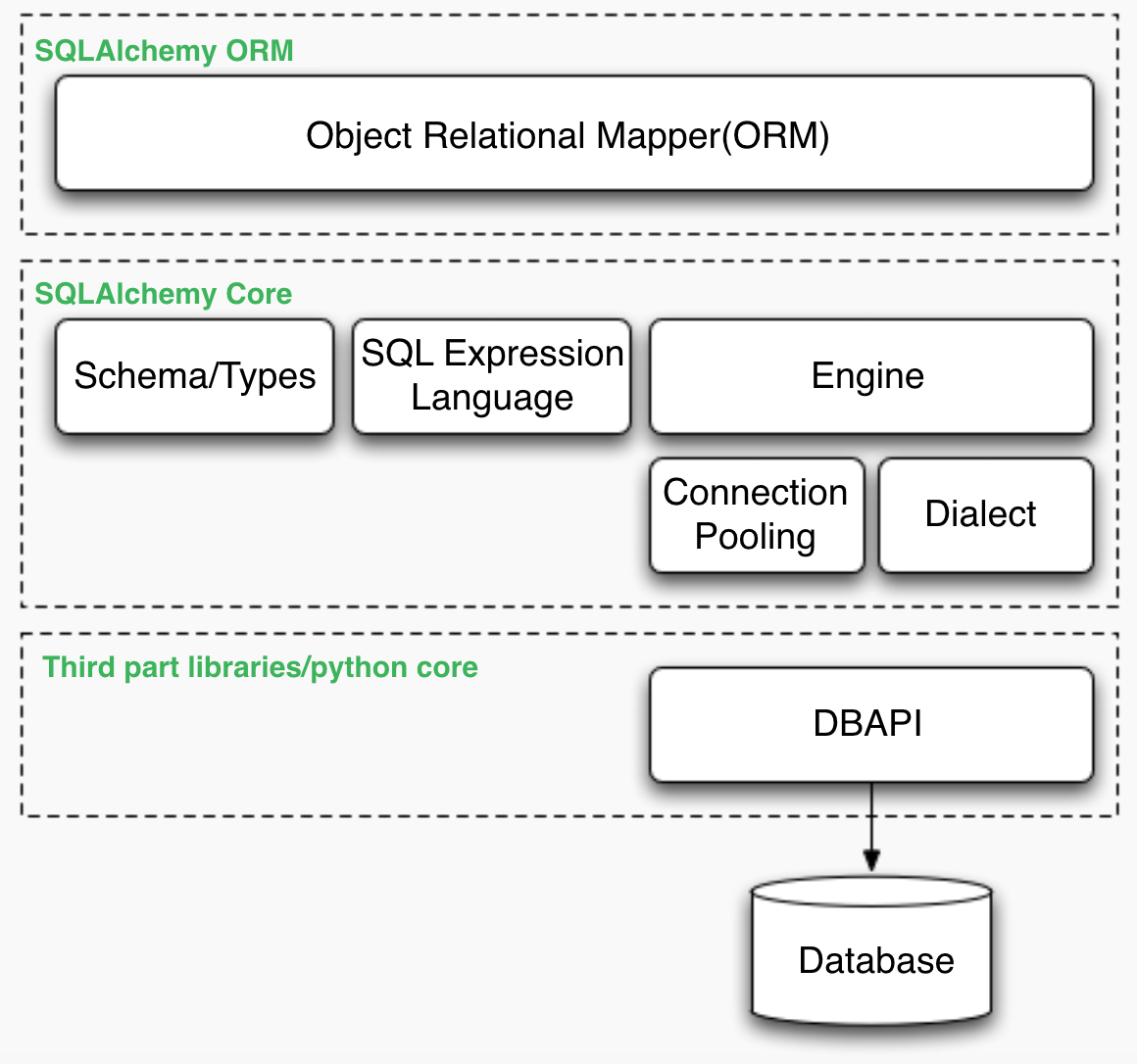
- SQLAlchemy Core: This is a low-level toolkit that provides a SQL Expression Language. It allows you to build SQL queries using Python objects and expressions. It gives you fine-grained control and is a major step up from raw SQL strings, but you still think in terms of tables and columns.
- SQLAlchemy ORM: This is the high-level, optional layer built on top of the Core. It implements the full Object-Relational Mapper pattern, allowing you to work with your own Python classes and objects.
For most of this course, we will focus on the ORM, as it's the most common pattern for application development.
Ultimate guide to SQLAlchemy library in python
This article from Deepnote provides an excellent, in-depth explanation of SQLAlchemy's dual-layer architecture. Understanding this is key to understanding SQLAlchemy's power and flexibility.
Read the introduction and the section titled "In-depth technical architecture (core and ORM)". This will clarify how the Core and ORM layers work together.
3. Setting Up Your First SQLAlchemy Project
Now for the practical part. Let's set up a Python project that uses SQLAlchemy to define a database model. We will use SQLite because it's built into Python and doesn't require a separate server.
The process involves four main steps:
- Install SQLAlchemy.
- Create an Engine to connect to the database.
- Define a Model class that maps to a table.
- Create the table in the database.
SQLAlchemy Makes Using Python Databases EASY
This video provides a fantastic, step-by-step walkthrough of setting up a basic SQLAlchemy application. We will follow along with the initial setup part.
Watch from 03:06 to 06:35. Follow along as the instructor installs SQLAlchemy, sets up the engine and session, defines a user model, and creates the table in the database. Don't worry about the session for now; we'll cover that in detail in the next lesson.
Let's consolidate those steps into a single, commented script.
Step-by-Step Code Walkthrough
Create a new file named database_setup.py.
# 1. Import necessary components from SQLAlchemy
from sqlalchemy import create_engine, Column, Integer, String
from sqlalchemy.orm import declarative_base


# 2. Define the database connection URL
# For this example, we'll use SQLite, which stores the database in a local file called 'app.db'.
DATABASE_URL = "sqlite:///app.db"


# 3. Create the SQLAlchemy engine
# The engine is the entry point to the database. The `echo=True` flag will print
# all the SQL statements SQLAlchemy generates, which is very useful for learning.
engine = create_engine(DATABASE_URL, echo=True)


# 4. Create a DeclarativeBase
# Our ORM models will inherit from this class. It keeps track of the "metadata"
# about our tables and the classes that map to them.
Base = declarative_base()


# 5. Define our first ORM Model
# This class represents the 'users' table in our database.
class User(Base):
    __tablename__ = 'users'  # This is the actual table name in the database.


    # Define the columns for the 'users' table.
    id = Column(Integer, primary_key=True, index=True) # `primary_key=True` makes this the primary key.
    name = Column(String(50), nullable=False) # `String(50)` corresponds to VARCHAR(50).
    email = Column(String(100), unique=True, nullable=False) # Emails should be unique.


    # The __repr__ method provides a developer-friendly string representation of the object.
    def __repr__(self):
       return f"<User(name='{self.name}', email='{self.email}')>"


# 6. Create the tables in the database
def create_db_and_tables():
    print("Creating database and tables...")


    # Base.metadata.create_all() checks for the existence of each table first.
    # If a table does not exist, it issues a CREATE TABLE statement.
    # It does not update existing tables if the model changes.
    Base.metadata.create_all(bind=engine)
    print("Database and tables created.")


# This allows you to run this script directly to create your database.
if __name__ == "__main__":
    create_db_and_tables()
To run this code:
- Make sure you are in a Python virtual environment.
- Install SQLAlchemy:
pip install SQLAlchemy. - Save the code above as
database_setup.py. - Run the script from your terminal:
python database_setup.py.
After you run the script, you will see SQL output in your terminal (because of echo=True) showing the CREATE TABLE statement. A new file named app.db will also appear in your project directory. This file is your SQLite database, and it now contains an empty users table with the schema you defined.
Conclusion
You've just taken a huge step in bridging the gap between Python and SQL. You now understand the role of an ORM and have successfully set up a project with SQLAlchemy.
Key Takeaways:
- An Object-Relational Mapper (ORM) is a tool that lets you interact with a relational database using object-oriented code, translating your actions into SQL.
- ORMs increase productivity, security, and maintainability, but require a learning investment and an awareness of the underlying database operations.
- SQLAlchemy is a powerful Python database toolkit with a layered architecture: a low-level Core and a high-level ORM.
- The basic setup of a SQLAlchemy project involves:
- Creating an
enginewithcreate_engine(). - Defining models by creating classes that inherit from a
declarative_base(). - Using
Base.metadata.create_all(engine)to generate the database schema.
- Creating an
In our next lesson, we will build on this foundation. You will learn how to use SQLAlchemy's Session object to perform CRUD (Create, Read, Update, Delete) operations, finally bringing your database to life by adding, querying, and managing data through Python objects.