Hello! Welcome back to our module on the Mathematics for Machine Learning.
In our last lesson, we established the groundwork by learning how to create, inspect, and perform basic element-wise operations on NumPy arrays. You learned that vectors and matrices, the fundamental objects of linear algebra, are represented as 1D and 2D arrays in NumPy.
Today, we'll build directly on that foundation. We will move beyond simple addition and subtraction to three of the most important operations in all of machine learning: the dot product, matrix transpose, and matrix multiplication. Today's learning outcome is to compute and interpret dot products, matrix multiplication, and transposes.
These operations are not just abstract calculations; they are the computational engine driving everything from linear regression to the massive neural networks used in Generative AI. Understanding them—both how to compute them and what they mean—is crucial.
1. The Dot Product: Measuring Alignment
Let's start with the dot product. At its core, it's a way to multiply two vectors to get a single number (a scalar).
How to Compute the Dot Product
The calculation is straightforward: you multiply the corresponding components of the two vectors and then sum the results.
Linear Algebra — ML Glossary documentation
This resource from the ML Glossary provides a clear, concise definition of the dot product and shows how to compute it in NumPy.
Read the short section titled 'Dot product'. Note the mathematical formula and the np.dot() example. The resource also mentions the Hadamard product, which is element-wise multiplication (*), serving as a good contrast to the dot product.
So, for two vectors and , the dot product is:
What the Dot Product Means
More important than the calculation is the interpretation. The dot product tells us about the alignment of two vectors.
Dot products and duality | Chapter 9, Essence of linear algebra
The dot product isn't just a number; it has a powerful geometric meaning. This short clip from the excellent 'Essence of linear algebra' series by 3Blue1Brown introduces this core idea.
Watch from 00:51 to 02:11. Focus on the concept of projection and how the sign of the dot product (positive, zero, or negative) relates to whether vectors point in the same, perpendicular, or opposite directions.
To solidify this intuition, the following article breaks it down into three clear cases.
Why Deep Learning Loves the Dot Product and Matrix Multiplication
This article provides another excellent breakdown of the dot product's meaning. It neatly summarizes the relationship between the angle of two vectors and the value of their dot product.
Read the section 'The Essence of the Dot Product'. Pay close attention to the three cases it presents: a small angle (high alignment), a 90° angle (no alignment), and a >90° angle (opposite alignment). This directly connects to what you just saw in the 3Blue1Brown video.
In summary:
- Large positive dot product: The vectors point in a similar direction.
- Dot product is zero: The vectors are perpendicular (orthogonal).
- Negative dot product: The vectors point in opposing directions.
This concept of measuring alignment is a cornerstone of machine learning, used everywhere from calculating feature importance to the attention mechanisms in Transformers.
2. The Matrix Transpose: Flipping Dimensions
Before we get to matrix multiplication, we need to know about a simple but essential operation: the transpose. Transposing a matrix "flips" it across its main diagonal (from top-left to bottom-right). The rows become columns, and the columns become rows.
If you have a matrix with shape (m, n), its transpose, denoted as , will have the shape (n, m).
Linear Algebra — ML Glossary documentation
This resource provides a clear visual and code example for the matrix transpose.
Read the 'Matrix transpose' section. Note the visual example of flipping the matrix and the simple .T attribute used in the NumPy code to perform the operation.
In Python, it's as simple as accessing the .T attribute of a NumPy array.
import numpy as np

A = np.array([[1, 2, 3],
              [4, 5, 6]])


# A has shape (2, 3)
print("Matrix A:\n", A)
print("Shape of A:", A.shape)


# A.T has shape (3, 2)
A_T = A.T
print("\nTranspose of A:\n", A_T)
print("Shape of A.T:", A_T.shape)
The main reason we need the transpose right now is to manipulate the shapes of our matrices to make them compatible for multiplication.
3. Matrix Multiplication: Combining Transformations
Matrix multiplication is one of the most fundamental operations in deep learning. It might seem complex at first, but it's just a systematic application of the dot product.
The Rules of the Game
You can't multiply any two matrices together. There's one critical rule.
Dot Product & Matrix Multiplication | Linear Algebra | TensorTeach
Let's first understand the most important rule for matrix multiplication, which determines whether the operation is even possible.
Watch this clip from 05:28 to 06:33. The key takeaway is the 'inner dimensions must match' rule. This is a non-negotiable prerequisite for matrix multiplication.
To recap: to multiply matrix by matrix (i.e., ), the number of columns in must equal the number of rows in .
- If has shape
(m, n)and has shape(n, p), the multiplication is valid. - The resulting matrix, , will have the shape
(m, p).
The Calculation Process
Each element in the resulting matrix is calculated by taking the dot product of a row from the first matrix and a column from the second matrix.
This image provides an excellent visualization of the process:
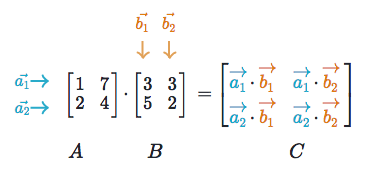
Now, let's watch a video that walks through a concrete example.
Dot Product & Matrix Multiplication | Linear Algebra | TensorTeach
This video demonstrates the step-by-step calculation, showing how matrix multiplication is essentially a series of dot products.
Watch from 02:06 to 05:28. Follow along with the example calculation. Notice how each cell in the output matrix is the result of a dot product.
Matrix Multiplication in NumPy
NumPy provides a simple and efficient way to perform matrix multiplication.
Linear Algebra — ML Glossary documentation
The ML Glossary provides a great summary of the rules and steps, along with the NumPy syntax you'll use in practice.
First, read the section 'Matrix multiplication' to review the steps. Then, read 'Numpy > Dot product'. Pay special attention to the @ operator. In modern Python/NumPy, @ is the standard, preferred operator for matrix multiplication, as it makes code more readable than np.dot() or np.matmul().
Let's practice with the @ operator.
A = np.array([[1, 2],
              [3, 4]])

B = np.array([[5, 6],
              [7, 8]])


# Both A and B are (2, 2) matrices. The inner dimensions (2 and 2) match.
# The result will be a (2, 2) matrix.
C = A @ B

print("Matrix A:\n", A)
print("\nMatrix B:\n", B)
print("\nResult of A @ B:\n", C)


# Let's check the first element, C[0, 0]
# It should be the dot product of the first row of A and the first column of B
# (1*5) + (2*7) = 5 + 14 = 19
print("\nC[0, 0] is:", C[0, 0])
Important Note: Unlike multiplication with regular numbers, matrix multiplication is not commutative. This means that, in general, . You can verify this by running B @ A in the code block above and comparing the result.
4. Why This Matters for AI
You might be wondering why we're so focused on these specific operations. It's because they form the language of how neural networks learn and make predictions.
A matrix can be thought of as representing a transformation or a set of learned "features". When you multiply a vector (your input data) by a matrix (a layer in a neural network), you are essentially transforming your data by checking its alignment against all the features the network has learned.
Why Deep Learning Loves the Dot Product and Matrix Multiplication
This last reading connects the dots from our mathematical operations to the core mechanics of modern AI, like the attention mechanism in Transformers.
Read the section titled 'From Dot Product to Matrix Multiplication'. The key idea is that matrix multiplication is a way to perform many alignment checks (dot products) in parallel. This concept is fundamental to how neural networks efficiently process vast amounts of information.
Conclusion
In this lesson, you've moved from basic array manipulation to the core computational workhorses of linear algebra. These are not just arbitrary rules but powerful tools for manipulating and interpreting data.
Key Takeaways:
- Dot Product: A scalar value representing the alignment between two vectors. It's computed by multiplying corresponding elements and summing the results.
- Matrix Transpose: An operation that flips a matrix's rows and columns, accessible in NumPy via the
.Tattribute. It's often used to align matrix dimensions for multiplication. - Matrix Multiplication: A process for combining two matrices, where the inner dimensions must match. The result is a new matrix where each element is a dot product of a row from the first matrix and a column from the second. The
@operator is the preferred way to do this in NumPy. - Interpretation: At a high level, multiplying a vector by a matrix transforms the vector, projecting it onto a new set of basis vectors (the rows or columns of the matrix) that are meaningful for a given task.
In our next lesson, we will investigate a very special case of matrix multiplication. We'll explore what happens when multiplying a matrix by a vector results in a new vector that is simply a scaled version of the original. This will lead us to the powerful and elegant concepts of eigenvalues and eigenvectors, which are critical for understanding many data analysis techniques like Principal Component Analysis (PCA).