Hello! Welcome to the first lesson of our fourth module, Mathematics for Machine Learning.
In the previous modules, you've built a strong foundation in Python programming, databases, and web development. You've learned how to build applications and serve them over the web. Now, we're going to pivot and dive into the "AI" part of your "Full Stack AI Developer" goal. This journey begins with understanding the mathematical language that machine learning models speak: Linear Algebra, Calculus, and Probability.
Don't worry, we won't be spending all our time on abstract theory. True to your preference, we'll take a balanced approach, learning the concepts and immediately applying them using Python's premier library for numerical computing: NumPy. Think of NumPy as the toolkit that turns mathematical ideas into practical, high-performance code.
Today's learning outcome is to create, index, and perform operations on NumPy arrays (vectors and matrices). This is the absolute starting point for any work in data science and machine learning in Python.
1. What are NumPy Arrays and Why Use Them?
You're already familiar with Python lists, which are flexible containers for data. NumPy's core data structure, the N-dimensional array (ndarray), looks similar at first glance but is fundamentally different. It's a grid of values, all of the same type, and it's optimized for numerical operations.
So, why not just use Python lists? The two main reasons are performance and functionality. NumPy operations are significantly faster and more memory-efficient because they are implemented in low-level languages like C and can process data in ways that are much more efficient for your computer's CPU.
To understand the "why" behind this speed, let's watch an introductory video.
Complete Python NumPy Tutorial (Creating Arrays, Indexing, Math, Statistics, Reshaping)
This video from Keith Galli's popular NumPy tutorial explains the key reasons why NumPy is faster than standard Python lists. Pay close attention to the concepts of fixed data types and contiguous memory.
Watch from the beginning to 11:09. The video covers: The performance difference between lists and NumPy arrays. How NumPy uses fixed types and less memory for each number. The concept of 'contiguous memory' and how it allows for faster processing.
This performance difference isn't just a minor improvement. As the next video demonstrates with a direct time comparison, for the large datasets typical in machine learning, NumPy is orders of magnitude faster.
Learn NumPy in 40 Minutes - Python NumPy Tutorial
In this clip from Tech With Tim, you'll see a practical performance test that pits a Python list against a NumPy array.
Watch from 03:38 to 06:35. This shows a real-world example of how much faster a simple vectorized operation in NumPy is compared to a loop over a Python list.
2. From Math Concepts to NumPy Code: Vectors and Matrices
In mathematics, the two most common structures we'll work with are vectors and matrices.
- A vector can be thought of as a list of numbers, representing a point or direction in space.
- A matrix is a rectangular grid of numbers, arranged in rows and columns.
In NumPy, these concepts have a direct and simple translation:
- A vector is a 1-dimensional array.
- A matrix is a 2-dimensional array.
For a formal definition, you can refer to the "Vectors and Vector Spaces" and "Matrix" sections in the article Linear Algebra for machine learning.
3. Creating NumPy Arrays
Now, let's get hands-on. Creating NumPy arrays is the first step. You can create them from Python lists or use built-in NumPy functions for convenience.
Let's watch a segment that demonstrates the most common ways to create arrays.
Complete Python NumPy Tutorial (Creating Arrays, Indexing, Math, Statistics, Reshaping)
This part of Keith Galli's tutorial covers a wide range of array creation and initialization techniques.
Watch the following two clips: Creating from lists (11:56 - 12:54): This shows the most basic method, using np.array() with a Python list. Initializing different arrays (23:12 - 31:33): This covers very useful functions like np.zeros(), np.ones(), np.full(), np.random.rand(), np.random.randint(), and np.identity() (for creating an identity matrix).
Your Turn: Practice Creating Arrays
Open a Jupyter Notebook or a Python interpreter and try running the following code. The best way to learn NumPy is to experiment. Remember to import NumPy first with import numpy as np.
import numpy as np


# Create a 1D array (vector) from a Python list
vec = np.array([1, 2, 3, 4])
print("Vector from list:\n", vec)


# Create a 2D array (matrix) from a list of lists
mat = np.array([[1, 2, 3], [4, 5, 6]])
print("\nMatrix from list of lists:\n", mat)


# Create a 3x4 matrix of all zeros
zeros_mat = np.zeros((3, 4))
print("\n3x4 matrix of zeros:\n", zeros_mat)


# Create a 2x3 matrix of all ones, with integer type
ones_mat = np.ones((2, 3), dtype=np.int16)
print("\n2x3 matrix of integer ones:\n", ones_mat)


# Create a 3x3 matrix filled with the number 7
sevens_mat = np.full((3, 3), 7)
print("\n3x3 matrix of sevens:\n", sevens_mat)


# Create a 3x3 identity matrix
identity_mat = np.identity(3)
print("\n3x3 identity matrix:\n", identity_mat)


# Create an array of random values
random_mat = np.random.rand(3, 2)
print("\n3x2 matrix of random values:\n", random_mat)
4. Inspecting Your Arrays: Shape, Size, and Type
Once you have an array, you'll often need to know its properties. The three most important attributes are:
.ndim: The number of dimensions (or axes). 1 for a vector, 2 for a matrix..shape: A tuple indicating the size of the array in each dimension. For a matrix, this is(rows, columns)..dtype: The data type of the elements in the array (e.g.,int32,float64).
The following video gives a clear walkthrough of these properties.
Learn NumPy in 40 Minutes - Python NumPy Tutorial
This section from Tech With Tim clearly explains how to interpret array attributes like shape, ndim, and size, especially in the context of multi-dimensional arrays.
Watch from 11:42 to 15:52. Pay close attention to how the shape tuple corresponds to the array's structure (e.g., (2, 3, 4) for a 3D array).
5. Accessing Data: Indexing and Slicing
Creating arrays is just the start. The real power comes from being able to access and manipulate specific elements or sections of the data efficiently. This is done through indexing and slicing.
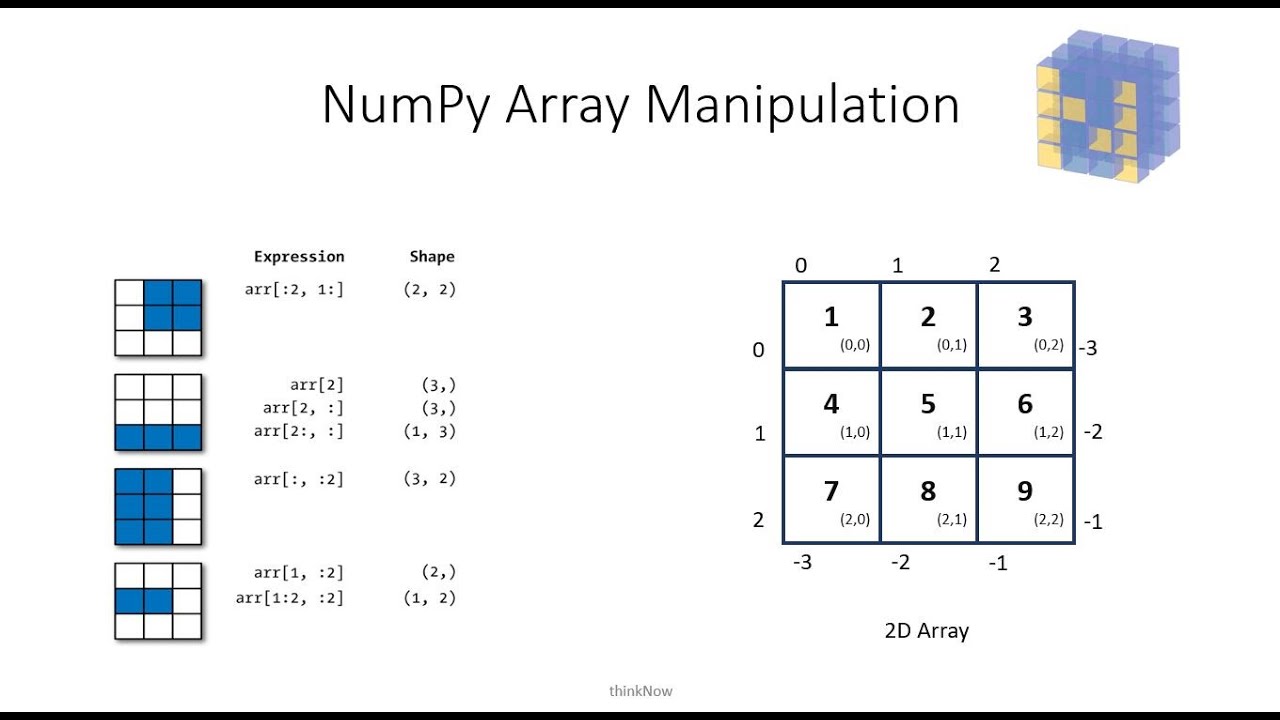
While 1D array indexing is identical to Python lists, 2D (and higher) indexing in NumPy is more powerful. You use a single set of square brackets with comma-separated indices: my_matrix[row, column].
This next video provides a comprehensive guide to basic and advanced indexing.
Complete Python NumPy Tutorial (Creating Arrays, Indexing, Math, Statistics, Reshaping)
Let's return to Keith Galli's tutorial for a deep dive into indexing, slicing, and modifying array elements.
Watch the following two segments: Basic Access (16:08 - 23:12): This covers accessing specific elements, rows, columns, and sub-sections of 2D and 3D arrays. It also shows how to change values. Advanced Indexing (50:10 - 58:01): This introduces the powerful concept of boolean masking, which allows you to select elements based on a condition (e.g., all values greater than 50).
Visualizing slicing can be tricky at first. The image below provides an excellent graphical representation of how different slicing syntaxes select different parts of a matrix.
6. Performing Operations on Arrays
The final piece of our learning outcome is to perform operations. This is where NumPy's convenience shines.
- Scalar Operations: You can perform an arithmetic operation between an array and a single number (a scalar). NumPy automatically applies the operation to every element. This is called broadcasting.
arr * 2multiplies every element inarrby 2. - Element-wise Operations: If you have two arrays of the same shape, you can use standard arithmetic operators (
+,-,*,/) to perform the operation on corresponding elements.
arr1 + arr2creates a new array where each element is the sum of the elements fromarr1andarr2at the same position.
This video gives a quick and clear demonstration of these operations.
Learn NumPy in 40 Minutes - Python NumPy Tutorial
This clip from Tech With Tim concisely shows how to perform element-wise and scalar arithmetic operations on NumPy arrays.
Watch from 20:20 to 22:44. Notice how simple the syntax is compared to writing loops with Python lists.
Conclusion
Great work! You've taken your first and most critical step into the world of numerical computing in Python. This foundation is what everything else in machine learning will be built upon.
Key Takeaways:
- NumPy
ndarray: The fundamental data structure for numerical work in Python, offering superior performance and functionality compared to standard lists. - Vectors and Matrices: In NumPy, these mathematical concepts are represented as 1D and 2D arrays, respectively.
- Creating Arrays: You can create arrays from lists (
np.array) or using helper functions likenp.zeros,np.ones, andnp.random. - Indexing and Slicing: You can access array elements using
array[row, col]syntax and select data based on conditions (boolean indexing). - Vectorized Operations: NumPy allows you to perform mathematical operations on entire arrays at once without writing explicit loops, leading to cleaner and much faster code.
In our next lesson, we will build directly on this foundation. Now that you know how to create and handle arrays, we will explore core linear algebra operations that are central to machine learning algorithms: computing and interpreting dot products, matrix multiplication, and transposes.