Hello! In our last two lessons, we've done the essential "thinking" part of building a React app. First, we broke down the UI into a component tree. Then, we planned how data would flow through that tree, establishing where our state should live.
Now, with our blueprint complete, it's time to prepare our workspace. Before we write a single line of component code, we need to decide how to organize our files and folders. A logical structure is the foundation of a clean, scalable, and maintainable application.
Your learning outcome for this lesson is to be able to define a logical folder and file structure for a scalable project.
We'll explore common patterns, from simple to advanced, and understand the trade-offs of each. By the end, you'll have a solid template that you can adapt for your own projects.
Why Folder Structure Matters
React is famously unopinionated about how you structure your project. While this offers great flexibility, it can also be daunting for newcomers. Without a plan, a project's src folder can quickly become a disorganized collection of files, making it hard to find code, understand relationships between files, and add new features.
A good folder structure helps with:
- Maintainability: When you know where to find things, fixing bugs and making updates is much faster.
- Scalability: A well-organized project is easier to grow without becoming a tangled mess.
- Collaboration: A consistent structure allows team members to navigate the codebase and contribute effectively.
Our focus will be entirely on the src folder, as this is where your application's source code lives. The other files and folders in a Vite project (like public, node_modules, and various config files) are standard and don't require restructuring.
Two Core Philosophies
Most React folder structures are based on one of two main philosophies, or a hybrid of both:
- Grouping by Type: You group similar files together. All components go in a
componentsfolder, all hooks in ahooksfolder, all styles in astylesfolder, and so on. This is easy to understand and works well for smaller projects. - Grouping by Feature: You group all files related to a single feature together. For example, everything related to user authentication (components, hooks, API calls) goes into an
authfolder. This is highly scalable and is preferred for larger applications.
Let's see how these philosophies are applied in practice by looking at structures of increasing complexity.
Level 1: The Simple, Type-Grouped Structure
For very small projects, like a simple to-do list, a basic structure grouping files by type is often sufficient.
src/
├── components/
│   ├── Button.jsx
│   ├── TodoItem.jsx
│   └── TodoList.jsx
├── hooks/
│   └── useTodos.js
├── App.jsx
├── index.css
└── main.jsx
In this setup, you have one folder for all your components and one for all your custom hooks. Any other files tend to live in the root of the src folder.
While simple, this approach has clear limitations. What about utility functions, images, or global state contexts? As the project grows beyond 10-15 components, the single components folder becomes crowded and difficult to navigate.
To get a better sense of this basic starting point, please watch the following video segment.
Junior vs Senior React Folder Structure - How To Organize React Projects
This video from Web Dev Simplified provides an excellent overview of three common folder structures. We'll start with the 'beginner' approach, which is very similar to what we just described.
Watch from 00:56 to 03:41. The presenter, Kyle, explains a simple structure and discusses its pros and cons for small projects.
Level 2: The Intermediate, Hybrid Structure
For most medium-sized applications, a more robust structure is needed. This approach still groups by type but introduces the concept of pages and more specific folders for different concerns. This is one of the most common and effective structures you'll see in the wild.
A typical intermediate structure looks like this:
src/
├── assets/         // Global images, fonts, etc.
├── components/     // REUSABLE, shared components (e.g., Button, Modal, Card)
├── context/        // Global React Context providers
├── hooks/          // REUSABLE, shared custom hooks
├── pages/          // Components that represent a whole page (e.g., HomePage, LoginPage)
├── utils/          // Utility functions (e.g., date formatters, validators)
└── ...
The key ideas here are:
pages/: Each file inside represents a distinct page or view in your application. These components compose smaller, reusable components to build the UI for that page.components/: This folder is now reserved for truly reusable components that can be used on any page, like a styledButtonor a genericCard.- Separation of Concerns: We now have dedicated folders for
assets,context,hooks, andutils, keeping the project tidy.
Let's dive deeper into this popular pattern. The following video introduces these standard folders and their purposes.
Folder structure in React - Complete Guide
In this video, Cosden Solutions walks through creating a solid foundational folder structure, explaining the role of each directory.
Watch from 01:28 to 11:12. This covers the Pages, Components (including the UI subfolder), Hooks, Services (which covers API, state, etc.), Providers, and Utils folders.
This intermediate structure is a fantastic default for many projects. However, it also has a potential weakness. As an application grows, more and more logic that was once specific to a single page might need to be shared across multiple pages. This can lead to the global components and hooks folders becoming bloated again, while the pages folders become thinner.
Level 3: The Advanced, Feature-Based Structure
For large, enterprise-scale applications, the most scalable approach is to group by feature. This method collocates all the code—components, hooks, services, types—related to a single piece of functionality.
src/
├── components/     // Truly generic UI primitives (Button, Input, Dropdown)
├── features/       // The core of your application logic
│   ├── authentication/
│   │   ├── components/
│   │   │   └── LoginForm.jsx
│   │   ├── hooks/
│   │   │   └── useAuth.js
│   │   └── index.js  // Public API for this feature
│   ├── products/
│   │   ├── components/
│   │   │   ├── ProductCard.jsx
│   │   │   └── ProductList.jsx
│   │   ├── services/
│   │   │   └── api.js
│   │   └── index.js
├── lib/            // Wrappers for 3rd-party libs (e.g., configured axios instance)
├── providers/      // App-wide context providers
├── pages/          // Very thin components that assemble features for a route
└── ...
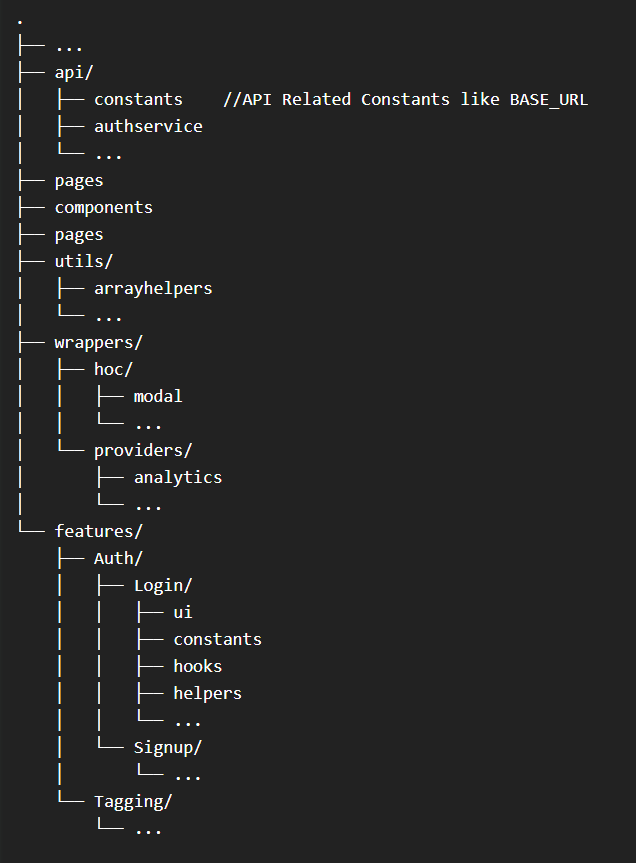
Key concepts in this advanced structure:
features/: This is the most important folder. Each subfolder represents a domain or feature of your app. It contains almost all the logic for that feature.- Collocation: All the code for a feature lives in one place. If you need to work on the "products" feature, you'll spend most of your time in the
src/features/products/directory. - Public API (
index.js): Each feature folder has anindex.jsfile (often called a "barrel file"). This file explicitly exports only the parts of the feature that should be accessible to the rest of the app. This creates a clear boundary and prevents other parts of the app from depending on the internal implementation details of a feature. components/: This folder becomes your design system or UI library, containing only highly reusable, generic components that are agnostic to any specific feature.
Let's continue with the Web Dev Simplified video, where Kyle explains this advanced, feature-based approach.
Junior vs Senior React Folder Structure - How To Organize React Projects
Now we'll look at the 'advanced' structure, which is built around features. This is the pattern you'll want to adopt for large and long-lasting projects.
Watch from 09:03 to 15:21. Pay close attention to the concept of the features folder and how it changes the role of other folders like pages.
To reinforce these concepts and explore them in more detail, the following article provides a comprehensive written guide that evolves from a single file to a full feature-based structure.
React Folder Structure in 5 Steps
This article by Robin Wieruch, a well-known React educator, breaks down the evolution of a React folder structure into five steps. It's an excellent resource for a deeper understanding.
Read the sections titled "From files to folders in React," "Technical Folders in React," "Feature Folders in React," and the bonus section "Page driven Project Structure." This will solidify the concepts from the video and provide more context.
A Practical Recommendation
So, which structure should you choose? As the resources emphasize, it depends on the project's scale. Don't over-engineer a small project with a complex feature-based structure.
For this course and for most of your future projects, I recommend starting with a hybrid intermediate/advanced structure. It provides excellent organization without being overly complex from the start.
Here is a solid, scalable starting point:
src/
├── assets/
│   └── // images, fonts, etc.
├── components/
│   └── ui/ // Generic, reusable UI components (Button, Card, Input)
├── features/
│   ├── auth/
│   │   └── // Components, hooks, etc. for authentication
│   └── // other features...
├── hooks/
│   └── // Globally reusable hooks (e.g., useLocalStorage)
├── lib/
│   └── // Setup for external libraries (e.g., axios.js)
├── pages/
│   ├── HomePage.jsx
│   ├── LoginPage.jsx
│   └── // Route components...
├── providers/
│   └── // App-wide context providers
├── utils/
│   └── // Helper functions (formatters, etc.)
├── App.jsx         // Main app component, routing setup
└── main.jsx        // Entry point of the application
This structure gives you the best of both worlds. You can organize by feature, but you also have clear top-level folders for shared, global concerns.
Conclusion
We've covered the critical task of organizing a React project. While there's no single "perfect" way, understanding the principles of grouping by type versus grouping by feature allows you to make an informed decision based on your project's needs.
Key Takeaways:
- React doesn't enforce a folder structure, so it's up to you to create one that is organized and scalable.
- Simple projects can start by grouping files by type (
components,hooks). - Medium-sized projects benefit from a hybrid approach that separates
pagesfrom reusablecomponentsand other shared concerns (utils,context). - Large-scale applications are best organized by grouping files by feature, which collocates all related code and improves modularity.
- Start with a sensible structure (like our recommended hybrid model) and don't be afraid to refactor as your project grows.
Next Up:
With our component plan, data flow strategy, and now our folder structure defined, we are finally ready to write some code! In the next lesson, we will implement the static UI of our application using components and props. We'll create our files and folders and bring our visual blueprint to life.