Hello! Welcome to the next step in your React journey.
In the last lesson, we focused on building static user interfaces. You learned how to break down a design into a component hierarchy and pass data down from parent to child using props. This is a powerful way to create structured, reusable UI, but as we noted, it's static—it doesn't respond to user input.
This lesson introduces the missing piece: state. We will explore the fundamental difference between props and state, which is a cornerstone concept in React. Our goal is to clearly explain the distinct roles of props (as external data) and state (as internal data), so you know when to use each.
1. Props: Data Passed from the Outside
Let's start with what you already know. Props (short for properties) are the way a parent component passes data and configuration down to its children.
Think of a React component as a JavaScript function. In this analogy, props are the arguments to that function.
// A regular JavaScript function
function greet(name) {
  return `Hello, ${name}!`;
}
greet('Alice'); // 'Alice' is the argument

// A React component
function Greeting({ name }) {
  return <p>Hello, {name}!</p>;
}
<Greeting name="Alice" /> // 'name' is a prop
A crucial rule in React is that a component must never change its own props. They are read-only. This principle ensures a predictable, one-way data flow, where data always flows down the component tree.
Attempting to change a prop directly will result in an error and goes against the design of React.
To get a deeper understanding of this, let's look at an article by Kent C. Dodds, a well-known figure in the React community.
React Fundamentals: Props vs State - Kent C. Dodds
This article, 'React Fundamentals: Props vs State', clearly explains the role of props and demonstrates why they are immutable.
Please read the section titled 'Props'. Pay close attention to the function argument analogy and the example where he tries to modify a prop, which results in a TypeError.
So, if props can't be changed by the component, how do we handle data that needs to change, like the text a user types into an input field or a counter that increments? This is where state comes in.
2. State: A Component's Internal Memory
If props are the arguments passed into a component, state is the data managed within a component. It's like a component's private memory.
Key characteristics of state:
- Internal: State is declared and managed entirely inside the component. It's not accessible to parent components directly.
- Mutable: Unlike props, a component can update its own state.
- Triggers Re-renders: This is the most important aspect. When you update a component's state, React automatically re-renders that component (and its children) to reflect the new data in the UI.
This video from Web Dev Simplified offers a concise and clear explanation of these concepts.
This video, 'React State Vs Props', effectively uses a counter example to illustrate the difference between passing an initial value (props) and managing the current value (state).
Watch from 00:42 to 02:32. Focus on how props are used for the 'initial count' and how state is used for the 'current, updatable count'.
The video you just watched highlighted the core idea: props are for external configuration, while state is for internal, interactive data.
3. A Direct Comparison: Props vs. State
Let's consolidate the differences into a clear comparison. Given your coding background, the analogy of function parameters versus local variables is especially fitting.
ReactJS Tutorial 22 : State In React, Props V/S State In React
The video 'Props V/S State In React' by Ashutosh Pawar reinforces this distinction with a helpful analogy.
Watch from 01:26 to 03:35. The speaker draws a direct parallel between props and function parameters, and state and local variables declared within a function's body. This should resonate with your programming experience.
Here is a summary table of the key differences:
| Characteristic | Props | State |
|---|---|---|
| Data Flow | Passed from parent to child (top-down). | Managed within the component (internal). |
| Mutability | Immutable (read-only by the component). | Mutable (can be updated by the component). |
| Source | External data passed into the component. | Internal data owned by the component. |
| Purpose | Configure and customize child components. | Manage data that changes over time due to user interaction. |
| Analogy | Function arguments. | Variables declared inside a function body. |
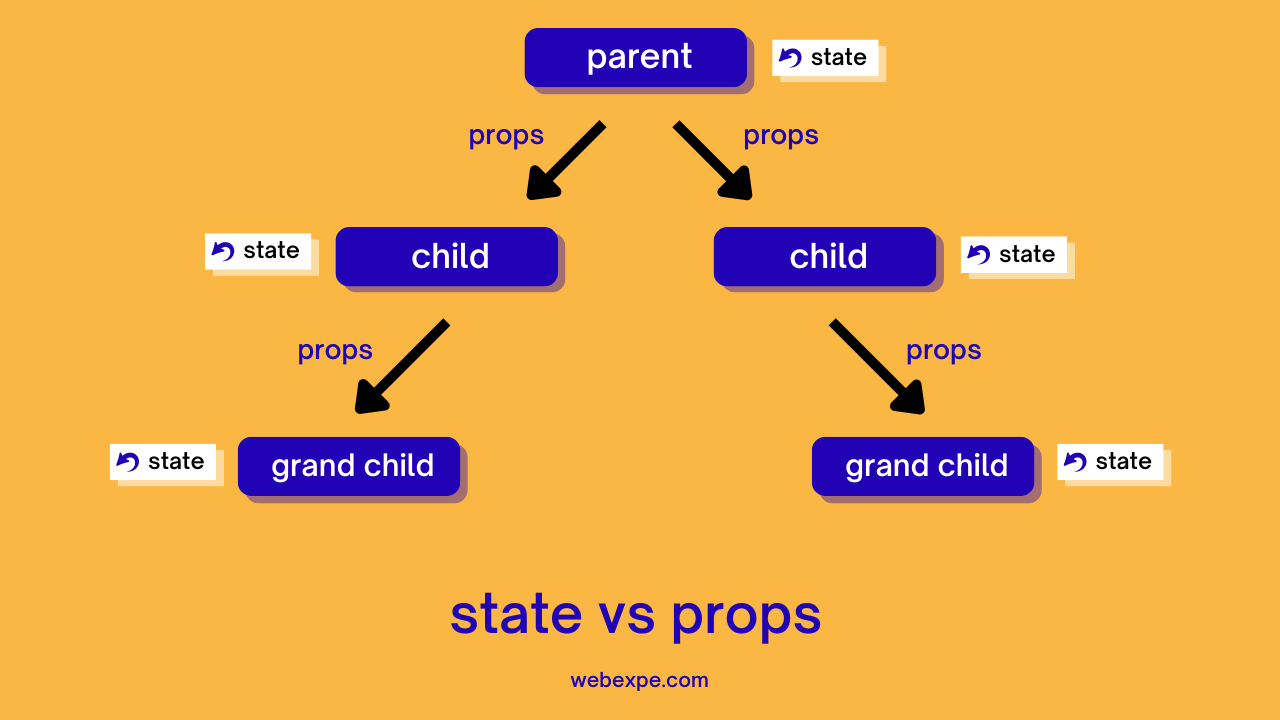
The following diagram visually captures this relationship. Props flow down from parent to child, while state is encapsulated within each component.
4. How to Decide: Is It Props or State?
When building a component, you'll often need to decide whether a piece of data should be managed as state. The official React documentation provides an excellent mental model for this. Ask yourself these three questions about any piece of data:
- Does it remain unchanged over time? If so, it isn't state.
- Is it passed in from a parent via props? If so, it isn't state.
- Can you compute it based on existing state or props? If so, it definitely isn't state!
Data that doesn't meet any of these criteria is likely state.
Let's read the section from the "Thinking in React" guide that explains this process.
The 'Thinking in React' guide provides a clear framework for identifying what data truly needs to be state.
Find the section 'Step 3: Find the minimal but complete representation of UI state'. Read through the list of questions and how they are applied to the example application. Pay special attention to the 'Props vs State' deep dive box, which provides a concise summary.
The principle of not storing computable data in state is crucial for avoiding bugs and keeping your components efficient. For example, if you have an array of items in state, you don't need a separate state variable to store the count of items; you can always compute it from array.length.
5. Common Pattern: Initializing State from Props
Props and state are different, but they often work together. A common pattern is for a parent component to pass a prop to a child, and the child then uses that prop as the initial value for its own internal state.
This is useful for components like a form input that needs a default value but must then manage its own changes.
Let's return to Kent C. Dodds' article to see a practical code example of this pattern.
React Fundamentals: Props vs State - Kent C. Dodds
This final reading shows how props and state can be combined to handle a common use case: providing an initial value that can then be updated by the user.
Read the section titled 'State'. Note how the component first tries to solve the problem with just props and fails. Then, see how React.useState is introduced to manage the changing input value. Finally, focus on how the initialN2 prop is used to set the starting value of the state.
The convention of naming the prop initialValue or defaultValue is a good practice, as it communicates that the prop only sets the starting value, and subsequent changes to the prop will not affect the component's state.
Conclusion
You've now covered one of the most fundamental concepts in React. Understanding the division of responsibility between props and state is key to building robust, interactive applications.
Key Takeaways:
- Props are for passing data down from a parent component. They are external and immutable (read-only) from the child's perspective.
- State is for managing a component's own data that changes over time. It is internal and mutable, and updating it triggers a re-render.
- To decide if something should be state, ask if it changes over time and cannot be computed from other props or state.
- Props and state work together, often with a prop providing the initial value for a piece of state.
Next Up:
We've focused on the "what" and "why" of state. In the next lesson, we'll dive into the "how." You will learn the syntax and mechanics of the useState hook to initialize and update state in your functional components, finally making your UIs interactive.