Hello! Welcome back to our module on Power Apps Component Framework (PCF) Development.
In the last lesson, we successfully packaged and deployed a PCF component, binding it to both fields and datasets in model-driven and canvas apps. This gave our components a way to display data provided by the host application.
Today, we will significantly expand your component's capabilities. The goal for this lesson is to learn how to use the ComponentFramework.WebApi to perform Create, Read, Update, and Delete (CRUD) operations against Dataverse data from within a component. This is a critical skill for building powerful, self-sufficient components that can interact with the database directly, a common requirement in professional Power Platform development and a key topic for the PL-400 exam.
Given your extensive experience with the XRM SDK and C# plugins, you're already an expert in Dataverse CRUD operations. This lesson will focus on translating that knowledge to the client-side PCF context, using its specific API.
1. Enabling the Web API in Your Component
Before you can make a single API call, you must explicitly grant your component permission to do so. This is a mandatory security step. You enable this capability in the ControlManifest.Input.xml file.
You need to uncomment or add the <uses-feature> node for the WebAPI within the <control> element.
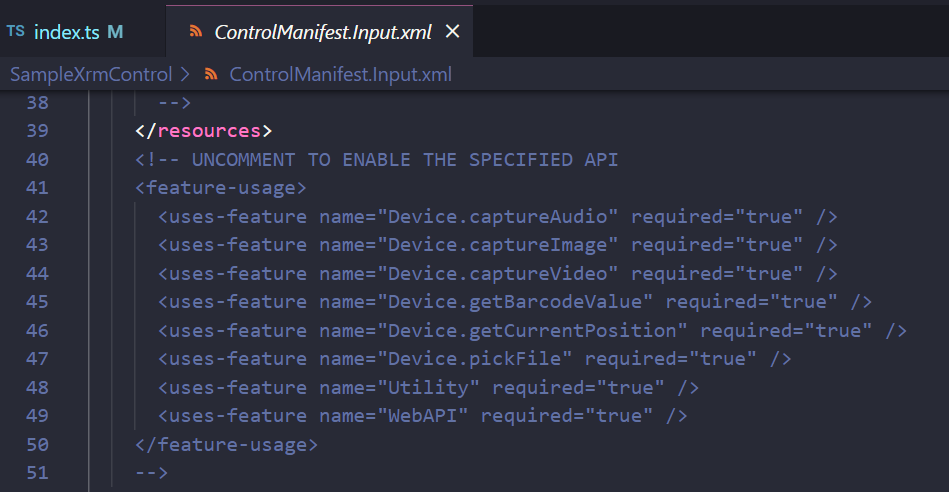
The line to add is:
<uses-feature name="WebAPI" required="true" />
Forgetting this step will result in a runtime error stating that the feature is not enabled in the manifest when your component tries to call the Web API.
2. The ComponentFramework.WebApi Object
Inside your PCF component's index.ts file, you access the Web API functionality through context.webAPI. This object provides a set of methods that are essentially a convenient, promise-based wrapper around the Dataverse Web API.
For context, let's briefly look at what the raw Dataverse Web API looks like.
PL-400 Exam Prep: Performing Common Operations with the Microsoft Dataverse API
This video from CRM Chap provides a quick overview of the underlying Dataverse Web API using a tool like Postman. You don't need to replicate this, but it's useful to see the raw HTTP requests that ComponentFramework.WebApi handles for you.
Watch from 00:52 to 07:05. Notice how raw REST operations are performed: GET requests with OData filters ($select, $top) to retrieve data. POST requests with a JSON body to create records. PATCH requests to update records. DELETE requests to remove records. The ComponentFramework.WebApi abstracts all of this boilerplate (authentication, headers, base URL) into simple TypeScript methods.
Think of context.webAPI as the PCF equivalent of the IOrganizationService interface you use in C# plugins or Xrm.WebApi you use in form scripts. It's the primary gateway for data operations within the component framework. All methods are asynchronous and return a Promise, making them ideal for use with async/await syntax, which will feel natural given your C# background.
3. Implementing CRUD Operations
Now, let's walk through the practical implementation of each CRUD operation. The following article provides excellent, concise examples for each method.
Building a PCF Control that calls Context WebApi
This article by Carl de Souza, 'Building a PCF Control that calls Context WebApi', is a fantastic hands-on guide. We will use its code snippets as the foundation for our examples.
Skim through this entire article. Pay close attention to the code blocks for createRecord, deleteRecord, retrieveMultipleRecords, retrieveRecord, and updateRecord. We will break these down one by one.
Create: createRecord
To create a new record, you use the createRecord method. It takes the logical name of the table and a JSON object representing the record's data.
// Example: Creating a new Account record
private async createAccountRecord(): Promise<void> {
    const accountData = {
        "name": "New Account from PCF",
        "telephone1": "555-0100"
    };

    try {
        const result = await this.context.webAPI.createRecord("account", accountData);
        console.log(`Account created with ID: ${result.id}`);
        // You can now use the new record's ID (result.id) and logical name (result.entityType)
    } catch (error: any) {
        console.error(`Error creating account: ${error.message}`);
    }
}
This is analogous to using service.Create(new Entity("account", ...)) in a plugin, but the data is provided as a simple key-value object.
Retrieve: retrieveRecord and retrieveMultipleRecords
To retrieve a single record, you use retrieveRecord. You must provide the table's logical name, the record's GUID, and optionally, OData query options.
// Example: Retrieving a specific Account
private async getAccountName(accountId: string): Promise<string | null> {
    try {
        // Using OData $select to retrieve only the 'name' column
        const result = await this.context.webAPI.retrieveRecord("account", accountId, "?$select=name");
        return result.name; // Access properties directly
    } catch (error: any) {
        console.error(`Error retrieving account: ${error.message}`);
        return null;
    }
}
To retrieve multiple records, you use retrieveMultipleRecords. This is where your knowledge of FetchXML is transferable. Instead of XML, you use OData query strings to define your filters, selected columns, and ordering.
// Example: Retrieving top 5 active accounts with specific columns
private async getActiveAccounts(): Promise<any[]> {
    const odataQuery = "?$select=name,accountnumber&$filter=statecode eq 0&$top=5";

    try {
        const results = await this.context.webAPI.retrieveMultipleRecords("account", odataQuery);

        console.log(`Retrieved ${results.entities.length} accounts.`);

        for (const account of results.entities) {
            // Access data like: account.name, account.accountnumber
            console.log(`- ${account.name} (${account.accountnumber})`);
        }
        return results.entities;
    } catch (error: any) {
        console.error(`Error retrieving accounts: ${error.message}`);
        return [];
    }
}
Test your understanding!
You need to retrieve all "Contact" records where the lastname is "Smith" and the emailaddress1 is not null. You only need the firstname and emailaddress1 columns. What would the OData query string look like for the retrieveMultipleRecords method?
Show answer
The query string would be: "?$select=firstname,emailaddress1&$filter=lastname eq 'Smith' and emailaddress1 ne null"
Update: updateRecord
To update an existing record, use updateRecord. You provide the table's logical name, the record's GUID, and a JSON object containing only the fields you want to change.
// Example: Updating an Account's phone number
private async updateAccountPhone(accountId: string, newPhone: string): Promise<void> {
    const dataToUpdate = {
        "telephone1": newPhone
    };

    try {
        const result = await this.context.webAPI.updateRecord("account", accountId, dataToUpdate);
        console.log(`Account ${result.id} updated successfully.`);
    } catch (error: any) {
        console.error(`Error updating account: ${error.message}`);
    }
}
This is a partial update (an HTTP PATCH), which is efficient as you only send the data that has changed.
Delete: deleteRecord
Finally, to delete a record, use deleteRecord, providing the table's logical name and the record's GUID.
// Example: Deleting an Account
private async deleteAccount(accountId: string): Promise<void> {
    try {
        const result = await this.context.webAPI.deleteRecord("account", accountId);
        console.log(`Account ${result.id} deleted successfully.`);
    } catch (error: any) {
        console.error(`Error deleting account: ${error.message}`);
    }
}
4. Best Practices and Performance
While the Web API is powerful, it's not without constraints. As a senior developer, you know the importance of writing performant and robust code that respects platform limits.
The official Microsoft documentation on best practices has a crucial point on this topic.
Best practices for code components
Please read this short but important section from the official Microsoft documentation on PCF best practices.
Read the section titled 'Limit size and frequency of calls to the WebApi'. It contains key advice for building enterprise-grade components.
As the documentation states, every call to context.webAPI consumes API entitlements and is subject to service protection limits. To build scalable components:
- Don't be chatty: Avoid making multiple API calls where one would suffice. For example, use
$expandin your OData query to retrieve related data instead of making a second call. - Be selective: Always use
$selectto retrieve only the columns your component needs. Sending less data over the wire improves performance. - Handle errors gracefully: Always wrap your API calls in
try...catchblocks to manage potential network errors or permissions issues, providing clear feedback to the user.
Test your understanding!
You are building a PCF component that displays details for a 'Project' record. The component also needs to show a list of related 'Project Task' records. Which of the following is the most performant approach?
- Use
retrieveRecordto get the Project. Then, useretrieveMultipleRecordsin a separate call to get the related Project Tasks. - Use a single
retrieveRecordcall for the Project and include an$expandOData option to retrieve the related Project Tasks in the same request. - Use
retrieveMultipleRecordsfor the Project and anotherretrieveMultipleRecordsfor the tasks.
Show answer
Option 2 is the most performant. Using $expand allows you to fetch the parent record and its related child records in a single API call, reducing network round-trips and staying within API limits more effectively. For example: ?$select=proj_name&$expand=proj_project_tasks($select=proj_taskname,proj_duedate).
Conclusion
Congratulations! You have now unlocked the full data-handling potential of PCF components. You can build components that are no longer just passive displays of information but are active participants in your business processes.
Key Takeaways:
- You must enable the
WebAPIfeature in theControlManifest.Input.xml. - The
context.webAPIobject provides asynchronous, promise-based methods for data operations:createRecord,retrieveRecord,retrieveMultipleRecords,updateRecord, anddeleteRecord. - OData query strings are used to filter, select, and sort data in retrieve calls.
- Writing performant components means minimizing API calls and data payload size, and implementing robust error handling.
What's Next?
With the core logic and data-handling capabilities covered, our next step is to focus on the user interface. In the next lesson, we will dive into how to style PCF components using CSS and responsive design principles, ensuring your components are not only functional but also look professional on any device.