Hello! Welcome back.
In our last lesson, we focused on the high-level design of Model-driven Apps, covering modern best practices for structuring app modules and creating intuitive navigation with sitemaps. We established the architectural foundation of a user-friendly application.
Now, we're going to bring that application to life with dynamic, client-side logic. Today's learning outcome is to evaluate the trade-offs between business rules and JavaScript for implementing client-side logic.
Given your extensive background in Dynamics 365 development, you are already well-versed in writing JavaScript for form events. Therefore, this lesson won't focus on JavaScript syntax. Instead, we'll concentrate on the strategic decision-making process that is central to modern Power Platform development and crucial for the PL-400 exam: knowing when to use a declarative, low-code tool like Business Rules versus reaching for custom code.
1. The "Low-Code First" Principle
The core philosophy of the Power Platform is to use low-code tools whenever possible and resort to custom code only when necessary. This approach empowers a wider range of builders and often leads to solutions that are easier to maintain. For client-side logic in Model-driven Apps, this means you should always evaluate Business Rules first.
Exam PL-400 Revision Notes: Implementing Client-Side ...
The article 'Exam PL-400 Revision Notes: Implementing Client-Side ...' from CRM Chap provides an excellent overview of this principle. It sets the stage for our evaluation by explaining why you should always consider Business Rules before writing code.
Read the section titled 'Form-Side Scripting: Why and When We Need It'. Focus on the two key reasons for referencing Business Rules: they use the same underlying mechanisms as JavaScript, and you should always exhaust their capabilities first.
2. Business Rules: The Declarative Tool
Business Rules provide a simple, graphical interface for implementing common form logic without writing a single line of JavaScript.
What Can Business Rules Do?
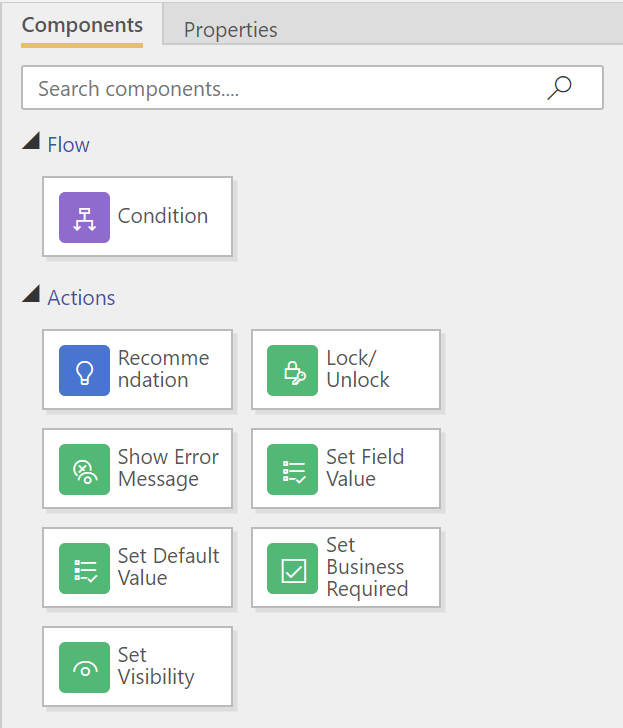
Business rules are excellent for logic that is contained within a single record's form. Their main capabilities include:
- Setting field values (statically or based on other fields).
- Clearing field values.
- Setting field requirement levels (Business Required, Not Required).
- Showing or hiding fields.
- Enabling or disabling fields.
- Validating data and showing error messages.
The Limitations of Business Rules
While powerful, Business Rules have a well-defined scope. You must turn to JavaScript when you encounter these limitations:
- No Interaction with Related Records: They cannot fetch data from other tables (e.g., you can't check a value on a related parent Account record).
- No UI Manipulation Beyond Fields: They cannot show/hide or interact with form components like tabs, sections, subgrids, or the command bar.
- No Complex Calculations: They are limited to simple conditional logic and cannot perform complex string manipulations, date calculations, or use regular expressions.
- No
OnSaveEvent Control: They cannot be used to prevent a record from being saved based on complex, multi-field validation (thepreventDefaultfunctionality in JavaScript). - No External Integrations: They cannot call external APIs or the Dataverse Web API.
This is where your JavaScript expertise becomes essential.
3. JavaScript: For Advanced Scenarios and Integrations
When a requirement exceeds the capabilities of a Business Rule, JavaScript is the designated tool. Your existing skills in C# plugin development give you a solid understanding of server-side logic; client-side JavaScript is the parallel for immediate user-facing interactions.
Let's walk through a practical example that highlights a scenario where JavaScript is necessary. The goal is to change the labels of fields on a form—a simple UI tweak that Business Rules cannot perform.
This process involves three key steps:
- Writing the JavaScript code and creating a Web Resource in your solution.
- Associating the Web Resource with a form and configuring an event handler (e.g.,
OnLoad). - Debugging the script using browser developer tools.
The following video provides a complete, hands-on demonstration of this entire lifecycle.
PL-400 Exam Prep: Creating a Basic JavaScript Form Function for a Model Driven Power App Form
This video from CRM Chap, 'PL-400 Exam Prep: Creating a Basic JavaScript Form Function', is a perfect practical guide. It demonstrates a real-world use case for JavaScript and covers the essential development and debugging steps.
Please watch the video from 0:39 to the end (around 15:46). Pay close attention to the following stages: (0:39 - 1:46): The justification for using JavaScript over a Business Rule for this specific requirement (renaming field labels). (1:46 - 7:13): The process of creating the JS file and adding it as a Web Resource within a Power Apps solution. (7:13 - 9:48): How to attach the library to a form and configure the OnLoad event handler, ensuring you pass the execution context. (9:48 - 13:54): This is a critical segment on debugging. Observe how the browser's developer tools are used to set breakpoints, inspect variables like the formContext, and diagnose a null reference error. This is a core developer skill. (13:54 - 15:46): The final step of correcting the code, updating the web resource, and verifying the fix.
This walkthrough solidifies the development pattern: identify the limitation, write targeted code, deploy it as a web resource, hook it into an event, and use professional tools to debug it.
4. Execution Order: What Happens When Both Are Used?
A crucial aspect of evaluating the trade-off is understanding how Business Rules and JavaScript interact, especially when both are configured on the same field or form. The execution order is not always intuitive.
Business Rules vs Client Script
The article 'Business Rules vs Client Script' provides a clear, practical explanation of this interaction, including a visual demonstration.
Read the section 'What runs first? Business rule or JavaScript?'. Focus on these key points: JavaScript attached to form events (onLoad, onSave, onChange) executes first because it is synchronous client-side code. A field change made by a Business Rule will not trigger a JavaScript onChange event handler. The GIF visually demonstrates this behavior, which we'll look at next.
Let's observe this behavior in action.

This interaction has significant implications: if you need a guaranteed sequence of operations where one action must trigger another, you cannot rely on a Business Rule to trigger a JavaScript onChange handler. In such cases, you would need to orchestrate the entire logical flow within a single JavaScript function.
5. Summary of Trade-offs
Choosing between Business Rules and JavaScript is a decision based on complexity, maintainability, and capability.
| Feature | Business Rules | JavaScript |
|---|---|---|
| Use Case | Simple, single-record form logic. | Complex logic, UI manipulation, data integration. |
| Complexity | Low. Declarative, no-code interface. | High. Requires coding and debugging skills. |
| Maintainability | Easy. Can be updated by admins/analysts. | Moderate. Requires a developer for changes. |
| Capabilities | Limited. Restricted to form field manipulation. | Extensive. Access to Xrm.WebApi, UI elements, etc. |
| Execution | Asynchronous potential; changes don't fire JS onChange. |
Synchronous on events; fires first. |
| Debugging | Difficult. Mostly trial and error. | Robust. Full browser developer tools available. |
| Guiding Principle | Use whenever possible. | Use only when necessary. |
Test your understanding!
You are tasked with implementing two new pieces of logic on the Account form:
- When an account's 'Industry' is set to "Finance," the 'Credit Limit' field should become visible and required.
- When an account is saved, the system must check the
Do Not Bulk Emailfield on all of its child Contact records. If any child contact is markedDo Not Bulk Email, a confirmation dialog must be shown to the user before the Account save proceeds.
Which tool (Business Rule or JavaScript) would you use for each requirement, and why?
Show answer
-
Requirement 1 (Credit Limit visibility): Use a Business Rule. This is a classic use case for a business rule as it involves simple conditional logic (checking a field's value) to change the properties (visibility and requirement level) of another field on the same form. It's fast to implement and easy to maintain without code.
-
Requirement 2 (Check child contacts): Use JavaScript. This is impossible with a Business Rule. It requires:
- Hooking into the form's
OnSaveevent. - Using
Xrm.WebApito query and retrieve data from related child Contact records. - Implementing logic to iterate through the results.
- Using
Xrm.Navigation.openConfirmDialogto display a confirmation prompt and potentially preventing the save event (eventArgs.preventDefault()).
- Hooking into the form's
Conclusion
You have successfully learned how to evaluate the critical trade-offs between Business Rules and JavaScript for implementing client-side logic. This strategic thinking is a hallmark of an advanced Power Platform developer.
Key Takeaways:
- Low-Code First: Always attempt to solve a problem with Business Rules before writing JavaScript.
- Know the Boundaries: Use Business Rules for form-level logic and JavaScript for anything more complex, especially data integrations (
Xrm.WebApi), advanced UI manipulation, and interacting with related records. - Execution Matters: Remember that JavaScript event handlers execute synchronously and before Business Rules, and that changes from Business Rules do not trigger JavaScript
onChangeevents. - Debugging is Key: Your developer skills are most valuable when debugging complex interactions, a capability that Business Rules lack.
Up Next:
We've established that one of the most compelling reasons to use JavaScript is to interact with data beyond the current form. In our next lesson, we will do a deep dive into that exact topic: Use Xrm.WebApi for client-side CRUD operations in Model-driven App forms.