Hello! Welcome to the next lesson in our journey toward the PL-400 certification.
In our previous session, we established the strategic reasons for choosing JavaScript over Business Rules, particularly when you need to perform complex data operations that go beyond the scope of a single form. We concluded that one of the most powerful uses for client-side code is interacting directly with the Dataverse database.
Today, we will dive deep into that exact capability. Our goal is to learn how to use Xrm.WebApi for client-side CRUD (Create, Read, Update, Delete) operations in Model-driven App forms. Given your background in JavaScript and server-side development, we will quickly move past the basics and focus on modern, asynchronous patterns and professional best practices essential for building robust and performant applications.
1. Introduction to Xrm.WebApi
Xrm.WebApi is the modern, supported client-side API for interacting with Dataverse data. It provides a streamlined interface that aligns with the standard Web API, but is accessed through the Xrm object model within a Model-driven App. This API is the designated replacement for older, now-deprecated methods.
All Xrm.WebApi methods are asynchronous, meaning they don't block the user interface while waiting for the server to respond. They return a JavaScript Promise object, which represents the eventual completion (or failure) of the operation.
Let's visualize where Xrm.WebApi fits within the overall client API object model.

2. The Core CRUD Operations
Xrm.WebApi provides five fundamental methods for data manipulation. We will review the syntax for each, but the most critical part is understanding how to handle the Promise they return.
Dynamics 365 Xrm.WebApi CRUD Operations Samples and Tips
The article 'Dynamics 365 Xrm.WebApi CRUD Operations Samples and Tips' from Dynamics Services Group provides a concise and practical set of code examples for each core operation. It will serve as our primary reference for this section.
Read the sections titled '1 — Quick overview' through '6 — Delete a record'. As you read, focus on the parameters required for each function (entityLogicalName, id, data, options) and the basic structure of the .then() callback for handling success and failure.
Let's summarize the key methods you just reviewed:
- Create:
Xrm.WebApi.createRecord(entityLogicalName, data)- The
dataobject is a simple JavaScript object where keys are the logical names of the columns (e.g.,{ name: "New Company", telephone1: "555-1234" }).
- The
- Retrieve (Single):
Xrm.WebApi.retrieveRecord(entityLogicalName, id, options)- The
optionsstring allows you to use OData query options. The most important is$selectto specify which columns you need (e.g.,"?$select=name,emailaddress1"). This is crucial for performance, as it minimizes the amount of data transferred from the server.
- The
- Retrieve (Multiple):
Xrm.WebApi.retrieveMultipleRecords(entityLogicalName, options)- Similar to retrieving a single record, but
optionscan also include$filter,$orderby, and$top. The result object contains anentitiesarray.
- Similar to retrieving a single record, but
- Update:
Xrm.WebApi.updateRecord(entityLogicalName, id, data)- This method uses
PATCHsemantics. Thedataobject should only include the columns you want to change.
- This method uses
- Delete:
Xrm.WebApi.deleteRecord(entityLogicalName, id)- A straightforward operation to delete a record by its GUID.
3. Mastering Asynchronous Operations with async/await
While the .then() syntax works, it can lead to deeply nested and hard-to-read code, often called the "pyramid of doom," especially when you need to perform sequential operations. Since you're proficient with modern JavaScript, you know there's a better way: async/await.
async/await is syntactic sugar built on top of Promises. It lets you write asynchronous code that looks and behaves like synchronous code, making it far more readable and maintainable.
Let's see how this modernizes the code samples.
Dynamics 365 Xrm.WebApi CRUD Operations Samples and Tips
The same article we just looked at also contains an excellent section on these modern patterns. Let's focus on that now.
Read section '8 — Better patterns: Promises, async/await, sequencing & parallel calls'. Pay close attention to: The async function createAndThenRetrieve() example, noting how await pauses the function's execution until the Promise is resolved. The Promise.all example, which is a powerful pattern for executing multiple independent API calls concurrently to improve performance.
Here is a practical comparison.
Legacy .then() style:
function createAndRetrieveWithThen(formContext) {
  const accountData = { name: "New Co via .then()" };
  // 1. Create the account
  Xrm.WebApi.createRecord("account", accountData).then(
    function (result) {
      const newAccountId = result.id;
      // 2. Retrieve the account after creation
      Xrm.WebApi.retrieveRecord("account", newAccountId, "?$select=name").then(
        function (retrievedAccount) {
          formContext.ui.setFormNotification(`SUCCESS: Created and retrieved ${retrievedAccount.name}`, "INFO", "msg1");
        },
        function (error) {
          console.error(error.message);
        }
      );
    },
    function (error) {
      console.error(error.message);
    }
  );
}
Modern async/await style:
// Function must be declared as 'async'
async function createAndRetrieveWithAsync(formContext) {
  const accountData = { name: "New Co via async/await" };
  try {
    // 1. Create the account and 'await' the result
    const result = await Xrm.WebApi.createRecord("account", accountData);

    // Code here will not run until createRecord is complete
    const newAccountId = result.id;

    // 2. Retrieve the account and 'await' the result
    const retrievedAccount = await Xrm.WebApi.retrieveRecord("account", newAccountId, "?$select=name");

    formContext.ui.setFormNotification(`SUCCESS: Created and retrieved ${retrievedAccount.name}`, "INFO", "msg2");
  } catch (error) {
    // A single catch block handles errors from any 'await'ed promise
    console.error(error.message);
    formContext.ui.setFormNotification(`ERROR: ${error.message}`, "ERROR", "msg3");
  }
}
The async/await version is cleaner, more readable, and its error handling is simpler. This is the standard you should aim for in professional Power Platform development.
Test your understanding!
You need to retrieve an Account record and its primary Contact in a single function. The two retrieve operations are independent of each other. Which approach would be more performant and why: two sequential await calls or a single await Promise.all()?
Show answer
Using await Promise.all() would be more performant.
- Sequential
await: The secondretrieveRecordcall would only start after the first one has fully completed. Promise.all(): BothretrieveRecordcalls are initiated at the same time, running in parallel. Theawaitthen waits for both to complete. The total wait time is determined by the longer of the two requests, not the sum of both, leading to faster execution.
4. A Practical Tool: CRM REST Builder
Manually writing complex OData queries ($filter, $expand, etc.) can be tedious and error-prone. The CRM REST Builder is a popular XrmToolBox tool that can generate the required code for you.
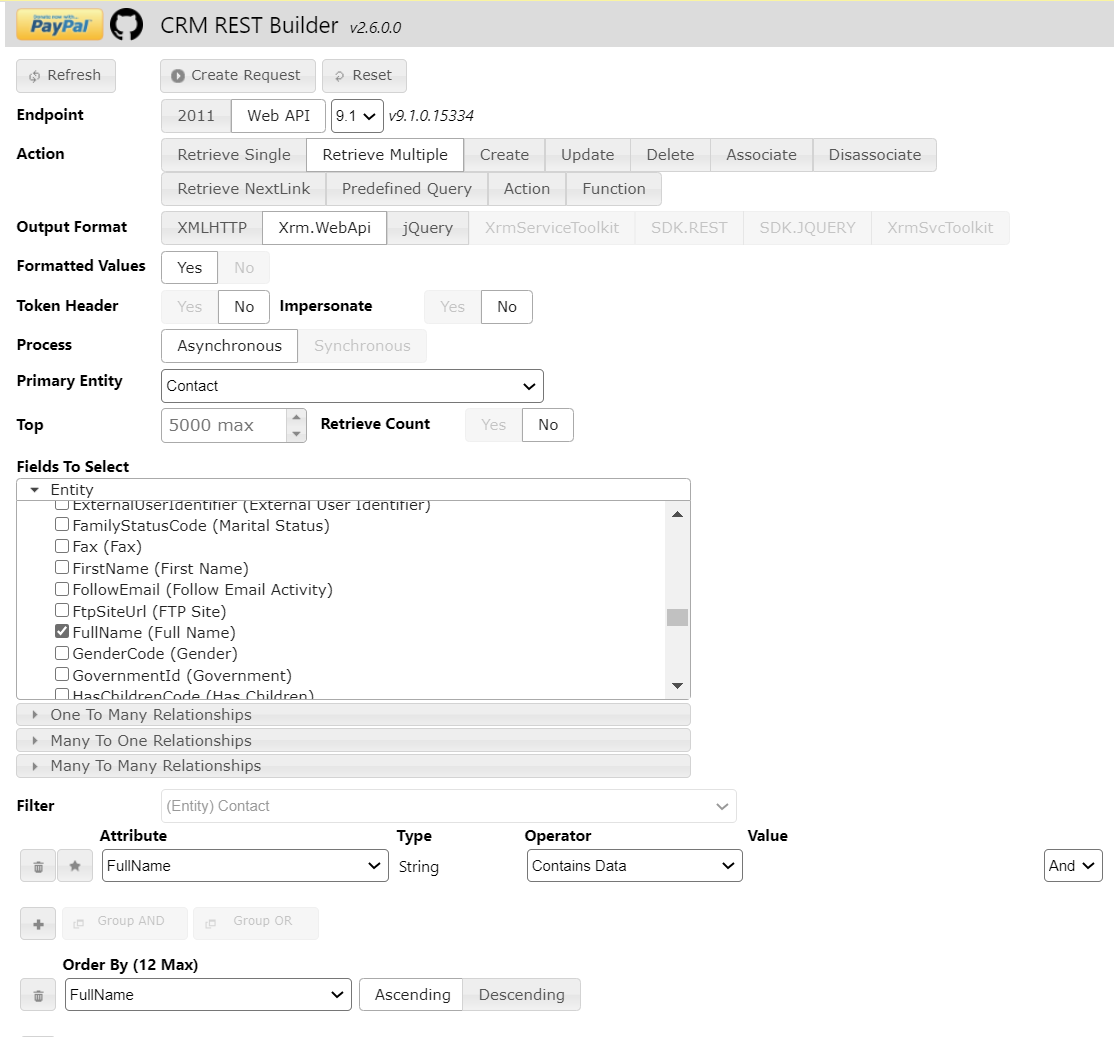
Using this tool, you can visually construct your query and copy the generated, syntactically correct code directly into your web resource. It's a must-have for any serious Dynamics 365 developer.
5. Professionalizing Your Code with TypeScript
For enterprise-grade projects, you'll want to move from plain JavaScript to TypeScript. Your CS degree and C# background make you a prime candidate for adopting this. TypeScript provides static typing, which catches errors during development rather than at runtime, and enables better tooling and code autocompletion.
A common best practice when using TypeScript is to create reusable helper functions that encapsulate your Xrm.WebApi calls. This promotes a clean, modular, and maintainable codebase.
How to call Xrm.WebApi using TypeScript
The article 'How to call Xrm.WebApi using TypeScript' from the Dynamics Community provides a fantastic, real-world example of this professional pattern. It walks through creating a reusable helper function and then using it in a form script.
Read the sections titled 'Helper' and 'OnLoad'. Don't worry about the project setup steps for now (we'll cover that in detail in the next lesson). Instead, focus on: The structure of the loadRecords helper function: Notice how it wraps retrieveMultipleRecords inside a new Promise to standardize the response. How the onLoad function calls the helper: See how it uses await helper.loadRecords(...) to cleanly get the data it needs, separating the data access logic from the business logic.
This pattern—separating your data access layer (the helper functions) from your presentation logic (the onLoad function)—is a cornerstone of professional software development and directly applies to Power Platform client-side scripting.
6. Summary of Best Practices and Error Handling
To ensure your client-side code is robust and performant, always keep these best practices in mind:
- Always Handle Errors: Use
try...catchblocks withasync/awaitto gracefully handle API failures. Inform the user or log the error as appropriate. - Minimize Data Transfer: Always use the
$selectOData query option to retrieve only the columns you need. Avoid retrieving all columns. - Filter on the Server: Use the
$filteroption to let the server do the work of finding the right records. Don't retrieve a large collection and filter it on the client. - Be Aware of Security: All
Xrm.WebApirequests are executed in the security context of the current user. The operation will fail if the user lacks the necessary privileges. - Handle Paging: If you expect
retrieveMultipleRecordsto return more than 5,000 records, you must implement logic to check for anextLinkin the result and call the API again to fetch the next page.
Conclusion
Congratulations! You've now covered the essentials of using Xrm.WebApi for client-side data operations, moving from basic syntax to the advanced, professional patterns expected of a senior developer.
Key Takeaways:
Xrm.WebApiis the modern, asynchronous API for client-side CRUD operations in Dataverse.async/awaitis the preferred syntax for handling Promises, leading to cleaner and more maintainable code than.then()chains.- Performance is critical: always use
$selectand server-side filtering to minimize data payloads. - Tools like CRM REST Builder can significantly accelerate development and reduce errors.
- For professional development, adopt TypeScript and use helper functions to create a modular and reusable data access layer.
Up Next:
We've seen the what and the why of using TypeScript for client-side code. In the next lesson, we will focus on the how: Develop and bundle client-side logic using TypeScript for improved type safety and maintainability. We will dive into the practicalities of setting up a TypeScript project, transpiling your code into JavaScript, and bundling it for deployment.