Hello! Welcome back to our advanced Power Platform developer course.
In the last lesson, we focused on making your plugins resilient by handling exceptions and implementing retry logic, which is essential for robust integrations. Today, we'll tackle another fundamental challenge in system integration: how to uniquely identify records across different platforms.
This lesson addresses the learning outcome: Configure and use alternate keys for external system integrations.
As a developer who has built integrations with Dynamics 365, you've likely faced the challenge of syncing data with an external ERP, a custom portal, or another database. These external systems have their own primary keys (like an employee ID, a product SKU, or an order number). Relying on Dataverse's internal GUIDs for these integrations can be cumbersome. Alternate keys provide an elegant and efficient solution to this problem, and mastering them is a key skill for a Power Platform developer.
1. The "GUID Problem" and the Alternate Key Solution
Every row in a Dataverse table has a unique identifier, a GUID, which serves as its primary key. While perfect for internal operations, this GUID is meaningless to an external system. When an external system wants to update a specific "Account" record in Dataverse, it likely knows the account by a human-readable identifier, like ACC-00123, not by f8c7c6a9-041e-ed11-b83e-002248242f3b.
An alternate key allows you to define a column (or a unique combination of columns) in a Dataverse table that can be used to uniquely identify a row, just like the primary key. This is the bridge that connects the external system's identifier to the Dataverse record.
To start, let's get a formal definition from the Microsoft documentation. This article explains the core concept of alternate keys and why they are essential for data integration.
Please read the introduction of this document. It's a short section that clearly defines the problem and the solution alternate keys provide.
2. Configuring an Alternate Key
Before you can use an alternate key, you must define it on a Dataverse table. This involves selecting one or more columns that, combined, will always be unique for any given row in that table.
The process involves:
- Navigating to the table definition in the Power Apps maker portal.
- Going to the "Keys" area.
- Creating a new key and selecting the column(s) that will form the key.
Once you save the key, Dataverse initiates a background system job to create a database index. This index enforces uniqueness and optimizes lookups using the key. For new tables this is fast, but for tables with millions of records, this job can take time.
PL-400 Exam Prep: Working with Alternate Keys in the Microsoft Dataverse Web API
This video from CRM Chap provides a practical, step-by-step demonstration of creating an alternate key and observing its effects.
Watch the sections where the presenter creates the alternate key and then tests the uniqueness constraint. Pay attention to: The process of creating a key on the 'Account Number' column (from 01:26 to 02:38). How to check the status of the background job and how Dataverse prevents the creation of a duplicate record (from 02:38 to 04:35).
Important Constraints for Developers
As you configure alternate keys, there are several technical constraints you must be aware of. These are critical for the PL-400 exam and for real-world implementation.
The Microsoft documentation provides a definitive list of these constraints. Understanding them will prevent runtime errors and design flaws.
Please read the sections on creating alternate keys and monitoring the index creation. Focus specifically on: The list of valid column types for keys (e.g., String, Whole Number, Lookup). The valid key size and the maximum number of alternate keys per table (10). The list of special characters that are not supported in key values if you plan to use them in Web API GET or PATCH requests. The concept of the asynchronous job for index creation.
3. Using Alternate Keys in Code
Once configured, you can use alternate keys to perform data operations without knowing a record's GUID. This is where the true power for integration scenarios comes in. You can do this via the Web API (for JavaScript or external applications) and the SDK for .NET (for your C# plugins and applications).
A. Via the Dataverse Web API
For your work with REST APIs, this will be a natural fit. Instead of using the GUID in the URL, you use a key-value pair syntax.
GET [Organization URI]/api/data/v9.2/accounts(accountnumber='ABC-00123')
This is far more intuitive for an external system than needing to first look up the GUID for 'ABC-00123' before making the request.
PL-400 Exam Prep: Working with Alternate Keys in the Microsoft Dataverse Web API
Let's return to the CRM Chap video for a clear demonstration of querying data using an alternate key with Postman, a tool you're likely familiar with.
Watch the section starting at 04:35. The presenter demonstrates how to retrieve a specific account record using the 'accountnumber' alternate key instead of the GUID. Notice the syntax used in the request URL.
The syntax supports single keys, composite (multi-part) keys, and even keys that use lookup columns.
Use an alternate key to reference a record
This documentation page provides the definitive syntax for various scenarios when using the Web API.
Review the table under the 'Web API' tab. It shows clear examples for referencing records with primary keys, single alternate keys, and multi-part alternate keys. This is a great reference to bookmark.
B. Via the SDK for .NET (C#)
Given your extensive background in C# plugin development, this method will be most relevant to your server-side logic. You can use alternate keys to initialize Entity and EntityReference objects. This is done using constructors that accept a KeyAttributeCollection.
Instead of this:EntityReference accountRef = new EntityReference("account", new Guid("..."));
You can do this:EntityReference accountRef = new EntityReference("account", "accountnumber", "ABC-00123");
Or for a composite key:
var keyCollection = new KeyAttributeCollection();
keyCollection.Add("firstname", "John");
keyCollection.Add("emailaddress1", "john.doe@example.com");

EntityReference contactRef = new EntityReference("contact", keyCollection);

This pattern is incredibly useful when a plugin is triggered by an action and needs to associate the target record with another record, where only the external key of that other record is known.
Use an alternate key to reference a record
For the full details on using alternate keys with the SDK for .NET, let's consult the official documentation again.
Read the section under the 'SDK for .NET' tab. Focus on the constructors for the Entity and EntityReference classes and the examples provided. This directly translates to the C# code you write in plugins and console applications.
Test your understanding!
You are integrating Dataverse with an external ERP system. The ERP's Product table has a unique SKU (Stock Keeping Unit) field. You need to write a C# plugin that receives an updated product price from the ERP. The incoming message to your custom action contains only the SKU and the new Price.
How would you set up your Dataverse product table and structure your Entity object in C# to perform this update without knowing the product's GUID?
Show answer
-
Configuration: In the Dataverse
producttable, you would first define a new alternate key. You would name it something like "SKU Key" and select theproductnumbercolumn (which you would use to store the SKU) as the key column. -
C# Implementation: In your plugin code, you would create an
Entityobject to perform the update. You would use the alternate key to identify the record, rather than the primary key (Id).// Assuming 'sku' and 'newPrice' are passed into your plugin string sku = "LAPTOP-123"; Money newPrice = new Money(1200.00m); // 1. Create the Entity object using the alternate key Entity productToUpdate = new Entity("product", "productnumber", sku); // 2. Set the attribute to be updated productToUpdate["price"] = newPrice; // 3. Call the update message service.Update(productToUpdate);This code tells Dataverse to find the
productrecord whereproductnumberequals "LAPTOP-123" and then update itspricefield.
4. Prime Use Case: Upsert Operations
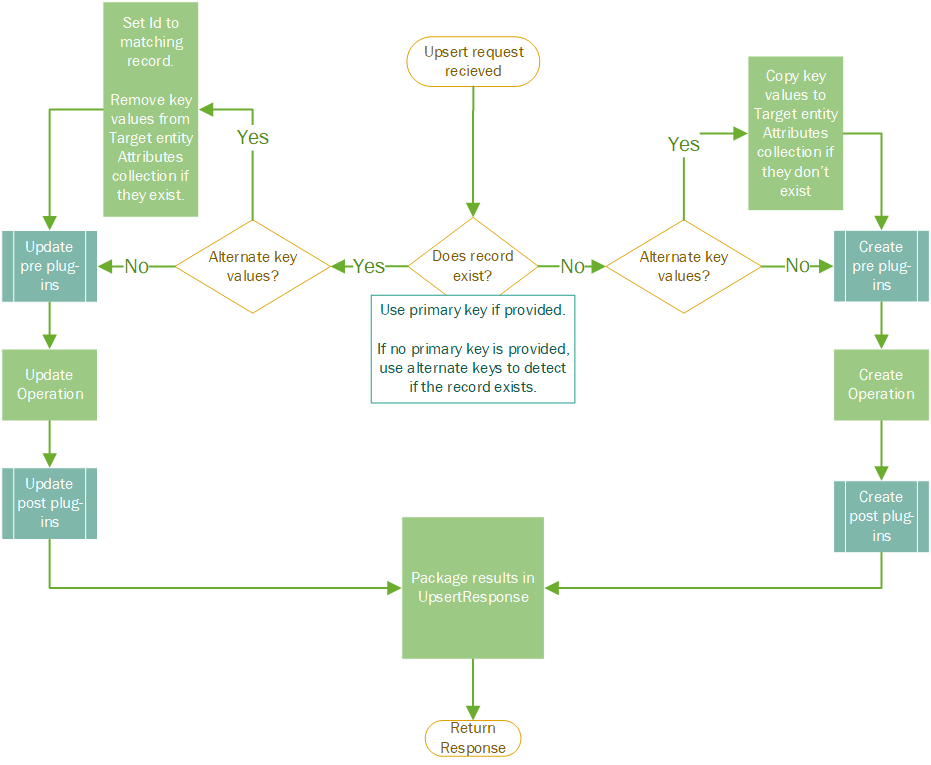
One of the most powerful uses of alternate keys is in Upsert operations. An Upsert request tells Dataverse to "update this record if it exists, otherwise create it." Alternate keys are the mechanism that allows Dataverse to determine if the record "exists."
When an Upsert request is received, the platform checks if a record matching the provided alternate key already exists.
- If yes, it performs an
Updateon that record. - If no, it performs a
Createoperation using the provided data.
This simplifies integration logic tremendously, as you no longer need to write separate Retrieve-then-Update-or-Create logic. You can just send one Upsert request.
Conclusion
In this lesson, we've seen how alternate keys solve a fundamental problem in system integration by providing a stable, external-facing identifier for Dataverse records. For a developer preparing for the PL-400, this is a non-negotiable concept to master.
Key Takeaways:
- Purpose: Alternate keys map an external system's unique ID (like a SKU or Employee ID) to a Dataverse record, avoiding reliance on internal GUIDs.
- Configuration: You define them on a table using one or more columns of specific data types. This creates a unique index in the database.
- Web API Usage: You can
GET,PATCH,DELETE, orUpsertrecords using a(keyname='keyvalue')syntax in the URL. - SDK for .NET Usage: You can initialize
EntityandEntityReferenceobjects using special constructors that take aKeyAttributeCollection, allowing you to target records by their alternate key in your C# code. - Upsert: Alternate keys are the enabling technology for
Upsertoperations, simplifying data synchronization logic.
Up Next:
We've now seen a practical way to use the SDK for .NET to reference records with alternate keys. In the next lesson, we will dive deeper into the Organization Service itself, exploring the foundational programming patterns you'll use for all data operations in your plugins: early-bound vs. late-bound programming.