Hello! Welcome back to our advanced Power Platform developer course.
In our last lesson, we explored how to use ExecuteTransactionRequest to group multiple operations into a single, atomic unit, ensuring data consistency. We focused on what to do when one part of a multi-step process fails: roll everything back.
Today, we'll zoom in on the failure of a single operation within your server-side C# code. As an experienced plugin developer, you know that things can go wrong—from invalid data to network timeouts when calling external services. This lesson is about building resilient and user-friendly plugins that can handle these failures gracefully. You will learn how to handle exceptions and implement retry logic in plugin development.
This is a critical skill for moving from writing functional code to writing production-ready, robust code that anticipates and manages errors effectively.
1. Graceful Failure: Handling Exceptions in Synchronous Plugins
When a synchronous plugin runs, its execution is part of the user's immediate experience. If your code throws an unhandled exception, the user sees a generic, unhelpful error message, and the underlying platform transaction is rolled back. While the rollback is good, the user experience is poor.
To improve this, Dataverse provides a specific exception class designed for this purpose: InvalidPluginExecutionException.
The Microsoft Learn documentation provides the essential guide to handling exceptions in plugins. It explains the role of InvalidPluginExecutionException and how it differs for synchronous and asynchronous plugins.
Please read the sections titled 'Cancelling the current operation' and the 'Tip' that follows. Focus on: The purpose of InvalidPluginExecutionException. Why it's ideal to throw this exception in the PreValidation stage. How Model-driven apps present this exception to the user. The recommended best practice for catching generic exceptions.
The InvalidPluginExecutionException Pattern
As the documentation highlights, throwing an InvalidPluginExecutionException is the correct way to deliberately cancel an operation and communicate the reason to the user. An unhandled NullReferenceException, for example, results in a generic error, but a properly thrown InvalidPluginExecutionException gives you full control over the message displayed.
This leads to a fundamental best practice in plugin development: wrap your entire plugin's Execute method in a try-catch block.
Best Practice: The "Catch-All, Re-throw" Pattern
- Try: Enclose your business logic.
- Catch
InvalidPluginExecutionException: If you're throwing this intentionally, just re-throw it. - Catch
Exception: Catch any other unexpected error (NullReferenceException,HttpRequestException, etc.), log the technical details for an administrator, and then throw a newInvalidPluginExecutionExceptionwith a user-friendly message.
Here is what this pattern looks like in code:
// Inside the Execute method of a synchronous plugin
ITracingService tracingService = (ITracingService)serviceProvider.GetService(typeof(ITracingService));

try
{
    // --- Your business logic starts here ---
    // Example: Check if a discount percentage is within a valid range
    var entity = (Entity)context.InputParameters["Target"];
    if (entity.GetAttributeValue<decimal>("discount_percentage") > 25.0m)
    {
        // This is an intentional cancellation based on a business rule.
        throw new InvalidPluginExecutionException("Discount percentage cannot exceed 25%.");
    }

    // --- Some other logic that might cause an unexpected error ---
    // object someObject = null;
    // someObject.ToString(); // This would cause a NullReferenceException

    tracingService.Trace("Plugin executed successfully.");
}
catch (InvalidPluginExecutionException ex)
{
    // Re-throw the specific business rule exception to show the user the message.
    throw;
}
catch (Exception ex)
{
    // Catch any other unexpected error.
    tracingService.Trace("An unexpected error occurred in MyPlugin: {0}", ex.ToString());

    // Throw a new, user-friendly exception. Include the original exception for better logging.
    // The user will see the message, and the stack trace of the original error will be in the logs.
    throw new InvalidPluginExecutionException("An unexpected error occurred. Please contact support.", ex);
}
Debugging and Monitoring Exceptions
When an exception is thrown, whether handled or unhandled, details are logged by the platform. For debugging, your primary tool is the Plugin Trace Log. The tracingService output and the exception details will appear here, which is essential for diagnosing issues.
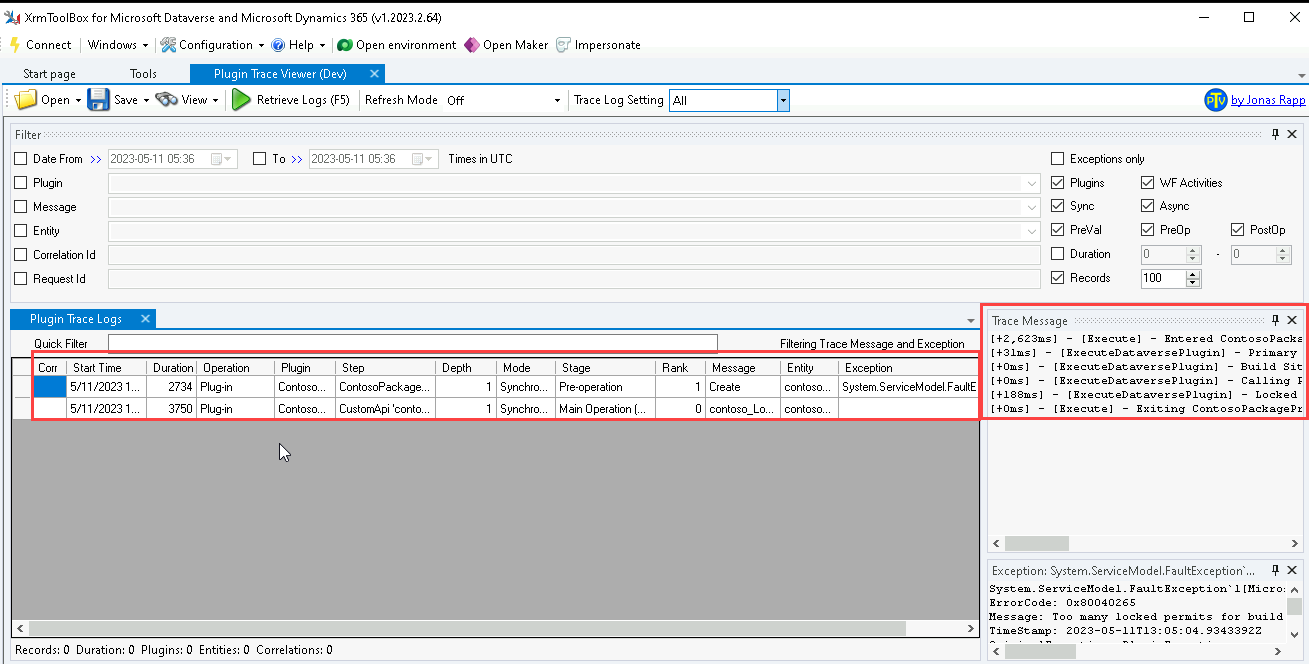
An unhandled exception results in a less graceful failure report, which might be captured by monitoring tools but provides a poor user experience.

2. Resilience: Implementing Retry Logic in Asynchronous Plugins
Exception handling in asynchronous plugins is different. They run in the background, so there's no user interface to display an error message. Instead, the exception details are recorded in the System Job (AsyncOperation) record corresponding to that plugin execution.
This background execution model opens up a powerful possibility: retrying a failed operation. This is particularly useful when your plugin interacts with external systems, where transient failures (temporary issues) are common.
Examples of transient failures include:
- A brief network interruption.
- An external API being momentarily unavailable (
503 Service Unavailable). - An API throttling your requests because you've exceeded a usage limit (
429 Too Many Requests).
In these cases, failing the operation permanently isn't ideal. The best approach is to wait and try again. Dataverse provides a built-in mechanism for this.
Let's return to the Microsoft Learn documentation to see how to implement this retry mechanism.
Please read the sections 'How Asynchronous plug-ins exceptions are handled' and 'Retry an asynchronous plug-in'. Focus on: Where exception messages for async plugins are stored. The specific constructor of InvalidPluginExecutionException used for retries. The role of the OperationStatus.Retry enum member.
Implementing the Retry Pattern
As you read, the key is to throw InvalidPluginExecutionException using a special constructor when you detect a transient error.
throw new InvalidPluginExecutionException(OperationStatus.Retry, "Transient error detected. Retrying...");
When the asynchronous service sees this specific exception, it doesn't immediately fail the System Job. Instead, it will re-queue the job and attempt to run it again later. This process is repeated a few times before the job is eventually marked as failed if it never succeeds.
Here's how you'd implement this in an async plugin that calls an external API:
// Inside the Execute method of an ASYNCHRONOUS plugin
ITracingService tracingService = (ITracingService)serviceProvider.GetService(typeof(ITracingService));
IPluginExecutionContext context = (IPluginExecutionContext)serviceProvider.GetService(typeof(IPluginExecutionContext));

// Ensure this is an async plugin before using retry logic
if (context.Mode != 1) // 1 = Asynchronous
{
    tracingService.Trace("This plugin logic should only run asynchronously.");
    return;
}

try
{
    using (var client = new HttpClient())
    {
        // Call an external service that might be unreliable
        var response = await client.GetAsync("https://api.example.com/data");

        // Check for a specific transient error code
        if (response.StatusCode == System.Net.HttpStatusCode.ServiceUnavailable) // 503 error
        {
            tracingService.Trace("External service is temporarily unavailable. Requesting a retry.");
            // Ask the platform to retry the entire async operation later
            throw new InvalidPluginExecutionException(OperationStatus.Retry, "The external service is temporarily unavailable.");
        }

        response.EnsureSuccessStatusCode(); // Throws for other non-success codes

        // Process the successful response...
    }
}
catch (InvalidPluginExecutionException ex) when (ex.Message.Contains("temporarily unavailable"))
{
    // Re-throw the specific retry exception
    throw;
}
catch (Exception ex)
{
    tracingService.Trace("A non-retriable error occurred: {0}", ex.ToString());
    // Let this fail the System Job permanently
    throw new InvalidPluginExecutionException("A permanent error occurred while contacting the external service.", ex);
}
This pattern is extremely important for building robust integrations, a topic often tested in the PL-400 exam. The platform's service protection API limits, which throttle high-volume requests, are a major reason you might encounter retriable errors.
To understand one of the most common reasons for retriable errors, it's helpful to know about service protection limits. This article explains what they are and why they exist.
Skim the introduction ('Service protection API limits') to understand the concept. Then, read the section 'Service Protection API Limit Errors returned' to see the kinds of errors you might get, such as 429 Too Many Requests (Hex code 0x80072322). This context helps you understand why a retry mechanism is so critical in real-world applications.
Test your understanding!
You have written an asynchronous plugin that triggers on the creation of an Account. The plugin calls an external address validation API. This API is known to occasionally time out during periods of high load. If the API call fails, you want the system to try again automatically a few minutes later without failing the entire process immediately.
How should you modify your plugin's exception handling to achieve this?
Show answer
You should wrap the API call in a try-catch block. In the catch block for a timeout exception (e.g., TaskCanceledException or HttpRequestException), you should throw a new InvalidPluginExecutionException(OperationStatus.Retry, "Address validation API timed out. Retrying operation."). This signals to the Dataverse asynchronous service that the failure is transient and that it should re-run the entire plugin job after a waiting period.
Conclusion
In this lesson, we elevated your plugin development skills by focusing on robust error handling and resilience. You are now equipped with the standard Dataverse patterns for managing both expected business rule violations and unexpected system failures.
Key Takeaways:
- For synchronous plugins, use
InvalidPluginExecutionExceptionto cancel an operation and provide a clear, user-friendly error message. Always wrap your code in atry-catchblock to handle unexpected errors gracefully. - For asynchronous plugins, exceptions are logged to the corresponding System Job.
- To handle transient errors (like network issues or API throttling) in async plugins, throw
InvalidPluginExecutionExceptionwith theOperationStatus.Retryenum. This instructs the platform to automatically re-run the job. - Use the Plugin Trace Log and System Jobs view to monitor and debug plugin executions and failures.
Up Next:
We've discussed making your server-side logic resilient, which is often crucial when integrating with external systems. A related challenge in integrations is consistently identifying records across different platforms. In our next lesson, we will address this by learning how to configure and use alternate keys for external system integrations.