Introduction
Hello and welcome back. In our previous lesson, we established a crucial distinction between data latency (speed) and data freshness (currency). You learned to identify the serious risks posed by "fast but stale" data, especially in decision-support interfaces where a system can feel responsive while providing dangerously outdated information.
Building on this, we'll now explore a UX pattern designed specifically to combat the perception of latency: optimistic updates. This powerful technique can make an application feel instantaneous. However, it operates on an assumption of success, which introduces a unique set of failure risks that you, as an architect, must understand and mitigate.
Today's learning outcome is to explain optimistic updates as a UX pattern and describe their associated failure risks. We will define the pattern, see why it's so appealing from a user experience perspective, and then critically analyze what happens when the system's optimism is misplaced.
1. The "Act Now, Verify Later" Pattern
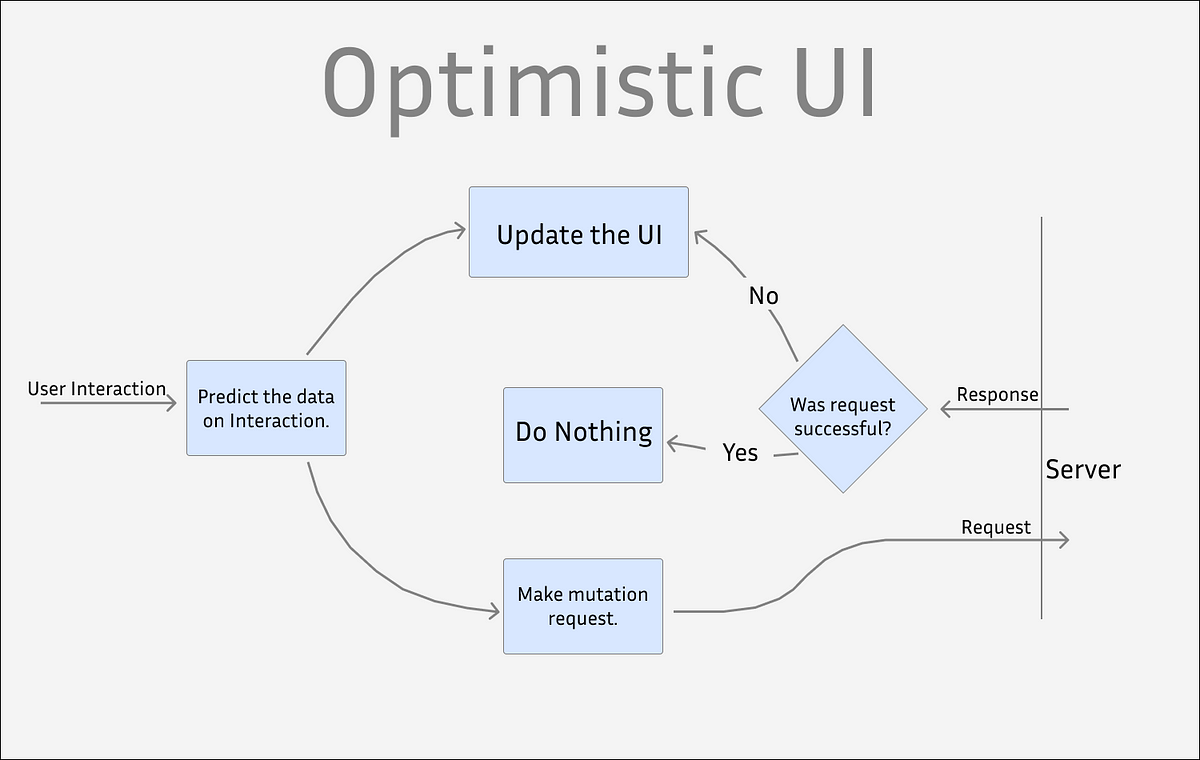
At its core, an optimistic update is a UX pattern where the user interface updates immediately in response to a user's action, without waiting for confirmation from the server. The system is "optimistic" that the action will succeed and sends the request to the server in the background.
This is the opposite of the traditional, or "pessimistic," approach, where the UI waits for the server to confirm the action before showing the result, often displaying a loading spinner in the meantime.
These two flowcharts clearly illustrate the difference:
The optimistic approach is all about creating a perception of speed. Let's watch a short video that introduces the concept and shows the user experience difference.
Frontend System Design Essentials: Optimistic updates
The video 'Frontend System Design Essentials: Optimistic updates' from the I Code It channel provides a great introduction to this topic. We'll watch the beginning to see the problem and the proposed solution.
Please watch from the beginning to 01:17 to understand the traditional 'pessimistic' flow. Then, skip to 05:53 and watch until 06:18 to see the optimistic flow in action. Notice how much more responsive the optimistic example feels.
As you saw, the difference in user experience is stark. The optimistic UI feels fluid and responsive, while the traditional UI feels sluggish, interrupting the user's flow.
2. The Unhappy Path: When Optimism Fails
The primary benefit of optimistic updates is a vastly improved user experience when everything goes right—the "happy path." But as a system architect, your focus must also be on the "unhappy path": what happens when the optimistic assumption of success proves false?
This is where the risks emerge. When the server rejects the action (due to a network error, invalid data, a permissions issue, etc.), the UI, which has already updated, is now showing an incorrect state. It has effectively "lied" to the user.
To correct this, the system must perform a rollback—reverting the UI to the state it was in before the user's action. This sudden reversal can be a jarring and confusing experience.
Let's read a short article that clearly defines the concept and then immediately dives into the risks this pattern introduces.
Why I Never Use Optimistic Updates (And Why You Might Regret It Too)
The article 'Why I Never Use Optimistic Updates' by Chris on dev.to provides a strong, critical perspective on the risks. It will help us focus on the failure modes.
Please read the sections 'What Is an Optimistic Update?' and 'Why I Stopped Using Optimistic Updates'. Pay close attention to the four reasons the author cites for avoiding this pattern.
As the article argues, the main failure risks of optimistic updates are:
- Multiplying Edge Cases: You must now account for what happens if the request fails, if data changes from another source, or if the user performs another action before the first one completes.
- Jarring UX of Rollbacks: A silent or sudden reversal of the UI state feels buggy and erodes user trust. Imagine you add an item to a list, turn away, and when you look back, it's gone with no explanation.
- Data Inconsistency: By design, the client's state is temporarily out of sync with the server's state. If not managed perfectly, this can lead to hard-to-debug bugs.
- High Implementation Cost: Properly handling all the edge cases, rollbacks, and user notifications requires significant development effort, which may not be justifiable.
This flowchart illustrates the complete optimistic flow, including the critical failure path.
3. Handling Failures Gracefully
Since failures are inevitable, the key to using optimistic updates successfully is designing a robust and graceful failure-handling process. This is a critical intersection of UX design and system architecture.
A good failure-handling process has two components:
- The Rollback Pattern: The system must reliably revert the UI to its previous state.
- Clear User Feedback: The user must be informed about what happened and why. A silent rollback is unacceptable.
The following video demonstrates exactly how a rollback works in practice and how the original user input can be preserved to avoid frustrating them further.
Frontend System Design Essentials: Optimistic updates
Let's return to the 'Frontend System Design Essentials' video to see how to handle a failure.
Please watch the section from 13:25 to 15:53. The presenter intentionally makes the server request fail. Observe how the UI reverts and how the user's typed comment is preserved so they don't lose their work.
To build a solid mental model for this, let's consult a guide that lays out the principles of failure handling very clearly.
Optimistic UI Updates in React (Simple Guide) - Unwired Learning
The 'Optimistic UI Updates in React' guide from Unwired Learning has excellent, non-technical sections on handling failures and common mistakes.
Please read the sections 'Handling Failures Gracefully' and 'Common Mistakes to Avoid'. Focus on the 'Rollback Pattern' and the importance of user feedback.
4. A Framework for Deciding: When to Be Optimistic
Optimistic updates are not an all-or-nothing tool. The decision to use them is a strategic trade-off. As an architect, you must weigh the UX benefits against the implementation complexity and the risk of failure.
Use optimistic updates for actions that are:
- High-Success-Rate: The action is very likely to succeed (e.g., liking a post, marking a task as complete).
- Low-Risk: The consequences of a failure and subsequent rollback are minor (e.g., a "like" failing is not critical).
- Non-Critical: The action does not involve sensitive processes like payments, account deletion, or password changes.
This final reading provides a clear table that serves as an excellent decision-making framework.
Optimistic UI Updates in React (Simple Guide) - Unwired Learning
Let's look at one more section from the Unwired Learning guide to solidify our decision framework.
Please read the section 'When to Use Optimistic Updates' and review the table. Then, read the section 'Optimistic Updates vs Loading States' and study that table as well. These provide a clear contrast for when each pattern is appropriate.
Your Turn: A UX Design Challenge
Let's apply these concepts to a practical scenario. Imagine you are designing a collaborative task management application (like a simplified Trello or Asana).
Please answer the following:
- Good Use Case: Identify one feature or action in this tool where an optimistic update would be an excellent choice to improve the user experience. Justify your choice based on the framework we just discussed (success rate, risk).
- Bad Use Case: Identify one feature or action where using an optimistic update would be a risky and poor choice. Explain why.
- Failure Design: For your "Good Use Case," describe the unhappy path. If the optimistic update fails, how would you design the UI/UX to handle the rollback gracefully? Describe the user feedback you would provide (e.g., a toast notification, an inline error icon).
This exercise will help you practice making the architectural trade-offs inherent in this pattern.
Conclusion
In this lesson, you've learned about optimistic updates as a powerful UX pattern for creating fast, responsive interfaces. You also critically examined the significant failure risks that come with this approach.
Key Takeaways:
- Optimistic updates improve perceived performance by updating the UI immediately, before server confirmation.
- The primary risk is a jarring user experience when the server rejects the action, forcing a rollback of the UI state. This can make an app feel buggy and untrustworthy.
- Implementing this pattern correctly requires robust error handling and clear user feedback to explain failures gracefully.
- The decision to use optimistic updates is an architectural trade-off. They are best suited for low-risk, high-success-rate actions, and should be avoided for critical operations like payments or deletions.
Next Steps
We started this module by understanding the risks of stale data. We then explored optimistic updates, a pattern that prioritizes perceived speed, sometimes at the cost of data consistency. The logical next step is to learn how to make the state of data explicitly clear to the user.
In our next lesson, we will focus on how to design UI patterns for data freshness indicators on a dashboard (e.g., 'last updated' timestamps). This will give you the tools to design interfaces that are not only fast but also transparent and trustworthy.