Introduction
Hello again! In our last lesson, we explored the dual-process model of the human mind, distinguishing between the fast, intuitive System 1 and the slow, deliberate System 2. We established that many modern AI tools function like a powerful System 1, which creates a design challenge: how do we prevent users from passively accepting AI outputs when careful, System 2 analysis is required?
Today, we'll tackle that challenge head-on. This lesson addresses the learning outcome: Design a UI component that communicates an AI's confidence level for a recommendation. This is one of the most direct and powerful tools in your UI/UX toolkit for engineering trust. By transparently showing how certain an AI is, you give the user a crucial signal about when to slow down, question the output, and engage their own analytical mind.
For a Decision Systems Architect, this isn't just about adding a new widget to an interface; it's about architecting a more honest and effective collaboration between the human and the machine.
1. The Goal: Calibrated Trust
When designing AI systems, the goal isn't to make users trust the AI unconditionally. Blind trust can be dangerous. Instead, the objective is to achieve calibrated trust. This means the user understands the system's strengths and weaknesses, trusting it when it's likely to be right and being skeptical when it's on shaky ground.
Communicating confidence is a primary way to help users achieve this calibration. A well-designed confidence indicator acts as a bridge between the AI's internal state and the user's mental model, transforming a black box into a more transparent partner.
To explore this concept further, let's watch a section from a talk by designers at Google who work on this exact problem.
Designing Human-Centered AI Products (Google I/O'19)
In this segment from 'Designing Human-Centered AI Products' at Google I/O'19, the speakers introduce the concept of 'calibrated trust' and its importance in AI product design.
Please watch from 26:42 to 28:50. Pay close attention to the definitions of under-trusting and over-trusting, and how calibrated trust helps a user know when to apply their own judgment.
As the video explains, over-trusting is the manifestation of staying in System 1—"if the AI says so, it must be the truth." By providing confidence signals, we prompt the user to ask, "Should I double-check this?" thereby engaging their System 2.
2. Methods for Communicating Confidence
Once you decide to show confidence, the next question is how. There is no single "best" way; the right choice depends on your users, the context, and the stakes of the decision. As a UI/UX designer, your skills in information hierarchy and visual communication are critical here.
Let's review the common patterns. The following article provides an excellent, concise overview of these patterns.
Confidence Visualization UI Patterns (CVP) - Agentic Design
This page from Agentic Design, titled 'Confidence Visualization UI Patterns,' provides a very practical, scannable guide to implementing these UI components.
Please read the '30-Second Overview,' 'Quick Implementation,' and 'Do's & Don'ts' sections. This will give you a solid vocabulary of the core patterns and best practices.
Based on that reading and other common practices, we can categorize the main approaches:
A. Categorical / Verbal:
This involves grouping confidence into a few simple buckets. It's easy for users to understand at a glance.
- Labels: Low, Medium, High
- Verbal Qualifiers: "Likely," "Possibly," "Uncertain"
- Visual Metaphors: Red/Yellow/Green lights, warning icons
B. Numeric:
This provides a specific number, often a percentage. It offers more granularity but can imply a level of precision that isn't always meaningful.
- Example: "We are 87% confident in this recommendation."
- Key Question: Would a user's decision change between 87% and 85%? If not, a numeric display might be overkill and lead to false precision. As the "Do's & Don'ts" list advises, avoid showing numbers like "99.73%".
C. Visual / Graphical:
This uses visual elements to represent confidence, which can be processed quickly.
- Progress Bars or Gauges: A bar that fills to show the level of confidence.
- Color Gradients: A color shift from low confidence (e.g., orange) to high confidence (e.g., green).
- Uncertainty Bands: Often used in charts, showing a range of possible outcomes around the AI's main prediction.
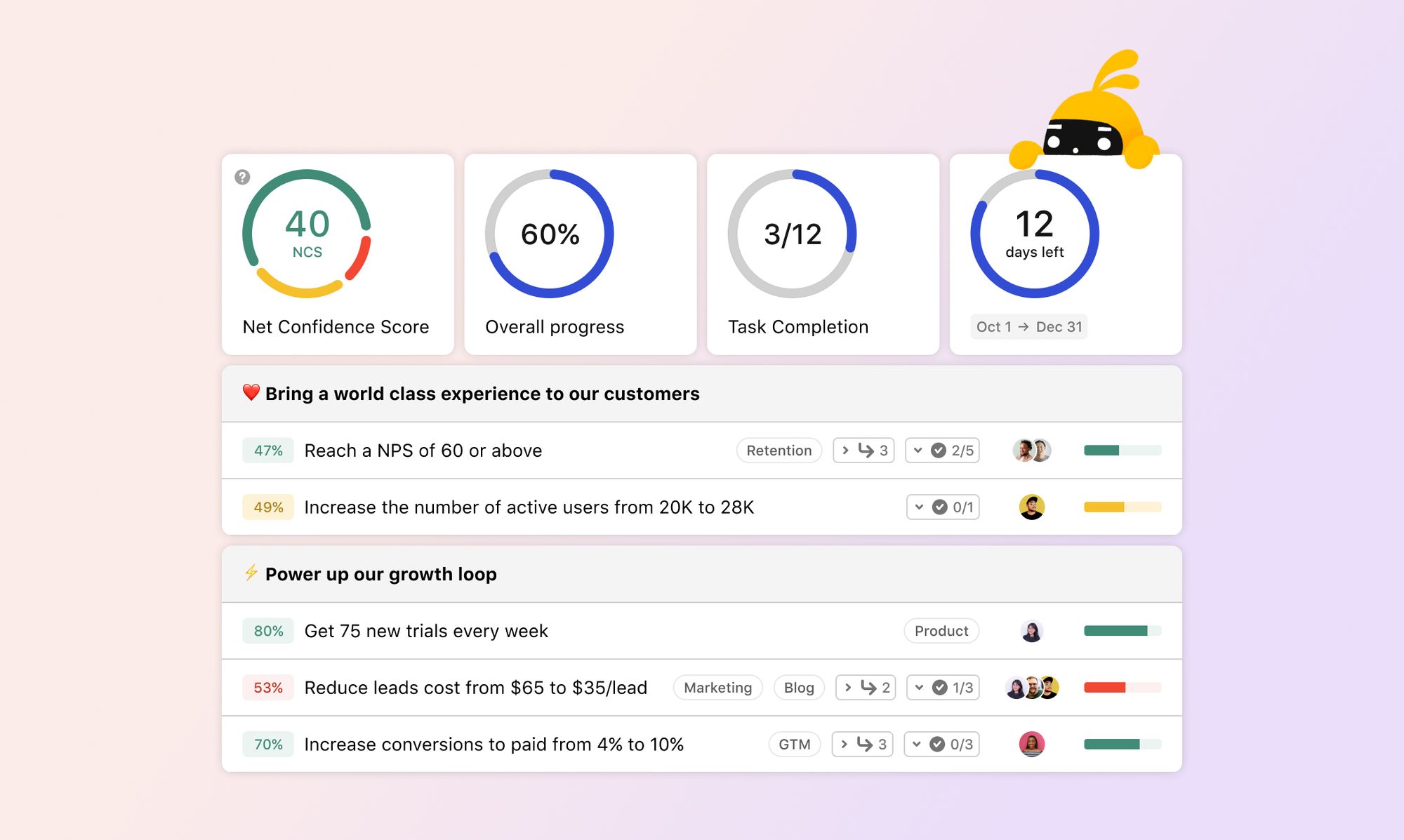
Here is an example from a real dashboard that uses a gauge to show a "Net Confidence Score."
D. Implicit Confidence (The Absence of a Signal):
Sometimes, the most elegant solution is to simply not show a recommendation if the AI's confidence is below a certain threshold. The Google Flights team famously used this approach: if the model wasn't highly confident that a price would go up or down, it would show no prediction at all. This protects the user from low-quality advice without cluttering the UI.
This choice is a major architectural decision that balances helpfulness with reliability.
3. Context, Stakes, and Accountability
Displaying confidence is not a universal rule. The decision to use it, and which method to use, is highly contextual.
20+ GenAI UX patterns, examples and implementation tactics
This article, '20+ GenAI UX patterns,' provides clear guidance on when to apply this pattern.
Read just the section titled '11. Convey model confidence'. Focus on the distinction between high-stakes and low-stakes scenarios.
As the article states, the stakes of the decision are the most important factor:
- High-Stakes (Fintech, Healthcare): Displaying confidence is crucial. An 80% confident medical diagnosis requires a different level of scrutiny than a 99% confident one.
- Low-Stakes (AI Art, Storytelling): Displaying confidence might just add unnecessary complexity and confuse the user.
Furthermore, a truly robust system shows accountability for its errors, which is the ultimate expression of confidence.
🔴 Live | Creating people-centered AI experiences: Google's People + AI Guidebook with Gabe Clapper
In this clip, 'Creating people-centered AI experiences,' speaker Gabe Clapper discusses accountability and uses the Google Flights price guarantee as a powerful example of backing up an AI's recommendation.
Please watch from 30:00 to 33:21. Notice how the price guarantee program gave users 'peace of mind' and built trust, not just through the feature itself, but by knowing the system was accountable for its mistakes.
While you may not always be able to implement a financial guarantee, this principle of accountability is key. A UI that clearly explains why confidence is what it is (e.g., "Confidence is high due to stable market data") and provides paths for recourse or feedback when the AI is wrong, builds deep, lasting trust.
4. Your Turn: Designing a Confidence Component
Let's return to the AI-powered "Portfolio Rebalancer" from our last lesson. The current design presents an optimized trade with a single "One-Click Rebalance" button, a design that heavily appeals to a user's System 1 and encourages passive acceptance.
Your task is to redesign this feature to communicate the AI's confidence and encourage a System 2 review.
- Choose a Method: Select one of the methods we discussed (Categorical, Numeric, Visual, or Verbal) to display the AI's confidence in its rebalancing suggestion.
- Design the Component: In a few sentences, describe your UI component. You can think in Figma terms. Where does it sit? What elements does it contain? How does it look?
- Justify Your Choice: Explain why you chose this method for a high-stakes fintech application.
- Define Interaction Logic: How would the UI behave differently at high confidence versus low confidence? For example, does the "One-Click Rebalance" button change? Are other elements revealed?
Take about 10-15 minutes to think through your design. This exercise connects the theory of calibrated trust directly to your practical skills as a UI/UX designer.
Conclusion
Today, we've moved from the psychological theory of System 1 and 2 to the practical design work of building trust with users.
Key Takeaways:
- The goal of displaying AI confidence is to achieve calibrated trust, where users neither over-trust nor under-trust the system.
- You can communicate confidence through various UI patterns: categorical, numeric, visual, and verbal qualifiers. The best choice depends on context and user needs.
- In some cases, the best design is implicit: withholding a recommendation if confidence is too low.
- The decision to show confidence, and how, is determined by the stakes of the task. High-stakes scenarios demand transparency.
- Effective confidence displays should be paired with context and accountability to help users engage their System 2 analytical thinking.
Next Steps
Communicating that an AI is only "medium" confident is a great first step. But the user's immediate next question will be, "Why?" In our next lesson, we will address that question by learning how to design a UI pattern that provides traceability for an AI's reasoning or data sources. This will give users the tools they need to perform their own System 2 investigation, completing the loop from skepticism to informed decision-making.