Hello! Welcome to your sixth lesson in the "Python Fundamentals for Algorithmic Trading" module.
In our last lesson, you learned how to create functions—reusable blocks of code that perform specific tasks. This was a huge step in learning to write clean and efficient programs. We saw how a function like calculate_pips could take simple inputs (like numbers) and return a result.
However, in trading, we rarely deal with single data points. We work with collections: a series of the last 20 candle closing prices, the Open, High, Low, and Close (OHLC) of a single candle, or a log of our past trades.
Today, we will tackle the learning outcome: Work with fundamental data structures: lists and dictionaries. These are Python's primary tools for grouping and organizing data. Mastering them is essential for handling the market data you'll need to analyze to find ICT setups and build your trading bots.
Let's start with a simple visual that contrasts these two powerful data structures.
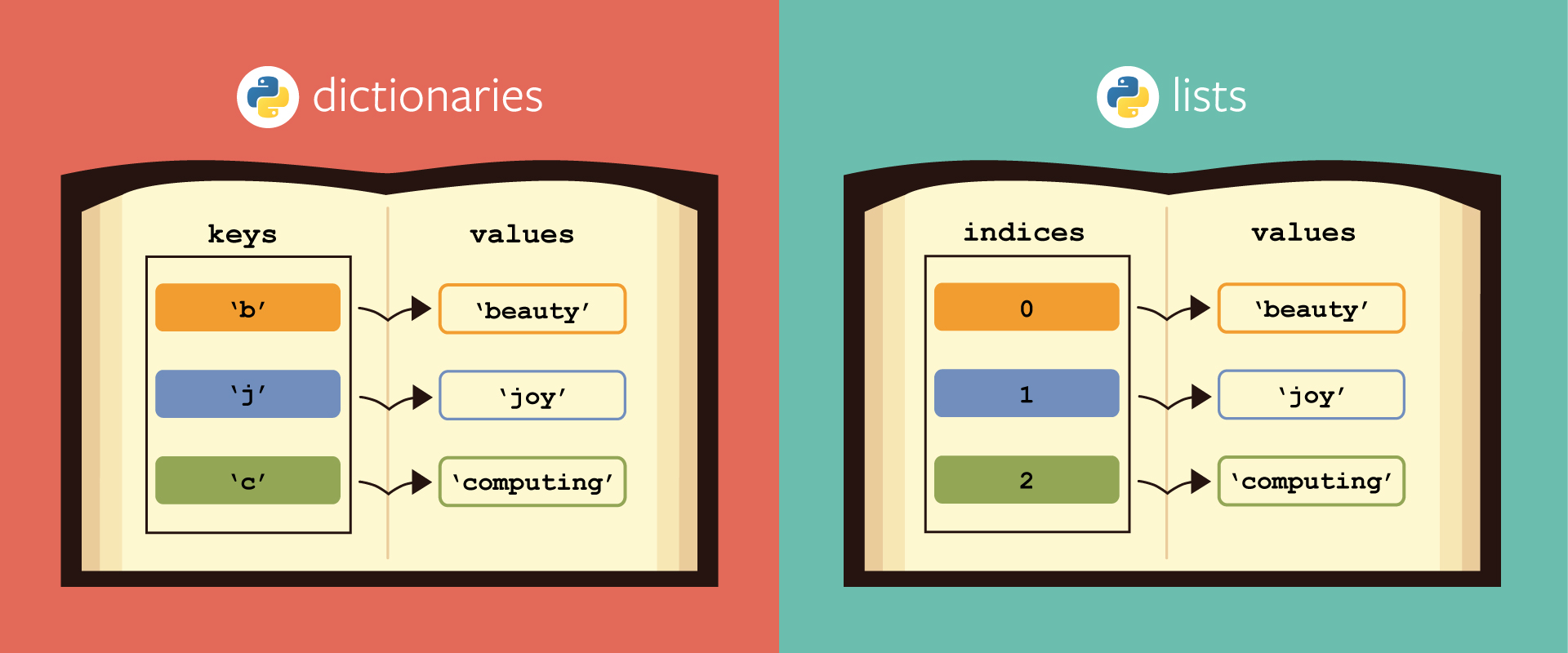
As you can see, lists are about order and sequence, while dictionaries are about mapping a specific name (a "key") to a piece of information (a "value"). Let's explore each one.
Part 1: Lists - The Ordered Sequence
A list in Python is an ordered, changeable collection of items. Think of it as a sequence of prices recorded one after another. You can add new prices to the end, remove old ones, or change a price in the middle.
A list is created using square brackets [], with items separated by commas.
# A list of recent closing prices for EUR/USD
eurusd_prices = [1.0710, 1.0712, 1.0709, 1.0715, 1.0718]

# A list of assets you are monitoring
watch_list = ["EURUSD", "GBPUSD", "USDCAD"]

# A list can contain different data types
mixed_data = ["EURUSD", 1.0718, True]
The video below gives a fantastic, detailed tour of what you can do with lists. We'll watch it in segments to focus on the most important operations.
The video 'How to Use Lists in Python' by Programming with Mosh is a clear and comprehensive guide. We'll start with the basics of creating lists and accessing their elements.
Watch from the beginning to 06:57. Pay close attention to: How to create lists (00:00 - 03:33). How to access elements using positive (from the start) and negative (from the end) indices (03:33 - 04:30). How to slice a list to get a sub-section of it (04:30 - 06:57).
Accessing and Slicing Data
As the video explained, Python uses zero-based indexing, meaning the first item is at index 0. This is crucial.
eurusd_prices = [1.0710, 1.0712, 1.0709, 1.0715, 1.0718]

# Get the first price
first_price = eurusd_prices[0]
print(f"The first price was: {first_price}") # Output: 1.0710

# Get the last price using negative indexing
last_price = eurusd_prices[-1]
print(f"The last price was: {last_price}") # Output: 1.0718

# Get the last 3 prices using slicing
recent_prices = eurusd_prices[-3:]
print(f"The last three prices were: {recent_prices}") # Output: [1.0709, 1.0715, 1.0718]
Adding and Removing Items
Your market data is dynamic. New prices arrive, and you might want to manage the size of your price history. The next clip shows you how to do this.
Let's continue with the same video to see how to modify lists.
Watch from 14:03 to 17:04. Focus on the methods append() (add to end), insert() (add at a specific position), and pop() (remove from end).
Here is a practical trading example:
# A list of recent 1-hour swing lows
swing_lows = [1.0750, 1.0720]
print(f"Initial swing lows: {swing_lows}")

# A new swing low forms and we add it to our list
swing_lows.append(1.0695)
print(f"After appending a new low: {swing_lows}")

# Let's say we only want to track the 10 most recent lows.
# We could remove the oldest one (at index 0).
oldest_low = swing_lows.pop(0) # .pop() can also take an index
print(f"After removing the oldest low ({oldest_low}): {swing_lows}")
Looping Through a List
In the lesson on loops, you learned how to repeat actions. Combining loops with lists is incredibly powerful. You can analyze every single price in your sequence.
This final clip on lists shows how to iterate through them and get both the item and its index, which is very useful.
Watch from 10:55 to 14:03. The enumerate() function is a key takeaway here.
Imagine you want to find all prices in your list that are below a certain level (e.g., inside a discount zone).
price_history = [1.0830, 1.0825, 1.0810, 1.0805, 1.0815]
discount_level = 1.0820

print(f"Searching for prices below {discount_level}...")
for price in price_history:
    if price < discount_level:
        print(f"Found a discount price: {price}")
Part 2: Dictionaries - The Key-Value Store
A dictionary is an unordered (in older Python versions) collection of key-value pairs. Instead of accessing data by its position, you access it by a unique key you define. This is perfect for storing the properties of a single object, like a trade or a candlestick.
A dictionary is created with curly braces {}.
# A dictionary representing the OHLC data for a single candle
h1_candle = {
    "open": 1.0720,
    "high": 1.0750,
    "low": 1.0715,
    "close": 1.0745
}

# A dictionary representing a trade setup
trade_setup = {
    "asset": "EUR/USD",
    "bias": "Bullish",
    "entry_price": 1.0725,
    "is_active": True
}
Let's watch a video that walks through the core concepts of dictionaries.
Python Tutorial for Beginners 5: Dictionaries - Working with Key-Value Pairs
Corey Schafer's tutorial on dictionaries is excellent for beginners. We'll start with how to create them and access their data safely.
Watch from 00:35 to 04:07. Focus on: The key: value syntax (00:35 - 02:48). The difference between accessing with [] (which can cause an error) and .get() (which is safer) (02:48 - 04:07).
Accessing and Modifying Data
Using .get() is a best practice when writing trading bots, as it prevents your script from crashing if you try to access data that doesn't exist.
h1_candle = {
    "open": 1.0720,
    "high": 1.0750,
    "low": 1.0715,
    "close": 1.0745
}

# Access the high price
high_price = h1_candle["high"]
print(f"The high was: {high_price}")

# Safely check for a key that might not exist
volume = h1_candle.get("volume", 0) # Returns 0 if 'volume' key is not found
print(f"The volume was: {volume}")

# Add a new key-value pair
h1_candle["volume"] = 1500
print(f"Updated candle data: {h1_candle}")

# Update an existing value
h1_candle["close"] = 1.0748
print(f"Final candle data: {h1_candle}")
Test your understanding!
You have a dictionary representing a trade. You want to add a stop_loss to it at a price of 1.2500. Which line of code will do this?
my_trade = {
    "asset": "GBP/USD",
    "entry_price": 1.2520,
    "type": "Short"
}

# Your code here

print(my_trade)
my_trade.append("stop_loss": 1.2500)my_trade["stop_loss"] = 1.2500my_trade.get("stop_loss", 1.2500)my_trade = {"stop_loss": 1.2500}
Show answer
The correct answer is 2: my_trade["stop_loss"] = 1.2500.
This syntax is used to either add a new key-value pair (if the key doesn't exist) or update the value of an existing key.
- Option 1 is incorrect syntax;
.append()is for lists. - Option 3 would retrieve the value of "stop_loss" or return a default, but it wouldn't change the dictionary itself.
- Option 4 would overwrite the entire
my_tradedictionary, losing the original data.
Looping Through a Dictionary
Just like with lists, you can loop through dictionaries to process their data. The .items() method is especially useful as it gives you both the key and the value in each iteration.
Python Tutorial for Beginners 5: Dictionaries - Working with Key-Value Pairs
Let's return to Corey Schafer's video to see how to loop through the keys, values, and key-value pairs of a dictionary.
Watch from 06:59 to 09:00. Pay close attention to the for key, value in student.items(): pattern, as it's the most common way to iterate through a dictionary.
trade_setup = {
    "asset": "EUR/USD",
    "bias": "Bullish",
    "entry_price": 1.0725,
    "stop_loss": 1.0710,
    "take_profit": 1.0780
}

print("--- Trade Setup Details ---")
for key, value in trade_setup.items():
    # Capitalize the key and format the output nicely
    print(f"{key.capitalize()}: {value}")
Part 3: Combining Lists and Dictionaries
The real power for algorithmic trading comes when you combine these structures. The most common pattern you will encounter is a list of dictionaries.
Imagine you want to store your entire trade history. Each trade is an object with several properties (asset, entry, exit, etc.), so it's a perfect fit for a dictionary. Your history is an ordered sequence of these trades, making it a perfect fit for a list.
Mastering Python Lists, Tuples, and Dictionaries
The article 'Mastering Python Lists, Tuples, and Dictionaries' from PyQuant News has a short but excellent section on this concept. It helps you see how these structures model complex, real-world data.
Read the section titled 'Combining Lists, Tuples, and Dictionaries'. This will solidify the idea of nesting these structures to represent more complex information.
Here's what a trade log might look like in Python:
trade_log = [
    {
        "asset": "EUR/USD",
        "entry_price": 1.0725,
        "exit_price": 1.0780,
        "outcome": "Win"
    },
    {
        "asset": "GBP/USD",
        "entry_price": 1.2550,
        "exit_price": 1.2530,
        "outcome": "Loss"
    },
    {
        "asset": "EUR/USD",
        "entry_price": 1.0810,
        "exit_price": 1.0855,
        "outcome": "Win"
    }
]

# Now we can write code to analyze our log.
# For example, let's count our wins.
win_count = 0
for trade in trade_log:
    if trade["outcome"] == "Win":
        win_count = win_count + 1

print(f"Total wins in the log: {win_count}")
This structure—a list of dictionaries—is exactly how you will receive historical market data from many APIs. Each item in the list will be a dictionary representing one candlestick.
Conclusion
Excellent work today! You've just learned about the two most fundamental data structures in Python, which are the containers you will use for all your trading data.
Key Takeaways:
- Lists are ordered, indexed collections, perfect for sequences of data like price history. You access items with a numerical index (e.g.,
prices[0]). - Dictionaries are collections of key-value pairs, perfect for storing the attributes of a single object, like a trade or a candle. You access values with a unique key (e.g.,
trade['entry_price']). - You can combine these structures, such as a list of dictionaries, to represent complex data like a trade log or historical OHLC data.
Preview for the Next Lesson:
We've now learned how to write functions and how to store data in lists and dictionaries. But how do we get real market data into our program? And how do we perform complex calculations on it without reinventing the wheel?
In the next lesson, we'll learn how to import and use external Python libraries. We will introduce pandas, the most important library for data analysis in Python. You will see how it takes the concepts of lists and dictionaries to an entirely new level, making it easy to handle and analyze the large datasets required for algorithmic trading.