Hello! Welcome to the fifth lesson in our "Python Fundamentals for Algorithmic Trading" module.
In our last lesson, you mastered loops, which allow us to automate repetitive tasks like analyzing a sequence of candlesticks. You saw how copying and pasting code to perform the same task in different places is inefficient. This is a common problem that all programmers face, and it has an elegant solution.
Today, we'll address the learning outcome: Define and call functions to create reusable blocks of code. Functions are one of the most important concepts in programming. They are named, reusable "recipes" that perform a specific task. For your goal of building trading bots, functions are the building blocks you'll use to create logic for everything from calculating risk to identifying complex ICT setups.
Why Do We Need Functions? The DRY Principle
In programming, there's a guiding principle called DRY: Don't Repeat Yourself. If you find yourself writing the same lines of code over and over, it's a signal that you should package that code into a function.
This isn't just about saving typing. It makes your code:
- More Readable: A well-named function like
calculate_risk_reward()is much clearer than a block of raw calculations. - Easier to Maintain: If you need to fix a bug or change the logic, you only have to do it in one place—the function itself.
- Reusable: You can call the same function from many different parts of your program.
Let's watch a short video that explains this core benefit.
Python Tutorial for Beginners 8: Functions
In this clip from his excellent Python tutorial series, Corey Schafer explains the 'DRY' principle and why functions are so crucial for writing clean, maintainable code.
Watch from 02:16 to 04:11. Notice how updating the code in a single function is far more efficient than finding and changing it in multiple places.
The Anatomy of a Python Function
So, how do we create one of these reusable code blocks? A function has a specific structure.
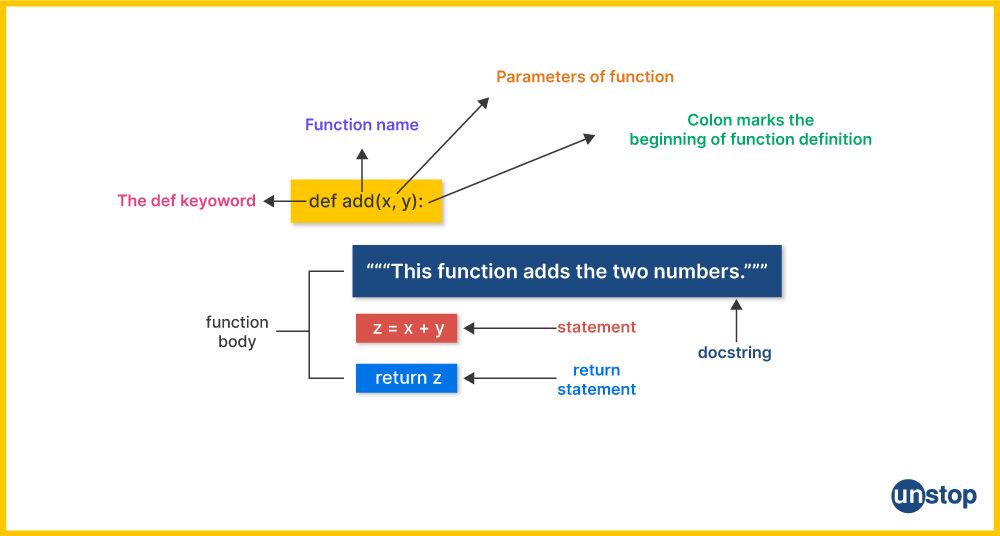
Let's break this down:
defkeyword: This signals the start of a function definition.- Function Name: A descriptive name you choose (e.g.,
print_trade_alert). It follows the same naming rules as variables (lowercase with underscores). - Parentheses
(): These hold the parameters (inputs) for the function. They are required even if the function takes no inputs. - Colon
:: Marks the end of the function header. - Indented Body: The code that the function will execute. This must be indented, just like with loops and
ifstatements. - (Optional)
returnstatement: Sends a value back from the function to the code that called it.
Here is the most basic example. Open your Jupyter Notebook and type this:
# 1. Define the function
def greet_trader():
    """This is a docstring. It explains what the function does."""
    print("Welcome to your trading bot dashboard.")
    print("Market analysis is running...")

# 2. Call the function
greet_trader()
When you run this, you "call" the function by writing its name followed by parentheses, and the code inside it executes.
Making Functions Useful: Parameters and Arguments
A function that does the same thing every time is of limited use. The real power comes from giving them inputs to work with.
- A parameter is the variable name inside the function's parentheses in its definition. It's a placeholder.
- An argument is the actual value you provide to the function when you call it.
Let's watch a video that makes this distinction clear.
Functions in Python are easy 📞
The 'Functions in Python are easy' video by Bro Code provides a straightforward explanation of how to pass data into your functions using arguments and parameters.
Watch from 01:47 to 04:54. Pay close attention to how the arguments you send when calling the function are received by the parameters inside the function. Notice that the order matters!
Now, let's create a trading-specific function. Imagine you frequently need to calculate the potential profit in pips for a trade.
def calculate_pips(entry_price, take_profit_price):
    """Calculates the difference between two prices in pips for a non-JPY pair."""
    # Assuming a standard forex pair where 1 pip = 0.0001
    pips = (take_profit_price - entry_price) / 0.0001
    print(f"The potential profit is {pips:.1f} pips.")

# Call the function with different arguments
calculate_pips(1.0710, 1.0760) # A long trade
calculate_pips(1.2550, 1.2500) # A short trade
In this example, entry_price and take_profit_price are the parameters. When we call calculate_pips(1.0710, 1.0760), the values 1.0710 and 1.0760 are the arguments.
Getting Results Back: The return Statement
Our calculate_pips function is helpful, but it only prints the result. What if we want to use that pip value in another calculation, like figuring out the dollar value of the trade?
This is where the return statement comes in. It stops the function and sends a value back to whoever called it.
This next video segment beautifully illustrates the difference between printing a value and returning it.
Python Tutorial for Beginners 8: Functions
Let's return to Corey Schafer's tutorial to understand the power of the return keyword. This is a crucial concept for making your functions truly modular.
Watch from 04:11 to 07:04. Focus on how a returned value can be stored in a variable or used directly in other expressions, unlike a printed value which is just displayed on the screen.
Let's refactor our calculate_pips function to be more useful.
def calculate_pips(entry_price, take_profit_price):
    """Calculates and returns the pip difference between two prices."""
    pips = (take_profit_price - entry_price) / 0.0001
    return abs(pips) # Use abs() to always return a positive number of pips

# Now we can store the result in a variable
long_trade_pips = calculate_pips(1.0710, 1.0760)
short_trade_pips = calculate_pips(1.2550, 1.2500)

print(f"Long trade potential: {long_trade_pips:.1f} pips")
print(f"Short trade potential: {short_trade_pips:.1f} pips")

# We can also use the returned value directly in another calculation
total_pips_potential = long_trade_pips + short_trade_pips
print(f"Total potential from both trades: {total_pips_potential:.1f} pips")
By using return, our function is no longer a dead end. It's a tool that produces a result we can work with.
Test your understanding!
You want to write a function that calculates the risk-to-reward ratio (R:R) for a long trade. The function should take entry, stop_loss, and take_profit as parameters.
The formula is: Reward / Risk where:
Reward = take_profit - entryRisk = entry - stop_loss
Given the following function definition, what is the missing line?
def calculate_rr_long(entry, stop_loss, take_profit):
    risk_pips = entry - stop_loss
    reward_pips = take_profit - entry

    # What goes here?

# Expected usage:
rr = calculate_rr_long(1.1000, 1.0980, 1.1040) # Risk=20 pips, Reward=40 pips
print(f"The R:R is: {rr:.1f}:1") # Should print "The R:R is: 2.0:1"
print(reward_pips / risk_pips)return reward_pips / risk_pipsrr = reward_pips / risk_pipsreturn "The R:R is", rr
Show answer
The correct answer is 2: return reward_pips / risk_pips.
We need the function to send the calculated ratio back so it can be stored in the rr variable and used in the print statement.
- Option 1 would just print the value inside the function, and
rrwould beNone(the default return value). - Option 3 calculates the value but doesn't return it, so
rrwould still beNone. - Option 4 returns a string and a variable that doesn't exist in that context, which is not what we want.
Good Practice: Documenting Your Functions
As your scripts grow, you'll forget what a function does or what its parameters mean. That's why good documentation is essential. The string right after the function definition is called a docstring, and it's the standard way to document your code.
Python Function Tutorial: Definition, Types, Namespace ...
The article 'Python Function Tutorial' by QuantInsti has a great section on DocStrings. It explains the convention and how to access this documentation.
Read the section titled 'DocStrings'. It's short but very important for writing code that you and others can understand later.
Here's our ICT-related function from the last lesson, now properly defined with parameters, a return value, and a docstring.
def get_price_zone(price_range_high, price_range_low, current_price):
    """
    Determines if a price is in the premium or discount zone of a range.

    Args:
        price_range_high (float): The high of the trading range.
        price_range_low (float): The low of the trading range.
        current_price (float): The price to check.

    Returns:
        str: 'Premium', 'Discount', or 'Equilibrium'.
    """
    equilibrium = (price_range_high + price_range_low) / 2.0

    if current_price > equilibrium:
        return "Premium"
    elif current_price < equilibrium:
        return "Discount"
    else:
        return "Equilibrium"

# --- USAGE ---
swing_high = 1.0850
swing_low = 1.0800
my_price = 1.0840

zone = get_price_zone(swing_high, swing_low, my_price)
print(f"The price {my_price} is in the {zone} zone.")

another_price = 1.0810
zone = get_price_zone(swing_high, swing_low, another_price)
print(f"The price {another_price} is in the {zone} zone.")
Notice how we can reuse the get_price_zone logic for different prices without repeating the calculation. This is the power of functions!
Conclusion
Great work! You've learned the fundamental concept of functions, which will be the backbone of your trading scripts. You now have the ability to write cleaner, more powerful, and more maintainable code.
Key Takeaways:
- Functions are defined with the
defkeyword and allow you to create reusable blocks of code (the DRY principle). - You pass data into functions using arguments, which are received by parameters.
- The
returnstatement is used to send a result back from a function, allowing you to store and use its output. - Docstrings are the standard way to document your functions, explaining what they do, their arguments, and what they return.
Preview for the Next Lesson:
So far, we've passed simple data like numbers and strings to our functions. But in trading, we deal with collections of data—a list of 50 candle prices, or the OHLC data for a single candle. In the next lesson, we will dive into the most common data structures in Python: lists and dictionaries. You'll learn how to group your data, which will prepare us to write functions that can analyze entire price series to find ICT setups.