Hello! Welcome to the final lesson in your "Python Fundamentals" module.
In our last lesson, we covered lists and dictionaries, the essential Python structures for organizing data. You learned how to store a sequence of prices in a list and how to represent a single candle's OHLC data in a dictionary. This was a crucial step, but so far, all our data has been manually typed into our scripts. To build a trading bot, we need to move beyond that.
Today, we will address the learning outcome: Import and use external Python libraries for extended functionality. This lesson is the bridge between basic Python and real-world algorithmic trading. You'll learn how to bring powerful, pre-built tools into your code to perform tasks like fetching live market data, conducting complex calculations, and plotting charts.
What are Libraries and Why Do We Need Them?
Think of Python's built-in functions (like print() or len()) as the basic tools that come with your workshop. You can do a lot with them, but what if you need to perform a specialized task, like calculating a moving average or downloading 10 years of price data for EUR/USD? Building that functionality from scratch would be incredibly difficult and time-consuming.
This is where libraries (also called modules or packages) come in. A library is a collection of pre-written code—functions, classes, and variables—that you can "import" into your program to use instantly.
They generally fall into two categories:
- The Standard Library: A vast collection of modules included with every Python installation. It provides tools for common tasks like working with dates and times (
datetime), math operations (math), and generating random numbers (random). - Third-Party Libraries: These are developed by the wider Python community and are not included with Python. You must install them yourself. For algorithmic trading, these are indispensable.
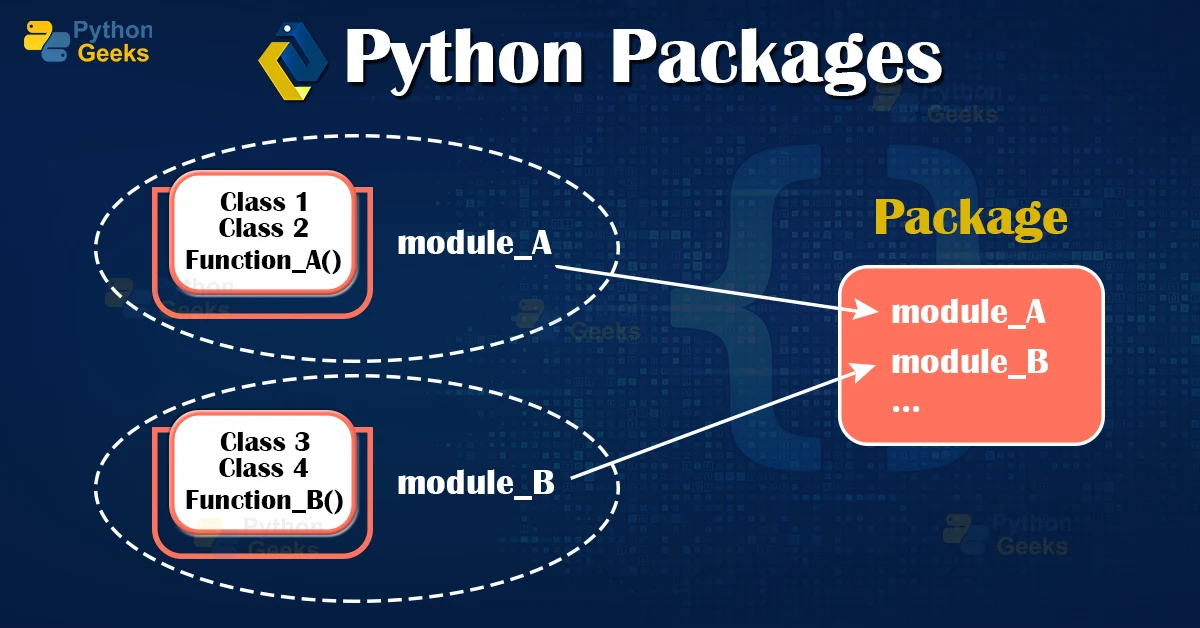
The import Statement: Using a Library's Tools
To use a library, you must first tell Python that you want to use it with the import statement. There are a few common ways to do this, each with its purpose.
The video below by Corey Schafer provides an excellent explanation of how importing works. We'll start with the basics of the import command.
Python Tutorial for Beginners 9: Import Modules and Exploring The Standard Library
In this first clip from 'Python Tutorial for Beginners 9: Import Modules', you'll learn the fundamental ways to import a module and use its contents.
Watch from the beginning to 05:09. Pay close attention to: The basic import my_module syntax. How to access a function from an imported module using dot notation (e.g., my_module.find_index()). Using the as keyword to create a shorter alias (e.g., import my_module as mm). This is a very common practice. Using from my_module import function to import a specific tool from the library.
To summarize the key methods:
import math: Imports the entiremathlibrary. You access its functions with the library's name as a prefix:math.sqrt(16).import pandas as pd: Imports the entirepandaslibrary and gives it a shorter alias,pd. This is the community-standard way to import libraries like pandas and NumPy. You access functions with the alias:pd.DataFrame().from datetime import datetime: Imports only thedatetimeclass from thedatetimemodule. You can then use it directly without a prefix:datetime.now(). This is useful but can cause name conflicts if you import two functions with the same name from different libraries.
A Look at the Standard Library
Before we get to the exciting trading-specific libraries, let's see what's already available in Python. The standard library is powerful and can handle many tasks. For example, the datetime and calendar modules are crucial for any time-based analysis, like identifying ICT Killzones.
Let's watch another segment from the same video to see some examples.
Python Tutorial for Beginners 9: Import Modules and Exploring The Standard Library
This clip demonstrates several useful modules from the standard library, giving you a feel for the kind of functionality that comes built-in with Python.
Watch from 13:42 to 17:59. Notice the examples for random (choosing a random item), math (for mathematical calculations), datetime (for handling dates), and os (for interacting with the operating system).
Here's a practical example using datetime. The ICT methodology often emphasizes specific days of the week for certain market behaviors (e.g., the weekly profile). We can use Python to find out the day of the week.
# First, import the 'datetime' object from the 'datetime' module
from datetime import datetime

# Get the current date and time
now = datetime.now()

# The weekday() method returns the day as an integer, where Monday is 0 and Sunday is 6.
day_of_week = now.weekday()
days = ["Monday", "Tuesday", "Wednesday", "Thursday", "Friday", "Saturday", "Sunday"]

print(f"Today is {days[day_of_week]}.")
# Example output: "Today is Tuesday."
Third-Party Libraries: The Real Power for Trading
The real magic for us begins with third-party libraries. These are specialized toolkits for data science, finance, and trading.
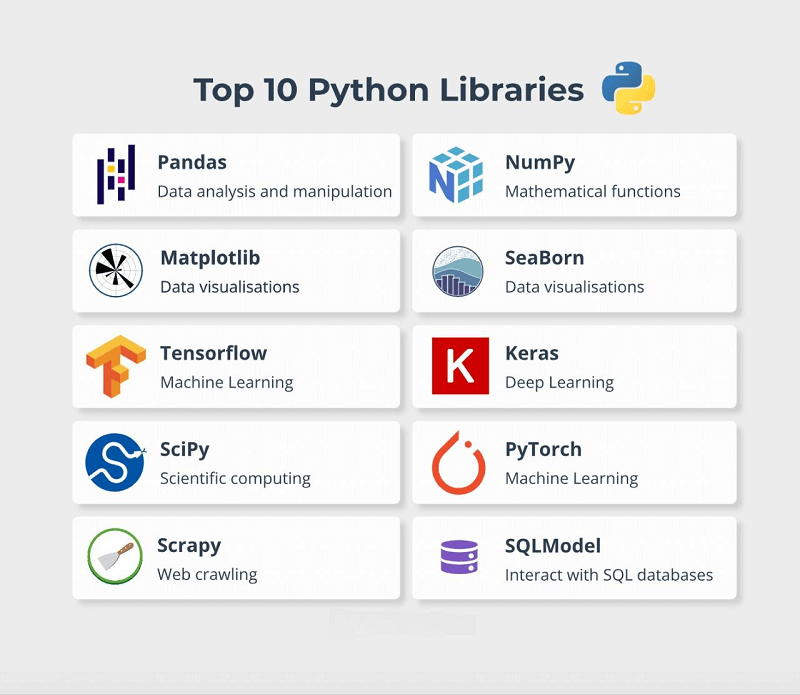
But how do we get these libraries? We use pip, Python's package manager. pip is a command-line tool that downloads and installs libraries from an online repository called the Python Package Index (PyPI).
Best Practice: Virtual Environments
Before you install anything, it is critical to create a virtual environment. Imagine you are working on two different trading bots. Bot A needs version 1.0 of a library, but Bot B needs the newer version 2.0. If you install them on your main computer, they will conflict.
A virtual environment is an isolated, self-contained directory that holds a specific version of Python and all the specific libraries for a single project. This prevents conflicts and keeps your projects organized. You should create a new virtual environment for every project you work on.
The next video explains this concept and shows you how to use pip to install packages inside a virtual environment.
Installing Packages With pip: Python Basics
This video from Real Python, 'Installing Packages With pip', clearly explains why virtual environments are essential and demonstrates the entire workflow: create, activate, and install.
Watch from 09:26 to 19:56. This is a crucial section. Focus on understanding: Why virtual environments are needed to avoid dependency conflicts (09:26 - 11:03). How to create a virtual environment using python -m venv <environment_name> (11:03 - 13:08). How to activate it. The prompt changes to show you are 'inside' the environment (13:08 - 15:31). How to install a package using pip install <package_name> (15:31 - 19:56).
Key Libraries for Your Trading Journey
Now that you know how to install libraries, let's talk about what you'll be using. This article from QuantInsti provides a great overview of the landscape.
Best Python Libraries for Algorithmic Trading and Financial ...
The article 'Best Python Libraries for Algorithmic Trading' provides a fantastic overview of the tools of the trade. We'll focus on the libraries for getting, handling, and visualizing data.
Read the sections titled 'Fetching data' (specifically about yfinance), 'Data manipulation' (covering NumPy and Pandas), and 'Plotting and visualization' (covering Matplotlib). Finally, look at the summary table at the end to see how these libraries fit together.
The three most important libraries you will start with are:
yfinance: For downloading historical market data from Yahoo Finance.pandas: The single most important library for data analysis in Python. It provides a powerful object called a DataFrame, which is like a supercharged spreadsheet for your code.matplotlib: For creating charts and visualizations of your data.
Test your understanding!
You want to install the pandas library into your currently active virtual environment. Which command would you type into your terminal?
import pandas as pdinstall pandaspip install pandaspython use pandas
Show answer
The correct answer is 3: pip install pandas.
pip is the command-line tool for managing packages. The install command tells pip to download and install the specified package. The import statement is used inside your Python script, not in the terminal, to make the library's code available.
Putting It All Together: Your First Data Script
Let's write a small script that uses these new tools. This example, inspired by the article "Financial Data Analysis with Python," will be your first step in building a real trading application.
Before running this, make sure you have:
- Created a virtual environment (e.g.,
python -m venv my_trading_env). - Activated it (e.g.,
source my_trading_env/bin/activateon Mac/Linux ormy_trading_env\\Scripts\\activateon Windows). - Installed the necessary libraries:
pip install pandas yfinance.
Now, create a new Python file (e.g., get_data.py) and type the following:
# Step 1: Import the libraries using their standard aliases
import yfinance as yf
import pandas as pd

# Step 2: Define the ticker symbol and the date range
ticker = "EURUSD=X" # Forex ticker for EUR/USD on Yahoo Finance
start_date = "2023-01-01"
end_date = "2023-12-31"

print(f"Downloading data for {ticker}...")

# Step 3: Use the yfinance library to download the data
# The result is automatically stored in a pandas DataFrame
df = yf.download(ticker, start=start_date, end=end_date)

# Step 4: Use pandas to display the last 5 rows of the data
print("Download complete. Here are the last 5 trading days of data:")
print(df.tail())
When you run this script, you will see it print a message, and then display a clean, formatted table with the OHLC data for the last five days of 2023. You have just successfully used third-party libraries to fetch and display real financial data!
Conclusion
Congratulations on completing the Python fundamentals module! Today, you've unlocked the true potential of Python by learning how to incorporate powerful external libraries.
Key Takeaways:
- Libraries are collections of pre-written code that extend Python's capabilities.
- We use the
importstatement to bring library functionality into our scripts. - It is a crucial best practice to use virtual environments to manage dependencies for each project.
pipis the command-line tool used to install third-party libraries likepandasandyfinance.- With just a few lines of code, you can now fetch real-world financial data, setting the stage for all future analysis.
Preview for the Next Lesson:
This lesson was the perfect transition into our next module, "Working with Market Data in Python." Now that you have the foundational skills, we will dive headfirst into practical application. In the next lesson, you will learn how to select and configure a market data source and write a more robust script to fetch and save historical price data. We're moving from learning the tools to building the workshop.