Hello! Welcome to your second lesson in the "Python Fundamentals for Algorithmic Trading" module.
In our last session, you successfully set up your professional development environment using Visual Studio Code. You now have a digital workshop ready for building. Today, we'll start using the tools in that workshop. We're going to learn the most basic but powerful building blocks of Python: how to store, categorize, and perform calculations on data.
This lesson directly addresses the learning outcome: Use variables, data types (strings, integers, floats), and basic operations. By the end of our 60 minutes, you will be able to write simple Python code to represent trading concepts like price, ticker symbols, and position size, and perform fundamental calculations with them. This is the first concrete step toward translating your ICT trading knowledge into a language a computer can execute.
What is a Variable? The "Boxes" for Your Data
Imagine you're packing for a move. You put your books in one box and label it "Books," your shoes in another and label it "Shoes." In programming, we do the same thing with data. A variable is simply a labeled container in the computer's memory where you can store a piece of information.
To get a clear mental model of this, let's watch a short clip that explains this "box analogy" perfectly.
Python Variables & Data Types - The Building Blocks of Code
This video from the Python Simplified channel provides an excellent analogy for understanding variables as labeled boxes for storing data.
Watch from the beginning until 00:54.
In Python, creating a variable is as simple as giving it a name and assigning it a value with the equals sign (=):
# A variable named 'asset' storing the text 'EUR/USD'
asset = 'EUR/USD'

# A variable named 'entry_price' storing the number 1.0750
entry_price = 1.0750
Data Types: What Kind of Information is in the Box?
Just as you wouldn't calculate the square root of "Books," a program needs to know what kind of data it's working with to know what operations are possible. These categories are called data types. For now, we'll focus on the four most essential ones.

- Integer (
int): Whole numbers. Useful for counting things, like the number of shares or a value in pips.risk_in_pips = 20
- Float (
float): Numbers with decimal points. This is the most important type for trading, as it's used for prices.gbpusd_price = 1.25432
- String (
str): Text, which must be enclosed in single (') or double (") quotes. Used for asset tickers, dates, labels, etc.ticker_symbol = 'SPX500'
- Boolean (
bool): Represents one of two values:TrueorFalse. This is the foundation for making logical decisions, which we'll explore more in the next lesson.is_trade_open = True
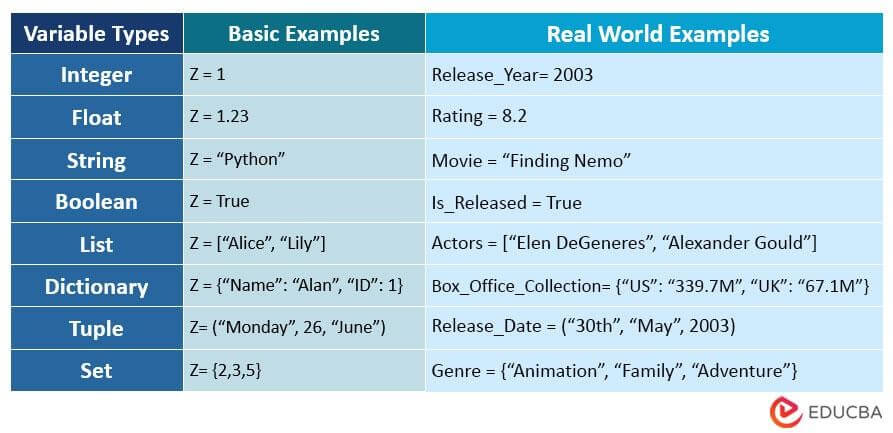
You can always check the type of a variable using Python's built-in type() function:
price = 152.75
print(type(price))
# Output: <class 'float'>

ticker = "AAPL"
print(type(ticker))
# Output: <class 'str'>
To reinforce these concepts, the next part of the video you started provides a great summary of these data types and the rules for naming your variables.
Python Variables & Data Types - The Building Blocks of Code
Continuing with the Python Simplified video, this section covers the core data types and the rules for naming variables.
Watch from 00:54 to 02:58.
Performing Basic Operations
Now that we can store data, let's do something with it. The most common operations in trading are arithmetic.
Arithmetic Operations with Numbers (int and float)
Python uses standard symbols for math:
+(addition)-(subtraction)*(multiplication)/(division)
Let's apply this to a trading scenario. Imagine you're planning a trade on the S&P 500 index.
# Open your Jupyter Notebook in VS Code for this part!
# Create a new cell and type the following:

entry_price = 4500.50
stop_loss_price = 4490.50
take_profit_price = 4530.50

# Calculate the potential risk and reward
potential_loss = entry_price - stop_loss_price
potential_profit = take_profit_price - entry_price

print("Potential Loss per share:", potential_loss)
print("Potential Profit per share:", potential_profit)

# Calculate the risk-to-reward ratio
risk_reward_ratio = potential_profit / potential_loss
print("Risk/Reward Ratio:", risk_reward_ratio)
When you run this cell (using Shift+Enter), you'll see Python perform the calculations instantly. This is the foundation of analyzing trade parameters programmatically.
The following video shows a very similar example related to finance, calculating the total value of a stock position.
Intro to Python for Finance: A Beginner's Guide
In this clip from 'Intro to Python for Finance', the presenter demonstrates a practical financial calculation using variables and multiplication.
Watch from 06:30 to 07:25.
Operations with Strings (str)
The + operator does something different with strings: it joins them together. This is called concatenation.
greeting = "Hello"
trader_name = "Alex"
full_greeting = greeting + ", " + trader_name + "!"
print(full_greeting)
# Output: Hello, Alex!
Handling a Common Beginner Error: TypeError
What happens if you try to combine a string and a number with +?
ticker = 'EUR/USD'
price = 1.0750
# This line will cause an error!
# print("The current price of " + ticker + " is " + price)
If you run this, Python will stop with a TypeError because it doesn't know how to "add" text to a number. To fix this, you must explicitly convert the number to a string using the str() function.
# The correct way
print("The current price of " + ticker + " is " + str(price))
This is a fundamental concept for displaying results. The video below demonstrates this exact problem and solution.
Intro to Python for Finance: A Beginner's Guide
This clip clearly explains why you can't concatenate strings and numbers directly and shows how to use the str() function to fix it.
Watch from 07:25 to 08:06.
A more modern and cleaner way to format strings in Python is using f-strings. You just put an f before the first quote and place your variables inside curly braces {}. Python handles the conversion automatically.
# Using an f-string (recommended)
print(f"The current price of {ticker} is {price}")
Test your understanding!
You want to calculate the size of a price leg. You have the following variables:swing_high = 1.2500swing_low = 1.2350
Which line of code will correctly calculate and print the range of the price leg in pips (assuming 1 pip = 0.0001 for this pair)?
range = swing_high + swing_lowrange = (swing_high - swing_low) * 10000range = "swing_high - swing_low"range = (swing_high - swing_low) / "10000"
Show answer
Line 2 is correct: range = (swing_high - swing_low) * 10000.
- It correctly subtracts the low from the high to get the price difference.
- It then multiplies by 10,000 to convert the decimal price difference into pips.
- Line 1 adds the prices, which is incorrect. Line 3 creates a string of text, not a calculation. Line 4 tries to divide by a string, which would cause a
TypeError.
For Further Reading
The concepts we've discussed are foundational. For a detailed textual reference that you can review at your own pace, the following resource is excellent. It provides clear definitions and code examples for everything covered.
2.1. Simple Calculations - Programming Basics with Python
The article 'Simple Calculations' from the SoftUni Python book provides a solid written summary of variables, data types, and arithmetic operations.
Read the sections on 'Data Types and Variables', 'Arithmetic Operations', and 'Concatenating Text and Numbers'. These sections directly reinforce what we've just practiced.
Conclusion
Excellent work today! You've taken your first steps as a programmer and learned how to communicate basic financial concepts to the computer. This is the bedrock upon which all your future automation will be built.
Key Takeaways:
- Variables are named containers for storing data (
entry_price = 1.0750). - Data has different types, with the most common being
int,float,str, andbool. - You can use arithmetic operators (
+,-,*,/) to perform calculations, which is essential for trade analysis. - Combining strings and numbers for display requires explicit type conversion (
str()) or using f-strings (e.g.,f"Price is {price}").
Preview for the Next Lesson:
Now that your program can store data and do math, the next logical step is to make decisions. In our next lesson, you'll learn about conditional statements (if, elif, else). This will allow you to write code that reacts to different scenarios, such as: "IF price breaks above the previous swing high, THEN a Break of Structure has occurred." This is where your code will start to embody the ICT logic you've been learning.