Hello! Welcome to your third lesson in the "Python Fundamentals for Algorithmic Trading" module.
In our last session, we covered the absolute basics: storing information in variables, understanding different data types like prices (float) and tickers (str), and performing simple calculations. You now know how to represent and manipulate individual pieces of data.
Today, we're going to make our code intelligent. This lesson focuses on the learning outcome: Write conditional statements (if/elif/else) to make decisions. We'll learn how to control the flow of our program, making it execute different actions based on different conditions. This is the moment we move from just doing calculations to implementing logic—the heart of any trading strategy.
The Foundation of Logic: The if Statement
In trading, your actions are driven by "if-then" logic: "IF the price breaks the last swing high, THEN I'll consider the trend bullish." In Python, we express this with an if statement. It checks if a condition is true and, if it is, executes a specific block of code.
An if statement has three parts:
- The
ifkeyword. - A condition that results in
TrueorFalse. For example,price > 1.5000. - A colon (
:) followed by an indented block of code to run if the condition isTrue.
Indentation is critical in Python. It's how Python knows which lines of code belong to the if statement. The standard is to use four spaces for indentation.
To see this in action, let's start with a clear, fundamental explanation.
Control Flow in Python - If Elif Else Statements
The video 'Control Flow in Python' by Programming with Mosh provides an excellent introduction to the if statement. Pay close attention to his explanation of conditions and the crucial role of indentation.
Watch from the beginning to 02:53.
Now, let's apply this to an ICT concept. Imagine we are monitoring for a potential Break of Structure (BOS).
# Open your Jupyter Notebook and try this out.

swing_high = 1.0850
current_price = 1.0865

# Check if the price has moved above the swing high
if current_price > swing_high:
    print("Potential bullish Break of Structure (BOS).")
    print("Market may be continuing its upward trend.")

# This line is NOT indented, so it will always run
print("Finished checking price.")
If you change current_price to 1.0840 and run it again, you'll see that the indented messages do not appear.
Handling Two Possibilities: if-else
What if you want to do something when the condition is not met? The else statement provides an alternative path.
Let's refine our BOS example:
swing_high = 1.0850
current_price = 1.0840

if current_price > swing_high:
    print("Potential bullish Break of Structure (BOS).")
else:
    print("Market structure is holding. No BOS confirmed yet.")
Here, only one of the two blocks will ever be executed. The following video demonstrates this if-else structure using a trading-related example of entry and exit prices.
Python Operators + if-else + Loops | 2/100 Days of Python Algo trading
In this clip from 'Python Operators + if-else + Loops', Kuldeep Singh Rathore demonstrates the if-else structure with a practical trading example.
Watch from 26:45 to 30:29. This will show you a direct application of if-else to price variables.
Handling Multiple Scenarios: The if-elif-else Chain
Trading logic is rarely just a single "yes/no" question. What if you need to check multiple, mutually exclusive conditions? This is where elif (short for "else if") comes in. It allows you to build a chain of checks.
A perfect application for this is determining if a price is in a premium, discount, or at equilibrium within a trading range.
ifthe price is above the 50% level, it's in a premium.elifthe price is below the 50% level, it's in a discount.else, it must be exactly at the equilibrium.
Let's code this:
range_high = 1.1000
range_low = 1.0800
equilibrium = (range_high + range_low) / 2  # The 50% level
current_price = 1.0925

print(f"Equilibrium is at: {equilibrium}")

if current_price > equilibrium:
    print(f"Price ({current_price}) is in a PREMIUM zone. Look for sells.")
elif current_price < equilibrium:
    print(f"Price ({current_price}) is in a DISCOUNT zone. Look for buys.")
else:
    print(f"Price is exactly at EQUILIBRIUM.")
Python will check these conditions in order and execute the first one that is true, then skip the rest of the chain.
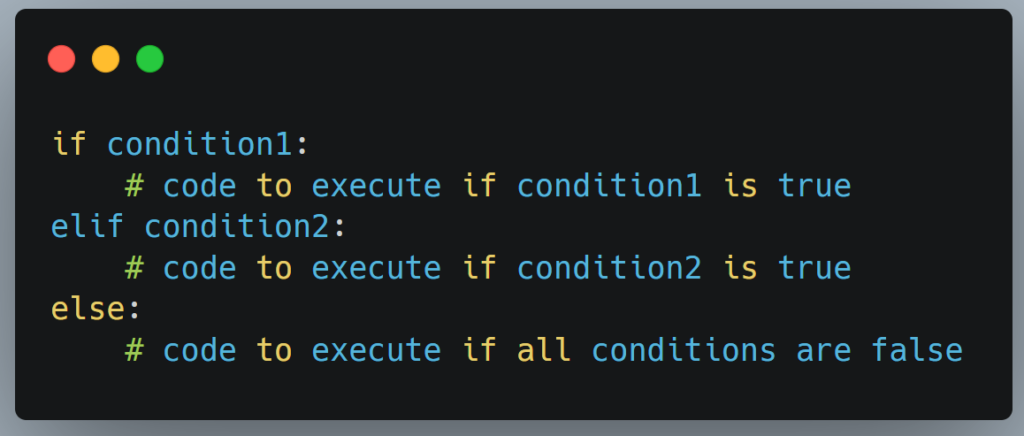
For a more comprehensive explanation, the following resource is an excellent written guide.
Python if, if...else Statement (With Examples)
The article 'Python if...else Statement' from Programiz provides a thorough textual explanation of conditional logic, which is great for review and reference.
Read the sections covering the 'if Statement', 'Indentation', 'if...else Statement', and 'if…elif…else Statement'. This will solidify your understanding of the different structures.
Creating Complex Rules with Logical Operators
Often, a single condition isn't enough. You might need to check multiple things at once. For this, we use logical operators: and, or, and not.
and: True only if all conditions are true.- ICT Example: "I'll consider a buy if the price is in a discount
andthere is a bullish order block."
- ICT Example: "I'll consider a buy if the price is in a discount
or: True if at least one condition is true.- ICT Example: "I will monitor price closely during the London Killzone
orthe New York Killzone."
- ICT Example: "I will monitor price closely during the London Killzone
not: Reverses the result (True becomes False, False becomes True).- ICT Example: "I will look for a new trade if I do
nothave an open position."
- ICT Example: "I will look for a new trade if I do
Let's build a more sophisticated rule:
price_in_discount_zone = True
bullish_fvg_present = True
is_trade_open = False

# We use 'and' to ensure both entry criteria are met.
# We use 'not' to ensure we don't enter a new trade while in another.
if (price_in_discount_zone and bullish_fvg_present) and (not is_trade_open):
    print("High-probability buy setup detected. Conditions met.")
else:
    print("Conditions not met for a buy setup.")
The parentheses () are used here to group conditions for clarity, much like in mathematics.
The next video gives a fantastic, detailed walkthrough of these logical operators.
Control Flow in Python - If Elif Else Statements
Mosh's video explains how to use and, or, and not to build complex, real-world conditions. This is essential for creating robust trading rules.
Watch from 06:15 to 10:29.
Test your understanding!
You are creating a filter for a Silver Bullet trade setup. The conditions are:
- The time must be within the designated window (
is_time_window = True). - Price must have taken liquidity (
liquidity_swept = True). - Price must have displaced to create a Fair Value Gap (
fvg_created = True).
A trade should only be considered if the time is correct AND (either liquidity was swept OR an FVG was created).
Which if statement correctly represents this logic?
if is_time_window and liquidity_swept and fvg_created:if is_time_window or (liquidity_swept and fvg_created):if is_time_window and (liquidity_swept or fvg_created):if (is_time_window and liquidity_swept) or fvg_created:
Show answer
The correct answer is 3: if is_time_window and (liquidity_swept or fvg_created):.
This line correctly checks that the time window is always required (and), and then checks if at least one of the two price action conditions (or) has occurred. The parentheses ensure the or condition is evaluated first before being combined with the and condition.
Conclusion
Fantastic progress! You've just learned one of the most powerful concepts in programming. You can now write code that responds dynamically to market conditions, which is the cornerstone of building any trading bot or analysis tool.
Key Takeaways:
if: Executes code only if a condition isTrue.if-else: Provides two separate paths forTrueandFalseoutcomes.if-elif-else: Creates a chain for checking multiple, mutually exclusive conditions.- Indentation: Is mandatory in Python and defines which code blocks belong to your conditional statements.
- Logical Operators (
and,or,not): Allow you to combine simple conditions into complex, powerful rules that mirror real trading logic.
Preview for the Next Lesson:
Now that your code can make a decision, what if you need to make that same decision over and over again? For example, checking every single candle in a year's worth of data for a Break of Structure. Doing that manually would be impossible. In the next lesson, we will learn about loops (for and while). Loops will allow you to automate repetitive tasks and iterate through large datasets, unleashing the true power of programming for trading analysis.