Introduction
In our previous lesson, we explored the Global Interpreter Lock (GIL) and established how it limits a single Python process to using one CPU core at a time for executing Python bytecode. We saw that this has profound implications for how we write concurrent code, especially the distinction between I/O-bound and CPU-bound tasks.
This lesson builds directly on that foundation. Our learning outcome is to compare threading, multiprocessing, and asyncio, and select the appropriate concurrency model for I/O-bound vs. CPU-bound backend tasks. We will move beyond the GIL's limitations and into the practical strategies Python provides to build performant, scalable backend systems. Mastering this is a non-negotiable skill for a senior backend role, as it forms the basis of architectural decisions for any service you build.
The Three Concurrency Models: A High-Level View
Python offers three distinct models for handling concurrent operations. The fundamental difference between them lies in how they manage execution and system resources.
Let's begin by visually contrasting the two hardware-level approaches: multiprocessing and multithreading.
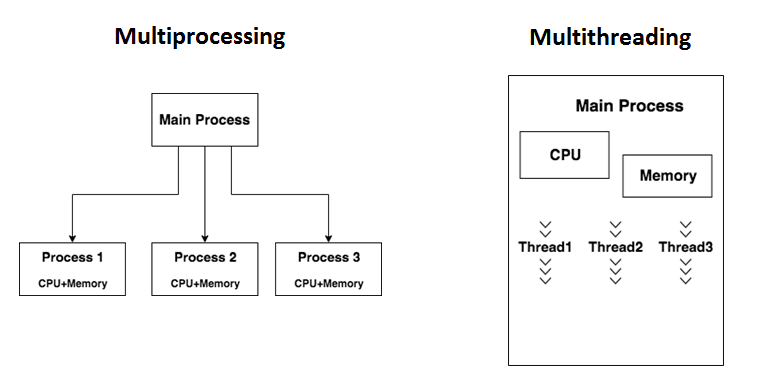
Now, let's formally define all three models. The following article from Real Python provides an excellent overview.
Speed Up Your Python Program With Concurrency
To start, let's get clear definitions of each concurrency model and the type of multitasking they use. This article, 'Speed Up Your Python Program With Concurrency', provides a great foundation.
Please read the section 'Exploring Concurrency in Python'. Focus on the table that compares asyncio, threading, and multiprocessing. Pay attention to the concepts of cooperative vs. preemptive multitasking.
Based on your reading, here is a summary table that you should commit to memory:
| Concurrency Model | Execution Unit | Parallelism Mechanism | Key Characteristic |
|---|---|---|---|
multiprocessing |
Process | True Parallelism | Bypasses the GIL by using separate processes, each with its own memory and interpreter. Ideal for CPU-bound tasks. |
threading |
Thread | Concurrency | Uses OS threads within a single process. All threads are constrained by the GIL but can run concurrently when one is waiting on I/O. |
asyncio |
Coroutine/Task | Concurrency | Uses a single thread and an event loop to manage tasks. Relies on cooperative multitasking (async/await). Highly efficient for I/O-bound tasks. |
The Deciding Factor: I/O-Bound vs. CPU-Bound
As we've touched upon, the correct choice of concurrency model depends almost entirely on the nature of your workload.
- I/O-Bound Tasks: The program spends most of its time waiting for external operations to complete. This is the bread and butter of backend services: network requests to other services, database queries, reading/writing to disk.
- CPU-Bound Tasks: The program spends most of its time performing computations. Examples include data serialization/deserialization, complex calculations, image or video processing, and report generation.
In the previous lesson, you learned that the GIL is released during I/O operations. This is why both threading and asyncio are effective for I/O-bound tasks. While one thread or task is waiting, another can acquire the GIL and run.
For CPU-bound tasks, the GIL is held continuously. This means threading and asyncio offer no performance benefit and, due to overhead, will actually slow your program down. The only way to achieve true parallelism for CPU-bound work in CPython is with multiprocessing.
A Tale of Two Tasks: Performance in Practice
Theory is useful, but seeing the performance data makes the concepts concrete. Let's analyze how these models perform on both I/O-bound and CPU-bound tasks.
The following video provides a concise demonstration with code examples for all three models.
AsyncIO VS Threading VS Multiprocessing in Python
The video 'AsyncIO VS Threading VS Multiprocessing in Python' by Indently provides clear, modern examples using concurrent.futures and asyncio to demonstrate the performance characteristics of each model.
Watch the entire video (it's short). Pay close attention to which model is used for the simulated I/O task and which is used for the CPU task, and note the performance results mentioned.
To reinforce these findings with hard data from a rigorous benchmark, let's examine a study that compares these models under heavy load.
Python Concurrency Model Benchmark
This GitHub project, 'Python Concurrency Model Benchmark', provides a detailed, data-driven comparison of the models. It's an excellent resource for a senior-level perspective grounded in empirical results.
Please review two key parts of this document: CPU-Bound Task: Character Encoding: Skim the results tables for Synchronous, Asyncio, and Threading. Note the 'Key Observations' and the author's final 'My Take'. IO-Bound Task: HTTP Requests: Skim the results tables for Synchronous, Asyncio, and Threading (specifically the 100-thread and 1000-thread tests). Pay close attention to the 'Key Observations' for each, the 'Threading Performance Analysis', and the final 'My Take'.
Let's synthesize what you've just reviewed.
For I/O-Bound Tasks (e.g., fetching 10,000 URLs)
asynciois the clear winner. It provides the highest throughput (1435 KB/s) and fastest execution time (14s) with very low overhead per task. It scales exceptionally well to tens of thousands of concurrent connections.threadingis a strong contender but has limitations. It provides a massive speedup over synchronous code. However, its performance degrades as the number of threads becomes very large (e.g., >1000) due to OS-level context-switching overhead. It's often less memory-intensive thanasyncioat lower concurrency levels.multiprocessingis a poor choice. The overhead of creating and managing separate processes for I/O tasks makes it significantly slower thanthreadingorasyncio.
For CPU-Bound Tasks (e.g., heavy computation)
multiprocessingis the only effective solution. It allows Python to bypass the GIL and use multiple CPU cores, providing a near-linear speedup with the number of cores.threadingandasynciomake performance worse. The benchmark shows that threading was 26% slower than the synchronous version due to GIL contention and context-switching overhead.asyncioalso adds overhead with no benefit.
The Decision Framework: An Interviewer's Perspective
In an interview, you'll be expected to articulate these trade-offs clearly and apply them to an architectural problem. This flowchart provides a simple mental model to guide your decision.

Interview Question: "You are tasked with building a new microservice. It has two primary functions: 1) An endpoint that receives a user ID, calls three different internal APIs to gather user data, aggregates it, and returns a JSON response. 2) An endpoint that takes raw data and generates a complex PDF report, which is a computationally intensive process. How would you handle concurrency for these two distinct workloads?"
-
Your Thought Process:
- Analyze Function 1 (API aggregation): This is classic I/O-bound work. The service will spend most of its time waiting for network responses from the three internal APIs. High concurrency is desirable.
asynciois a perfect fit. - Analyze Function 2 (PDF generation): The description "computationally intensive" immediately signals a CPU-bound task. Running this inside the web server process is a recipe for disaster, as it would block the event loop or hold the GIL, preventing any other requests from being served. This work must be offloaded.
multiprocessingis the tool for the actual computation.
- Analyze Function 1 (API aggregation): This is classic I/O-bound work. The service will spend most of its time waiting for network responses from the three internal APIs. High concurrency is desirable.
-
Structured Answer:
- "For the API aggregation endpoint, I would use
asyncio."- Justification: "This is an I/O-bound workload.
asynciois extremely efficient for this, as it can initiate all three API requests concurrently without the overhead of creating OS threads. Using a library likehttpx, I'd create a list ofasyncio.Tasks for each API call and run them concurrently withasyncio.gather(). This minimizes the total response time to be slightly more than the single longest API call, rather than the sum of all three."
- Justification: "This is an I/O-bound workload.
- "For the PDF generation endpoint, I would use a background task queue with multiprocessing workers."
- Justification: "This is a CPU-bound task. Executing it in the request-response cycle would block the server. The correct approach is to offload it. The API endpoint would receive the request, enqueue a job in a task queue like Celery or RQ, and immediately return a
202 Acceptedresponse with a job ID. - "The Celery workers would be configured to use the
preforkpool (which is based onmultiprocessing). This allows multiple PDF generation jobs to run in parallel on different CPU cores, fully utilizing the machine's hardware and bypassing the GIL. This architecture decouples the CPU-intensive work from the web-serving layer, ensuring the API remains responsive."
- Justification: "This is a CPU-bound task. Executing it in the request-response cycle would block the server. The correct approach is to offload it. The API endpoint would receive the request, enqueue a job in a task queue like Celery or RQ, and immediately return a
- "For the API aggregation endpoint, I would use
Conclusion
You have now analyzed the three core concurrency models in Python, connecting them directly to the GIL's behavior and real-world backend workloads.
Key Takeaways:
- The choice between
asyncio,threading, andmultiprocessingis determined by whether your task is I/O-bound or CPU-bound. - I/O-Bound: Use
asynciofor the best performance and scalability, especially for new network-heavy services. Usethreadingwhen you need to integrate with blocking I/O libraries or for simpler concurrency needs. - CPU-Bound: Use
multiprocessingto achieve true parallelism and leverage multiple CPU cores. Never usethreadingorasynciofor heavy computation, as they will degrade performance. - In a real backend system, you will often use a hybrid approach:
asyncioorthreadingin your web server for I/O-bound requests, andmultiprocessingin background workers for CPU-bound jobs.
Preview of the Next Lesson
We've discussed how multiprocessing uses separate memory and how the GIL was created to simplify memory management. This naturally leads to our next topic: Python's memory management and garbage collection. We will explore how CPython handles memory, what can cause memory leaks in long-running services, and how to identify them—a critical skill for ensuring production reliability.