Hello! Welcome to the fifth module of our course. We're now shifting gears from the runtime world of resource management and polymorphism to the powerful domain of compile-time programming.
In the last module, you mastered the RAII idiom and the use of smart pointers to manage object lifetimes automatically and safely. We saw how features like virtual destructors are essential for handling polymorphic objects at runtime. Now, we will explore a different kind of polymorphism, one that is resolved entirely by the compiler: generic programming using templates.
Your strong foundation in C gives you a unique perspective here. You're likely familiar with C's approaches to generic code, such as using void* pointers or preprocessor macros. You also know their pitfalls: void* is type-unsafe and requires manual casting, while macros are simple text substitution, offering no type checking and creating cryptic error messages. C++ templates are the answer to these problems, providing a robust, type-safe way to write code that works with any type that meets certain requirements.
Today's lesson will introduce you to this feature. Our learning outcome is to implement function and class templates and explain the process of template instantiation by the compiler. We'll focus on how these "blueprints" are turned into real, executable code, which is a fundamental concept for understanding the performance and structure of template-based libraries like the STL.
What are Templates? The "Write Once, Use Many" Principle
At its core, a template is a blueprint that the compiler uses to generate code. Instead of writing separate functions or classes for int, double, std::string, and your own custom types, you write a single template and let the compiler generate the specific versions you need. This is the heart of generic programming.
Function Templates
Let's start with a classic example: a function to find the maximum of two values. In C, you might write a macro, but in C++, we use a function template.
#include <iostream>

// This is a function template. 'typename T' declares a template parameter.
// T is a placeholder for a type that will be specified later.
template <typename T>
T max(T a, T b) {
    return b < a ? a : b;
}

int main() {
    // The compiler sees max(5, 10) and knows T must be 'int'.
    // It generates a version of max for integers: max<int>(int, int).
    std::cout << "Max of 5 and 10 is " << max(5, 10) << std::endl;

    // The compiler sees max(3.14, 2.71) and knows T must be 'double'.
    // It generates a version of max for doubles: max<double>(double, double).
    std::cout << "Max of 3.14 and 2.71 is " << max(3.14, 2.71) << std::endl;

    // We can also be explicit about the type.
    std::cout << "Max of 'a' and 'z' is " << max<char>('a', 'z') << std::endl;
}
The process of the compiler generating a concrete function like max<int> from the max template is called template instantiation.
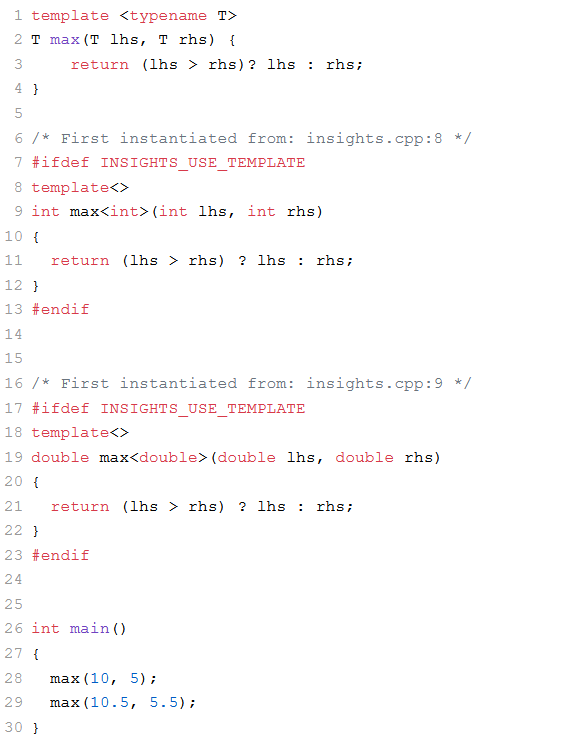
The Instantiation Process: From Blueprint to Binary
A template itself doesn't generate any code in your final executable. It's just a set of instructions for the compiler. The compiler is "lazy" and only instantiates a template when it encounters a call to it.
This is a critical point that aligns with your interest in "under the hood" mechanics. We can actually observe this process.
The video "Templates under the hood" from the Code for yourself channel provides an excellent, concise explanation of this process. It demonstrates how to verify compiler behavior using standard command-line tools.
Watch the segment from 01:09 to 05:50. Pay close attention to: The concept of the compiler generating 'concrete specializations'. The demonstration using g++ -c to create an object file and objdump (or nm) to inspect the symbol table. You'll see the mangled names for each template instantiation, similar to what we saw with function overloading. The explanation for why the compiler is lazy: it saves compile time and binary size, and it's impossible to know all possible types in advance.
As the video shows, if you compile a file that uses max(int, int) and max(double, double), the resulting object file contains the compiled machine code for two distinct functions. If you never call max, no code for it is generated at all.
Template Argument Deduction
For function templates, the compiler usually figures out the type T automatically from the arguments you pass. This is called template argument deduction. However, it's very strict.
int i = 5;
double d = 10.5;

// This will cause a compilation error!
// max(i, d);
The compiler can't deduce a single T that satisfies both int and double. It won't perform implicit conversions here. You have to be explicit, either by casting one of the arguments or by telling the compiler which template to use:
// Option 1: Cast one argument
max(static_cast<double>(i), d); // Compiles, instantiates max<double>

// Option 2: Explicitly specify the template argument
max<double>(i, d); // Compiles, instantiates max<double>. The 'i' is promoted to double.
Test your understanding!
You have the following function template:
template <typename T>
void print(T value) {
    std::cout << value << std::endl;
}
If you have a short s = 10;, will print(s); compile? If so, what is the type T deduced as? What function is instantiated?
Show answer
Yes, it will compile. The type T is deduced as short. The compiler will instantiate and call void print<short>(short). This is a straightforward case of template argument deduction.
Class Templates
Just like with functions, you can create generic blueprints for classes. This is the foundation of the C++ Standard Template Library (STL) containers like std::vector and std::map.
Let's build a simple Array class template. Your C background will make the internal structure familiar, but templates make it type-safe.
Back to Basics: Templates (part 1 of 2) - Andreas Fertig - CppCon 2020
In his CppCon 2020 talk, Andreas Fertig demonstrates a practical class template for a fixed-size Array. This example is perfect for understanding the syntax and mechanics.
Watch from 20:55 to 30:08. Focus on: The syntax for a class template with both a type parameter (typename T) and a non-type parameter (size_t Size). How member functions are defined, both inline and out-of-line. How the compiler instantiates the entire class for each unique combination of template arguments (e.g., Array<int, 2>, Array<double, 2>). The key observation that member functions are only instantiated if they are used.
Here is a simplified version of the code from the video for reference:
#include <cstddef> // for size_t

template <typename T, size_t Size>
class Array {
private:
    T m_data[Size];

public:
    // Returns the size of the array
    size_t size() const { return Size; }

    // Access elements with bounds checking
    T& at(size_t index) {
        if (index >= Size) {
            throw std::out_of_range("Index out of range");
        }
        return m_data[index];
    }

    // An unused function
    void some_other_function() {
        // ... some complex logic ...
    }
};

int main() {
    Array<int, 5> my_int_array; // Instantiates Array<int, 5>
    my_int_array.at(0) = 100;    // Instantiates Array<int, 5>::at(size_t)

    Array<double, 10> my_double_array; // Instantiates Array<double, 10>
    my_double_array.size();             // Instantiates Array<double, 10>::size() const

    // Note: `some_other_function` is never called, so it is never instantiated for either type.
}
Class Template Instantiation: A Deeper Look
The rule that unused member functions are not instantiated is a crucial optimization. It means you can have member functions in your template that only work for certain types, and as long as you don't call them with incompatible types, your code will compile fine.
This also means that if a member function has a syntax error, but you never call it, your program might compile successfully! The error will only be triggered when the compiler tries to instantiate that specific function.
This is another "under the hood" detail we can verify.
Chapter 7: Class Template Instantiation
The article "Chapter 7: Class Template Instantiation" from Tech For Talk provides a step-by-step guide to verifying instantiation behavior using the nm utility, which lists symbols from object files.
Read the sections titled "Instantiation at object creation" and "Unused member function not instantiated". The author demonstrates exactly how to see that: Creating an object MyTemplate<int> myObj; causes the class and its used members to be instantiated. The symbol for an unused member function does not appear in the nm output. Trying to call a declared-but-not-defined member function causes a link error, proving it was only looked for upon use.
The Compiler's Process: Two-Phase Lookup
When the compiler encounters a template, it processes it in two phases. This is called two-phase name lookup. Understanding this helps demystify many template-related compiler errors.
The blog post "Template Instantiation" by Aerial Mantis breaks down the compiler's process into clear stages. We'll focus on the concept of two-phase lookup.
Read the section "Name Lookup", focusing on the explanation of two-phase lookup. Understand the difference between a non-dependent name (checked in phase one) and a dependent name (checked in phase two).
In short:
- Phase 1 (At template definition): The compiler parses the template, checking for syntax errors and looking up any names that do not depend on a template parameter (e.g., calls to global functions like
std::cout). - Phase 2 (At template instantiation): When you use the template (e.g.,
Array<int, 5>), the compiler substitutes the template arguments (int,5) and then checks the code again. This time, it looks up names that do depend on the template parameters (e.g., operations on an object of typeT).
This is why an error like using b < a in our max template is only caught in Phase 2, when the compiler knows what type T is and can check if operator< is defined for it.
Managing Instantiation in Large Projects
So far, we've relied on implicit instantiation: the compiler automatically generates code wherever it's needed. In a large project where the same template (e.g., std::vector<int>) is used in many different .cpp files, this can lead to problems:
- Code Bloat: The compiler instantiates
std::vector<int>in every translation unit that uses it. The linker then has to merge all these duplicates, throwing away all but one. - Increased Compile Times: This redundant work slows down compilation.
C++ provides tools to manage this: explicit instantiation and extern template. This is an advanced technique, but given your interest in systems-level details, it's highly relevant.
Chapter 7: Class Template Instantiation
The Tech For Talk article we looked at earlier also has a superb explanation of this very problem and its solution. It's a perfect real-world application of understanding the compilation and linking process.
Read the sections from "Multiple translation unit and template class instantiation" to the end. This is the most advanced part of the lesson. First, understand the problem described under "Multiple translation unit and template class instantiation". The nm output showing the same template symbols in two different object files is key. Then, see how explicit instantiation (template class MyTemplate<int>;) in one .cpp file tells the compiler "I will take care of generating the code for MyTemplate<int> right here." Finally, see how extern template (extern template class MyTemplate<int>;) in other .cpp files tells the compiler "Don't generate code for MyTemplate<int> here; I promise it will be available at link time." This combination avoids redundant work and speeds up builds.
Test your understanding!
You have a class template Logger<T> defined in logger.h. You want to ensure that Logger<std::string> is only ever compiled once in your entire project, inside logger.cpp, to save compile time.
What line of code would you add to logger.cpp? What line of code would you add to logger.h (or any other header that needs to use Logger<std::string>) to prevent other .cpp files from instantiating it?
Show answer
-
In
logger.cpp, you would add an explicit instantiation definition:#include "logger.h" #include <string> // This tells the compiler: generate the full code for Logger<std::string> here. template class Logger<std::string>; -
In
logger.h, you would add an extern template declaration:#pragma once #include <string> template<typename T> class Logger { /* ... definition ... */ }; // This tells other translation units: "Do not instantiate Logger<std::string> yourself. // The definition will be provided by another object file during linking." extern template class Logger<std::string>;
This setup ensures that only logger.o contains the code for Logger<std::string>, and all other object files simply have unresolved symbols that the linker will resolve against logger.o.
Conclusion
Today we've laid the groundwork for compile-time polymorphism in C++. You've seen that templates are not magic; they are a well-defined mechanism for code generation that you can observe and even control.
Key Takeaways:
- Templates are Blueprints: They are patterns that the compiler uses to generate concrete classes and functions at compile time.
- Instantiation is On-Demand: The compiler is lazy. It only instantiates a template when it's used, and for class templates, it only instantiates member functions that are actually called.
- Instantiation is Verifiable: Using tools like
nmandobjdump, you can see the generated symbols in your object files, proving that instantiation has occurred. - The Process is Phased: Two-phase lookup separates general syntax checking from the validation of type-dependent code, which happens upon instantiation.
- Instantiation Can Be Controlled: For large-scale projects, you can use explicit instantiation and
extern templateto prevent code bloat and reduce compile times.
What's Next?
We've seen how templates work. In the next lesson, we'll dive into the practical consequences. The learning outcome will be to analyze the trade-offs of template use, including potential for code bloat and improved performance. We'll discuss when templates are a zero-cost abstraction and when they can lead to larger binaries, and how to make informed decisions about their use.