Hello! Welcome to the fourth lesson in our "Foundations for Automated Deployment" module.
In our last lesson, we learned how to use Git tags and Semantic Versioning to create clear, permanent markers for your application releases. This gives us a reliable way to track what's deployed and to roll back if needed.
The core of our strategy so far is keeping the main branch in a deployable state at all times. But this makes the main branch incredibly important. An accidental git push --force or a merge of untested code could break production. How do we prevent that?
Today, you will learn how to implement branch protection rules to safeguard your production code. These rules act as a gatekeeper for your most important branches, enforcing quality standards and team workflows automatically.
What is Branch Protection?
Branch protection is a set of rules you configure in your Git provider (in our case, GitHub) for one or more branches. These rules define conditions that must be met before code can be merged. The primary goal is to prevent irreversible mistakes and ensure that every change to a critical branch is deliberate and verified.
The benefits are significant, especially in a team environment moving towards automation.
Configuring your GitHub repository
To start, let's get a clear overview of the key benefits. Please read the section 'Benefits of Branch Protection' from this IBM Cloud document.
Focus on how these rules contribute to code quality, collaboration, and integrity.
In essence, branch protection automates your team's policies, ensuring no one can take shortcuts that might compromise the stability of your application.
Key Protection Rules: A Practical Walkthrough
Let's explore the most common and effective branch protection rules. GitHub provides a straightforward UI for this, and we'll walk through the essential options.
GitHub branch rules (protect your git branches)
This video by Eddie Jaoude provides a concise tour of the main branch protection settings in GitHub. It's a great way to see the options in context.
Watch from 00:25 to 03:23 and from 04:40 to 06:42. As you watch, pay attention to the following key rules he discusses: Require a pull request before merging: The cornerstone of branch protection. Require approvals: Enforcing code review. Dismiss stale pull request approvals: A critical setting for ensuring new changes are reviewed. Require status checks to pass: Your CI pipeline's seal of approval (we'll build this in Module 3). Include administrators: Making sure everyone follows the rules. Allow force pushes: Why you almost always want this disabled for collaborative branches.
Let's summarize the most vital rules you will almost always want for a main or production branch:
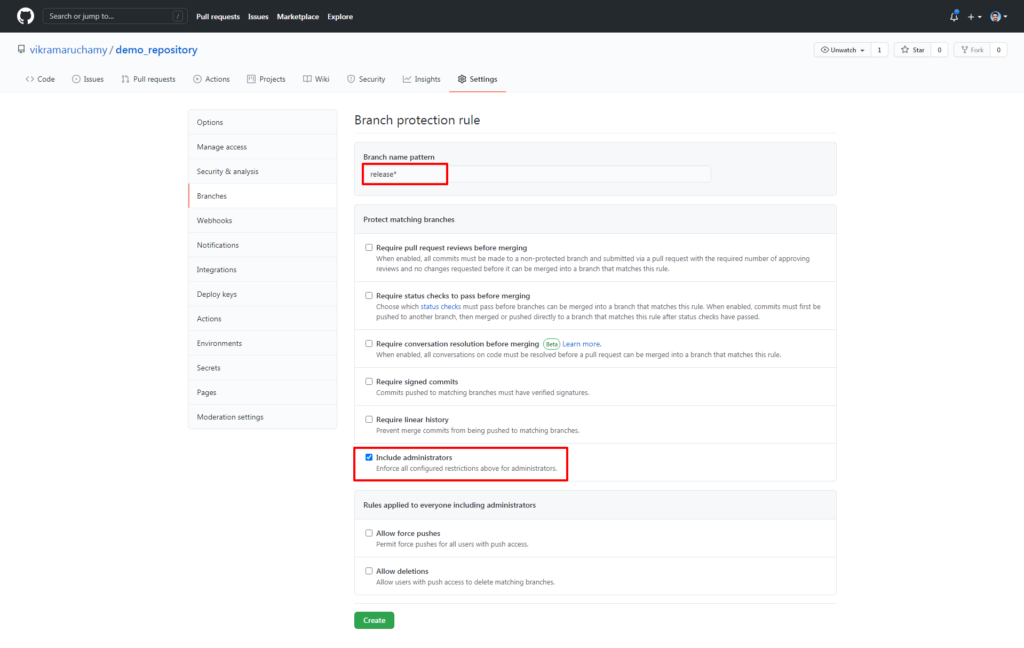
- Require a pull request before merging: This disables direct pushes. All changes must be proposed via a pull request, creating a formal record and discussion point.
- Require approvals: You can specify that at least one (or more) team member must approve the pull request before it can be merged. This enforces code review.
- Dismiss stale pull request approvals when new commits are pushed: This is crucial. If a PR is approved, but the author then pushes more commits, the original approval is revoked. This forces a re-review to ensure the new changes are also vetted.
- Require status checks to pass before merging: This rule integrates with your CI pipeline. You can specify that jobs like running tests (
PHPUnit), static analysis (Larastan), and building assets must succeed before merging is allowed. We will set up these checks in Module 3. - Include administrators: This ensures that even repository owners and admins are subject to the protection rules. Without this, an admin could bypass all your checks.
Test your understanding!
You are the lead developer on a Laravel project. You want to protect your main branch. A junior developer on your team submits a pull request with a new feature. You review it, and it looks good, so you approve it. A few hours later, they push a small "fixup" commit to the same pull request.
Which branch protection rule ensures that you get a chance to review this new "fixup" commit before the PR can be merged?
Show answer
The "Dismiss stale pull request approvals when new commits are pushed" rule. When the developer pushes the new commit, your original approval is automatically dismissed, and the pull request cannot be merged until it is approved again. This prevents unreviewed code from slipping into the main branch.
The Limitation of Classic Rules and the Rise of Rulesets
The branch protection rules we've discussed are powerful, but they have a limitation that becomes apparent as you increase automation. They apply to everyone, including any automated scripts or "bots" you might use.
Imagine an automated workflow that, after a successful deployment, pushes a new Git tag to the main branch. If main is protected against direct pushes, this automated action will fail. This has historically been a tricky problem to solve cleanly.
To address this, GitHub introduced a more flexible and powerful feature: Rulesets.
Configuring your GitHub repository
This article from IBM Cloud explains the advantages of using Rulesets over traditional branch protection.
Read the 'Benefits of Rulesets' section. Focus on how they offer more granular control, especially the ability to apply different rules to different actors (like a bypass list).
Rulesets allow you to create layered rules and, most importantly, define a bypass list. This is the key to integrating automation. You can create a rule that applies to all users except for a specific user or application, like your deployment bot.
Here's a common pattern for a main branch using rulesets:
-
Ruleset 1: Base Rules (Applies to everyone, no bypass)
- Target:
mainbranch - Rule: Block force pushes.
- Rule: Restrict deletions.
- Target:
-
Ruleset 2: PR Requirements (Applies to everyone except the deployment bot)
- Target:
mainbranch - Bypass List: Add your deployment bot/app.
- Rule: Require a pull request before merging.
- Rule: Require 1 approval.
- Rule: Require status checks to pass.
- Target:
This configuration achieves the perfect balance:
- Human developers are forced to use the pull request and review workflow.
- Your automation script is permitted to perform specific actions directly on the branch, like pushing tags or version bumps.
The following article provides a real-world example of this exact scenario. While it goes into detail about creating a GitHub App (which we will cover later), the core concept of setting up the two rulesets is the key takeaway for today.
Managing GitHub Branch Protections
Please read this article by Laura Vuorenoja, which details how to use Rulesets to protect a branch while still allowing a release bot to function.
Read the sections 'Branch Protection Prevents Releasing', 'Rulesets to the Rescue', and 'Rulesets' (under 'Configuration'). You can skim the parts about creating the GitHub App itself; focus on the logic of the two rulesets she creates and why one has a bypass list.
Conclusion
You have now learned how to erect the necessary guardrails around your most critical code. Branch protection rules are not about slowing down development; they are about building a safety net that allows your team to move quickly and confidently, knowing that simple mistakes won't lead to production outages.
Key Takeaways:
- Branch protection rules enforce quality and process for critical branches like
main. - Essential rules include requiring pull requests, code reviews (approvals), and passing CI checks.
- Always enable "Dismiss stale approvals" and "Include administrators" to make your rules robust.
- While classic branch protection is good, GitHub Rulesets are the modern, more flexible solution, especially for automated workflows, because they support bypass lists.
In the previous lessons, we've established our foundation in version control: a solid branching strategy, a clear tagging convention, and now, robust protection for our main branch. We are ready to move on to the next fundamental concept in modern deployment.
In our next lesson, we will explore the role of containerization with Docker in modern deployment workflows. You'll discover how Docker allows us to package our Laravel application and all its dependencies into a single, portable unit, which is a game-changer for creating consistent and reliable deployments.