Hello! Welcome to your next lesson in the "Foundations for Automated Deployment" module.
In our last lesson, we put essential safeguards around our code by implementing branch protection rules. This ensures that any code merged into our main branch is reviewed and verified. But having reliable code is only half the battle. What about the environment where that code runs?
As an experienced web developer, you have likely encountered the infamous "it works on my machine" problem. You build a feature on your local LAMP stack, and everything is perfect. But when you deploy it to the server, something breaks because the PHP version is slightly different, a required extension is missing, or a system library has another version.
Today, we'll explore the definitive solution to this problem. You will learn to describe the role of containerization with Docker in modern deployment workflows. We'll see how Docker allows us to package an application—like your Laravel projects—along with its entire environment into a single, portable unit, making deployments predictable and reliable.
The Core Problem: Environment Inconsistency
Before diving into Docker, let's clearly define the problem it solves. Modern applications have a complex web of dependencies: the runtime (like PHP), system libraries, OS-level packages, and application-level dependencies managed by tools like Composer. Keeping these dependencies perfectly synchronized across every developer's machine, testing servers, and production is a significant challenge.
This short video from Fireship provides an excellent, high-energy overview of this problem and introduces how containerization offers a solution.
100+ Docker Concepts you Need to Know
Watch this introductory segment from '100+ Docker Concepts' to understand the fundamental challenge that Docker addresses in software development and deployment.
Watch from the beginning until 02:25. Pay close attention to the explanation of scaling challenges and the comparison between virtual machines and containers.
As the video explains, traditional solutions like virtual machines (VMs) tried to solve this by bundling a whole guest operating system with each application. This works, but it's slow and resource-heavy. Docker provides a more elegant and efficient approach.
Containers vs. Virtual Machines
The key to Docker's efficiency is its architectural difference from VMs. Instead of virtualizing the hardware to run a full guest OS, containers virtualize the operating system itself, allowing multiple containers to share the host OS kernel.

This architectural distinction has profound implications for performance and resource usage.
What Is Docker? Complete Guide to Containerization ...
For a detailed breakdown, please read this guide from Sealos. It provides an excellent comparison between Docker and VMs.
Read the section titled 'Docker vs. Virtual Machines: A Comprehensive Comparison'. The table provides a clear summary of the key differences in architecture, startup time, and resource usage.
In short, because containers don't carry the weight of a full operating system, they are:
- Smaller: Megabytes instead of gigabytes.
- Faster: They start in seconds, not minutes.
- More Efficient: You can run many more containers on a single host than VMs.
The Building Blocks of Docker
Docker's ecosystem is built around a few core concepts. Understanding these is key to seeing how the whole system works.
- Image: A read-only template containing the application, a runtime (like PHP), and all the necessary libraries and files. Think of it as a blueprint or a "snapshot" of the environment.
- Container: A runnable, live instance of an image. You can start, stop, and interact with a container. It's the isolated environment where your application actually runs.
- Dockerfile: A simple text file that contains step-by-step instructions for building a Docker image. This is "infrastructure as code" for your application's environment. We will dive deep into writing Dockerfiles in the next module.
This clip succinctly explains how these pieces fit together.
100+ Docker Concepts you Need to Know
Let's revisit the Fireship video to see a quick explanation of these core components.
Watch from 02:25 to 03:10. This segment clearly defines the Dockerfile, Image, and Container relationship.
Test your understanding!
You have a Laravel application that you want to containerize. You write a set of instructions specifying that the environment needs Ubuntu, PHP 8.2, the gd and pdo_mysql extensions, and then copies your application code into the /var/www/html directory.
What Docker concept does this set of instructions represent?
Show answer
This represents a Dockerfile. It's the recipe that Docker will use to assemble a Docker Image. Once you run that image, it becomes a Container.
Docker's Role in a Modern Deployment Workflow
Now we can tie everything together and see why Docker is fundamental to modern deployment and CI/CD. The benefits of using Docker directly support the goals of automation.
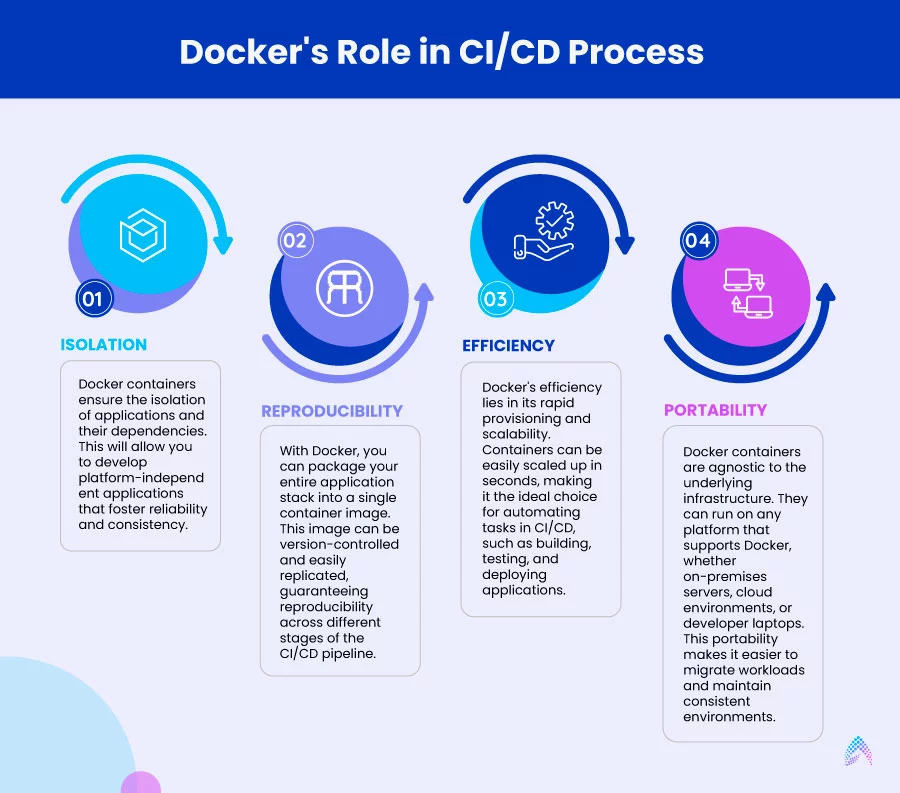
Let's explore these benefits in more detail.
What Is Docker? Complete Guide to Containerization ...
The following article provides a fantastic, in-depth look at the benefits of Docker and how they apply to real-world production scenarios.
Please read two sections from this article: 'Why Docker Has Revolutionized Software Development': This section covers the core benefits like consistency, resource efficiency, and portability. 'Docker in Production: Real-World Applications and Benefits': This explains how those benefits translate into accelerated application delivery and dynamic scaling.
To summarize Docker's role, it becomes the standard unit of deployment throughout your entire workflow:
- Development: You run your Laravel application inside a Docker container on your local machine. This environment is defined by a
Dockerfileand is identical to what will be used in production. - Continuous Integration (CI): When you push code to GitHub, your CI pipeline (e.g., GitHub Actions) doesn't need to install PHP or Composer. Instead, it builds your Docker image and runs your tests (
PHPUnit,Larastan, etc.) inside a container. This guarantees your tests run in the exact same environment as your application. - Distribution: After tests pass, the CI pipeline pushes the version-tagged Docker image to a central Registry (like Docker Hub or GitHub Container Registry). This image is now the immutable artifact for your release.
- Continuous Deployment (CD): Your deployment script on the production server simply pulls the new image from the registry and starts a new container from it. The process of "deploying" is reduced to stopping the old container and starting the new one.
This workflow, which we will build step-by-step throughout this course, eliminates an entire class of deployment errors related to environment drift.
Conclusion
In this lesson, we've established the "why" behind Docker. You've learned that containerization is a powerful paradigm for packaging applications and their dependencies, ensuring they run consistently and reliably everywhere.
Key Takeaways:
- Docker solves the "it works on my machine" problem by creating portable, self-contained application environments.
- Containers are far more lightweight and efficient than traditional Virtual Machines because they share the host OS kernel.
- The core components are the Dockerfile (the recipe), the Image (the blueprint), and the Container (the running instance).
- In deployment workflows, Docker provides consistency, portability, and efficiency, making it a foundational tool for CI/CD and automation.
We've now covered how to manage our code with Git and how to package our application with Docker. But where do these containers run? On servers, networks, and databases that make up our infrastructure. How do we create and manage that infrastructure in an automated, repeatable way?
In our next lesson, we will get the answer to that question as we outline the responsibilities of Infrastructure as Code (IaC) tools like Terraform. You'll see how we can define our entire cloud infrastructure in code, just as we do for our applications.