Welcome back. In our previous lesson, we delved into Hick's Law, quantifying how the time to make a decision increases with the number of choices. You saw how reducing options can prevent the cognitive strain of "analysis paralysis," both in a retail setting and in structuring relationship agreements.
Today, we transition from the cognitive act of choosing to the physical act of executing that choice. This lesson introduces Fitts's Law, a foundational principle of human-computer interaction and ergonomics. You will learn to apply it to optimize the placement and size of interactive elements, specifically buttons in a lingerie e-commerce interface, to enhance usability and efficiency. As an efficiency expert, you'll find Fitts's Law provides a robust model for minimizing the time required to perform a task, moving our focus from the time cost of thinking to the time cost of acting.
From Decision to Action: Defining Fitts's Law
Fitts's Law is a predictive model of human movement. It states that the time required to move to a target area (e.g., clicking a button with a mouse) is a function of the distance to the target and the size of the target. Put simply: larger, closer targets are faster to hit.
Your background in statistics and operations research will make the mathematical formulation of this law feel familiar. It's an elegant model that quantifies a speed-accuracy trade-off.
Leveraging Fitts' Law: UI Design Principles for E-commerce | Toptal®
This Toptal article provides an excellent, in-depth explanation of Fitts's Law and its mathematical underpinnings, framed for e-commerce applications.
First, read the introductory paragraphs to grasp the core concept, from the beginning of the article. Then, review the section "Breaking Down the Fitts’ Law Formula." Pay close attention to the equation: t = a + b \log_2(2d/w) Notice the key variables: movement time (t), distance (d), and width (w). The term log2(2d/w) is the "Index of Difficulty" (ID). This logarithmic relationship means that the impact of changing d or w is not linear, which is a critical insight for optimization.
The formula confirms that to decrease t (the time to complete an action), a designer has two primary levers:
- Decrease the distance (
d) to the target. - Increase the width (
w) of the target.
Let's apply these levers to your specified context.
Application 1: Optimizing a Lingerie E-commerce Interface
The goal of an e-commerce site is to guide a user from browsing to purchasing with minimal friction. Fitts's Law provides the blueprint for minimizing the physical friction of this journey.
Principle 1: Target Size (w)
The most straightforward application of Fitts's Law is making important buttons large. A larger target requires less precision to hit, reducing both time and error rates. The "Add to Cart" and "Proceed to Checkout" buttons are the most critical targets in the purchasing funnel.

Making these buttons small or "discreet" in an attempt to be aesthetically minimalist directly violates Fitts's Law, increasing the Index of Difficulty and potentially losing sales.
Fitts' Law: 14 concrete examples to understand and optimize your ...
This article from Agerix provides a case study that directly illustrates the commercial impact of applying this principle.
Please read the subsection "Optimizing order buttons on an e-commerce site." The author describes how simply making the "Add to Cart" and "Proceed to Checkout" buttons more visible and larger led to a measurable increase in conversions.
Principle 2: Target Distance (d)
Reducing the distance the cursor must travel is equally important. To do this, you must anticipate where the user's cursor (the "prime pixel") is likely to be and place the target action nearby. On a product page, after a user selects a size and color, their attention and cursor are focused in that area. Placing the "Add to Cart" button immediately adjacent to the size/color selectors minimizes d. Placing it far away, or forcing the user to scroll to find it, increases d and therefore t.
Special Considerations for Mobile Interfaces
On mobile devices, Fitts's Law is even more critical. The finger replaces the cursor, and it is a much less precise pointing device. Furthermore, most users operate their phone one-handed, typically with their thumb. This creates natural zones of accessibility.
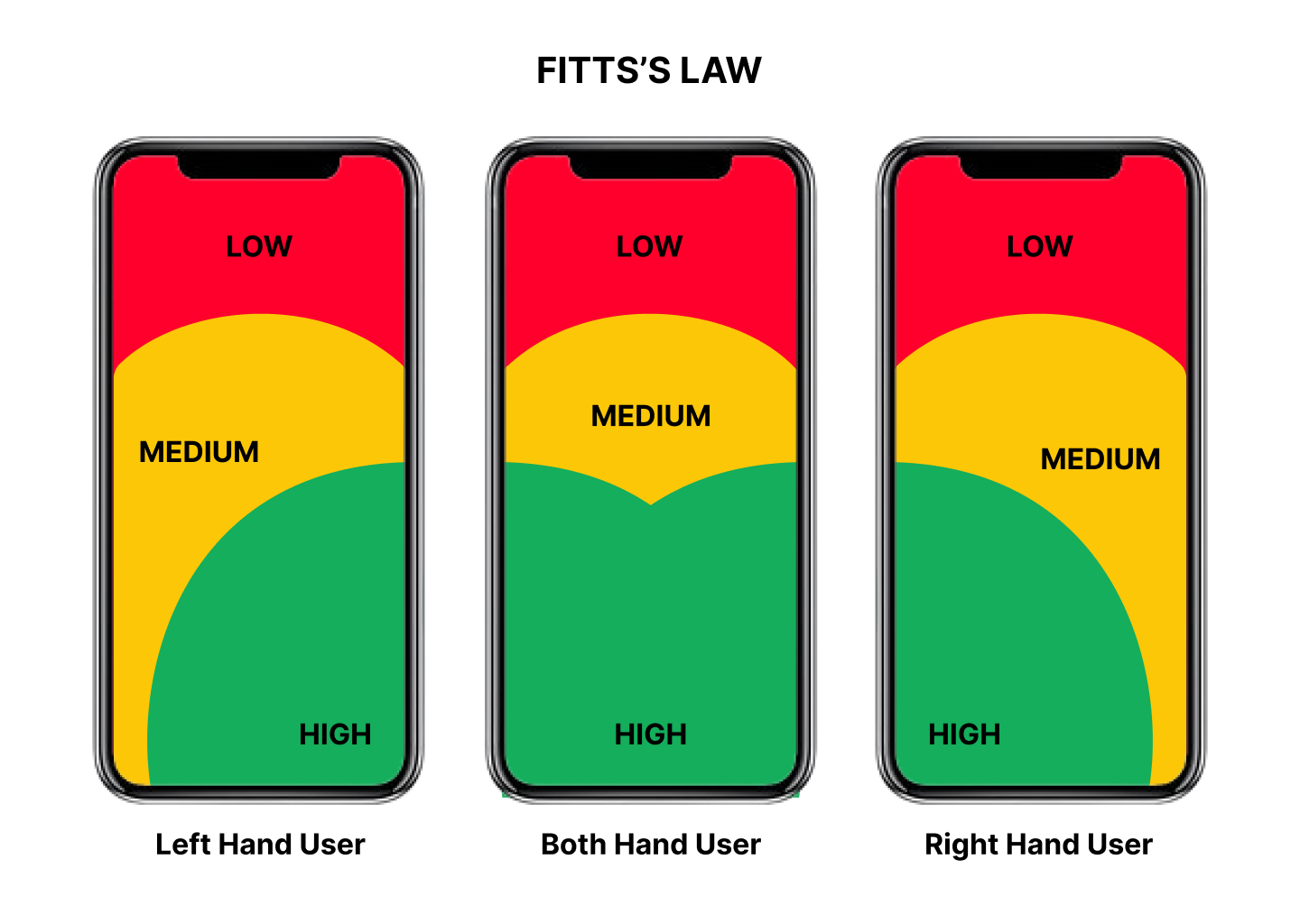
To optimize a mobile interface for a lingerie site, you must place the most important and frequent actions within the green zone.
Laws of UX: Fitt's Law (with examples!)
This video from AM Design gives a clear visual explanation of how major apps use thumb zones to prioritize actions.
Watch the segment from the discussion on mobile devices. Notice how primary actions and content are placed in the most accessible areas (bottom and middle of the screen), while tertiary actions like profile settings are placed in the harder-to-reach top corners.
For your lingerie e-commerce site, this means:
- Primary Actions: The "Add to Cart" or "Buy Now" button should be large and placed at the bottom of the screen, where it's easy to tap with a thumb. This is the green zone.
- Secondary Actions: Buttons like "Add to Wishlist" or "View Size Guide" could be placed slightly higher or closer to the edges, in the yellow zone.
- Tertiary/Destructive Actions: Actions like "Sign Out" or links to "Privacy Policy" should be in the red zone at the top. You can even use Fitts's Law in reverse to increase the difficulty of accidental taps on destructive actions like "Remove from Cart" by making them smaller or placing them further away.
Application 2: Optimizing a Vee Relationship "Interface"
Applying a law of physical motion to relationship dynamics requires an analogy. Let's define the "interface" of the relationship as its communication protocols and shared emotional space.
- Target: A desired conversation, request, or action (e.g., asking for alone time, bringing up an insecurity, initiating a discussion about finances).
- Distance (
d): The emotional or procedural effort required to initiate that action. Is the topic considered taboo? Does it require scheduling a formal meeting? High barriers create large distances. - Width (
w): The size of the opportunity to take the action. Is there a very narrow, specific window when it's "okay" to talk about something, or is the opportunity broad and welcoming?
Consider our vee relationship: Anna (the hinge) is married to Bob and dating Charlie.
Violating Fitts's Law (High-Difficulty Interface):
Imagine Bob feels insecure about a new milestone in Anna and Charlie's relationship. However, the implicit "rule" in the house is that such concerns can only be brought up during their "official weekly check-in," and only if no one is tired or stressed.
- The Target: The conversation about insecurity.
- Distance (
d): Very large. Bob has to wait for a specific meeting, suppressing his feelings in the meantime. - Width (
w): Very small. The conditions for the meeting ("not tired or stressed") create a tiny, hard-to-hit window of opportunity.
The "Index of Difficulty" is enormous. The time t required for Bob to successfully "click" this conversational target is long, and he is more likely to miss the target (i.e., not bring it up at all), letting the insecurity fester.
Applying Fitts's Law (Low-Difficulty Interface):
An efficiency expert in relationships would redesign this interface to reduce friction for important actions. The goal is to make crucial conversations easy to initiate.
- Increase Target Size (
w): Anna can create a large, welcoming "target" by explicitly stating, "You can bring up insecurities or concerns with me anytime you feel them. We don't have to solve it right then, but I always want to know what's on your mind." This transforms the opportunity from a specific, narrow window into a standing, open invitation. - Decrease Target Distance (
d): By normalizing these conversations and reacting with calm and validation, the partners reduce the emotional "distance" to the topic. It no longer feels like a monumental, scary action to take. A simple "Hey, is now a good time to talk about something that's on my mind?" becomes the low-effort path.
By making the "buttons" for important emotional actions large and close, the partners reduce the time and energy cost of maintaining their connection, making the relationship more efficient and resilient.
Conclusion
Fitts's Law provides a powerful model for understanding the time cost of physical action. It moves beyond intuition, giving you a framework with quantifiable variables—distance and width—to optimize any interface, whether digital or human.
Key Takeaways:
- Time to act is predictable: The time to acquire a target is a logarithmic function of its distance and size.
- Optimize by changing
dandw: To make actions faster and easier, make targets larger and place them closer to the user's point of focus. - Mobile design is thumb-centric: On mobile devices, the most accessible area is the bottom-center of the screen. Critical actions must live there.
- The principle is universal: The concept of reducing friction to encourage desired actions can be abstracted from UI design to relationship design, making it easier for partners to initiate important conversations.
In our next lesson, we will explore Jakob's Law. We have discussed how to size and place a button for maximum efficiency with Fitts's Law, but Jakob's Law will address a related question: Where do users expect that button to be based on their experience with all the other websites they use? This will add a crucial layer of user psychology and convention to our design toolkit.