Good to see you again. In the previous lesson, you mapped your semester subjects by their overlap with GATE ECE, placement preparation, and college-specific requirements. That map tells you which work has long-term leverage. This lesson adds the missing decision: what deserves attention this week.
A task can be valuable without being this week’s top priority. For example, Control Systems has direct GATE value, but a VHDL lab submission due tomorrow may temporarily deserve more immediate attention. Your aim is not to treat college, GATE, DSA, and projects as four equal piles of work. It is to assign each specific task a clear weekly level so that you know what must survive when time becomes tight.
Priority is a weekly decision, not a permanent label
Your long-term direction is clear:
- GATE 2027 is a serious goal.
- Python and DSA are essential for placement coding.
- College performance matters for GPA, fundamentals, internal assessments, and eligibility.
- Coding projects strengthen practical skills and later help you present evidence of what you can build.
But the priority of a stream changes with deadlines and academic pressure. A useful distinction is:
- Importance: Does this help your long-term goals?
- Urgency: Does delaying it create a near-term consequence?
For instance:
- Revising a Control Systems topic for GATE is important, even if there is no exam tomorrow.
- A lab record due Friday is urgent, even if its formatting itself has little GATE value.
- Practising Python consistently is important because you are building from beginner level; it becomes harder if repeatedly postponed.
- Designing an optional project feature may be useful, but it can wait during a test-heavy week.
The Eisenhower Matrix gives a simple way to separate these ideas.
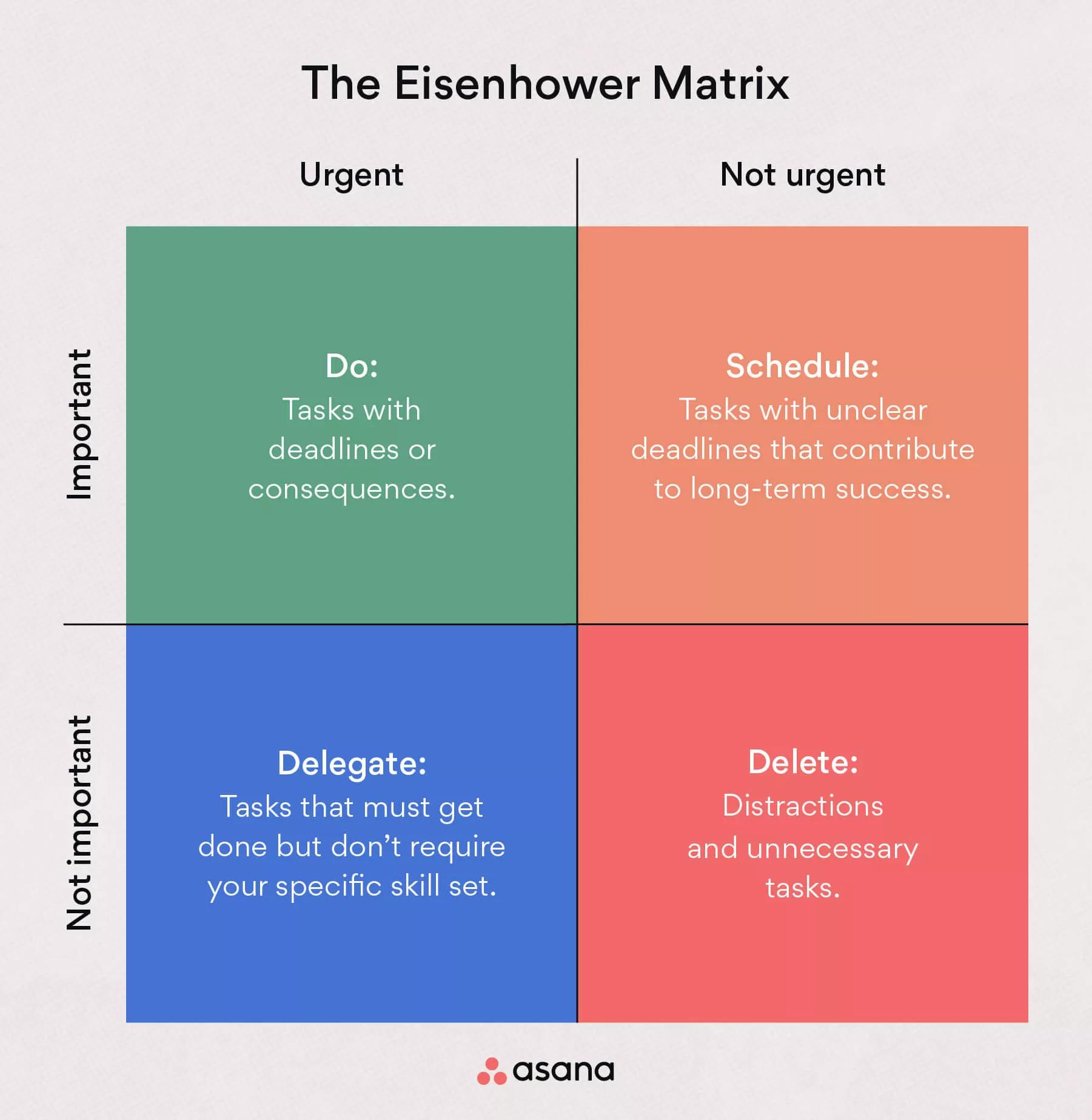
Read Columbia University School of Professional Studies' short guide to distinguish urgency from importance before assigning weekly levels. Its student examples are especially useful when deadlines compete with long-term preparation.
In the opening discussion through “The Difference Between Urgent and Important Tasks,” read urgent versus important. Notice that urgent tasks have immediate consequences, whereas important tasks contribute to longer-term goals. Then find “The Four Quadrants of the Eisenhower Matrix.” Read the four quadrants, including the student example. Focus on why reviewing notes and planning a distant project are important even without an immediate deadline.
For your weekly plan, we will convert the matrix into three practical priority levels:
| Weekly level | Meaning | What happens if the week becomes difficult? |
|---|---|---|
| Must do | Essential this week; a deadline, major consequence, or protected long-term commitment is involved. | Complete it first. Other tasks may shrink or move. |
| Should do | Important and planned, but delaying it briefly will not cause serious damage. | Do it after Must-do tasks are secure. |
| Could do | Useful extra work, optional improvement, or work that can wait without meaningful harm. | Drop, shorten, or postpone it without guilt. |
These labels are not judgments about whether you are hardworking. They are a way to prevent a common failure mode: making every task “high priority,” then feeling behind on everything.
Turn broad commitments into tasks you can actually rank
Do not write “College,” “GATE,” or “DSA” as individual entries on your to-do list. They are too broad to prioritize. Instead, break each stream into a concrete outcome that can fit into one study block.
Compare these two lists:
| Too vague to rank | Specific enough to rank |
|---|---|
| Study Control Systems | Solve the five assigned feedback-system problems for Friday’s tutorial |
| Prepare for GATE | Revise transfer-function rules and solve eight basic numerical questions |
| Do DSA | Complete two Python exercises on conditionals and trace both by hand |
| Work on project | Organize the project folder and write a one-paragraph problem statement |
| Finish VHDL | Debug the multiplexer simulation needed for Monday’s lab check |
A task is ready to prioritize when it has:
- A visible finish line — what “done” means.
- A time estimate — preferably one block of about 30–90 minutes.
- A consequence or purpose — deadline, exam relevance, skill-building, or project milestone.
This matters especially for college tasks. “Study Digital Communications” might include both a high-leverage GATE topic such as PCM and a low-leverage task such as rewriting notes neatly. The subject is the same; the weekly priority need not be.
A default priority structure for your semester
Because you are in the fifth semester, learning programming and DSA from the beginning, and preparing gradually for GATE 2027, the normal week should preserve progress in all four streams—but not at equal intensity.
Here is a sensible default for a week without major tests or submission deadlines.
| Stream | Normal weekly level | Why |
|---|---|---|
| GATE preparation | Must do | It is a long-horizon goal, and direct-overlap semester topics give you efficient preparation now. |
| Python / DSA practice | Must do | As a beginner, steady repetition matters more than occasional long sessions. A missed week easily becomes a lost habit. |
| College work | Should do, rising to Must do for exams, labs, and deadlines | College work varies greatly: a near exam is urgent; routine reading can be scheduled around the other core commitments. |
| Coding project work | Should do or Could do | Projects matter for placements, but until there is a defined milestone, they should not displace GATE, DSA foundations, or a college deadline. |
This may initially look surprising: why put GATE and DSA at Must-do level even when they are not urgent?
Because they belong to the important but not urgent quadrant. If you leave them there without scheduled blocks, semester deadlines will repeatedly push them aside. Then, a few months later, they become urgent precisely because they were never protected.
A Must-do label for GATE or DSA does not mean studying each for many hours every day. It means that each receives a realistic, protected commitment during the week.
For example, in a balanced week:
- GATE might have three focused blocks using a direct-overlap subject such as Control Systems or Digital Communications.
- Python/DSA might have three or four shorter blocks, focused on the current foundational topic.
- College work gets the blocks needed for lectures, tutorials, labs, and upcoming assessments.
- A project gets one modest milestone only after the Must-do tasks are placed.
Use the “consequence first, leverage second” rule
When you are unsure whether something is Must, Should, or Could, decide in this order.
1. Is there a real consequence this week?
A hard deadline, examination, viva, lab evaluation, or group dependency can make a task Must-do.
Examples:
- DIP record due Thursday → Must do.
- Control Systems internal test next week → Must do.
- Group member needs your VHDL module before integration → Must do.
- Replying to a routine club message → probably Could do, unless you have a defined responsibility.
2. If there is no immediate deadline, does it protect an important long-term goal?
This is where GATE and DSA enter. Their main consequence is delayed: lost skill development, rushed preparation later, and weaker placement readiness. Therefore, give them recurring Must-do blocks even without an approaching deadline.
Examples:
- Revise one Control Systems concept that overlaps with GATE → Must do in a normal week.
- Complete planned Python fundamentals practice → Must do in a normal week.
- Read Computer Networks notes for placement interview understanding → usually Should do, unless there is an imminent college assessment.
- Watch an extra tutorial on a topic you already understand → Could do.
3. Does the task create a specific, visible gain right now?
Project work should move up only when it has a real milestone.
- “Explore project ideas” may be a Could do task.
- “Create a repository and add the first working program by Sunday” can become a Should do task.
- “Prepare project demo for an internship application next week” becomes a Must do task.
This protects you from spending entire weekends “working on a project” without a clear output while GATE practice or Python foundations remain unfinished.
College work: prioritize the task, not the subject name
Your semester contains direct GATE subjects, placement-adjacent subjects, and college-only execution work. Use that distinction when deciding what to protect.
Here is an example of how tasks from the same subject can receive different levels.
| Task | Overlap label from the previous lesson | Likely weekly priority |
|---|---|---|
| Prepare for a Control Systems quiz on feedback and stability | G + C | Must do |
| Solve extra Control Systems GATE-style numerical problems after the quiz | G | Must do or Should do, depending on available capacity |
| Rewrite Control Systems notes with coloured headings | C only | Could do |
| Submit a VHDL lab file due tomorrow | C + core skill | Must do |
| Learn an optional advanced VHDL syntax feature unrelated to the lab | Core skill | Could do |
| Practise C bit-mask operations from a Microcontroller lab | P applied coding + C | Should do, or Must if the lab requires it this week |
| Revise Computer Networks layers for an internal assessment | P interview theory + C | Must do near the assessment |
| Read extra Computer Networks interview questions with no assessment near | P interview theory | Should do |
The key principle is:
A direct GATE subject is high leverage, but a college-specific deadline can still be the first task to complete.
At the same time, avoid letting college administration consume all your energy. Formatting a record, arranging screenshots, or making notes aesthetically perfect is not equivalent to learning the underlying concept. Meet the required standard, submit on time, and reserve deep-focus time for learning.
Priority modes: how a week changes when pressure changes
A stable plan needs a normal mode and clear exceptions. The table below gives you three useful weekly modes.
| Situation | College | GATE | Python / DSA | Projects |
|---|---|---|---|---|
| Balanced normal week | Should; Must for specific deadlines | Must | Must | Should or Could |
| College test or submission week | Must | Must only for a small maintenance block or through overlap with college study | Should; keep a short continuity session if possible | Could |
| Placement or coding-test window | Must for non-negotiable coursework | Should; maintain rather than expand | Must | Must or Should if the project supports applications |
| Immediately before semester exams | Must | Maintenance only, preferably through exam topics that overlap | Maintenance only | Could / paused |
Notice what does not happen: you do not declare one path permanently abandoned. You reduce a stream deliberately, for a defined week, and restore it in the next review.
For example, if you have a Digital Communications internal examination on Friday:
- College revision for the exam is Must do.
- Since Digital Communications is also direct GATE material, part of that college work contributes to GATE preparation.
- Python/DSA might reduce from several blocks to one or two short continuity blocks.
- Project work becomes Could do and can be postponed without creating a false sense of failure.
This is different from trying to study everything at full intensity during an exam week.
Make your Must-do list deliberately short
Your Must-do list should represent the work you would protect if classes run late, a lab becomes difficult, or you have an unexpectedly tiring day. If it contains fifteen items, it is really a wish list.
A useful weekly target is:
- 2–4 Must-do outcomes that are genuinely important;
- several Should-do tasks that can be moved within the week;
- a small list of Could-do tasks that you are willing to drop.
A Must-do outcome can contain multiple study blocks, but it should still be concrete. For example:
| Poor Must-do item | Better Must-do item |
|---|---|
| Finish GATE Control Systems | Complete the planned three Control Systems blocks: transfer functions, basic feedback reduction, and a short recall review |
| Do DSA | Complete three Python practice blocks on the current topic and record mistakes |
| Finish college work | Submit the Microcontroller lab record and prepare for Tuesday’s quiz |
| Build project | Complete the week’s defined project milestone |
The goal is not to make the list artificially easy. The goal is to make it honest.
Apply Must–Should–Could to your own plan
The short UNC Learning Center worksheet gives you a simple format for converting a mixed task list into these three levels.
Priorities Worksheet: Must do, Should do, Could do – The Learning Center
Use this one-page worksheet from the UNC Learning Center as a practical model for your weekly list. It reinforces two rules that are especially useful here: break large work into smaller tasks, then judge each task by its deadline, difficulty, and required time.
On the worksheet, read the opening directions immediately above the three-column table. Read how to break projects down before using the Must do, Should do, and Could do columns. Then use the stated factors—due dates, difficulty, and time required—to decide the column for each task rather than assigning a whole subject to one column.
Now create a one-page priority list for the next seven days. Use this template in a notebook, spreadsheet, or notes app:
| Must do | Should do | Could do |
|---|---|---|
| College deadline or test preparation | A non-urgent college reading or tutorial | Extra note-making or optional video |
| Planned GATE concept/practice blocks | Additional GATE questions beyond the planned set | A new topic not in the current plan |
| Planned Python/DSA foundation blocks | Computer Networks interview-theory review | Optional coding challenge |
| A project milestone only if deadline-driven | A small project improvement | Extra project feature or redesign |
Before accepting an item in Must do, ask:
- What is the consequence if I delay this until next week?
- Does it directly protect my GATE, placement-coding, or college outcome?
- Can I state what “done” looks like?
- Do I have realistic capacity for it after preserving recovery time and your buffer?
If the answer to the fourth question is no, move something down. Prioritization requires choosing what will not happen this week.
A worked example
Suppose the coming week contains the following:
- A Control Systems quiz on Friday.
- A VHDL simulation to demonstrate on Monday.
- No project deadline.
- Three planned Python foundation sessions.
- A planned GATE revision topic on Control Systems.
- A Computer Networks lecture chapter to review.
- An optional extra set of antenna numericals.
Your first draft could look like this:
| Must do | Should do | Could do |
|---|---|---|
| Finish and test the VHDL simulation before Monday | Review the Computer Networks chapter from this week | Solve the optional antenna numerical set |
| Prepare for Friday’s Control Systems quiz | Add one extra GATE Control Systems practice set if time remains | Improve the appearance of class notes |
| Complete the three planned Python foundation sessions | Make a short list of possible project ideas | Start an unrelated new programming tutorial |
| Review the GATE-relevant Control Systems concepts used in the quiz |
Why is Control Systems listed twice in Must do? The college quiz is urgent, while the connected GATE review is important. You can often combine them intelligently: learn the concept thoroughly for the quiz, then spend a smaller block applying it in a GATE-style way.
Why is the project only Should or Could? With no milestone, application, or deadline, it should not displace foundational Python/DSA practice. Later in the course, when you define a specific image-processing project and its milestones, project work can become a regular Should-do commitment.
Key takeaways
Weekly priority is not a statement that one goal matters and another does not. It is a decision about what must receive limited attention now.
- Use Must do for near deadlines, serious consequences, and protected long-term commitments such as your planned GATE and Python/DSA blocks.
- Use Should do for valuable work that can move briefly without serious harm.
- Use Could do for optional improvements, extra material, and projects without a near milestone.
- Prioritize specific tasks, not broad labels such as “college” or “GATE.”
- In a normal week, keep GATE and DSA as recurring Must-do streams; let college work rise to Must-do when tests, labs, and deadlines require it.
- During a deadline-heavy week, deliberately reduce project work and keep only realistic maintenance in the other streams.
Next, you will turn these priority levels into a weekday template for your four available study hours—while avoiding the mistake of putting several cognitively demanding tasks back-to-back.