Welcome to the final lesson of our module on feature engineering and preprocessing. So far, we have assembled a powerful toolkit of individual techniques: you've learned to split your data to prevent leakage, scale numerical features, encode categorical variables, and perform feature selection using variance and correlation analysis. Each of these is a critical step, but performing them one by one can be cumbersome and, more importantly, prone to subtle errors like data leakage.
In this capstone lesson, we will integrate all these disparate steps into a single, elegant, and robust workflow. We will learn how to use scikit-learn's Pipeline and ColumnTransformer to build a complete, automated preprocessing system. This will not only streamline your code but also enforce best practices, ensuring your data transformations are applied correctly and consistently. By the end of this lesson, you will be able to take a raw, messy dataset and transform it into a clean, model-ready state within a single, cohesive object.
The Problem with Manual Preprocessing
Imagine applying all the steps we've learned to a new dataset. The workflow might look something like this:
- Load data.
- Perform Exploratory Data Analysis (EDA).
- Split data into training and testing sets.
- On the training set:
- Identify missing values.
- Fit an imputer and transform the training data.
- Identify categorical and numerical columns.
- Fit a scaler on numerical columns and transform them.
- Fit an encoder on categorical columns and transform them.
- Combine the processed columns.
- On the testing set:
- Use the already-fitted imputer to transform the test data.
- Use the already-fitted scaler to transform the numerical test data.
- Use the already-fitted encoder to transform the categorical test data.
- Combine the processed columns.
- Train a model on the processed training data.
- Evaluate the model on the processed testing data.
This manual process is tedious and has several major pitfalls. The most dangerous is data leakage, where information from the test set accidentally bleeds into the training process. For example, if you fit your scaler on the entire dataset before splitting, the mean and standard deviation of the test data will influence the transformation of your training data, giving your model an unrealistic advantage and leading to overly optimistic performance estimates.
The following comprehensive video demonstrates what a full manual preprocessing workflow looks like. As you watch, consider how many separate steps are involved and how easy it would be to make a mistake, especially in correctly applying transformations fitted on the training data to the test data.
🚀 Data Cleaning/Data Preprocessing Before Building a Model - A Comprehensive Guide
This video from "Learn with Ankith" provides a thorough guide to manual data preprocessing, covering everything from sanity checks and EDA to imputation, outlier treatment, and encoding. We are using it here not as a method to emulate, but to appreciate the complexity that scikit-learn pipelines help us manage.
Watch the overview from the introduction to see the full list of steps. Then, you can skim through the sections on missing value treatment, outlier treatment, and encoding to see how each is handled as a separate, distinct action.
The Solution: Pipeline and ColumnTransformer
scikit-learn provides two powerful tools to automate and safeguard this entire process: Pipeline and ColumnTransformer.
Pipeline: This object chains multiple transformers and an optional final estimator into a single unit. When you call.fit()on the pipeline, it fits all transformers sequentially on the data and then fits the final estimator.ColumnTransformer: This is designed for heterogeneous data. It allows you to apply different transformers to different columns of your dataset. For example, you can applyStandardScalerto your numerical columns andOneHotEncoderto your categorical columns, all within one step.
When combined, they create a complete preprocessing and modeling workflow that can be treated as a single object. This object internally manages the correct fit/transform logic, completely protecting you from data leakage.
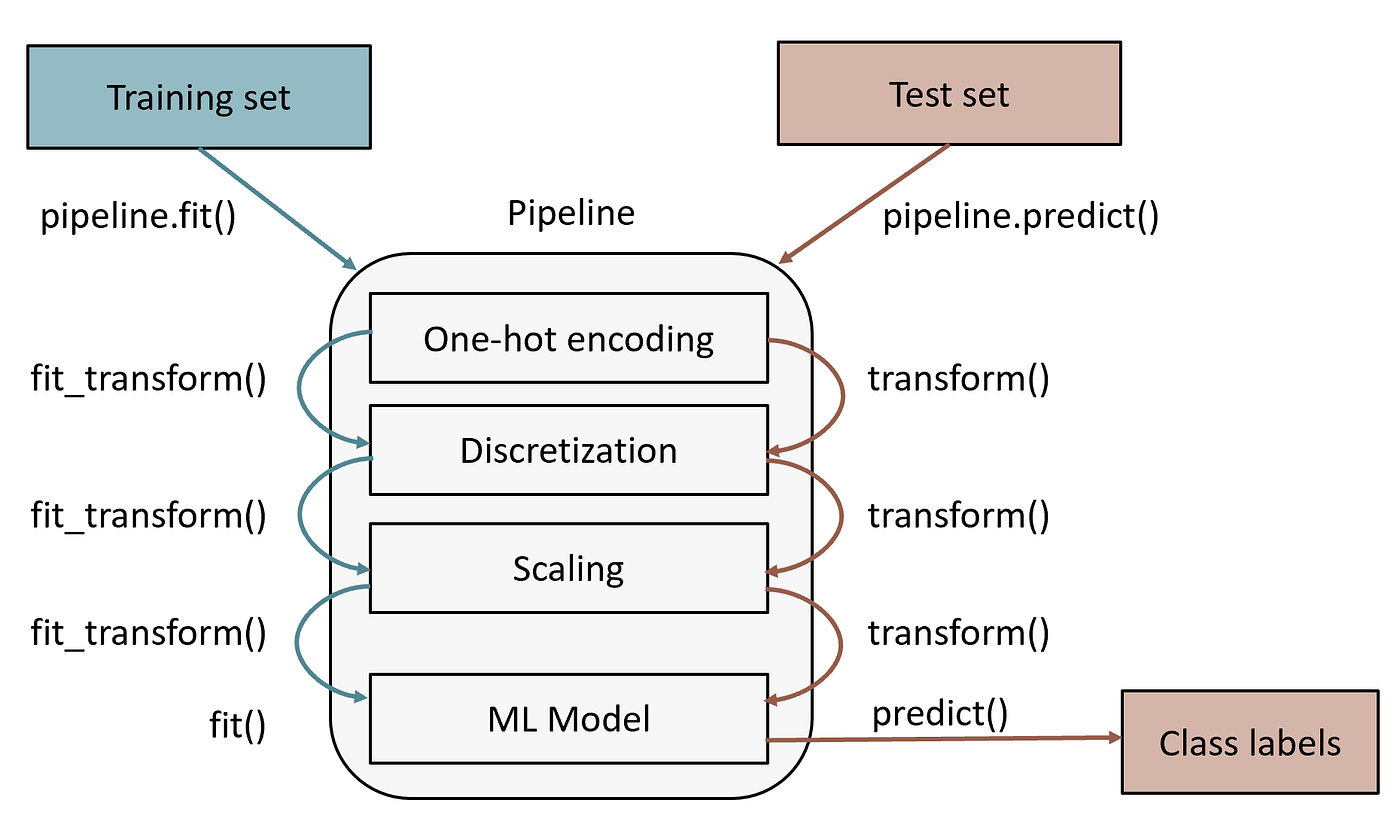
Let's see how this is done in practice.
Building a Complete Pipeline Step-by-Step
The best way to understand pipelines is to build one. We'll start with a simple case and then build up to a more realistic scenario involving mixed data types. The following video tutorial is an excellent guide.
Building a Machine Learning Pipeline with Python and Scikit-Learn | Step-by-Step Tutorial
This video from Ryan & Matt Data Science provides a clear, step-by-step tutorial on building pipelines, perfectly matching our learning goal. It starts with a simple pipeline and progresses to a more complex one using ColumnTransformer.
First, watch the introduction from the start for a summary of the benefits of using pipelines. Next, follow the simple example from building a basic pipeline. This demonstrates using make_pipeline to chain an imputer and a logistic regression model for a dataset with only numeric features. This shows the core concept in its simplest form. Now for the main event. Watch the segment from handling mixed data. Here, the instructors build separate pipelines for numeric (imputation + scaling) and categorical (imputation + one-hot encoding) features. This is the standard, modular approach for real-world data. Finally, see how these separate pipelines are combined into a single preprocessor using ColumnTransformer from this section. Then, this preprocessor is put into a final pipeline with a model, creating the complete workflow.
The video you just watched provides a fantastic conceptual and practical overview. The diagram below shows a similar structure, where a ColumnTransformer directs different feature types to their respective processing logic before they are recombined and fed into the final model.

A Full-Scale Example with Code
Now let's solidify this understanding with a detailed, text-based example. The following article walks through building a sophisticated pipeline for the Ames Housing dataset, which is rich with missing values and mixed data types, making it a perfect case study.
Regression Pipelines in Scikit-learn
This article by Miykael provides an excellent, in-depth walkthrough of creating an advanced preprocessing pipeline. It mirrors the structure from the video but with more complex data and detailed code.
Begin by reading the sections on Why Preprocessing? and Feature Analysis. This sets the stage and performs the initial EDA to understand what preprocessing is needed. Next, see the crucial train-test split being performed before any other steps. Now, examine how the specific sub-pipelines are constructed. Read Handling categorical data to see the SimpleImputer and OneHotEncoder chain. Then, read Handling numerical data to see a more complex chain for numeric features, including imputation, scaling, and even feature selection. The key step is next: combining these into a single object. Study the short but powerful code in Combining pipelines, which uses ColumnTransformer. Finally, see how the complete preprocessor is placed into a final pipeline with a regression model in the section Add regression model.
This article provides a fantastic template you can adapt for your own projects. For another excellent, focused example, especially on the encoding part of the pipeline, you can also review the sections on "Make column transformer" and "Build machine learning pipeline" in the article from Towards Data Science titled "Guide to Encoding Categorical Features".
Conclusion
Congratulations on completing the data preprocessing module! You have progressed from learning individual cleaning and transformation techniques to mastering the art of assembling them into a single, automated, and robust pipeline. This is a significant step in moving from academic exercises to building professional, production-ready machine learning systems.
Key Takeaways:
- Automation: Preprocessing pipelines automate the entire sequence of data transformation, from imputation and scaling to encoding and feature selection.
- Preventing Data Leakage: By encapsulating
fitandtransformlogic, pipelines ensure that information from the test set never influences the training process. You fit the entire pipeline on the training data once. ColumnTransformerfor Heterogeneity:ColumnTransformeris the essential tool for applying different preprocessing steps to different types of columns (e.g., scaling for numbers, encoding for categories).- Reproducibility and Modularity: A pipeline is a single object that contains your entire preprocessing logic. It can be saved, reused, and easily integrated into larger workflows like hyperparameter tuning with
GridSearchCV, making your work clean, reproducible, and highly efficient.
In our next module, we will shift our focus from preparing data to the models themselves. With your strong foundation in preprocessing, you are now fully equipped to start building, training, and evaluating machine learning algorithms, beginning with the cornerstone of regression: Linear Regression.