Hello!
In our previous lessons, we built a strong foundation in how a single Linux system works—managing files, users, processes, and even scheduling automated tasks with cron. As we previewed, we're now shifting our focus from the single machine to the intricate world of how multiple machines communicate. This is the bedrock of networking and, by extension, hacking.
This lesson introduces you to the Open Systems Interconnection (OSI) model. You will learn to explain the OSI model layers and the role each layer plays in network communication.
Think of the OSI model as the anatomy of network communication. Just as a doctor must understand the skeletal, muscular, and nervous systems to diagnose an illness, a hacker must understand the layers of network communication to identify weaknesses and understand how attacks work. This model provides a universal framework for talking about network functions, troubleshooting problems, and mapping out attack surfaces.
1. Why Do We Need a Model? A Common Language for Networks
In the early days of computing, if you bought a computer from Company A, it could likely only talk to other computers from Company A. Each vendor had its own proprietary way of doing things, creating isolated "islands" of technology. This was a massive barrier to building the interconnected world we have today.
To solve this, standards were developed to provide a common blueprint that all manufacturers could follow. The OSI model is a result of that effort. It's a conceptual framework, a set of rules and guidelines, that ensures a device made by one company can successfully communicate with a device made by another.
To get a feel for why this was so revolutionary, let's watch a short video that explains the historical problem and the solution networking models provide.
what is TCP/IP and OSI? // FREE CCNA // EP 3
The video 'what is TCP/IP and OSI?' by NetworkChuck provides an energetic and clear explanation of the history behind networking models.
Watch the video from the beginning until 03:47. Focus on understanding the core problem of proprietary, incompatible networks and how a standardized model was proposed as the solution.
2. The Seven Layers of the OSI Model
The OSI model organizes the complex process of network communication into seven distinct layers. Each layer has a specific job and provides services to the layer above it while relying on the services of the layer below.
This layered approach makes it easier to design protocols, troubleshoot issues, and understand where specific network functions occur.
Understanding the OSI Model - N10-008 CompTIA Network+ : 1.1
Let's get a formal introduction to these seven layers from Professor Messer, a highly respected source for IT certification training. His explanation is clear and professional.
Watch the beginning of 'Understanding the OSI Model' from 00:02 to 02:06. Pay attention to the name of each layer and the mnemonic used to remember them: All People Seem To Need Data Processing.
Here is a visual summary of the seven layers, which you can use as a reference as we go through the lesson.
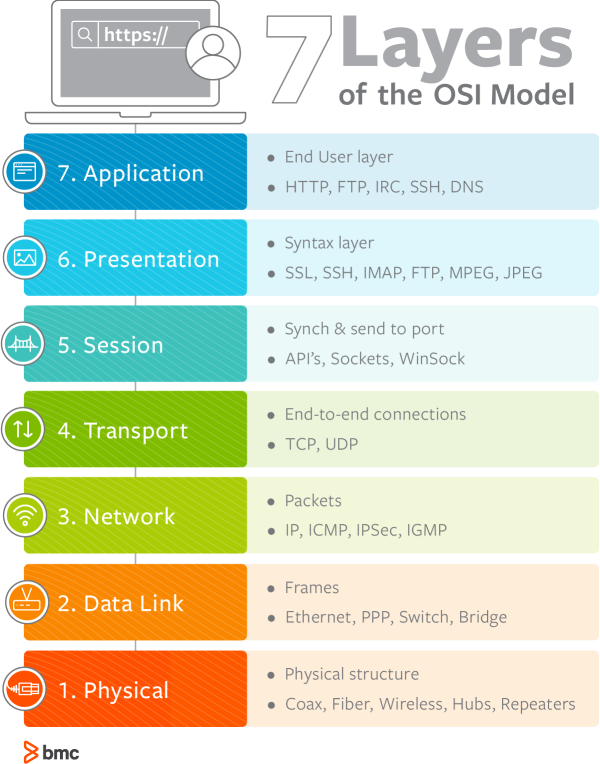
3. The Journey of Data: Encapsulation
Before we dive into each layer, it's crucial to understand the concept of encapsulation. When you send data from your computer—say, an instant message—it doesn't just go out onto the wire as is. Instead, it travels down the OSI model from Layer 7 to Layer 1. At each layer, a piece of information, called a header, is added. This is like putting a letter inside an envelope, then putting that envelope inside a bigger package, with each layer of packaging adding new instructions for delivery.
Understanding the OSI model - NetworkAcademy.IO
The article 'Understanding the OSI model' from NetworkAcademy.IO uses a fantastic analogy of sending a physical letter to explain encapsulation. This will help make this abstract concept very concrete.
Read the first two sections, 'What is data encapsulation?' and 'Data Encapsulation in Networking'. Focus on how the letter/envelope analogy maps to adding headers to data in a network.
Once the data reaches its destination, the reverse process, called decapsulation, occurs. The receiving computer strips off the headers one by one as the data travels up the stack from Layer 1 to Layer 7, until the original message is delivered to the right application.
4. A Tour of the Layers
Now, let's explore each layer's specific role. We'll work our way down the stack, from the application you interact with to the physical wires. For each layer, we'll watch a short video explanation and then connect it to its relevance in security.
Layer 7: The Application Layer
This is the layer closest to you, the user. It provides network services directly to software applications. When you use a web browser (HTTP/HTTPS), an email client (SMTP), or a file transfer program (FTP), you're interacting with protocols at the Application Layer.
- Security Angle: This layer is a massive attack surface. Vulnerabilities in web applications, such as SQL injection or Cross-Site Scripting (XSS), are Layer 7 attacks.
Watch the explanation of the Application Layer now.
Understanding the OSI Model - N10-008 CompTIA Network+ : 1.1
Professor Messer explains the Application Layer.
Watch from 06:19 to 06:49.
Layer 6: The Presentation Layer
This layer acts as a translator. It ensures that data sent from the Application layer of one system can be read by the Application layer of another. It handles data formatting, character encoding (like ASCII to EBCDIC), data compression, and, most importantly for security, encryption and decryption.
- Security Angle: This is where technologies like TLS (Transport Layer Security) operate to encrypt your web traffic (the 'S' in HTTPS). Attacks at this layer might involve trying to force a connection to use weak encryption or no encryption at all (a "downgrade attack").
Watch the explanation of the Presentation Layer.
Understanding the OSI Model - N10-008 CompTIA Network+ : 1.1
Professor Messer explains the Presentation Layer.
Watch from 05:48 to 06:19.
Layer 5: The Session Layer
This layer is responsible for opening, managing, and closing communication sessions between two devices. Think of it as the dialogue controller. It establishes the connection, keeps it alive, and terminates it when finished.
- Security Angle: Session hijacking, where an attacker takes over your active session (e.g., with a website you're logged into), is a classic Layer 5 attack.
Watch the explanation of the Session Layer.
Understanding the OSI Model - N10-008 CompTIA Network+ : 1.1
Professor Messer explains the Session Layer.
Watch from 05:23 to 05:48.
Layer 4: The Transport Layer
This layer provides end-to-end communication between hosts. Its main job is to take large chunks of data from the Session Layer, break them into smaller segments, and ensure they arrive correctly at the other end. This is where we find two of the most important protocols you'll study:
-
TCP (Transmission Control Protocol): Reliable and connection-oriented. It guarantees that all segments arrive in order and without errors. Used for web browsing, email, and file transfers.
-
UDP (User Datagram Protocol): Unreliable and connectionless. It's faster but doesn't guarantee delivery. Used for video streaming, online gaming, and DNS lookups, where speed is more important than perfect reliability.
-
Security Angle: Port scanning (used in reconnaissance to find open services) and Denial-of-Service (DoS) attacks like the SYN Flood are common Layer 4 attacks.
Watch the explanation of the Transport Layer.
Understanding the OSI Model - N10-008 CompTIA Network+ : 1.1
Professor Messer explains the Transport Layer, introducing TCP and UDP.
Watch from 04:39 to 05:23.
Layer 3: The Network Layer
This is the layer of routing. It's responsible for moving packets from the source host to the destination host, which may be on a different network. It uses logical addresses, like IP addresses, to determine the best path for the data to travel. Routers operate at this layer.
- Security Angle: IP spoofing (faking an IP address) and attacks that disrupt routing tables happen at Layer 3.
Watch the explanation of the Network Layer.
Understanding the OSI Model - N10-008 CompTIA Network+ : 1.1
Professor Messer explains the Network Layer and the concept of routing with IP addresses.
Watch from 03:51 to 04:39.
Layer 2: The Data Link Layer
This layer handles communication between devices on the same local network. It moves frames of data from one node to the next. It uses physical addresses, known as MAC addresses, which are hard-coded into your network interface card (NIC). Switches operate at this layer.
- Security Angle: The infamous ARP spoofing/poisoning attack, a staple of man-in-the-middle attacks on local networks, occurs at Layer 2.
Watch the explanation of the Data Link Layer.
Understanding the OSI Model - N10-008 CompTIA Network+ : 1.1
Professor Messer explains the Data Link Layer and MAC addresses.
Watch from 02:46 to 03:51.
Layer 1: The Physical Layer
This is the hardware layer. It consists of the physical medium through which data is transmitted—the cables (Ethernet, fiber optic), connectors, and radio signals (Wi-Fi). It's all about sending and receiving raw bits (1s and 0s) as electrical signals or light pulses.
- Security Angle: Physical security is key here. Attacks include wiretapping, cutting cables, or using signal jammers.
Watch the explanation of the Physical Layer.
Understanding the OSI Model - N10-008 CompTIA Network+ : 1.1
Professor Messer explains the Physical Layer.
Watch from 02:06 to 02:46.
5. Bringing it All Together: A Hacker's View
Now that you have a theoretical understanding of each layer, let's see how it looks in practice and how it applies to your goal of becoming a hacker.
Seeing the Layers in Wireshark
Packet capture tools like tcpdump and Wireshark allow you to see the encapsulated data and the headers from each layer. This is an indispensable skill for network analysis and hacking. You will learn to use these tools extensively later in the course.
Understanding the OSI Model - N10-008 CompTIA Network+ : 1.1
Let's see a practical demonstration of how the OSI layers appear inside a real network packet capture using Wireshark.
Watch from 08:10 to 10:18. Observe how Wireshark breaks down a single frame, showing you the Ethernet (Layer 2), IP (Layer 3), TCP (Layer 4), and application data (Layers 5-7) headers.
Mapping Attacks to the OSI Model
Understanding the OSI model allows you to categorize vulnerabilities and attacks. This helps in both defending a network and probing one for weaknesses. A firewall might protect Layer 3 and 4, but it won't stop a Layer 7 SQL injection attack.
This article provides a fantastic summary of common attacks at each layer. It's a great first step in building a mental "threat map" based on this model.
OSI Model Explained: The Complete Networking Guide
The article 'OSI Model Explained' from LearnCyber.in has an excellent section that directly connects the OSI layers to specific security threats and defenses.
Read the section titled 'Security Implications & Common Attacks by Layer'. As you read, notice how different types of attacks target different layers of the communication process.
6. OSI vs. TCP/IP: The Model vs. The Reality
While the OSI model is the standard for teaching and talking about networking, the model that is actually implemented in the real world is the TCP/IP model. It's simpler, with only four or five layers that roughly map to the seven OSI layers.
However, network professionals—including hackers—still use the OSI layer numbers as a universal language. You'll frequently hear phrases like "That's a Layer 2 issue" (referring to a problem on the local network) or "We need to block that at Layer 7" (referring to an application-level firewall rule). Knowing both is essential.
Understanding the OSI model - NetworkAcademy.IO
To understand this distinction, let's read a short piece that compares the two models.
Read the section 'The OSI model vs. TCP/IP model'. Focus on the diagram comparing the models and the key takeaway that professionals still refer to OSI layer numbers.
Conclusion
In this lesson, you've been introduced to the foundational framework of all modern networking. You've learned what the OSI model is, why it was created, and the specific role of each of its seven layers.
Key Takeaways:
- The OSI model is a 7-layer conceptual framework that standardizes network communication.
- Data moving down the stack is encapsulated with headers at each layer.
- The seven layers are: Application (7), Presentation (6), Session (5), Transport (4), Network (3), Data Link (2), and Physical (1).
- For an ethical hacker, each layer represents a different potential attack surface, from physical wiretapping (Layer 1) to web application exploits (Layer 7).
- While the TCP/IP model is the practical implementation, the OSI model's terminology is the universal language of network professionals.
Next Lesson Preview:
Now that you have the "map" of network communication, we'll begin to explore the most important territories. In the next lesson, we will dive deep into Layer 3, the Network Layer, and learn about its cornerstone protocol: IP addressing. You'll learn how IP addresses work, what a subnet mask is, and how devices are given unique addresses to communicate across the globe.