Hello!
In our last lesson, we explored the OSI model, which serves as a conceptual map for all network communications. We touched upon Layer 3, the Network Layer, and its responsibility for routing data packets using logical addresses. Now, it's time to zoom in and master that fundamental addressing system.
This lesson focuses on how computers are assigned unique addresses to communicate across networks. Specifically, you will learn to describe how IP addressing works, including subnet masks and CIDR notation.
Understanding this is non-negotiable for a career in hacking. It's the equivalent of learning the street grid of a city before planning a route. Every tool you will use, from reconnaissance scanners like Nmap to exploitation frameworks like Metasploit, relies on the principles of IP addressing to find, target, and communicate with other systems.
1. The Anatomy of an IP Address
Just as every house on a street has a unique address, every device on a network needs a unique identifier. In TCP/IP networking, this is the IP address. We'll focus on the most common version, IPv4.
An IPv4 address is a 32-bit number, but for human readability, we write it as four decimal numbers separated by dots (e.g., 192.168.1.10). Each of these numbers is called an octet and can range from 0 to 255.
Crucially, an IP address isn't just one single identifier. It's composed of two parts:
- Network ID: Identifies the network the device is on (like the street name).
- Host ID: Identifies the specific device on that network (like the house number).
To get a clear overview, let's start with a short, animated video.
The video 'Subnet Mask - Explained' from PowerCert Animated Videos provides an excellent introduction to the structure of an IP address and its two main components.
Watch from the beginning to 02:06. Focus on the definition of an IP address and the distinction between the network and host portions.
2. Thinking in Binary: The Computer's Perspective
While we see IP addresses in decimal, computers and network devices operate in binary—a language of 1s and 0s. To truly understand how networks are divided, you must understand how these decimal numbers are represented in binary.
An octet is an 8-bit binary number. Each bit has a place value (a power of two), and the decimal number is the sum of the place values for all the bits that are "on" (equal to 1).
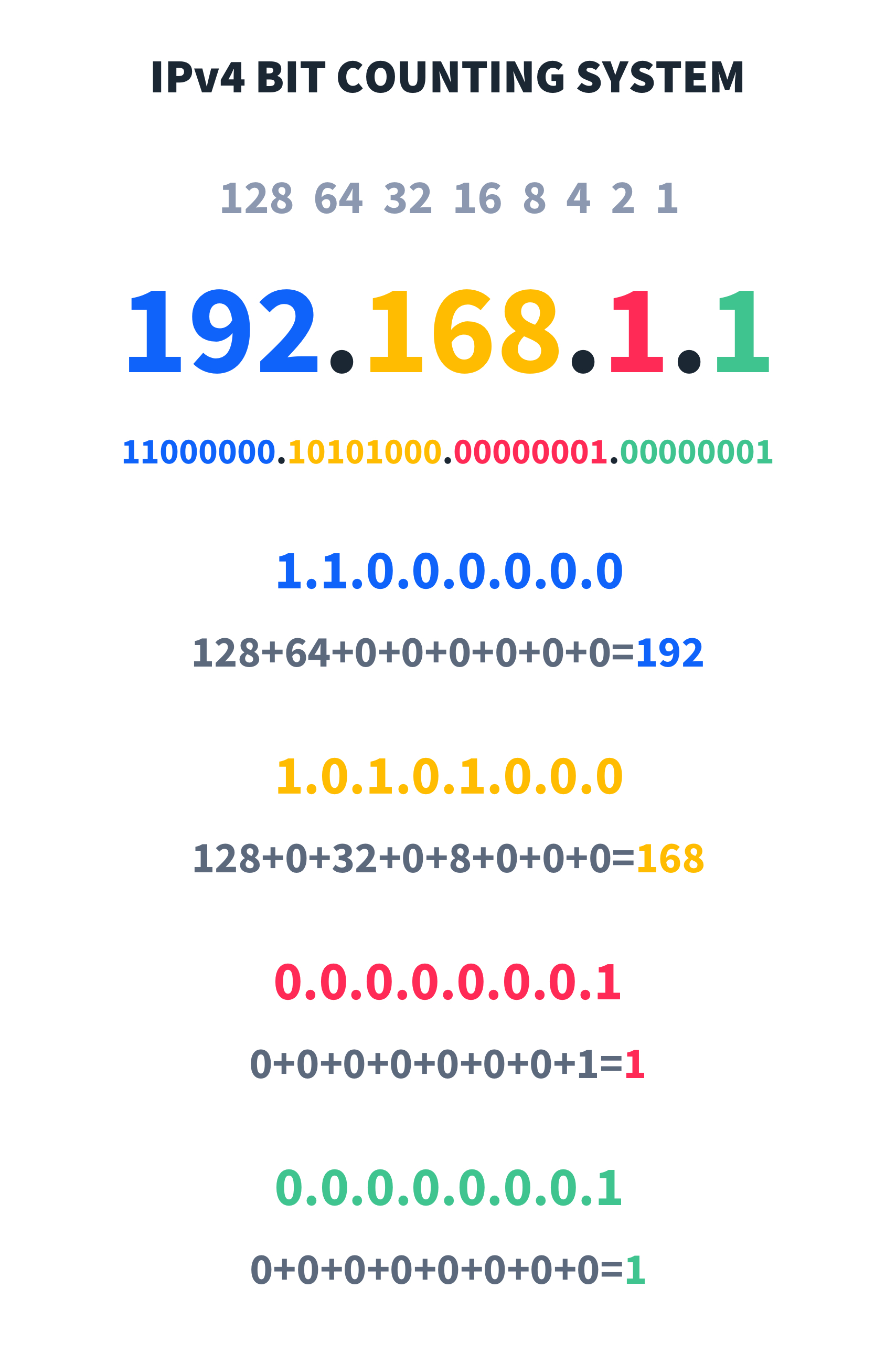
The process of converting between decimal and binary is a core networking skill. Let's watch a demonstration of this conversion.
Let's return to the PowerCert video for a clear, animated guide on converting decimal IP addresses to binary.
Watch from 02:06 to 04:37. Follow along with the examples to see how numbers like 192 and 168 are constructed in binary.
3. The Subnet Mask: Dividing Network from Host
So, how does a computer know which part of an IP address is the network ID and which part is the host ID? This is the job of the subnet mask.
A subnet mask is another 32-bit number that looks like an IP address (e.g., 255.255.255.0). When viewed in binary, its structure is simple: a series of consecutive 1s followed by a series of consecutive 0s.
- The 1s in the subnet mask "mask" the network portion of the IP address.
- The 0s in the subnet mask identify the host portion.
Network devices perform a logical operation called a bitwise AND between the IP address and the subnet mask to determine the network address.
Let's see this in action.
This segment of the PowerCert video will show you exactly how the subnet mask's binary pattern lines up with an IP address to reveal the network and host parts.
Watch from 04:37 to 07:26. Pay close attention to how the 1s in the mask correspond to the network bits and the 0s correspond to the host bits.
4. CIDR Notation: The Modern Shorthand
Writing out 255.255.255.0 is cumbersome. In modern networking, we use a much simpler method called Classless Inter-Domain Routing (CIDR) notation.
CIDR notation appends a forward slash and a number to the end of an IP address (e.g., 192.168.1.10/24). The number simply represents the total count of 1s in the subnet mask (the length of the network prefix).
255.255.255.0in binary is11111111.11111111.11111111.00000000. It has 24 ones. So, its CIDR notation is /24.255.255.0.0has 16 ones, so it's a /16.255.255.255.192(11111111.11111111.11111111.11000000) has 26 ones, so it's a /26.
This notation is efficient and tells you everything you need to know about the size of a network.
A COMPLETE BEGINNER'S GUIDE TO SUBNETTING
For a clear, concise text explanation, read the section on 'Slash Notation' in this excellent guide to subnetting.
Read the short section titled 'SLASH NOTATION'. It perfectly summarizes how CIDR notation is a shortcut for writing the full subnet mask.
5. Practical Application: Subnets and Usable IPs
Now we can bring these concepts together. The primary reason for this system is subnetting: breaking a large network into smaller, logical sub-networks. This improves organization, boosts performance by containing broadcast traffic, and enhances security by isolating segments.
For any given subnet, two addresses are always reserved and cannot be assigned to devices:
- Network Address: The very first address in the range (where the host bits are all 0s). It identifies the subnet itself.
- Broadcast Address: The very last address in the range (where the host bits are all 1s). It's used to send messages to all devices on the subnet simultaneously.
This means the number of usable IP addresses in a subnet is calculated with the formula:
where is the number of host bits (the number of 0s in the subnet mask).
For a /24 network:
- Total bits: 32
- Network bits: 24
- Host bits (): 32 - 24 = 8
- Total addresses:
- Usable addresses:
For a /29 network:
- Total bits: 32
- Network bits: 29
- Host bits (): 32 - 29 = 3
- Total addresses:
- Usable addresses:
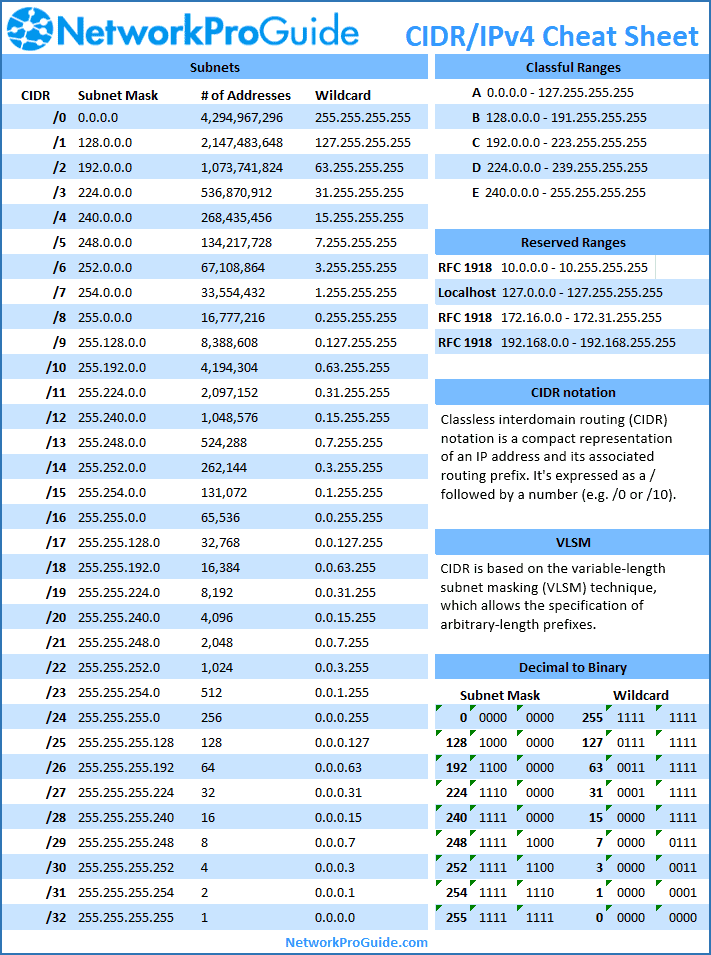
To help with these calculations and concepts, a cheat sheet is invaluable.
6. Hands-On Practice
Theory is one thing, but subnetting only clicks with practice. You need to be able to look at an IP address and its mask and quickly determine the network, broadcast, and number of usable IPs.
The following video demonstrates a web-based tool specifically designed for practicing these calculations.
IP Subnetting tutorial | How to subnet IPv4 addresses
The video 'IP Subnetting tutorial' by RichTechGuy includes a walkthrough of a subnetting practice tool he created. Watching him solve a few problems is a great way to prepare for trying it yourself.
Watch from 40:49 to 43:23. Observe the process of filling in the CIDR, Network IP, Broadcast IP, and other fields for a given problem. After watching, I encourage you to visit a subnetting practice website (like the one shown or others like cidr.xyz) and try a few problems on your own.
Working through these problems will solidify your understanding and build the muscle memory you need to perform these calculations quickly, a skill you'll use constantly.
Conclusion
In this lesson, you've unpacked the core mechanics of IPv4 addressing, the universal system for locating devices on a network.
Key Takeaways:
- An IPv4 address is a 32-bit number with a network portion and a host portion.
- Computers process these addresses in binary, and understanding binary-to-decimal conversion is crucial.
- The subnet mask is used to separate the network and host portions. A '1' in the mask means the corresponding bit is part of the network ID; a '0' means it's part of the host ID.
- CIDR notation (e.g.,
/24) is a shorthand that counts the number of network bits in the subnet mask. - In any subnet, the first IP (network address) and the last IP (broadcast address) are reserved. The number of usable IPs is , where is the number of host bits.
Next Lesson Preview:
Now that you understand Layer 3's logical addressing (IP addresses), we will move down to Layer 2 in our next lesson. You'll learn about MAC addresses—the unique, physical hardware identifiers burned into every network card—and how they work with IP addresses to deliver data on a local network.